Language Reactor not working? How to fix "Loading subtitles"
Language Reactor stuck on "Loading subtitles" or missing from the player? Find out in 60 seconds if it is you or them, then work through the fixes that actually helped users in 2026.

You sit down with a Spanish episode on Netflix, the Language Reactor panel opens, and both subtitle lines say "Loading subtitles, please wait..." forever. The episode keeps playing, YouTube works fine in the next tab, and you end up searching "Language Reactor not working" instead of watching.
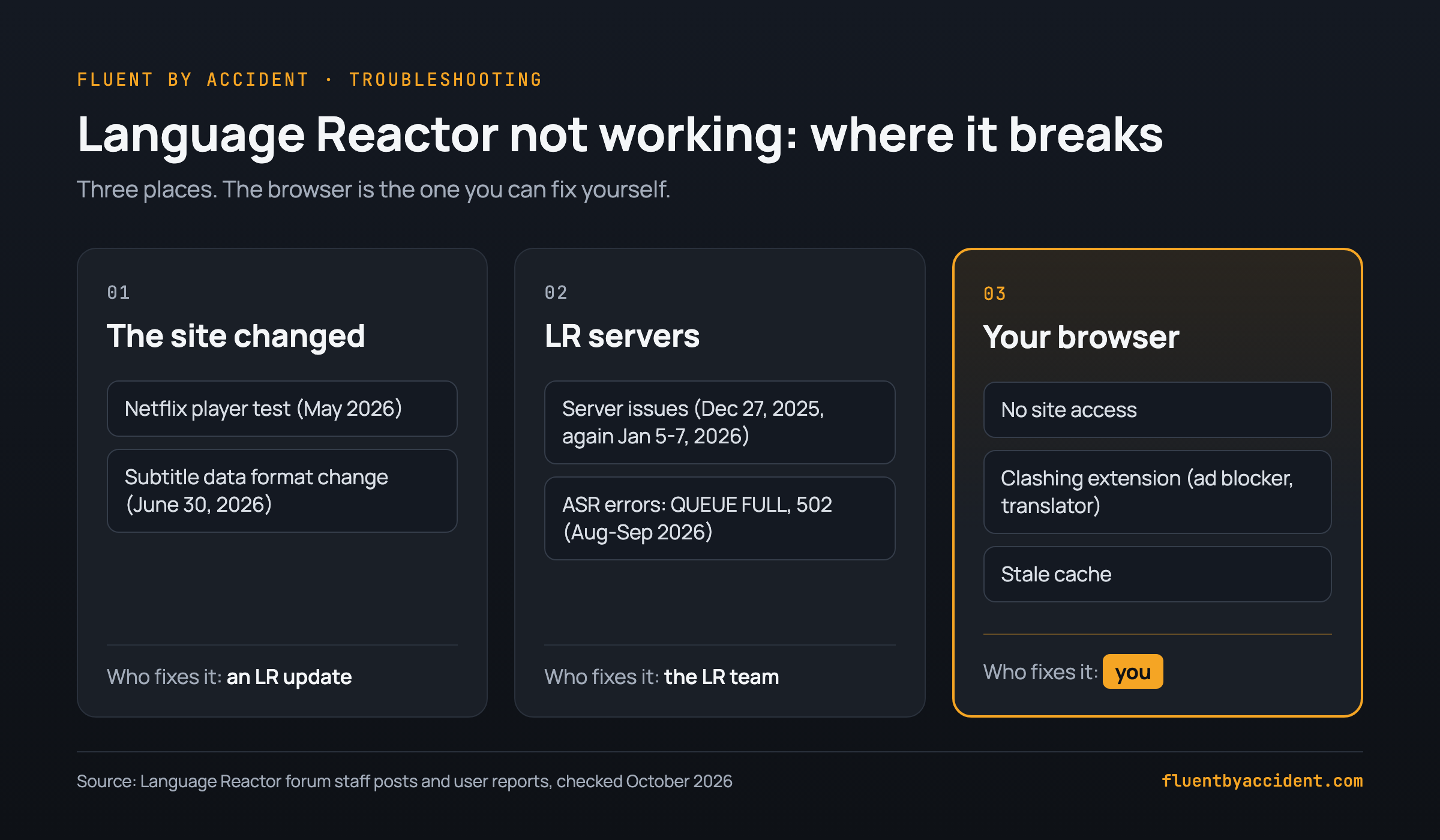
The cause is usually one of three things: the streaming site changed something that only a Language Reactor update can fix, Language Reactor's own servers are having trouble, or something in your browser is blocking it (site access, another extension, stale cache).
A 60-second test tells you which. If it is your browser, the fixes below take minutes. In order: update the extension, give it site access, clear the cache and cookies, test in Incognito, then turn off clashing extensions such as ad blockers and translators. If it is Netflix or Language Reactor, local fixes rarely help and you usually wait for an update: in 2026 the Netflix problems lasted 48 days, from the first forum report on May 14 to the fix on July 1.
Last checked: October 2026 (Language Reactor 5.1.8 on Chrome, per its Chrome Web Store listing).
Why is Language Reactor stuck on "Loading subtitles"?
Language Reactor reads the subtitle data that Netflix or YouTube sends to the player and draws its own two lines on top. Anything that changes or blocks that data leaves you on "Loading subtitles". It breaks in three places:
- The site changed. In May 2026, staff suggested Netflix was testing a new player on some accounts (staff post). On June 30 they traced the wider breakage to "a change in the manifest format", the data that tells the player where subtitles are (staff post). Only an extension update fixes this.
- Language Reactor's servers. Users in several countries reported a server outage on December 27, 2025, with more reports on January 5-7, 2026 (forum thread). From late August 2026, Pro users reported auto-generated (ASR) subtitle errors such as QUEUE FULL and 502 (forum thread).
- Your browser. Chrome has not given the extension access to the site (staff post), another extension clashes with it (staff checklist), or the cache is stale, a cause staff have named more than once.
A telltale sign: if the settings panel also shows "Loading..." for the original language, Netflix audio and Netflix subtitle language, as one Pro subscriber described (forum thread), the extension cannot read Netflix's subtitle data at all.
Is Language Reactor down, or is it just me?
We found no official status page. During server outages, users reported the extension itself showing a "server issues" message (forum thread), and the languagereactor.com site has shown "Failed services" (user report). A site change like Netflix's in June 2026 shows nothing but an endless "Loading subtitles" (user suggestion for a notice).
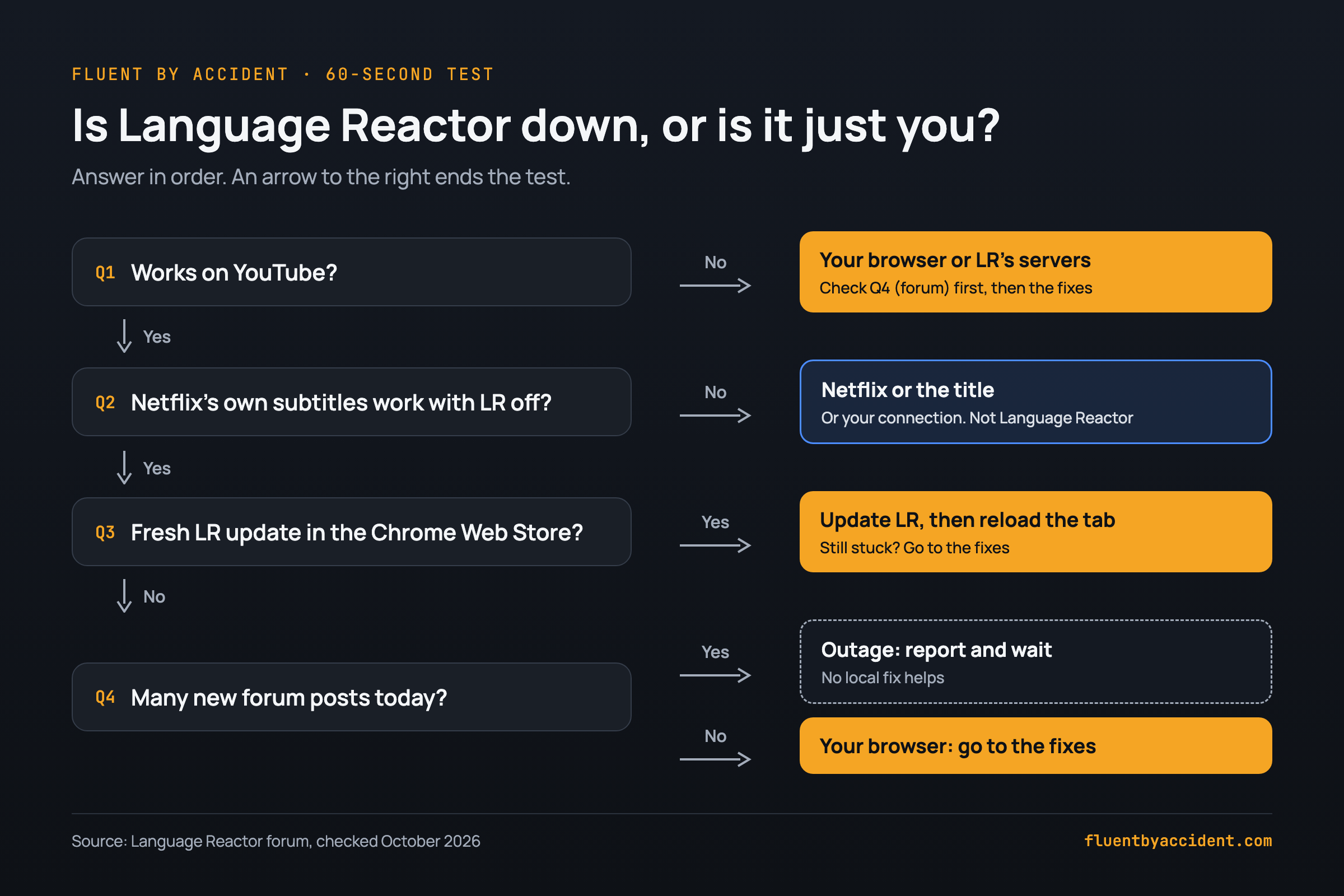
Wait two minutes first, once. One user said subtitles usually take a full 2 minutes to appear for them (forum thread). Still stuck? Run this test in order:
- Open a YouTube video with captions in the same browser. In May and June 2026, several forum users saw the same pattern: Netflix stuck, YouTube fine (forum thread). That points at Netflix's side. Broken on YouTube too? It can still be Language Reactor's servers (the December 2025 outage hit YouTube as well), so check step 4 before changing browser settings.
- Turn Language Reactor off, reload the Netflix title and switch on Netflix's own subtitles. One user found they worked with the extension off and stayed stuck with it on (forum thread). Netflix subtitles work: the problem sits with Language Reactor or something blocking it. They fail too: it is Netflix, the title or your connection. Any title from our list of Netflix shows for Spanish learners works as a test case.
- Check the Chrome Web Store listing for the version and "Updated" date. In 2026 the July 1 update matched the day staff announced the Netflix fix.
- Open the forum's latest threads. Several posts from today with your symptom mean an outage: add your details and wait.
Language Reactor not working on Netflix: fixes in order
Cheapest first. Reload the Netflix tab after each step and stop as soon as subtitles appear. The last column shows what users reported during the June 2026 breakage, when most local fixes did nothing (forum thread).
| Step | What to do | Why it can help | Helped in June 2026? |
|---|---|---|---|
| 1 | Hard refresh the tab, then restart Chrome | Clears a stuck page. One user says a restart usually works, not always (forum) | Not reported |
| 2 | Update Language Reactor: chrome://extensions, turn on Developer mode, click Update, then reload Netflix. Compare your version with the Chrome Web Store listing | Gets a fix as soon as it ships; Chrome's own check runs only every few hours (Chrome for Developers). Version 5.1.8 fixed Netflix on July 1, 2026 (staff post) | Yes, from July 1 |
| 3 | Give the extension access to netflix.com: puzzle icon, Language Reactor, three dots, Site access, "On netflix.com" | Without access the extension cannot read the player (staff post, Chrome help) | Not reported |
| 4 | Turn off Netflix test participation at netflix.com/DoNotTest | Takes your account out of Netflix experiments. Staff passed this fix on (staff post) | Yes for some, until June 30 |
| 5 | Clear cache and cookies | Removes stale site data (staff post) | No |
| 6 | Test in Incognito with the extension allowed there | Rules out cache and other extensions at once (staff checklist) | No (user report, another) |
| 7 | Disable other extensions, re-enable one by one | Ad blockers, VPN extensions, privacy tools and translators can clash (staff checklist) | Not reported |
| 8 | Turn off your VPN | Staff ask about a VPN when you report a bug (staff post) | No |
| 9 | Try a different title | One user found some series worked and others did not (forum) | Not reported |
| 10 | Reinstall, last, after checking your words are saved to your account (see the FAQ) | One user lost all their marked words this way (forum) | No |
Step 4. Netflix's help center confirms the setting lives under Settings, Test Participation (Netflix Help); the DoNotTest link opens it when you are signed in. It is free and harmless, but it only helped during Netflix's player test: after the June 30 manifest change (staff post), one user said it had stopped working (forum post).
Step 5. In Chrome, open the three-dot menu, choose Delete browsing data, pick a time range, tick "Cookies and other site data" and "Cached images and files", and click Delete data (Chrome Help). This signs you out of most sites, Netflix included (Google Account Help).
Step 6. Go to chrome://extensions, open Language Reactor's Details and switch on "Allow in incognito" (Chrome Web Store Help). Works there? The culprit is in your normal profile. One user got Language Reactor back by removing the Google Translate extension (forum post).
Language Reactor not working or not showing up on YouTube
If Language Reactor is not showing up on YouTube and its toggle is missing from the player, staff said in August 2026 that the extension usually lacks permission to access YouTube (staff post).
Quick fix: Click the puzzle piece icon in Chrome's toolbar and find Language Reactor. If it sits under "Access requested", click the three dots next to it, choose Site access, pick "On youtube.com" and refresh the tab. For a lasting setting: chrome://extensions, Language Reactor, Details, Site access, "On specific sites" or "On all sites" (Chrome Web Store Help).
Still missing? Staff list a few more checks (staff post):
- You are looking in the right place: Language Reactor turns on and off from its toggle in the YouTube or Netflix player controls (staff post), not from the icon in Chrome's toolbar, which opens the Language Reactor website (forum answer).
- The extension is turned on in chrome://extensions and not paused.
- No ad blocker, privacy tool or translator extension is interfering.
- On a work or school network, a domain blocker may stop the extension from loading (staff advice from 2023, staff post).
Toggle there but subtitles never load: check site access first, then compare your version with the Chrome Web Store listing, then report it with the console line. One user in September 2026 found version 5.1.8 would not load on YouTube in Chrome 151 while Netflix worked, with a console TypeError (forum thread). No staff reply confirmed the cause, so include your Chrome version in your report.
What Language Reactor's error messages mean
Here is what each message has meant in forum threads, and whether you can fix it.
| Message you see | What it usually means | Can you fix it? |
|---|---|---|
| Endless "Loading subtitles, please wait..." plus "Loading..." in the language settings | The extension cannot read the site's subtitle data, after a site change (staff post) or a local block | Maybe. Run the 60-second test first |
| "Problem fetching ASR subs" with QUEUE FULL, RATE_LIMIT_EXCEEDED, SERVER_ERROR or make-ready, or "Processing failed with status: 502" | The Pro auto-generated subtitle service is overloaded or down (user reports: August, late August, September) | No. One user said RATE_LIMIT_EXCEEDED went away after a while. Use the platform's own subtitles meanwhile |
| "Language Reactor Error: Failed to retrieve linguistic data: NETWORK_ERROR" | A server-side problem. Staff said it happens when their language-processing (NLP) servers have problems (staff post). In November 2025 users reported it on and off for about three weeks (user reports) | Mostly no. One user got it back by opening another show and returning (forum). Otherwise wait |
| "Server issues" | Language Reactor's servers are down, as users reported on December 27, 2025 (forum thread) | No. Wait and check the forum |
| "Failed services: HOST MEM, ASR CONTAINERS, ASR-L" | A server-side failure; staff forwarded it to the team (staff post) | No. Report it and wait |
| An error in the top-right corner right after an ad | The extension cannot detect subtitles inside the ad before the video (staff post) | Yes. Pick the subtitle language manually in the extension settings |
| Subtitles out of sync after a Netflix ad break | Netflix does not provide accurate ad-break durations, per staff (staff post) | No. Known issue, staff said in September 2026 they were working on it |
| A console "TypeError" in a pageScript_*.min.js file (for example pageScript_lln on Netflix, pageScript_lly on YouTube) | The extension's script crashed on the page (examples: Netflix, YouTube) | No. Copy the line into your bug report |
How long do Language Reactor outages last?
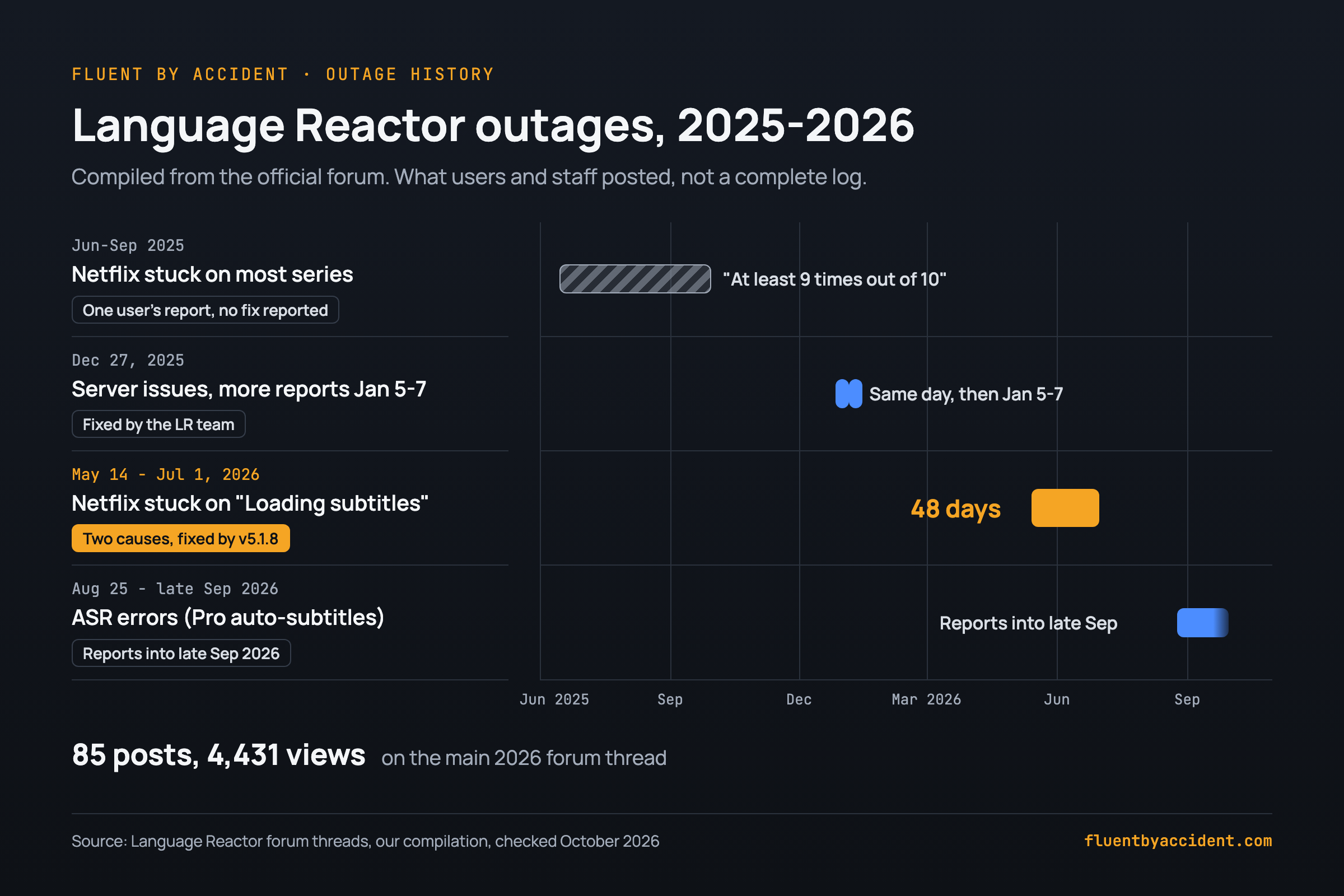
Language Reactor publishes no outage history, so we compiled one from forum posts by users and staff. It is not a complete log.
- Mid-June to late September 2025: one user reported Netflix stuck "at least 9 times out of 10" (forum thread).
- December 27, 2025: server issues in several countries. Users said service returned the same day. The error came back on January 5, staff said that day it was fixed, and a few users still reported it on January 6 and 7 (forum thread).
- May 14 to July 1, 2026: Netflix stuck on "Loading subtitles" for many accounts. It started with a Netflix player test in May (a settings workaround helped some users from mid-June), then a manifest-format change around June 29 that version 5.1.8 fixed on July 1. That is 48 days from the first report to the final fix; the main thread reached 85 posts and 4,431 views (forum thread).
- From August 25, 2026: ASR errors for Pro auto-generated subtitles, with reports into late September (forum thread).
The pattern: browser problems take minutes to fix. Problems on Language Reactor's or Netflix's side that did get fixed took anywhere from a few hours (the December 2025 server issue, though users reported the error again on January 5-7) to 48 days (the 2026 Netflix problems, from first report to final fix). The 2025 Netflix report and the 2026 ASR errors never got an announced fix.
How to report a Language Reactor bug so it gets fixed
Post on the official Language Reactor forum, where staff answer threads. They ask for the same details almost every time (staff questions), so give them up front.
Copy this bug report:
- Video link:
- Country:
- Browser and version (from chrome://version):
- Operating system:
- Language Reactor version (from chrome://extensions):
- VPN on? (yes / no):
- Languages (audio, subtitles, translation):
- What I see (exact error text, screenshot attached):
- What I already tried (steps from the checklist):
- Netflix only, if staff ask: the player version
For the player version, staff in May 2026 asked users to paste one line into the browser console: netflix.reactContext.models.playerModel.data.config.core.initParams.version (staff post). Only run a line a staff account gives you, never code from strangers.
One thing not to do while you wait:
- Do not install "patched" copies. In June 2026, a user shared a self-patched build loaded in developer mode "at your own risk" (forum post). It could not log in (follow-up).
If nothing works: what to use while you wait
When the fault is with Netflix or Language Reactor, keep watching with something else until the update lands.
| Option | Works on | Setup | Catch |
|---|---|---|---|
| Netflix's own subtitles, one language | Netflix | None | One line only. Pause to look words up |
| Language Reactor on YouTube | YouTube | Already installed | Helps only if Netflix alone is broken, the 2026 pattern |
| Trancy | YouTube, Disney+ and other sites on its listing | Chrome Web Store | Listing (300,000 users, 4.7/5, updated Sept 18, 2026) does not name Netflix |
Whichever tool you use, the dual subtitle method for Netflix stays the same: two lines, pause on new words, save the useful ones. We build Fluent by Accident, a Chrome extension that shows two subtitle lines on Netflix, YouTube, Prime Video, Disney+ and Max with click-to-translate; it needs a free account. And a week with one subtitle line is not wasted, for the reasons in why watching shows teaches you a language.
FAQ
Is Language Reactor down right now?
We found no official status page, so you check yourself. During server outages, users reported the extension showing a "server issues" message (forum thread), and the languagereactor.com site showed "Failed services" (user report). A site change like Netflix's in June 2026 shows only an endless "Loading subtitles". Open a YouTube video: if the extension works there but not on Netflix, the problem is probably Netflix-specific. Check the "Updated" date on the Chrome Web Store listing. Then open the forum's latest threads: several posts from today with your symptom mean an outage no local fix will solve.
Why does Language Reactor work on YouTube but not on Netflix?
Netflix changes how its player delivers subtitle data, and Language Reactor has to catch up. In June 2026, staff traced a long Netflix breakage to a change in the manifest format, and an update fixed it on July 1 (staff post). YouTube kept working because nothing changed there. In that situation, clearing the cache or reinstalling rarely helps, and you wait for the extension update.
Does Language Reactor work on Edge, Brave or Firefox?
Officially, no. Staff said in August 2026 that the extension is currently supported only in Google Chrome, answering a user whose toggle was missing in Brave (staff post). One forum user reported some videos working in Edge when they failed in Chrome, but that is a single report, not support you can count on. If you hit a problem in another browser, test in Chrome before reporting it.
Does Language Reactor work on a phone or smart TV?
Not as an extension. Staff said in September 2026 that there is no official Language Reactor mobile app. The website works in mobile browsers, but the extension runs only on desktop, because mobile browsers do not support Chrome extensions (staff post). Smart TV apps for Netflix and YouTube do not run browser extensions either, so for dual subtitles you need Chrome on a computer.
Will reinstalling Language Reactor delete my saved words?
It can. One user on the Language Reactor forum reported losing all their marked words after reinstalling the extension (forum post). Staff have noted that subtitles work even without logging in (staff post), so working subtitles do not prove your account is connected. Before you reinstall, make sure your email shows in the extension's settings (gear icon) and your words appear in the Saved section on the languagereactor.com website (staff post). Keep reinstalling as the last step.
Is Language Reactor discontinued?
No. Language Reactor is still maintained: version 5.1.8 shipped on July 1, 2026 and fixed the long Netflix breakage, and the Chrome Web Store listing shows 2,000,000 users. Staff were still answering bug threads in late September 2026 (staff post). The worry is understandable: in July 2025 one user opened a bug thread by calling it "an abandoned project" (forum thread). The 2026 fix shows the team still ships updates, even if slowly.
Sources
- Chrome Web Store: Language Reactor and Trancy listings
- Google: Install and manage extensions, Clear cache and cookies
- Netflix: Help Center, Test Participation setting
- Language Reactor forum: Netflix "Loading" thread 2026, missing YouTube toggle, staff checklist, Chrome only, mobile, ads, ASR errors