Anki Backlog: How to Clear Overdue Reviews Without Burnout
Reviews piling up in Anki? Here is the recovery plan: stop new cards, split due from overdue, clear a set batch a day, and know when a reset or Set Due Date makes sense. With the catch-up math.

To clear an Anki backlog, stop adding new cards, keep doing today's due reviews as normal, and move the overdue pile into a separate filtered deck that you work through by a fixed extra batch every day (for example 100 cards), sorted so the cards you are most likely to forget come first. Do not reset the deck: the official Anki manual calls resetting because you are behind "the worst possible thing you can do".
The math is simple. 1,000 overdue cards at 100 extra a day takes 10 days, and you never have to face the full number in one sitting.
If you opened Anki after a holiday, an exam month or a burnout break and saw a review count in the four digits, you are in the most common situation on r/Anki. Learners ask some version of "Should I just start over?" and "How to get back after long break" all the time. This guide is only about getting out of the pile. For choosing settings from scratch, see our separate guides linked below.
How we tested: On 14 November 2026 we checked every step below against Anki 26.09.4, the latest release on GitHub (published 4 November 2026), and against the official manual pages on deck options, filtered decks, resetting, breaks and Set Due Date. The clearing numbers are our own calculation (days = overdue cards ÷ extra reviews per day), not user data. The time per card (10 seconds) is an assumption, not a timed session; swap in your own figure.
How do I clear an Anki backlog? The 5-step plan
The plan below combines the manual's advice with a method the manual itself quotes from an Anki user who cleared a backlog of 800 cards with filtered decks.
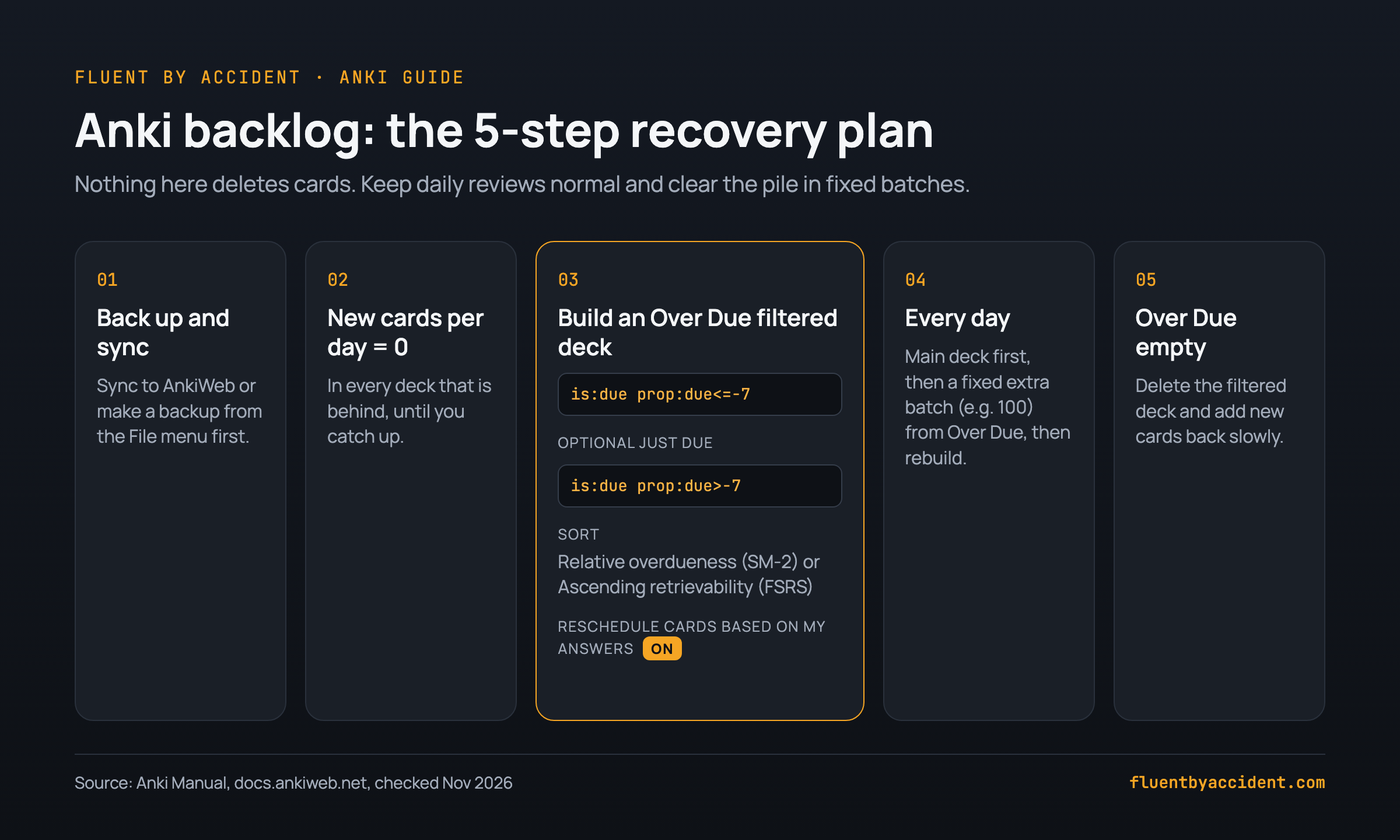
- Back up and sync. Sync to AnkiWeb (or make a backup from the File menu) before you change anything. Nothing below deletes cards, but a backup costs one minute.
- Stop new cards. Set new cards per day to 0 in the deck options of every deck that is behind. The manual is direct about it: "If you have a backlog of overdue review cards, it is recommended that you stop introducing new cards until you catch up with that backlog" (Anki Manual, Deck Options). If you turned on the option that lets new cards ignore the review limit, turn it off for now.
- Build an Over Due filtered deck. Go to Tools > Create Filtered Deck and use the search
is:due prop:due<=-7. That pulls cards that are at least a week overdue. Set the limit high (for example 9999) so every overdue card is gathered, choose the sort order from the section below, and leave Reschedule cards based on my answers switched on so your answers count (Anki Manual, Filtered Decks). The same user also made a Just Due deck withis:due prop:due>-7for cards that became due in the last week, so the daily work looks normal again. - Every day: current cards first, then a fixed batch. Study your main deck (or Just Due deck) until it is empty, then do a set number of cards from Over Due, for example 100. On the Anki forum, Danika_Dakika described a single overdue deck with
prop:due<=-1 -is:learn -is:buriedand said she rebuilds it after each session "to kick any lapsed/re-learning cards back to the main deck" (forum thread, Dec 2023). Rebuilding is a good habit with either search. - Stop when Over Due is empty, then add new cards back slowly. Delete the filtered deck (the manual confirms "No cards are deleted when you delete a filtered deck") and raise new cards per day a little at a time.
Tip: Copy-paste searches. Over Due:
is:due prop:due<=-7. Just Due:is:due prop:due>-7. Single overdue deck (any lateness, no learning or buried cards):prop:due<=-1 -is:learn -is:buried. Filtered decks "cannot pull in cards that are suspended, buried, or already in a different filtered deck" (Anki Manual), so empty one before building another.
How long will it take to catch up on Anki reviews?
Days to clear = overdue cards ÷ extra overdue reviews per day. "Extra" means on top of the cards that fall due normally each day, which you keep doing in step 4. The user quoted in the manual put it the same way: how long it takes "depends on how many overdue cards you study each day in addition to the ones that become due regularly" (Anki Manual).
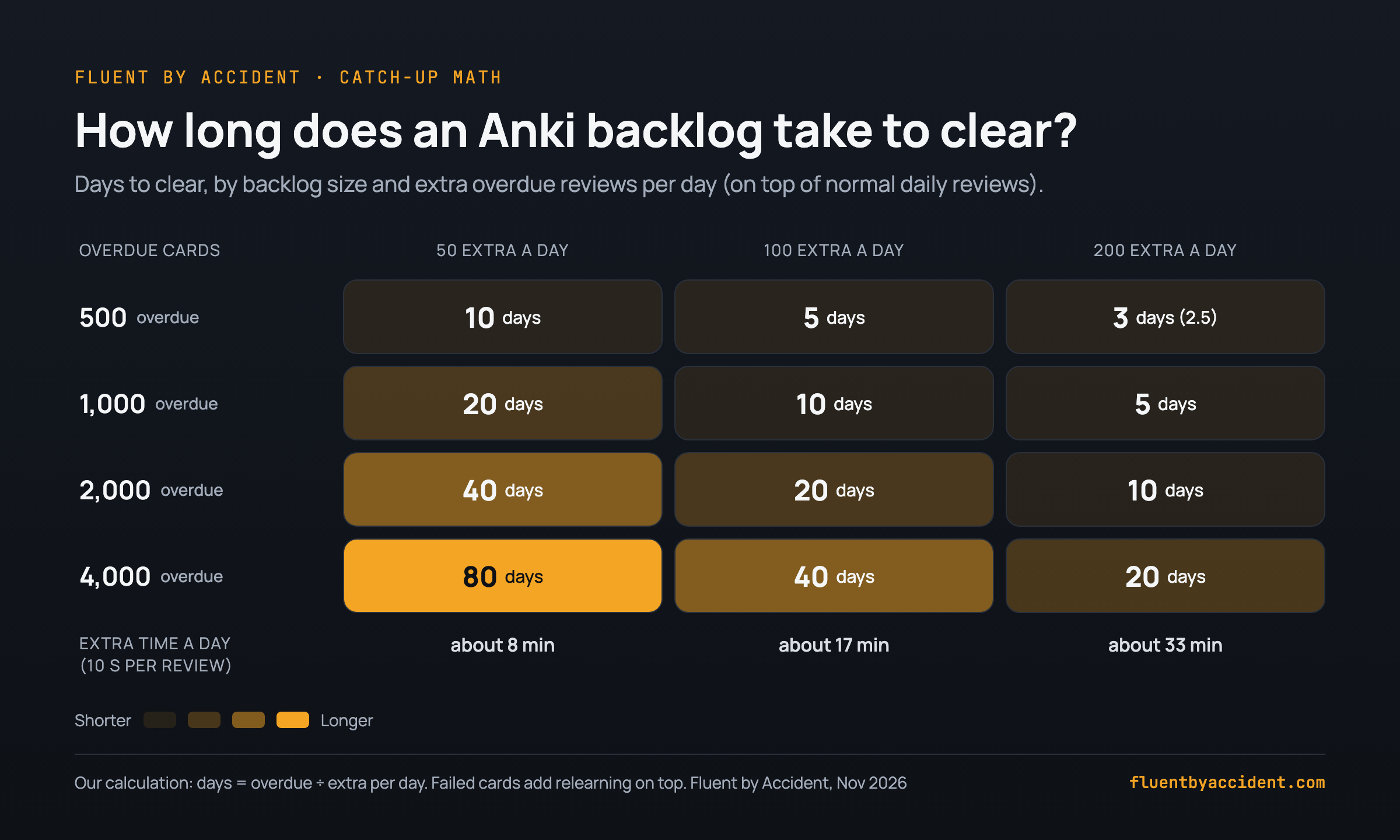
| Overdue cards | 50 extra a day | 100 extra a day | 200 extra a day |
|---|---|---|---|
| 500 | 10 days | 5 days | 3 days (2.5) |
| 1,000 | 20 days | 10 days | 5 days |
| 2,000 | 40 days | 20 days | 10 days |
| 4,000 | 80 days | 40 days | 20 days |
| Extra time a day at 10 s per card (assumed) | about 8 min | about 17 min | about 33 min |
The time row is 50 × 10 s = 500 s, 100 × 10 s = 1,000 s and 200 × 10 s = 2,000 s. Replace 10 seconds with your own average seconds per card from Anki's Stats screen. Overdue cards are often slower than fresh ones because you have to dig harder for the answer.
Example, with an assumed lapse rate: overdue cards are forgotten more often. If 30% of 1,000 overdue cards are failed, that is 300 cards going back through relearning and showing up again within days. So the real clearing time is longer than the table, and the extra cards land in your main deck, which is why you rebuild Over Due after each session.
Pick an extra batch you can hold for the whole period, not the number you could manage on your best day. One poster on the Anki forum wanted to spend "no more than 45 mins per day reviewing cards" (forum thread); start from a daily time budget like that, subtract your normal reviews, and the rest is your batch.
Which review order should you use for a big backlog?
Sort order decides which overdue cards you see first, and for a large pile it matters. The manual says the default "Due date, then random" is recommended "when you are up to date, or when you only have a small backlog," and suggests changing the order temporarily after an extended break (Anki Manual, Deck Options).
| Sort order | When to use it | Scheduler |
|---|---|---|
| Due date, then random (default) | Up to date or a small backlog | SM-2 and FSRS |
| Relative overdueness | Large backlog that will take a while; shows cards you are more likely to have forgotten first | SM-2 only (removed when FSRS is on) |
| Ascending retrievability | The FSRS equivalent for a large backlog, based on each card's probability of recall and your desired retention | FSRS |
| Deck, then due date | Avoid: "generally not recommended," because a fixed order makes answers easier to guess from context | Both |
Source for every row: Anki Manual, Deck Options. Relative overdueness weighs lateness against the interval: the manual's example is that a card with a 5-day interval that is 2 days overdue shows before a card with a 10-day interval that is 3 days overdue (Filtered Decks).
Not sure which scheduler you run? If FSRS is enabled in your deck options, use Ascending retrievability. Our guide to how FSRS schedules cards explains what retrievability means, so we will not repeat it here.
Should I reset my Anki deck or start over?
Almost never because of a backlog. The Anki FAQ says "Resetting part of your collection because you are behind is not recommended," since you still remember many of those cards and would have to start them all over (Anki FAQ, Resetting progress). The FAQ on breaks adds that after a long absence "chances are you haven't forgotten them all," so it recommends you "study as normal" (Anki FAQ, Due times after a break).
| Your situation | Do this | Why |
|---|---|---|
| Behind on reviews, cards still useful | Catch up with the 5-step plan | Reset because you are behind is "not recommended" (Anki FAQ) |
| You rewrote a card so much it is a new card | Reset those cards (Cards > Reset) | A listed valid reason; history stays visible but no longer affects scheduling (Anki FAQ) |
| You flipped through cards without really studying | Reset those cards | Also a listed valid reason (Anki FAQ) |
| You need a short pause, e.g. a trip next week | Set Due Date with a range such as 0-14 | Spreads cards out without changing their interval, unless you add ! (Anki Manual, Browsing) |
| Cards you no longer want (words you will never meet, duplicates) | Suspend or delete them | Suspended cards leave review and filtered decks (Anki Manual) |
| You fail nearly every card when you test a sample | Starting over is a defensible choice | An opinion from the Anki forum, not the manual (see below) |
On the last row: in the Anki forum thread on review pacing, nkia suggested that "if you find yourself failing most of the cards you may just start over completely." Treat that as one learner's view. A cheap way to check is to do 50 cards from Over Due first and count how many you fail before deciding anything.
Set Due Date has two catches. The manual notes "the answer time is not recorded when manually scheduling cards," and adding ! at the end of the range also changes the interval (Anki Manual, Browsing). It moves the pile around in time; it does not make the reviews go away.
Why are my Anki reviews piling up in the first place?
Three causes cover most backlogs: too many new cards, a review cap below your real daily load, and missed days. Each new card creates future reviews, which is why the manual warns that new cards while behind "can make the backlog worse" (Anki Manual). How many new cards a language learner should add is covered in the best Anki settings for language learning.
The review cap is the sneaky one. Maximum reviews/day stops Anki showing more reviews "even if there are more waiting," and the manual pitches it for smoothing "occasional peaks" when you study consistently (Anki Manual). It hides cards; it does not clear them.
Cap 20, about 30 due a day: hidden overdue cards 0 100 200 300 Day 0 Day 10 Day 20 Day 30 Worked example, our calculationTip: The cap trap, as a worked example. Say about 30 cards fall due per day on average and your cap is 20. That leaves 10 cards behind each day: 100 after 10 days, 200 after 20, 300 after 30. When the cap hides reviews, Anki shows a message on the congratulations screen suggesting you raise the limit (Anki Manual). If you see that message every day, the cap is below your average and the pile is growing.
Missed days compound with both. If you use FSRS, the deck options include a simulator that estimates your workload "in reviews per day or in minutes of studying per day" from your real card memory states (Anki Manual). Run it before you raise new cards again after the recovery.
How to stop an Anki backlog from coming back (and avoid burnout)
Catching up once is the easy part. Staying caught up needs a routine that survives bad weeks, plus a deck that contains only cards worth reviewing.
Checklist: after the backlog is gone
- Minimum day rule: on a bad day, do only due reviews, no new cards. A short day beats a skipped day.
- Raise new cards slowly: add a few at a time and watch the next week's due counts before adding more.
- Check the congratulations screen: if it says reviews were hidden by your limit, your cap is below your real load (Anki Manual).
- Use Easy Days for lighter weekdays: it moves load away from days like Sunday, but setting every day to Reduced or Minimum gives "the same workload as setting all days to Normal" (Anki Manual).
- Suspend, don't drill: words you will never meet again, duplicates and cards you keep failing for no clear reason can be suspended; it keeps their history.
- Plan breaks ahead: before a trip, Set Due Date with a small range spreads the next days' cards out (Anki Manual, Browsing).
- Keep the filtered-deck searches from step 3 in a note, so the next recovery takes five minutes to set up.
For language learners, the cards themselves are often the cause. A bare word with no sentence is hard to recall and fails often, and each failure adds relearning reviews. Cards built with sentence mining with context and from scenes you actually watched (see our guide on flashcards from Netflix and YouTube) give your memory more to hold on to. If Anki itself is what you dread, compare Anki alternatives before you quit reviews altogether.
If you collect words while watching shows, the free Fluent by Accident extension can save them to an "Advanced" deck that is never due, so new words wait there without growing your review pile.
FAQ
Should I reset my Anki deck if I have too many reviews?
No, not because you are behind. The Anki FAQ says resetting because of a backlog is not recommended and calls erasing your progress "the worst possible thing you can do," because you still remember many of those cards (Anki FAQ). Instead, pause new cards and clear a fixed number of overdue cards each day. The FAQ lists two good reasons to reset specific cards: you changed a card so much that it needs relearning, or you flipped through cards without really studying them. Reset those cards only, with Cards > Reset in the Browser, and leave the rest of the deck alone.
How many overdue Anki cards should I do per day?
Pick a fixed number you can keep up every day for the whole recovery, on top of your normal due cards. Our calculation: days to clear = overdue cards ÷ extra cards per day, so 1,000 overdue cards take 20 days at 50 a day, 10 days at 100 and 5 days at 200. At an assumed 10 seconds per card, that is about 8, 17 or 33 extra minutes a day. Use your own seconds per card from Anki's Stats screen. Expect it to take longer than the table, because failed overdue cards come back through relearning within a few days.
Does a max reviews/day limit clear a backlog?
No. Maximum reviews/day only stops Anki from showing more reviews that day, "even if there are more waiting" (Anki Manual). The hidden cards stay due and keep getting later. If the cap is below the number of cards that fall due on an average day, the pile grows: a worked example with 30 due a day and a cap of 20 leaves 300 cards behind after 30 days. A cap is useful for smoothing occasional peaks. To clear a backlog you need a deliberate extra batch from an overdue filtered deck.
What happens to Anki cards that are overdue?
They stay due until you review them, and Anki counts the real time since you last saw them. Under the legacy SM-2 scheduler, a card due in 5 days and answered 20 days late gets about 6 days if you press Hard, 37.5 days for Good (half the delay is used) and 81.25 days for Easy (the full delay is used), according to the Anki FAQ on breaks. So overdue cards you still know are not wasted; they jump to long intervals. Under FSRS, the next interval comes from the card's memory state instead.
Should I stop adding new cards while catching up?
Yes. The Anki manual recommends that you "stop introducing new cards until you catch up with that backlog," because new cards while you are behind "can make the backlog worse" (Anki Manual). Every new card creates a chain of future reviews, so adding them during recovery pushes the finish line further away. Set new cards per day to 0 for each deck that is behind. When your overdue filtered deck is empty, add new cards back a few at a time and watch your due counts for a week before raising the number again.
Does Set Due Date lose my progress?
Not by default. Set Due Date makes cards due on the date or range you enter, and review cards are rescheduled "without changing their current interval, unless an exclamation mark ( ! ) is included at the end of the range" (Anki Manual, Browsing). It is useful for spreading a short interruption, for example a range like 0-14 before a trip. Two limits: the answer time is not recorded for manually scheduled cards, and the cards still have to be reviewed later. It spreads the workload; it does not remove it.
Sources
- Ankitects, Anki Manual: Deck Options, checked 14 November 2026.
- Ankitects, Anki Manual: Filtered Decks, Catching Up, checked 14 November 2026.
- Ankitects, Anki FAQ: Resetting progress in a deck, checked 14 November 2026.
- Ankitects, Anki FAQ: Due times after a break, checked 14 November 2026.
- Ankitects, Anki Manual: Browsing (Set Due Date, Reset), checked 14 November 2026.
- Ankitects, Anki releases on GitHub, version 26.09.4 published 4 November 2026.
- Anki forums, Review pacing after returning to Anki, posts by Amadeus, nkia and Danika_Dakika, December 2023.
- r/Anki, Should I just start over?, November 2024, and How to get back after long break, April 2025.
- Fluent by Accident team, days-to-clear and review-cap calculations in this article, November 2026.