Best Anki alternatives for language learners (2026)
Leaving Anki? Pick an alternative by the reason you are quitting: setup, the dated look, the $24.99 iPhone app or making cards. Prices checked, plus how to move your decks.

You downloaded Anki because every language-learning thread told you to. A week later you're reading about note types and card templates, the shared deck you found has no audio, the iPhone app wants $24.99, and the review count on your screen is bigger than yesterday's. So you start searching for an Anki alternative.
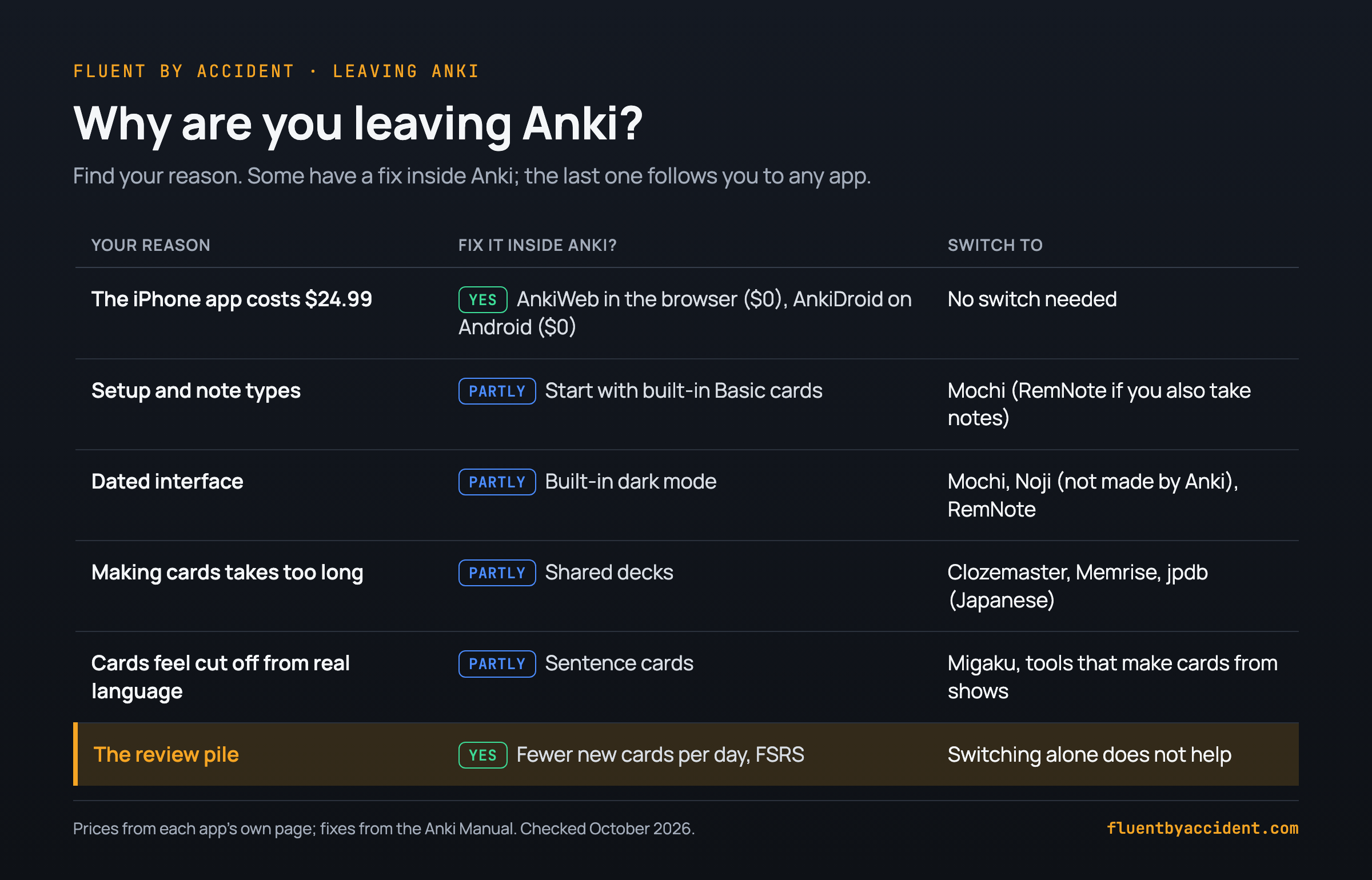
The best Anki alternative depends on why you're leaving. If it's the iPhone price, you may not need to leave at all: AnkiWeb lets you study in a phone browser with a free account, and AnkiDroid is free on Android (Anki, Anki Manual).
Setup and the dated look? Mochi and RemNote say they import your Anki decks with review history (Mochi docs, RemNote Help). Hate making cards? Pick ready-made content (Clozemaster, Memrise, jpdb for Japanese). Cards feel cut off from real language? Use a tool that turns what you watch into cards.
One warning: the review pile comes with you. Any spaced repetition app (reviews spaced further apart each time you remember a card) brings each word back several times. If the backlog is your problem, add fewer new cards, whatever the app.
Last checked: October 2026. Prices are US prices from each app's own page on that date. This isn't every flashcard app. It's the ones worth a look for each reason people leave Anki.
Why do people quit Anki? The six usual reasons
Anki is free on computers, open source and very capable. People still leave it, for reasons that repeat across forums.
- Setup. Anki works with notes, fields, card types, templates and note types. Its manual says the built-in note types exist "to make Anki easier for new users", and that in the long run you should create your own (Anki Manual). That's a lot of machinery for learning Spanish words.
- The look. In a 2025 WaniKani forum thread, one learner called Anki's interface "mind-numbing" and asked for alternatives; another reply said nothing matches Anki's features, so push through (WaniKani forum).
- The iPhone price. AnkiMobile costs $24.99 in the US App Store, "priced as a computer application" because its sales fund both versions (App Store). In a 2025 Anki forum thread, a user in Turkey saw about $31 and called the pricing "completely wrong" (Anki forum).
- Making cards takes longer than studying them. Each card means typing the word, finding a sentence and, if you want sound, adding audio. Shared decks save that work, but Anki's own FAQ notes that some shared decks are missing sounds or images (Anki FAQ).
- Cards feel cut off from real language. A word on a bare card has no voice or scene behind it.
- The review pile. Miss three days and the due count stacks up. Switching apps alone doesn't fix this, as the last section shows.
Which Anki alternative should you use? Pick by your reason
There's no single best Anki alternative, so this isn't a ranking: find your reason in the "Pick it if" column. Apps like Anki differ most in whether your old decks and your review history (when each card is next due) come with you.
| App | Pick it if | Price (US) | Platforms | Imports Anki decks? | Keeps review history? |
|---|---|---|---|---|---|
| AnkiWeb + AnkiDroid (still Anki) | you only mind the iPhone price | $0 (Anki) | browser, Android | it is Anki | yes, same collection |
| Mochi | you want Anki's idea with a cleaner, Markdown look | Free (local only); Pro $5/mo billed yearly, for sync (Mochi) | Mac, Windows, Linux, iOS, Android | yes, .apkg | yes, per Mochi's docs |
| RemNote | you also take notes and want cards inside them | Free; Pro $8/mo or $96/yr (RemNote) | web, desktop, iOS, Android (RemNote Help) | yes, .apkg | yes, per RemNote Help |
| Noji (formerly Anki Pro; not made by Anki) | you want a polished phone app and accept a subscription | Free with in-app purchases, $4.99 to $89.99 (App Store) | iOS, Android, web | .apkg and .colpkg | yes, if exported with progress (Noji Help) |
| Clozemaster | you want ready-made sentences, no card making | Free, with a paid Pro tier (Clozemaster) | web, mobile | no | n/a |
| jpdb (Japanese only) | you learn Japanese from anime, novels or dramas | Free, Patreon optional (jpdb) | browser | partial | not stated |
| Migaku | you want to make cards from shows and websites | $10/mo, $96/yr, $499 lifetime; 10-day trial (Migaku) | browser extension and apps | not stated | n/a |
| Fluent by Accident (we make it) | you want cards from Netflix and YouTube subtitles | Free up to 100 words; Pro $6.99/mo or $49/yr (Fluent by Accident) | Chrome extension, web app | yes, words only | no, cards start fresh |
"Imports Anki decks" means the app's own docs say so; "not stated" means they don't say either way. Test one small deck before you move everything.
Mochi. Who it's for: people who like Anki's logic but not its screens. Cards are written in Markdown, and Anki imports are converted to it (Mochi docs); the free plan keeps everything on your device (Mochi pricing). A 2023 Bunpro forum post called it closer to physical flashcards than Anki (Bunpro forum).
RemNote. Who it's for: learners who keep grammar notes and want cards inside them. It has its own learning curve, and custom CSS and JavaScript from Anki cards don't come across (RemNote Help).
Noji. Who it's for: phone-first learners who never need Anki sync. Anki's FAQ says Anki Pro (now Noji) and AnkiApp (now AlgoApp) were developed by separate groups and don't work with the other Anki apps (Anki FAQ). Noji can still be a fine app. It just isn't Anki.
Quizlet's App Store listing leads with test prep and now includes a spaced repetition mode (App Store), so it fits short-term study better than a multi-year vocabulary deck.
Is there a free Anki alternative for iPhone?
You may not need one. AnkiWeb lets you "study online" after you sign up for a free account (Anki Manual), and it runs in Safari. AnkiDroid is free on Android and developed by contributors (Anki). The catch: you build your decks in Anki on a computer (or AnkiDroid) and sync; a forum answer suggests making cards on your laptop and reviewing them on AnkiWeb (Anki forum).
Free Anki on iPhone, 3 steps:
- Make a free AnkiWeb account and sign in on Anki for your computer.
- Add your decks or shared decks on the computer, then press Sync.
- On your iPhone, open ankiweb.net in Safari and study there. Add it to your home screen if you like.
If you can afford it, AnkiMobile is a one-time purchase that funds Anki, and its creator wrote in February 2026 that it "will continue to be a $25US one-time purchase" (Anki forum).
Free options outside Anki: Mochi's free plan works on iPhone but stays local (Mochi). Noji is a free download with premium sold in the app (App Store), and it doesn't sync with Anki.
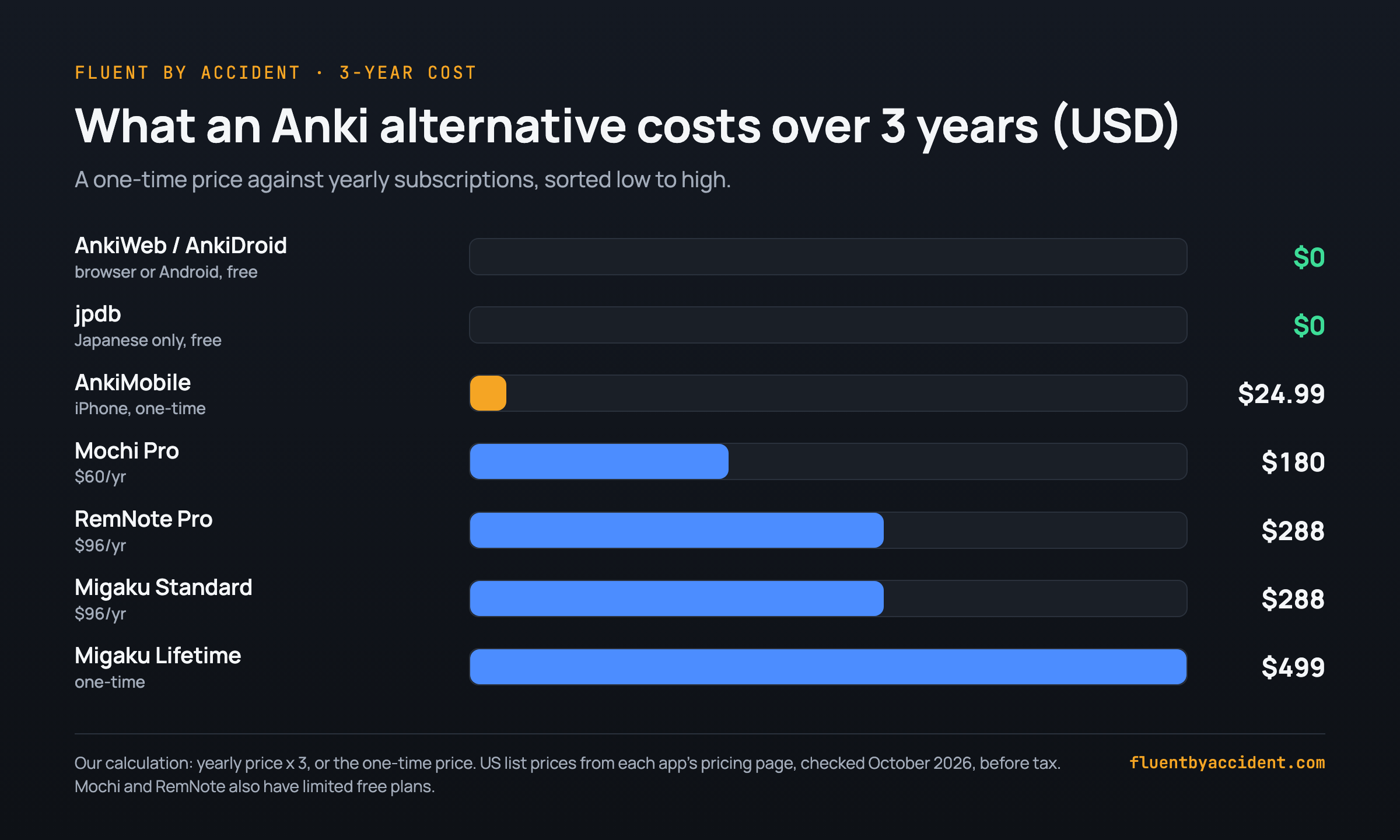
Over a few years, the one-time price looks different. Mochi Pro at $60 a year costs $180 over three years, about seven times the AnkiMobile price ($180 / $24.99 = 7.2). RemNote Pro and Migaku Standard at $96 a year each come to $288.
Anki alternatives that give you ready-made cards
If you never want to build a deck again, use someone else's content. Three options fit language learners:
- Clozemaster. Sentences with one word blanked out, in 50+ languages. The site says its core is free, with a paid Pro tier on top (Clozemaster).
- Memrise. Official courses made by the company. On March 31, 2024, user-made community courses moved off the main app to a separate site, community-courses.memrise.com, where course creation still works; in November 2025 Memrise said it's exploring how to bring them back (Memrise blog). The main app is now built around its own courses.
- jpdb. If you want an Anki alternative for Japanese, jpdb has prebuilt vocabulary decks for specific anime, novels, visual novels and live-action shows, and can partially import an Anki database (jpdb). Its Patreon page says the site is free to use (jpdb Patreon). In the 2025 WaniKani thread, learners also suggested jpdb and Bunpro (WaniKani forum).
The trade-off: ready-made cards get you studying in minutes, but you didn't pick the words. If you'd rather pick them from what you watch, start with a list like Netflix shows to learn Spanish, sorted by level.
Who ready-made cards suit:
- Beginners who don't know yet which words matter.
- People with 10 to 15 minutes a day.
- Anyone whose own decks kept dying in week two.
Skip them if you already know what you want to learn from your shows or books.
Anki alternatives that make cards from what you watch
If your Anki cards feel cut off from real language, the fix is a card that remembers where the word came from. You look up a word in an episode, and it becomes a card with the sentence you heard. This builds on the dual subtitle method for learning with Netflix.
Words met in a scene come with a voice, a situation and a reason to care. That's the idea behind why comprehensible input from TV works, though how much input alone teaches is still debated.
Migaku. Who it's for: learners who want one tool for reading and watching in 11 languages, including Japanese, Korean and Spanish. Its pricing page lists tapping words for meanings and "One-click flashcard creation", at $10 a month after a 10-day free trial (Migaku).
Fluent by Accident. We make this one, so weigh our take accordingly. Who it's for: people who already watch Netflix, YouTube, Prime Video, Disney+ or Max in Chrome. The extension shows two subtitle lines; you click a word to translate it, save it to a deck, then review it as flashcards in the web app.
The limits: Chrome only, sign-in required, 100 saved words and no AI on the free plan, and no mobile app yet (cards open in your phone's browser). It schedules with SM-2, like classic Anki, not FSRS. Anki imports keep the words only; media and review history stay behind.
How to move your Anki deck without losing progress
If you do switch, export carefully. Two checkboxes decide whether your progress and your audio make the trip.
Before you leave Anki:
- Sync, then go to File > Export.
- Choose Anki Deck Package (.apkg) for one deck, or Anki Collection Package (.colpkg) for everything (Anki Manual).
- Tick "Include scheduling information" (your review history) and "Include media" (audio and images).
- Import one small deck first and check due dates and audio before moving the rest. Keep the original file as a backup.
| Destination | Cards | Audio and images | Review history | Watch out for |
|---|---|---|---|---|
| Mochi | yes | not stated in docs | yes (Mochi) | cards may not look the same; CSS and JavaScript are stripped |
| RemNote | yes | yes, if exported with media | yes (RemNote) | custom CSS/JS and on-the-fly text-to-speech do not carry over |
| Noji | yes | not stated | yes, if exported with progress (Noji) | no Anki sync afterwards (Anki FAQ) |
| jpdb | partial (jpdb) | not stated | not stated | Japanese only |
| Fluent by Accident (we make it) | words only | no | no, cards start fresh | formatting and cloze markers are stripped |
"Not stated" means the vendor's import page doesn't say either way, so check after your test import.
Should you quit Anki at all? Fix these first
If the review pile is why you want to leave, it follows you. Every spaced repetition app brings a card back several times before it sticks. That's the method, and spacing is well supported: a 2006 meta-analysis by Cepeda and colleagues pooled 839 assessments from 317 experiments (Cepeda et al., 2006).
Worked example (assumptions, not measurements): say each new card gets about 5 reviews in its first two months. At 20 new cards a day, that's roughly 20 x 5 = 100 reviews a day once you're two months in. At 10 new cards a day, roughly 50. The arithmetic is the same in any app, so halve your new cards per day before you change apps.
Two fixes inside Anki: lower "New cards/day" in deck options, and try FSRS, which the manual says "can help you remember more material in the same amount of time"; turn it on at the bottom of the deck options page (Anki Manual).
And Anki isn't going away. In February 2026 its creator began handing business operations to AnkiHub, calling it "a step back for me rather than a goodbye" (Anki forum).
Stay with Anki if:
- You already have a deck that works.
- Your only issue is the iPhone price.
- You depend on add-ons, such as dictionary lookups.
Switch if:
- You've quit Anki twice over setup.
- You never make cards anyway.
FAQ
What is the best free Anki alternative?
Often it's Anki itself: the computer version, AnkiWeb and AnkiDroid are all free (Anki, Anki Manual). Outside Anki, Mochi's free plan keeps cards on your device with no sync (Mochi), and RemNote's free plan includes unlimited notes and flashcards (RemNote). For Japanese, jpdb is free to use (jpdb Patreon). Clozemaster says its core is free, with a paid Pro tier on top (Clozemaster). On iPhone, the AnkiWeb-in-Safari steps above cost nothing.
Is Noji (Anki Pro) the same as Anki?
No. Anki's own FAQ says the Anki ecosystem is Anki, AnkiMobile, AnkiDroid and AnkiWeb, and that Anki Pro (now Noji) and AnkiApp (now AlgoApp) were developed by separate groups of people and don't work with the other Anki clients (Anki FAQ). So your AnkiWeb collection won't sync to Noji. You can still import Anki deck files into Noji and keep your progress if you include it when exporting (Noji Help).
Can I move my Anki decks to another app?
Yes, for most apps. In Anki, export a Deck Package (.apkg) or Collection Package (.colpkg) and tick "Include scheduling information" and "Include media" so review history and audio come along (Anki Manual). Mochi, RemNote and Noji all document importing review history from Anki (Mochi, RemNote, Noji). Import one small deck first, check due dates and sound, and keep the original file as a backup.
Is Anki still worth using in 2026?
Yes, if it already works for you. The computer version and AnkiDroid are free, and the FSRS scheduler is supported from Anki 23.10 (Anki Manual). In February 2026, Anki's creator began moving business operations to AnkiHub. He wrote that the computer version will remain free and open source, syncing will stay free, and AnkiMobile will remain a $25 one-time purchase (Anki forum). Leaving makes most sense when setup or making cards is what stops you.
What is the best Anki alternative for Japanese?
For vocabulary, jpdb comes up often in learner forums, for example in a 2025 WaniKani thread (WaniKani forum). It's free, has prebuilt decks for specific anime, novels and dramas, and can partially import an Anki database (jpdb). If you'd rather make cards from Japanese shows and websites, Migaku supports Japanese and creates cards in one click, from $10 a month after a 10-day trial (Migaku). In the same 2025 WaniKani thread, learners also named Kitsun, Torii and Bunpro, a grammar site with its own SRS (WaniKani forum).
Why does Anki cost $24.99 on iPhone but nothing on a computer?
Because the iPhone app pays for everything else. The AnkiMobile listing says its sales support development of both the computer and mobile versions, which is why it's priced like a computer application (App Store). The computer version and AnkiWeb sync are free, and AnkiDroid is free and built by contributors (Anki). Anki's creator wrote in 2026 that syncing stays free, "supported by sales of the iOS app" (Anki forum).
Sources
- Anki: apps.ankiweb.net, AnkiMobile, AnkiDroid
- Anki Manual: Syncing, Getting Started, Deck Options, Exporting, knockoffs FAQ, shared deck media FAQ
- Anki forum: Anki's Growing Up (2026), post #110, App Store price (2025)
- Vendors: Mochi pricing, Mochi import, RemNote pricing, RemNote import, RemNote desktop and web, Noji, Noji import, Migaku, jpdb, jpdb Patreon, Clozemaster, Memrise, Quizlet
- Cepeda, Pashler, Vul, Wixted & Rohrer (2006). Distributed practice in verbal recall tasks. Psychological Bulletin.
- Forums: WaniKani (2025), Bunpro (2023)