What Is FSRS in Anki, and Should You Switch?
FSRS is the newer Anki scheduler that predicts when you will forget each card. How it differs from SM-2, what the benchmark really shows, and how to switch without a review pile-up.
FSRS (Free Spaced Repetition Scheduler) is an optional scheduler in Anki, supported since Anki 23.10, that predicts card by card when your chance of recalling it falls to a target you choose (90% by default) and schedules the review then. For most language learners the answer is yes, switch: keep desired retention at 90%, leave "Reschedule cards on change" off, and your due dates do not change on day one.
This guide covers FSRS in Anki in plain terms: what it tracks, how it differs from the old SM-2 algorithm, what the evidence does and does not show, how to migrate, and what your daily review count will do afterwards. If you only want the exact option values, the exact Anki settings we use for language decks are in a separate post.
Last checked: November 2026.
How we tested: Checked on 13 November 2026 against the current Anki manual, the Anki 25.07 release notes and the open srs-benchmark (9,999 Anki collections, 349,923,850 evaluated reviews). Interval figures below are our own calculations from Wozniak's SM-2 formula and the published FSRS formula, with the arithmetic shown. We did not measure anyone's personal review counts, so you will not find a before/after number from us here.
What is FSRS in Anki?
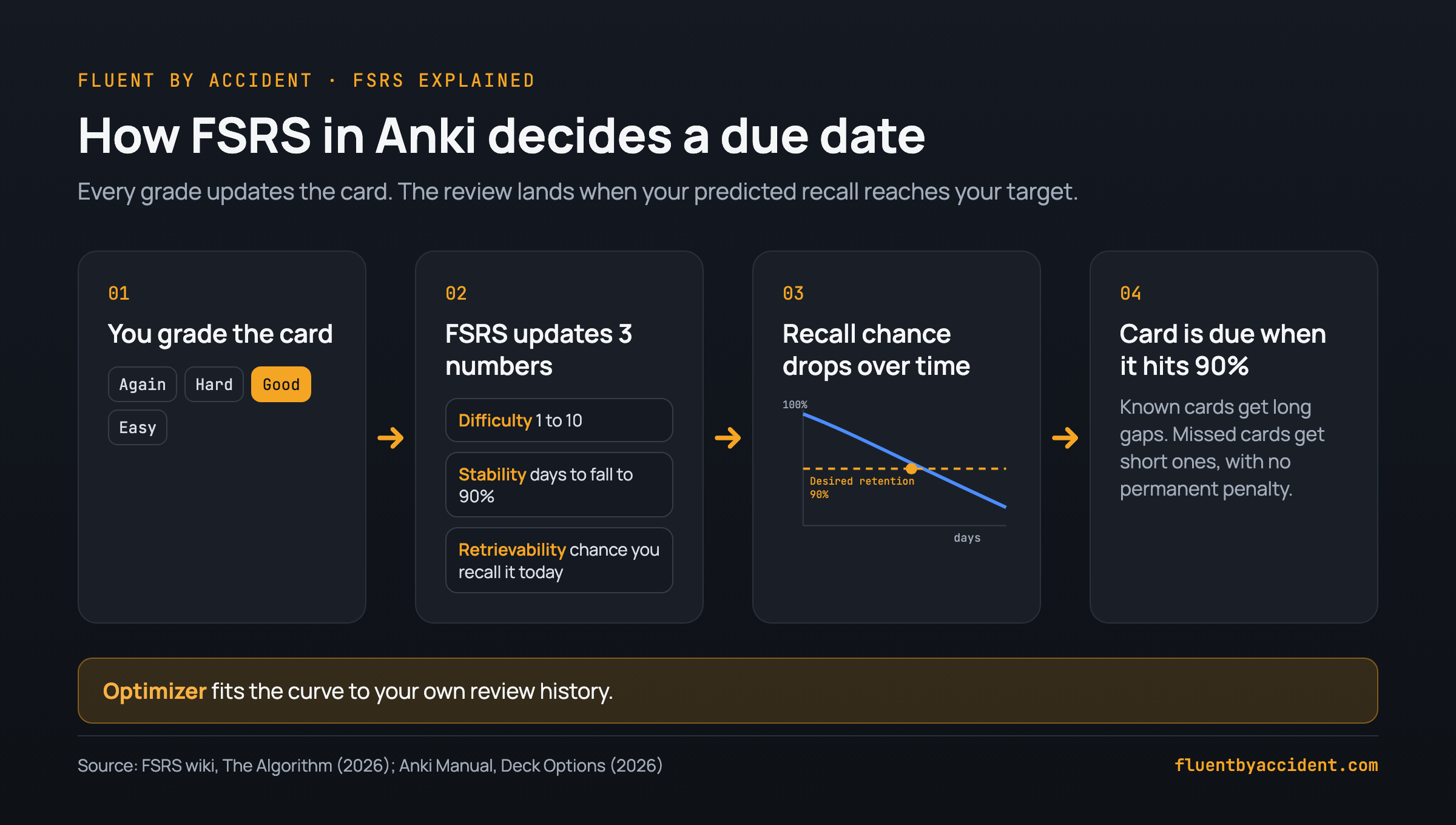
FSRS keeps three numbers for every card, as described on the FSRS algorithm wiki:
- Difficulty (D): how hard the card is for you, on a scale from 1 to 10.
- Stability (S): the number of days until your chance of recalling the card drops to 90%.
- Retrievability (R): your probability of recalling the card right now.
Every time you press Again, Hard, Good or Easy, FSRS updates those numbers. Then it asks one question: on which day will R fall to your desired retention? That day becomes the due date. Domenic Denicola put it neatly in his FSRS explainer: the algorithm turns "test just before we are about to forget" into "a prediction problem: when does the probability of recalling a card drop to 90%?"
The method comes from research by Jarrett Ye, Jingyong Su and Yilong Cao, published as a spaced repetition scheduling paper at ACM KDD 2022. According to the srs-benchmark README, FSRS v4 "is the first version that was integrated into Anki." Since then it has kept moving: the Anki 25.07 release brought FSRS-6, which uses 21 parameters in the benchmark table.
Those parameters are the interesting part. A built-in optimizer fits them to your own review history, so the curve that predicts forgetting is shaped by how you actually remember, not by fixed rules from the late 1980s.
FSRS vs SM-2: what actually differs
SM-2 is the algorithm Piotr Wozniak described for SuperMemo; he wrote that he built the first SuperMemo program in December 1987. Its rules are short: the first interval is 1 day, the second is 6 days, and every later interval is the previous one multiplied by an ease factor (EF). A new card's EF is assumed to be 2.5, and it can never fall below 1.3. The same rules apply to every learner and every deck.
Anki's version is not pure SM-2. The Anki FAQ on its algorithm lists changes: configurable learning steps, four answer buttons with a single fail button, a boost when you answer late, an Easy bonus, and failures during learning that do not lower ease.
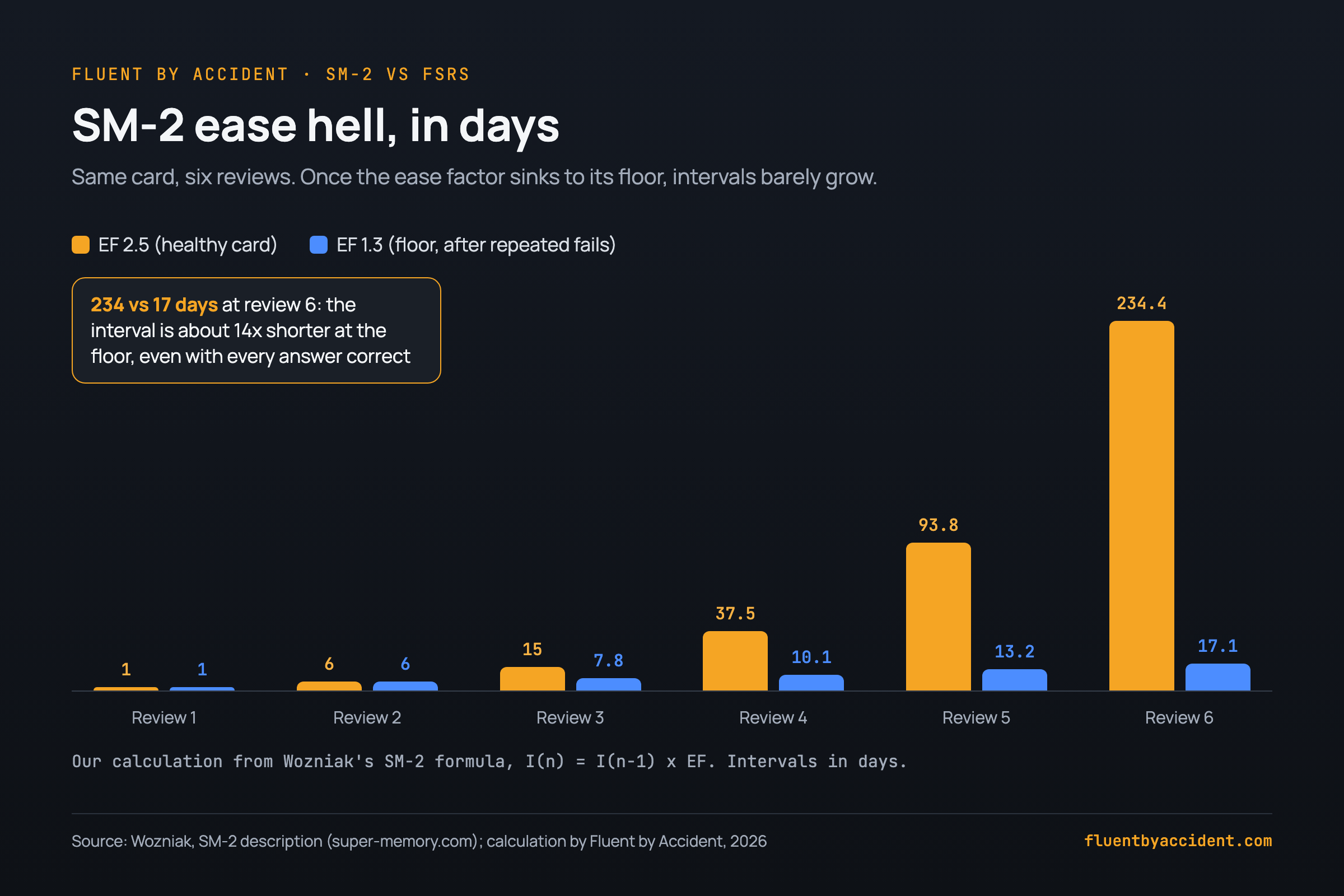
The weak spot is what the Anki manual calls ease hell: "repeatedly failing a card after it has graduated from the learning phase could reduce its ease a lot." A card at the 1.3 floor grows very slowly even after you have learned it. Here is our own calculation with the SM-2 formula, for a card you answer correctly every time from the second review on:
- EF 2.5: 1, 6, 15, 37.5, 93.75, 234.4 days (6 x 2.5 = 15, 15 x 2.5 = 37.5, and so on).
- EF 1.3: 1, 6, 7.8, 10.14, 13.18, 17.14 days (6 x 1.3 = 7.8, 7.8 x 1.3 = 10.14, and so on).
By the sixth interval the floored card comes back after about 17 days instead of 234, roughly 13.7 times sooner. For a vocabulary deck full of words you once struggled with, that is a lot of extra reviews of words you now know.
| Feature | SM-2 (Anki legacy) | FSRS |
|---|---|---|
| Parameters | Fixed rules, same for everyone | Learned from your review history by the optimizer |
| What it tracks per card | Ease factor and current interval | Difficulty, Stability, Retrievability |
| Target retention you can set | No | Yes, desired retention, 90% default |
| Reviews done late | Boosts the interval with a fixed rule | "Much better at scheduling cards that have been reviewed with a delay" |
| Ease hell risk | Yes, ease can sink to 1.3 | No ease factor to sink |
| Options you stop using | None | Graduating interval, Easy bonus and similar SM-2 options are hidden |
Is FSRS better than SM-2? What the evidence says
The honest answer is "better at predicting memory, and the Anki team says that means fewer reviews," but you will not find an official percentage. The Anki FAQ states: "With FSRS, users have to do fewer reviews than with Anki's default algorithm to achieve the same retention level." It also says "Preliminary tests seem to indicate FSRS is roughly on par with SM-17," a much newer SuperMemo algorithm.
The best public evidence is the srs-benchmark, built on data "from 10 thousand users who use Anki" with "~727 million reviews of flashcards." Without same-day reviews, it evaluates 349,923,850 reviews from 9,999 collections. It measures how well each algorithm predicts whether you will remember a card, using log loss and RMSE (bins). For both, lower is better. It does not measure "reviews saved."
| Algorithm | Parameters | Log loss (lower is better) | RMSE bins (lower is better) |
|---|---|---|---|
| FSRS-7 | 34 | 0.3401 | 0.0634 |
| FSRS-6 (Anki 25.07) | 21 | 0.3460 | 0.0653 |
| FSRS-5 | 19 | 0.3561 | 0.0742 |
| FSRS-4.5 | 17 | 0.3625 | 0.0764 |
| FSRS v4 (first in Anki) | 17 | 0.3726 | 0.0838 |
| AVG baseline | 0 | 0.3945 | 0.1034 |
Source: srs-benchmark README, table without same-day reviews, checked 13 November 2026.
Two things to take from it. Each FSRS version predicts better than the last, and all of them beat the baseline that just guesses an average. The README text tables do not include an SM-2 row, so we do not print an SM-2 score here. When you see claims online like "FSRS cuts reviews by a quarter," they come from vendor pages and forum posts, not from Anki or the benchmark. If you are still deciding on the app itself, see how flashcard apps compare for language learning.
Should you switch to FSRS?
Most people should. The scheduler is built into Anki, supported on Anki 23.10, AnkiMobile 23.10, AnkiWeb and AnkiDroid 2.17+, and switching does not rewrite your due dates unless you ask it to. A few situations call for waiting.
| Your situation | What to do | Why |
|---|---|---|
| New or young deck, or cards stuck in ease hell | Switch now | No ease factor to sink; intervals follow your real memory |
| Large, mature SM-2 collection | Switch, leave Reschedule off | Rescheduling "will often result in a large number of cards becoming due" (Anki manual) |
| You press Hard when you actually forgot | Fix grading first | The manual warns "all intervals will be unreasonably high" |
| Fewer than a few hundred reviews | Switch, optimize later | The manual lists "low number of reviews" as a poor fit for optimizing |
| Add-ons that change intervals | Remove them or wait | Such an add-on "shouldn't be used with FSRS" |
| One device on Anki older than 23.10 or AnkiDroid older than 2.17 | Update first | Older clients do not support FSRS |
If the setup itself is what puts you off Anki, there are apps that schedule cards without Anki's setup. FSRS does not make Anki simpler; it makes the schedule smarter.
How to switch to FSRS in Anki (step by step)
This is the full migration checklist. It covers the switch, not every option value; for those, use the exact Anki settings we use for language decks.
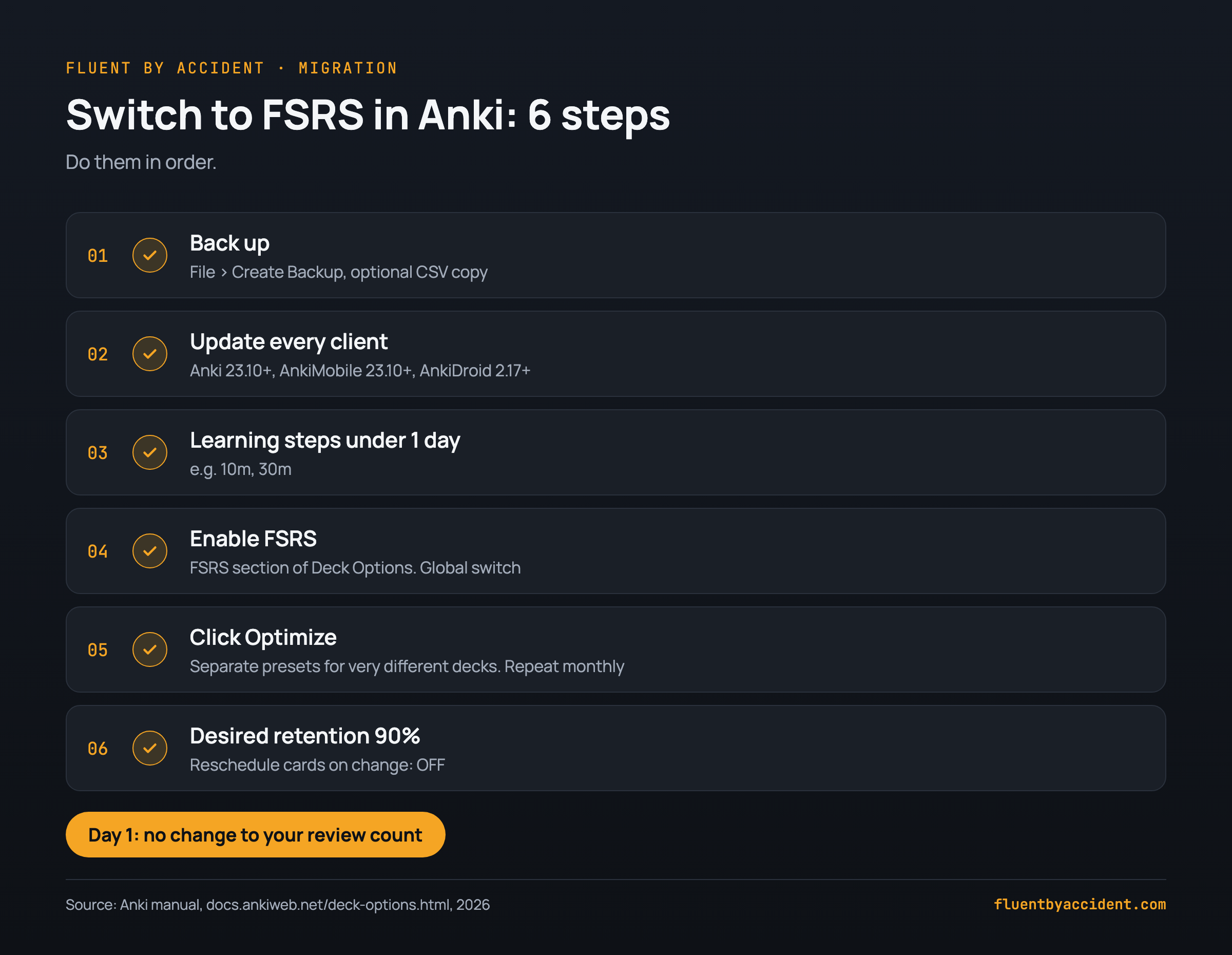
- Back up your collection. Use File > Create Backup in Anki to back up your collection (media files are not included). If you also want a readable copy of the cards, export your deck to CSV first with our free tool.
- Update every client. Desktop and AnkiMobile need 23.10 or later, AnkiDroid needs 2.17 or later. Sync everything once.
- Shorten learning steps. The manual says to "ensure that all your learning and re-learning steps are shorter than 1d and can be completed on the same day." Steps such as 10m or 30m are fine; remove any 1d step.
- Turn on FSRS. Open Deck Options and scroll to the FSRS section. It applies to the whole collection: "FSRS can only be enabled globally."
- Optimize per preset. Press Optimize in each preset. Give decks that differ a lot in difficulty their own presets, as the manual recommends. Re-optimize about once a month; the manual says "once every month is sufficient."
- Keep desired retention at 90% and Reschedule off. 90% is the default and "offers a good balance of retention and workload." Leave "Reschedule cards on change" unchecked so nothing becomes due at once.
What changes in your daily reviews after switching?
Day 1: nothing. With Reschedule off, "future reviews will use the new scheduling," according to the Anki manual. Cards already due stay due; cards due next month stay due next month.
The following weeks: each card gets an FSRS interval the next time you review it. Cards that sat at a low ease under SM-2 are no longer held back by it, so intervals on words you now know start to stretch. Cards you keep failing come back sooner, because their stability stays low.
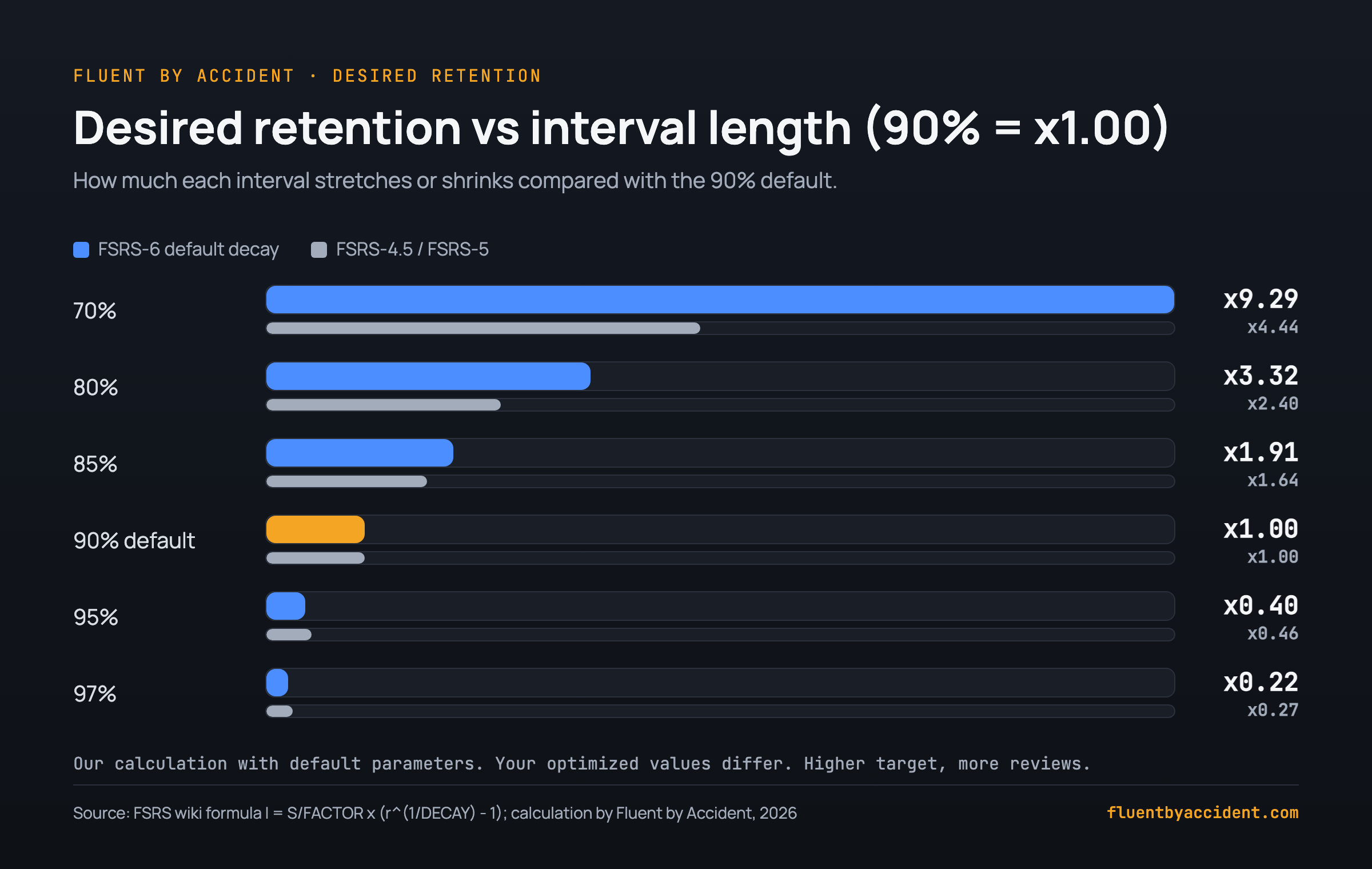
The long run: desired retention is your workload dial. The FSRS formula gives the next interval as I = S / FACTOR x (r^(1/DECAY) - 1), where the interval equals stability at r = 90%. We plugged in the FSRS-6 default decay (w20 = 0.1542) to see how intervals scale relative to 90%:
- 97%: intervals x 0.22
- 95%: intervals x 0.40
- 85%: intervals x 1.91
- 80%: intervals x 3.32
With the older FSRS-4.5/5 curve shape the same targets give 0.27, 0.46, 1.64 and 2.40. Example: a mature word with an interval of 30 days at 90% would come back after about 12 days at 95% (30 x 0.40). This is an approximation for default parameters; your optimized curve will differ. It matches the manual's warning that "above 90% the workload increases very quickly, and above 97% the workload can be overwhelming."
Two real-world reports, both one person's experience. Domenic Denicola simulated a year on his Japanese deck with 10 new cards a day and a 200-review cap: at 90% he was "quickly reaching 200" reviews a day, while at 70% reviews went from about 60 to 130. On the Anki Forums, one user reported going from about 150 reviews a day to over 4,000 on a deck of about 17,000 cards after raising retention from 90% to 95% and optimizing with "Reschedule cards on change" turned on. Setting retention back to 90% did not bring the count down (see the Reschedule mistake below). Before you move the dial, try Anki's "Help Me Decide" simulator, which the manual says lets you "simulate workload at different levels of retention."
Common FSRS mistakes language learners make
- Pressing Hard when you forgot. Hard means "I got it, with effort." If you did not recall the word, press Again, or the manual says intervals become "unreasonably high."
- Copying someone else's parameters. The manual is blunt: "Do not change the parameters manually or copy them from someone else." Press Optimize instead.
- One preset for everything. Kanji and cognate-heavy Spanish vocabulary behave very differently. Separate presets let each get its own fitted curve.
- Day-long learning steps. A 1d step overlaps with what FSRS schedules itself. Keep steps within the same day.
- Keeping interval add-ons. Anything that changes intervals fights the scheduler.
- Raising retention with Reschedule on. That combination can make a large share of your collection due at once. In the forum report above, daily reviews jumped from about 150 to over 4,000, and lowering retention again did not undo it.
Tip: FSRS works best when cards are easy to grade honestly. Sentence cards, where you either understand the line or you do not, make the Again/Good decision clear. Our sentence mining guide shows how to build them, and you can turn Netflix and YouTube lines into flashcards from shows you already watch.
If you want to collect those words while you watch, the Fluent by Accident Chrome extension shows two subtitle lines on Netflix, YouTube and other platforms and saves words with a click, ready to export and take into Anki.
FAQ
Is FSRS better than SM-2 in Anki?
For predicting when you will forget, yes. In the open srs-benchmark, built on 9,999 Anki collections, every FSRS version beats the average baseline on log loss and RMSE, and newer versions do better than older ones. The Anki manual adds that FSRS users "have to do fewer reviews" for the same retention. What nobody has published officially is a single "X% fewer reviews" number, so treat such figures from blogs and app vendors with caution. FSRS also handles late reviews much better, which matters if you skip days.
Why did my reviews go up after turning on FSRS?
Two common causes. First, desired retention above 90%: the manual warns workload rises very quickly above that level. Second, "Reschedule cards on change" was on, which recalculates every card and often makes many due at once; this also applies when you re-optimize parameters with Reschedule on. Lower retention back to 90%, keep Reschedule off, and let the pile clear over a few weeks.
Do I need to optimize FSRS parameters, and how often?
Yes. Press Optimize once a preset has a few hundred reviews; with fewer, the manual lists a low review count as a reason FSRS may not fit well. After that, the Anki manual says "once every month is sufficient." Optimizing more often does little harm but gains little. Do not type parameters in by hand or copy someone else's set. Each preset gets its own parameters, so a kanji deck and a Spanish deck in separate presets each get a curve that fits how you learn that material.
What desired retention should I use for language learning?
Start at 90%, the Anki default, which the manual says "offers a good balance of retention and workload." Going higher shortens intervals fast: by our calculation with default FSRS-6 parameters, 95% makes intervals about 0.4 times as long, so mature words come back more than twice as often. Going lower, such as 85%, lengthens them. If you want a specific setting per deck type, the exact Anki settings we use for language decks cover it. Use the Help Me Decide simulator before changing it.
Can I use FSRS on some decks and SM-2 on others?
No. The manual states that "FSRS can only be enabled globally; you cannot enable it for some presets and disable it for others." What you can vary is per preset: each preset has its own optimized parameters and its own desired retention. So a hard deck can run at one retention and an easy deck at another, both under FSRS. If you want a deck to be scheduled very differently, give it its own preset rather than trying to keep SM-2 for it.
Can I go back to SM-2?
Yes, turn the FSRS toggle off in Deck Options and Anki uses its SM-2 scheduler again. If you left "Reschedule cards on change" off when you switched, your existing due dates were never rewritten in one go: existing due dates stay as they are, and SM-2 takes over from each card's next review. Make a backup before switching in either direction, so you can restore the exact earlier state if you change your mind.
Sources
- Ankitects, Anki Manual: Deck Options, FSRS, checked 13 November 2026.
- Ankitects, Anki Manual FAQ: What spaced repetition algorithm does Anki use?, checked 13 November 2026.
- Open Spaced Repetition, srs-benchmark README, checked 13 November 2026.
- Open Spaced Repetition (Jarrett Ye), FSRS wiki: The Algorithm, edited July 2026, checked 13 November 2026.
- Ankitects, Anki 25.07 release notes (original on GitHub), checked 13 November 2026.
- Ye, J., Su, J., Cao, Y. (2022), A Stochastic Shortest Path Algorithm for Optimizing Spaced Repetition Scheduling, ACM KDD 2022.
- Wozniak, P., SM-2 algorithm description, SuperMemo World, classic source (1990).
- Denicola, D., Spaced repetition recap, personal blog, checked 12 November 2026.
- Anki Forums user report, I raised FSRS desired retention and reviews shot up radically, one user's experience.