Best flashcard app for language learning (2026 ranking)
Which flashcard app is best for language learning in 2026? Eight apps ranked on algorithm, audio, imports, phone sync and price, checked in October 2026, with each one's real limits.

You have 300 new words from a month of shows and podcasts sitting in a notes app. You search for the best flashcard app for language learning, and most lists you open are written by a company that sells one of the apps, often ranked at or near the top.
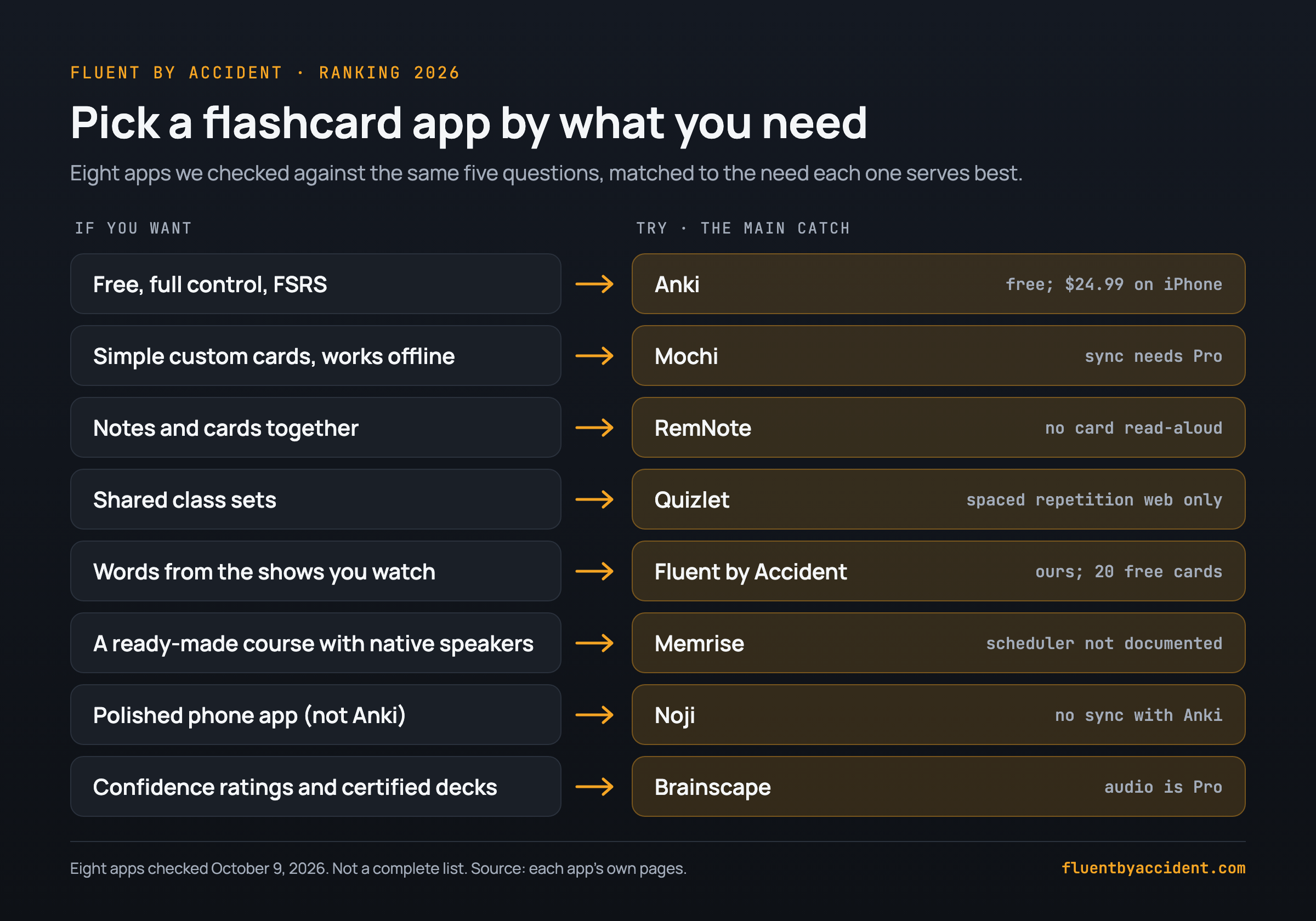
For most learners in 2026, Anki is still the best flashcard app for language learning. It is free on computers, Android and the web, has the FSRS scheduler built in, and gives you free sync and free read-aloud. On iPhone it is a one-time $24.99 (App Store).
If Anki's setup puts you off, Mochi is the simplest serious alternative and RemNote suits learners who keep grammar notes. Memrise is a course, not a deck. If your words come from what you watch, our own app, Fluent by Accident, turns subtitle words into cards; we ranked it fifth and list its limits.
This is not every flashcard app. It is eight apps we checked against the same five questions. We left out course-first apps such as Drops, Lingvist and Clozemaster, and kept Memrise because learners so often weigh it against Anki.
Last checked: October 9, 2026. US prices from that day; they vary by country.
What is the best flashcard app for language learning in 2026?
- Best overall: Anki, if you will spend an evening on setup.
- Best simple alternative: Mochi, free everywhere, sync is paid.
- Best if you learn from shows: Fluent by Accident (ours), 20 cards free.
How we ranked them: five questions, weighed together, with scheduling counting most:
- Scheduling: real spaced repetition, ideally FSRS.
- Audio on the free plan.
- Getting words in: imports, and cards from what you read or watch.
- Phone, and sync with your computer.
- Price of the plan that covers 1 to 4.
Spaced repetition: a card comes back just before you would forget it, with the gap growing each time you remember.
| App | Best for | Algorithm | Read-aloud / audio | Imports | Phone + sync | Price (US) |
|---|---|---|---|---|---|---|
| 1. Anki | Full control, free | SM-2; FSRS built in, switch on | Device voices, free | CSV, .apkg, .colpkg | All platforms; free sync | Free; iPhone $24.99 once |
| 2. Mochi | Simple custom cards | Own; FSRS optional | 200 characters/month free | .apkg with history, CSV, Markdown | All platforms; sync is Pro | Free; Pro $5/month billed yearly |
| 3. RemNote | Notes plus cards | SM-2; FSRS v6 beta | Embedded audio files only | Anki with history | Desktop, iOS, Android; free sync | Free; Pro $96/year |
| 4. Quizlet | Shared class sets | Spaced repetition, website only | Text-to-speech free in most languages; recording your own needs Plus | Pasted text | iOS, Android, web | Free tier; $44.99/year |
| 5. Fluent by Accident (ours) | Words from shows | Anki-style SM-2 | Browser voices, free | Anki (text only), CSV, Excel, Kindle | Web app in phone browser; sync listed as Pro | Free (20 cards); Pro $49/year |
| 6. Memrise | Courses with native video | Not documented | Native-speaker video | None in the app | iOS, Android, web | Free tier; $61.99/year |
| 7. Noji | Phone-first studying | "Enhanced", not documented | Premium | .apkg with progress, CSV, Quizlet | iOS, Android | Free tier; $4.99 to $19.99/month |
| 8. Brainscape | Certified decks | 1 to 5 confidence rating | Adding sounds is Pro | CSV, TSV, Google Sheets | iOS, Android, web | Free tier; $95.99/year in app |
Anki vs Quizlet vs Memrise in one line: Anki for control, Quizlet for shared sets, Memrise for a guided course.
The best flashcard apps for language learning, ranked (8 we checked)
1. Anki
Anki is free on Windows, macOS and Linux, AnkiDroid is free on Android, and free AnkiWeb sync keeps your cards in step across devices (Anki). AnkiMobile on iPhone costs $24.99 once, with 4.0 stars from 2.4K ratings (App Store).
FSRS has been built in since version 23.10; you switch it on in the deck options (Anki Manual). Read-aloud uses the built-in voices on Windows, macOS and iOS; Linux ships no voice engine (Anki Manual).
In February 2026, Anki's creator announced a plan to gradually hand business operations to AnkiHub (Anki forum) and wrote that the computer version "will remain free and open source" (Anki forum).
- Why #1: passes all five questions for free; only the iPhone app costs money.
- Who it is for: you want the most control at the lowest cost and will spend an evening on setup.
- Watch out for: a dated look, a learning curve, and an iPhone price that can be higher outside the US (Anki forum).
2. Mochi
Mochi is "free forever" with no sign-up, unlimited cards, and offline use on Mac, Windows, Linux, iOS and Android (Mochi pricing). It imports Anki .apkg files including review history, plus CSV and Markdown (Mochi docs). It uses its own algorithm by default, and you can switch to FSRS (Mochi docs). Pro is $5 a month billed yearly and adds sync; free text-to-speech stops at 200 characters a month (Pro: 200,000 characters) (Mochi pricing).
- Why #2: strong scheduling and imports for free; misses free sync.
- Who it is for: you want serious scheduling with a cleaner editor and will pay for sync.
- Watch out for: without Pro, your phone and computer hold separate decks.
3. RemNote
RemNote puts flashcards inside your notes, which suits grammar and conjugation tables. The free plan includes unlimited notes, flashcards and synced devices; Pro is $96 a year ($8 a month billed yearly) or $10 month to month (RemNote pricing). SM-2 is the default, and FSRS version 6 is a beta you enable yourself (RemNote Help). It imports Anki cards with review history (RemNote Help).
You can embed audio files (RemNote), but we found no built-in read-aloud for cards in its docs, and users request it on the feedback board.
- Why #3: free sync, FSRS and Anki import; misses free read-aloud.
- Who it is for: grammar-heavy learners who want cards inside their notes.
- Watch out for: no built-in card read-aloud.
4. Quizlet
Quizlet has a huge library of shared sets and 4.8 stars from 1.1M ratings; Plus Unlimited is $44.99 a year (App Store). Its spaced repetition lives in Flashcards mode and is "currently only available on the Quizlet website" (Quizlet Help). You import by pasting from Word or a spreadsheet (Quizlet Help).
Text-to-speech is free in most languages; about a dozen, such as Hindi, need Plus (Quizlet Help). Recording your own audio needs Plus (Quizlet Help).
- Why #4: documented spaced repetition on the website, free phone apps and free text-to-speech; misses on spaced repetition outside the website, and on file imports.
- Who it is for: classes, shared sets and quick drills.
- Watch out for: check community sets for errors yourself, and the adaptive Learn mode needs Plus beyond a few free rounds (Quizlet Help).
5. Fluent by Accident (ours)
We make this one, so weigh our take accordingly. Fluent by Accident is a Chrome extension that shows two subtitle lines on Netflix, YouTube, Prime Video, Disney+ and HBO Max. Click a word or drag across a phrase, and it becomes a flashcard in the web app, with Anki-style spaced repetition and free read-aloud through your browser's voices.
It imports Anki decks (text only: media and review history stay behind), CSV, Excel and Kindle vocab.db. The free plan saves 20 words; Pro is $49 a year or $6.99 a month for unlimited words and AI subtitle translation that follows the scene. The dual subtitle method shows the routine around it.
- Why #5: SM-2 scheduling on the web (phone browser, no app), free read-aloud and the most import formats here; misses on a phone app and on a free plan capped at 20 cards.
- Who it is for: you learn mostly from shows and want those words to become cards without copy and paste.
- Watch out for: the 20-card free cap (imports count), Chrome on desktop only, sign-in required, no AI on the free plan.
6. Memrise
Memrise is a course app "built around real native-speaker videos", with 4.8 stars from 217K ratings. The App Store lists $61.99 a year, $24.99 a month or $329.99 lifetime (App Store). Community courses left the app on March 31, 2024, and user-created word lists returned in 2026 (Memrise). We found no documentation of how it schedules reviews.
- Why #6: native-speaker video in a phone app, but no documented scheduler, no imports in the app, and free-plan audio not stated.
- Who it is for: beginners who want someone else to pick the words and want real speakers.
- Watch out for: it is not a general flashcard app.
7. Noji (formerly Anki Pro)
Anki's FAQ says Anki Pro is now Noji and is "not related to the rest of the Anki ecosystem" (Anki FAQ). The App Store lists 4.6 stars from 14K ratings, Premium at $4.99 to $19.99 a month, two annual Premium plans at $44.99 and $89.99, and a scheduler described only as "enhanced" (App Store). Noji imports .apkg and .colpkg files with progress, plus CSV and Quizlet (Noji Help). Premium adds auto-created audio (Noji).
- Why #7: strong Anki import; misses on scheduling (undocumented) and free audio.
- Who it is for: you want a polished phone app and are not using Anki itself.
- Watch out for: decks do not sync with Anki.
8. Brainscape
You rate each card from 1 to 5 for confidence, and those ratings drive the spacing (Brainscape). Your own cards are free. Brainscape documents spreadsheet import (CSV, TSV, Google Sheets), not Anki decks (Brainscape Academy). Pro adds sounds, images and unlimited certified decks: $95.99 a year in the app (App Store) or $7.99 a month billed yearly on the web (Brainscape pricing).
- Why #8: free scheduling and spreadsheet import; misses on free audio and price.
- Who it is for: learners who like rating confidence and buying expert-made decks.
- Watch out for: audio is paid, and the in-app yearly plan is the priciest here.
Which flashcard app has the best spaced repetition algorithm?
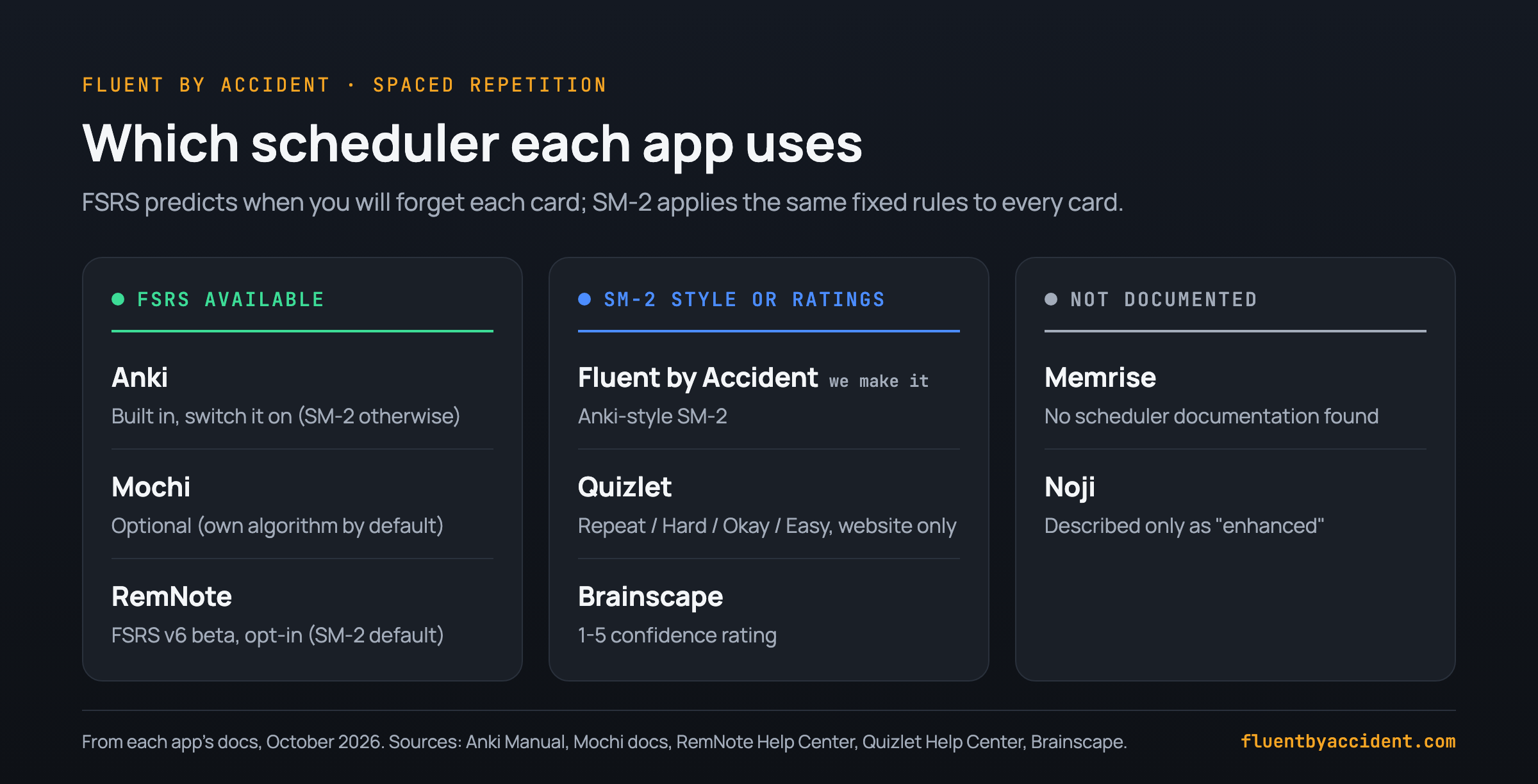
The best spaced repetition app for language learning uses FSRS or lets you switch to it. Three of the eight offer FSRS: Anki (built in, off until you switch it on), Mochi (optional) and RemNote (v6 beta, opt-in). Fluent by Accident uses SM-2 in its web app, Quizlet's spaced repetition works only on its website, Brainscape uses 1 to 5 confidence ratings, and Memrise and Noji do not document theirs.
SM-2 (SuperMemo 2) is the older formula Anki now calls legacy: every card follows the same fixed rules. FSRS is a newer model trained on review data that predicts when you will forget each card.
Anki's manual says FSRS "can help you remember more material in the same amount of time" (Anki Manual). FSRS's open benchmark covers about 727 million reviews from 10,000 Anki users (SRS benchmark).
Which flashcard apps read cards aloud?
Hearing a word helps you say it and catch it in speech.
Free read-aloud with no monthly cap comes from Anki (device voices), Quizlet (built-in text-to-speech; about a dozen languages need Plus) and Fluent by Accident (browser voices). Mochi's free plan reads 200 characters a month. Voices vary by phone and browser, so check your target language before you commit.
| App | Free plan | Paid plan |
|---|---|---|
| Anki | Device voices; audio files | No audio upgrade |
| Mochi | 200 characters a month | 200,000 a month |
| RemNote | Embedded audio files | Not stated |
| Memrise | Not stated | More lessons, same video |
| Fluent by Accident | Browser voices, Listen mode | Same |
| Quizlet | Text-to-speech (most languages) | More TTS languages; record your own |
| Noji | Not stated | Auto-created audio |
| Brainscape | Cannot add sounds | Add sounds |
Can you import your words from Anki, a spreadsheet or Kindle?
Mostly yes, but what survives differs. Anki imports packaged decks with their scheduling (Anki Manual), plus media if the export included it (Anki Manual), and plain-text files with commas or tabs (Anki Manual). Export from Anki with scheduling and media, and test a small deck first.
For Kindle, Fluent by Accident reads the vocab.db file directly. None of the other import pages we cite mentions Kindle, so convert your words to a CSV first.
| App | Anki deck | Review history | Audio and images | Other imports |
|---|---|---|---|---|
| Anki | Native | Yes | Yes | CSV, text |
| Mochi | Yes | Yes | Not stated | CSV, Markdown |
| RemNote | Yes | Yes | Not confirmed | Not stated |
| Noji | Yes | If exported with progress | Not stated | CSV, Quizlet |
| Fluent by Accident | Yes | No, cards start new | No, text only | CSV, Excel, Kindle vocab.db |
| Quizlet | No | n/a | n/a | Pasted text |
| Brainscape | Not documented | n/a | n/a | CSV, TSV, Google Sheets |
| Memrise | Not in the app | n/a | n/a | Paste on the community site |
Phone sync and cost: is there a free flashcard app for language learning that covers everything?
Anki (through AnkiWeb) and RemNote sync phone and computer for free (Anki, RemNote pricing). Quizlet, Brainscape and Memrise run on phone and web from one account; Mochi syncs only on Pro; Noji is phone-first. Fluent by Accident is a web app, so on any plan your cards open in your phone's browser; its pricing page lists sync across devices as a Pro feature.
Anki is the one free app that covers everything: $0 on Android, though on iPhone it is $24.99 once. For the rest, we priced the cheapest plan that covers spaced-repetition reviews on your phone, computer sync, audio and unlimited cards.
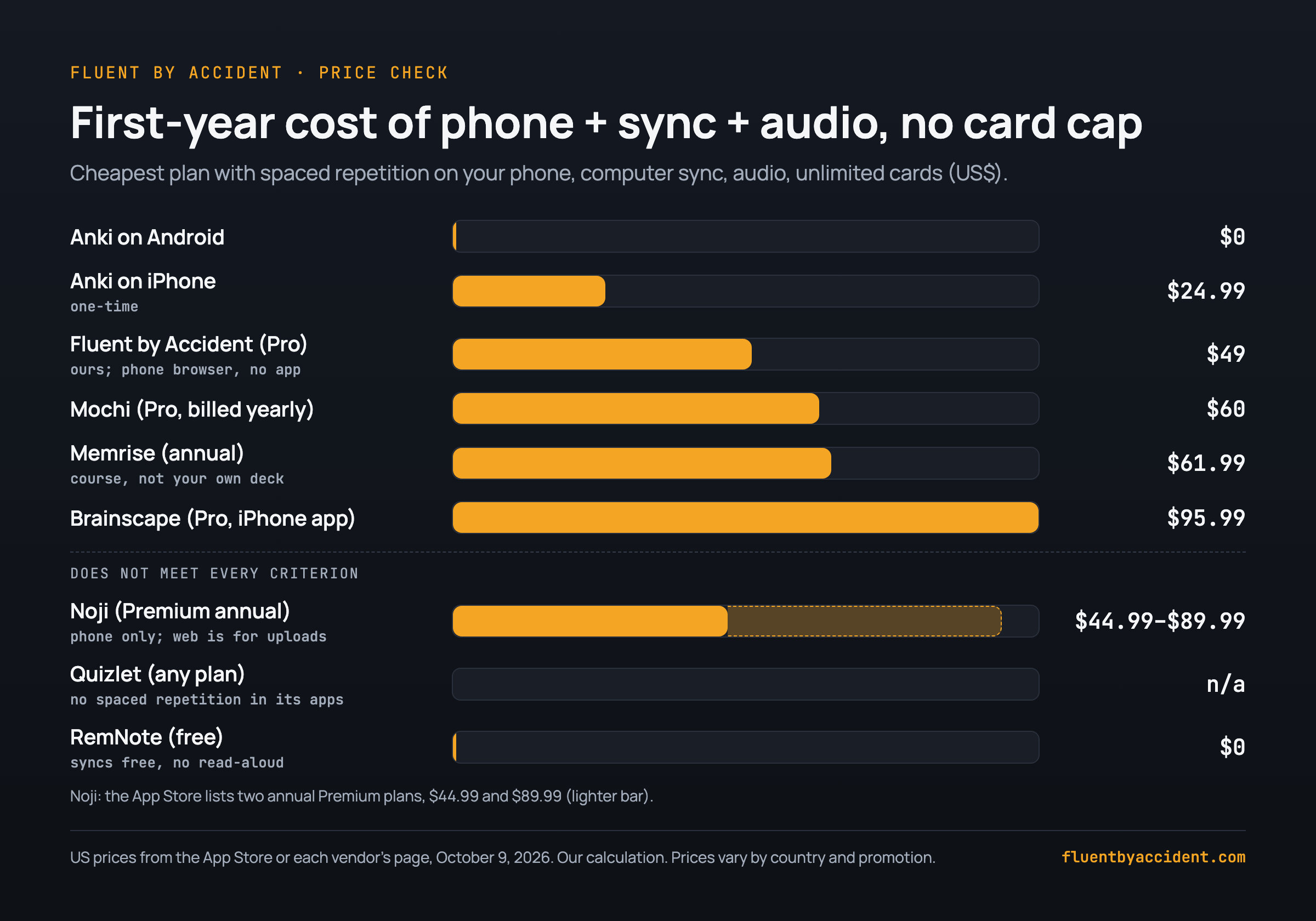
The arithmetic: Mochi is $5 x 12 = $60 billed yearly, or $6 x 12 = $72 monthly (Mochi pricing). Brainscape is $95.99 in the app, or $7.99 x 12 = $95.88 on the web (Brainscape pricing).
Do flashcard apps actually work for learning a language?
They work for what they do: keeping words in memory. A 2006 meta-analysis of 839 assessments from 317 experiments found that spacing study sessions beats cramming them (Cepeda et al., 2006). A 2016 review added that testing yourself on top of spacing helps further (Kang, 2016).
Cards do not teach you to follow fast speech. That comes from hours of listening, which is why comprehensible input from TV shows pairs well with a deck. For Spanish, our Netflix shows to learn Spanish, by level is a good source of new words.
A routine we suggest (not a study result): 10 to 15 minutes of reviews a day, plus an episode or a podcast in your target language. Add only the words you would actually want to say.
FAQ
What is the best free flashcard app for language learning?
Anki, for most people: the desktop app, AnkiDroid and AnkiWeb are free, with free sync and read-aloud through your device's voices. Only the iPhone app costs money, $24.99 once. Free runners-up: RemNote (free sync, no documented card read-aloud) and Mochi (free everywhere, but sync is Pro). Fluent by Accident's free plan covers only 20 cards, so treat it as a trial.
Is Anki still worth using in 2026?
Yes, for most language learners: FSRS is built in, and AnkiWeb sync and read-aloud are free. In February 2026 its creator announced a plan to gradually hand business operations to AnkiHub (Anki forum). The published promises: the core code stays open source, the computer version stays free, the mobile apps stay maintained, and AnkiDroid stays independent. The real costs are setup time, a dated look and $24.99 on iPhone.
Is Noji the same as Anki Pro, and is it related to Anki?
Noji is the app formerly called Anki Pro, and it is not related to Anki. Anki's FAQ says a separate group built it and it does not work with Anki clients, so Noji decks will not sync with Anki, AnkiDroid or AnkiWeb (Anki FAQ). If you use Anki, AnkiDroid or AnkiMobile keeps your reviews and AnkiWeb sync; to switch, export your deck with scheduling first, since Noji keeps its own history (Noji Help).
Does Quizlet use spaced repetition?
Yes, but only in one place. Quizlet's Flashcards mode has spaced repetition with Repeat, Hard, Okay and Easy ratings, but its help center says it is "currently only available on the Quizlet website" (Quizlet Help). The adaptive Learn mode needs Plus beyond a few free rounds per set. For free spaced repetition on your phone, Anki on Android or RemNote fits better.
Which flashcard apps have audio for language learning?
Three of the eight read cards aloud for free with no monthly cap: Anki (device voices), Quizlet (text-to-speech in most languages; about a dozen, such as Hindi and Czech, need Plus) and Fluent by Accident (browser voices). Mochi's free text-to-speech stops at 200 characters a month. Paid audio comes with Mochi Pro, Noji Premium, Brainscape Pro and Quizlet Plus (your own recordings). Memrise courses include native-speaker video.
Sources
- Anki: apps.ankiweb.net, AnkiMobile, Manual on FSRS, text to speech, importing packaged decks and text files, exporting, other apps
- Anki forum, 2025-2026: handover, post #110, iPhone price
- Vendors: Mochi, RemNote, Memrise, Quizlet, Noji, Brainscape
- Research: Cepeda et al. (2006), Psychological Bulletin; Kang (2016), Policy Insights from the Behavioral and Brain Sciences; SRS benchmark