HBO Max dual subtitles: which Chrome extensions work (2026)
HBO Max dual subtitles need a Chrome extension: Max has no built-in option. Here are the tools that list HBO Max support, how to set one up, and what breaks (ads, TVs, missing languages).
HBO Max shows one subtitle track at a time, so HBO Max dual subtitles need a Chrome extension running on a computer. As of October 2026, nine Chrome extensions say they support HBO Max. Three are built only for Max (HBO Max Dual Subtitles, Double Subtitles for HBO Max by MovieLingo, HBO max Subtitles & Dictionary); six are multi-platform tools (Trancy, Lingosive, FluentAI, Sublo, EasyDualSub and our own Fluent by Accident). Language Reactor is not one of them.
Last checked: October 26, 2026.
HBO Max (called Max for a while) has fewer tools than Netflix, and its player works differently enough that a Netflix tool does not just carry over. This guide covers HBO Max only.
How we checked: We read the store listings of every extension below on October 9 and October 26, 2026 (the Max-only tools through ExtScope mirrors on October 26, because the store's consent wall blocked us), plus each vendor's own pricing or help pages. We did not play HBO Max titles with the third-party tools, so everything about them is what their listings say, not our test results. On October 26, 2026 we ran our own extension (version 0.32.5) through its automated end-to-end check in Chrome for Testing 155 on macOS, on a test copy of the HBO Max player. Max by manifest: pass (English and Polish lines both shown, 2 subtitle periods read per language). Max by playback info with an ad period: pass (lines hidden during the ad, shown again after it). HBO Max support in our tool is new (added October 2026): we have checked it on that test copy, not yet on every real title. We did not time setup or subtitle delay, so there are no speed numbers here.
Can you get dual subtitles on HBO Max?
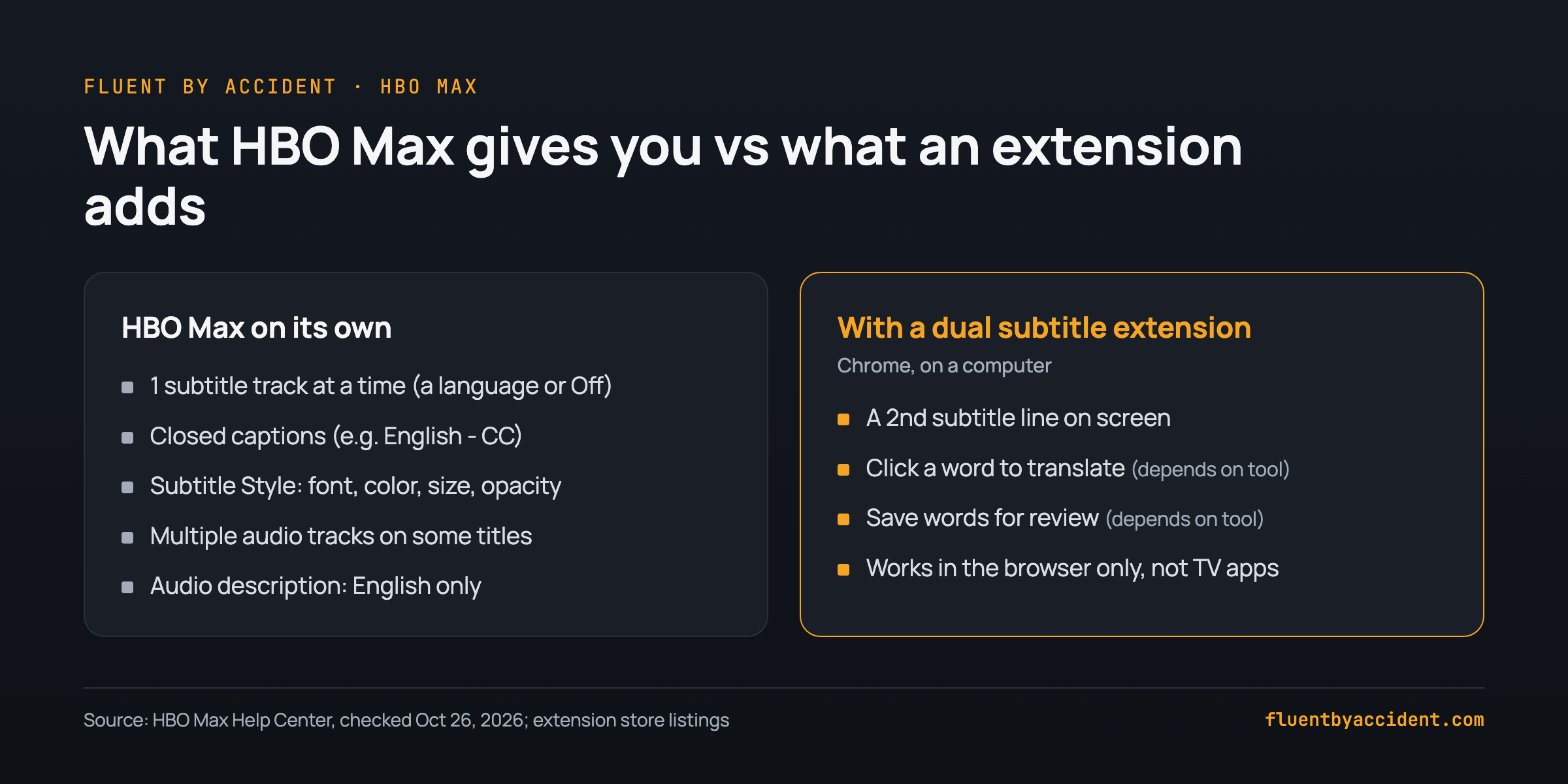
Not with HBO Max alone. According to the HBO Max Help Center, "some HBO Max shows and movies have subtitles, closed captions, and multiple audio tracks", and you can change how captions look. On a computer you click the screen, open the Audio and Subtitles icon (the speech bubble) and, under Subtitles, "choose a language or Off" (HBO Max Help Center). One language or off: there is no second slot.
A few native details matter for learners:
- Audio follows your last choice. HBO Max plays the last audio language you picked; if that is not available it uses your app language, and if your preferences are not available at all, it plays the English track (HBO Max Help Center).
- Audio description is English only for now, per the same page.
- Subtitle Style at HBOMax.com (profile, then Settings, then Subtitle Style) lets you change caption font, color, size and opacity. Useful, but it styles the one track you already have.
Bottom line: the native player handles "Spanish audio, Spanish subtitles" well. It cannot show "Spanish line on top, English line below". That second line, plus learning features such as click-to-translate, is what an extension adds.
HBO Max dual subtitles: every Chrome extension that lists Max (October 2026)
The table lists every Chrome extension we found whose listing names HBO Max. It is not a ranking. Users and ratings are as shown on the store or ExtScope in October 2026; prices only where the vendor states them. "How the 2nd line is made" is filled in only where the listing says it. For the full ranking across Netflix and other sites, see our dual subtitles extension comparison.
| Extension | Scope | How the 2nd line is made | Users | Rating (count) | Price as stated | Notes |
|---|---|---|---|---|---|---|
| HBO Max Dual Subtitles - Subtitle Translator | HBO Max only | Translates HBO Max subtitles; listing says it adds "bilingual or dual subtitle options" | 5,000 | 4.0 (29) | Not stated | ExtScope's own summary (not store text) mentions real-time translation and subtitle download as a premium feature |
| Double Subtitles for HBO Max by MovieLingo | HBO Max only | Additional subtitles shown above HBO Max's own; language picked in the pop-up | 5,000 | 2.9 (36) | Not stated | ExtScope's summary says it relies on Google Translate |
| HBO max Subtitles & Dictionary | HBO Max only | Not stated | 270 | 4.0 (4) | Paid features, price not shown | Listing mentions saving words and downloading transcripts |
| Trancy | Multi-platform | On most platforms, the platform's existing captions | 300,000 | 4.7 (2,800) | Free plan includes HBO; Premium about $42/year as listed on October 9, 2026; regional pricing | Free plan saves 100 words and 50 sentences |
| Lingosive | Multi-platform | "Dual subtitles & AI translation" | 6,000 | 4.2 (57) | In-app purchases, price not stated | Lists YouTube, Netflix, HBO Max, Prime and Disney+ |
| FluentAI | Multi-platform | Not stated | 9,000 | 3.9 (94) | Paid Basic, Pro and Backer tiers | "Flashcards are free" |
| Sublo | Multi-platform | A translated track "in any of 30+ languages" | 1,000 | 4.7 (31) | Free plan with a daily limit, no registration; Pro via license key | Name lists Netflix, HBO Max, Disney+ |
| EasyDualSub | Multi-platform | "Merge native tracks when possible. Translate when necessary." | 763 | 4.7 (12) | 5 free videos a month (10 with a free account); about €2/month unlimited; lifetime license offered | Name lists "Max" |
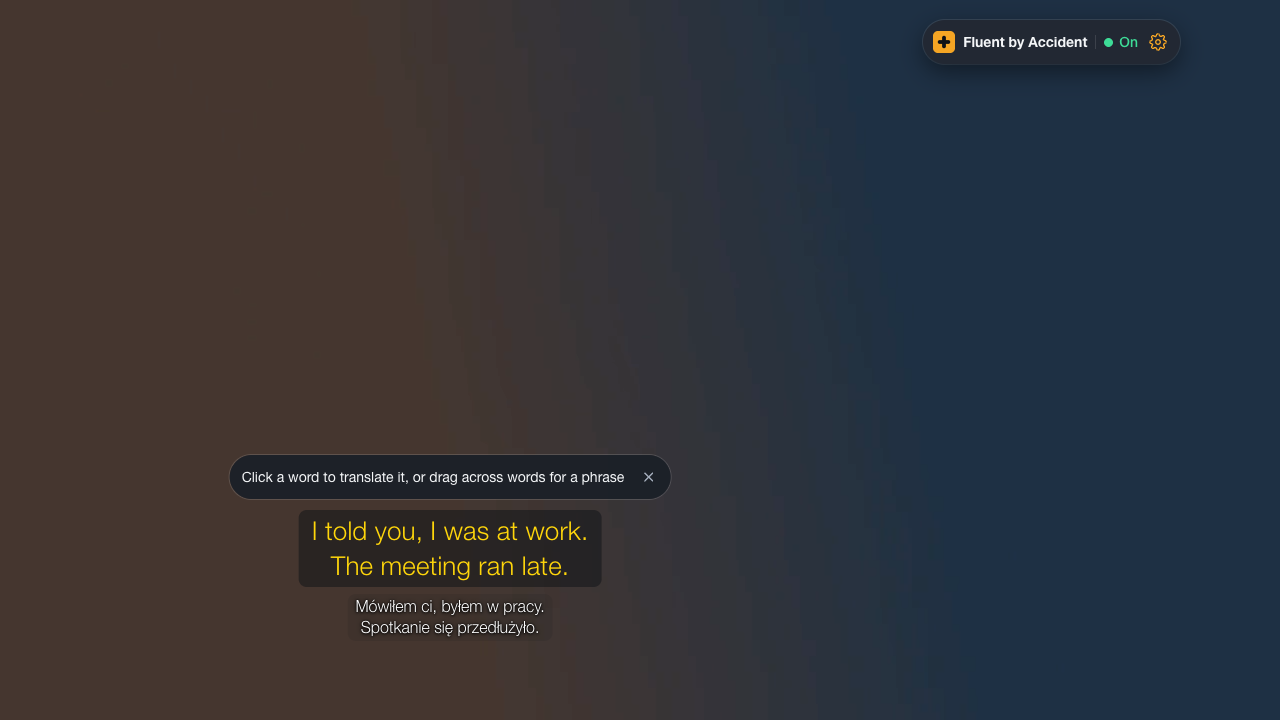
| Fluent by Accident (ours) | Multi-platform: Netflix, YouTube, Prime Video, Disney+, HBO Max | Official subtitle tracks from the HBO Max player | Not shown for our own tool | Not shown for our own tool | Free: two lines, basic translation, 20 saved words, no AI. Pro: $6.99/month or $49/year | We make this one, so weigh our take accordingly. Chrome on desktop only, sign-in required. HBO Max support is new and checked on a test copy of the player, not yet on every real title. |
How to pick without a ranking:
- You only watch HBO Max and want a second line fast: the three Max-only tools are built for exactly that. Their listings say little about price, so check before you sign up.
- You want the second line to be HBO Max's own subtitles, not a machine translation: look for tools that say they use existing or native tracks (Trancy, EasyDualSub, ours). A machine-translated line can drift from what the actors say.
- You also watch other services: a multi-platform tool saves you learning a second interface. Our platform guides cover dual subtitles on Prime Video, Disney Plus dual subtitles and YouTube dual subtitles.
- You want flashcards from what you watch: FluentAI, Trancy, HBO max Subtitles & Dictionary and ours all mention saving words in some form.
Does Language Reactor work on HBO Max?
Short answer: No. Language Reactor's Chrome Web Store listing covers Netflix and YouTube (plus importing books and websites), and its FAQ says of other platforms: "We do not support these platforms yet".
That FAQ also says a single Pro subscription covers Netflix, YouTube and the LanguageReactor.com website, which leaves HBO Max out. When learners asked for Disney+ on the Language Reactor forum in 2022, the team replied: "We do not support these platforms yet but might do in the future" (Language Reactor forum, March 2022). We found no later announcement for HBO Max.
So Language Reactor will not appear on play.hbomax.com: a coverage gap, not a fault you can fix. If it also misbehaves on Netflix, see when Language Reactor stops loading subtitles.
How to set up dual subtitles on HBO Max in Chrome (5 steps)
These steps work for any extension in the table; menu names differ, the order does not.
1 Install indesktop Chrome 2 Sign in if thetool asks 3 Open a title onplay.hbomax.com 4 Pick the targetlanguage in HBO Max 5 Pick the 2nd linein the extension- Install the extension in Chrome on a computer. All of these are Chrome Web Store extensions. Our own runs in Chrome on desktop only, and other browsers are not supported yet (Fluent by Accident pricing FAQ). It is on the download page.
- Sign in or create an account if the tool needs it. Some do (ours requires sign-in; EasyDualSub gives more free videos with a free account), some do not (Sublo's free plan works without registration).
- Open play.hbomax.com and start a title. Reload the tab once if HBO Max was already open when you installed the extension, so the extension loads on the page.
- Choose your target language in HBO Max's own menu. Click the screen, open the Audio and Subtitles icon, and under Subtitles pick the language you are learning (HBO Max Help Center). If you also want audio in that language, switch it in the same menu, where the title offers it.
- Choose the second line in the extension. Usually your native language. Depending on the tool it comes from another official track of the title or from machine translation.
Why HBO Max dual subtitles go out of sync or disappear
HBO Max's web player delivers subtitles differently from Netflix. The points below come from building HBO Max support into our own extension; they describe how the player works, not bugs in any tool.
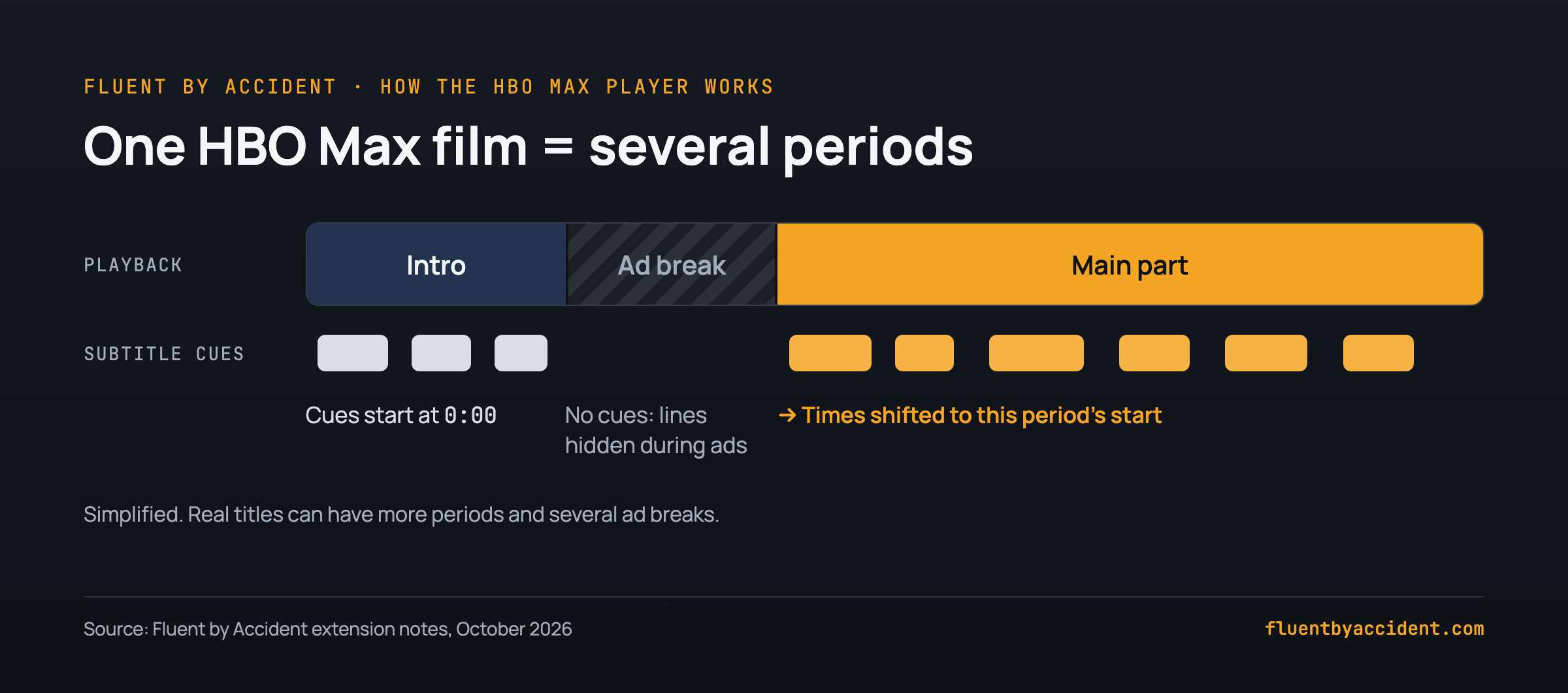
- A film is split into periods. The player treats a title as several pieces (for example an intro, ad breaks and the main part). Subtitle times are counted per piece, so a tool has to shift each piece's lines to the right start time. Otherwise lines run early or late after the first break.
- Ad breaks come from the playback info. A tool that reads them can hide the dual lines while an ad plays; ours does on our test copy of the player. If your lines vanish during an ad and come back after it, that is expected.
- Subtitle text arrives in small chunks. HBO Max sends subtitles as many short WebVTT segments rather than one file, so a tool has to stitch them together. A missing chunk can mean a missing line.
- HBO Max draws its own captions too. Our extension hides HBO Max's caption overlay and draws both lines itself; other tools may do the same, so two subtitle extensions running at once can clash.
Troubleshooting checklist: 1) Reload the HBO Max tab after installing or updating the extension. 2) If the lines vanished during an ad, wait until the ad ends. 3) Check that the title really offers your subtitle language in the Audio and Subtitles menu. 4) Turn off every other subtitle extension, then reload. 5) If lines drift after a break, pause, seek back a few seconds and play again. 6) Still broken: try another title to see whether it is one title or the tool.
Which languages can you pair on HBO Max?
It depends on the title. Each show or film has its own list of subtitle and audio languages, and HBO Max says only that "some" titles have multiple tracks (HBO Max Help Center). So before blaming an extension, open the Audio and Subtitles menu and see what the title offers.
The second line can then come from one of two places:
| Source of the 2nd line | Which tools say so | What to expect |
|---|---|---|
| Another official track of the same title | Trancy (existing captions on most platforms), EasyDualSub (native tracks when possible), Fluent by Accident | Matches the professional subtitles, but only for languages the title has |
| Machine translation | HBO Max Dual Subtitles, MovieLingo (per ExtScope's summary), Sublo (30+ languages), Lingosive, EasyDualSub (when needed) | Works for more languages, but wording can differ from the dialogue |
Tip: Put the language you are learning on top and your native language below while you are still catching less than half the dialogue, then drop the native line as you improve. Our guide on target-language subtitles or native subtitles walks through which language goes on which line at each level, and whether dual subtitles are good for learning covers when to fade them out.
Does it work on a TV, Roku, iPhone or iPad?
No. Every tool in this guide is listed on the Chrome Web Store, so it needs a desktop browser that runs Chrome extensions; none of them run in the HBO Max apps. Our own extension works in Chrome on desktop only (Fluent by Accident pricing FAQ). The HBO Max apps on TVs, streaming sticks and phones use the single-track menu described at the top.
| Device | Dual subtitles via extension | What you can do instead |
|---|---|---|
| Windows or Mac computer, Chrome | Yes, with a tool from the table | Use it as is |
| Smart TV, Roku, Fire TV, Apple TV | No, no Chrome extensions | Connect a laptop running Chrome to the TV with an HDMI cable |
| iPhone, iPad, Android phone | No, the HBO Max app shows one track | One subtitle track in the app, or use a computer |
| Firefox or Safari on a computer | Not covered by the Chrome listings we checked; ours is Chrome only | Use Chrome for HBO Max |
The workarounds are the same as for Netflix. Our guide to dual subtitles on a TV, iPad or phone explains the HDMI setup in detail. Tab casting may not show protected video; we did not test it.
Once you have two lines running, the useful part is what happens to the words you click: Fluent by Accident turns saved words into spaced repetition flashcards in its web app, and the pricing page lists what the free plan includes.
FAQ
Does HBO Max have dual subtitles built in?
No. HBO Max lets you pick one subtitle or caption language, or Off, from the Audio and Subtitles menu, according to its Help Center. Subtitle Style changes how captions look, but you cannot show two languages at once. To see two lines you need a Chrome extension on a computer, such as one of the Max-only tools (HBO Max Dual Subtitles, MovieLingo's Double Subtitles, HBO max Subtitles & Dictionary) or a multi-platform tool that lists HBO Max (Trancy, Lingosive, FluentAI, Sublo, EasyDualSub, Fluent by Accident).
Does Language Reactor work on HBO Max?
No. As of October 2026, Language Reactor's listing covers Netflix and YouTube, and its FAQ says of other platforms, "We do not support these platforms yet". Use an extension whose listing names HBO Max.
Is there a free HBO Max dual subtitles extension?
Several have a free tier. Trancy's free plan lists HBO among its supported sites and saves up to 100 words. EasyDualSub gives 5 free video translations a month, or 10 with a free account. Sublo has a free plan without registration and a daily limit. Our Fluent by Accident free plan shows two lines on HBO Max with basic translation and 20 saved words, without AI, and requires sign-in. The three Max-only extensions do not state prices on their listings.
Can I use HBO Max dual subtitles on my TV or phone?
Not directly. TV apps, Roku, Fire TV, iPhone, iPad and Android apps cannot run Chrome extensions and show one subtitle track at a time. The practical workaround is to play HBO Max in Chrome on a laptop with the extension on, then connect the laptop to your TV with an HDMI cable. Tab casting may not show protected video; we did not test it. On a phone or tablet, your only choice is one subtitle language inside the HBO Max app.
Why does my second subtitle line disappear during ads on HBO Max?
HBO Max's web player reports ad breaks in its playback info. A tool that reads it can hide its lines during an ad and bring them back after; ours does on our test copy of the player. If the lines do not come back, reload the tab and turn off any second subtitle extension.
Does Max (play.max.com) still work with these extensions?
Yes, as long as the extension matches the current address. The old play.max.com address now redirects to play.hbomax.com. Ours runs on both. If an older tool stopped appearing after the switch, update it and reload the tab.
Sources
- HBO Max Help Center, "Subtitles, captions, and audio", including the Computer steps and Subtitle Style settings, undated, checked October 26, 2026: https://help.hbomax.com/us/Answer/Detail/000002515
- HBO Max Dual Subtitles - Subtitle Translator, ExtScope mirror of the Chrome Web Store listing, version 2.5.0, checked October 26, 2026: https://www.extscope.org/extension/hgonbljnbdgjdmflachhbplipifagfei
- Double Subtitles for HBO Max by MovieLingo, ExtScope mirror, version 1.0.13, checked October 26, 2026: https://www.extscope.org/extension/cnaoacpapmmcfeglkagcndjghgbnmcfe
- HBO max Subtitles & Dictionary (App For Language), ExtScope mirror, version 4.26.01.08, checked October 26, 2026: https://extscope.org/extension/fbapbihckolakfondjgehpjhljnedogo
- Trancy pricing page (Premium about $42/year list, regional pricing), checked October 9, 2026: https://www.trancy.org/pricing
- Lingosive: AI Dual Subtitles & Translator, Chrome Web Store, version 2.0.2, checked October 9, 2026: https://chromewebstore.google.com/detail/cdkjljpfeodbkfkhhehmhgdleojloemj
- FluentAI: Dual Subtitles for Netflix & more, Chrome Web Store, version 2026.60, checked October 9, 2026: https://chromewebstore.google.com/detail/hbghjfaenddmdpbkobgdcgkmcdcdjjko
- Sublo - Subtitle Translator, Chrome Web Store, version 1.9.5, checked October 9, 2026: https://chromewebstore.google.com/detail/hlcdfopbidmbolmhipodfjkokacbnfom
- EasyDualSub, Chrome Web Store, version 1.4.8, checked October 9, 2026: https://chromewebstore.google.com/detail/onppmeaeeccnhhheakdhebalcfbbnoch
- Language Reactor, Chrome Web Store, version 5.1.8, checked October 9, 2026: https://chromewebstore.google.com/detail/hoombieeljmmljlkjmnheibnpciblicm
- Language Reactor FAQ, checked October 9, 2026: https://www.languagereactor.com/help/faq
- Language Reactor forum, "Support for Disney+", team reply March 18, 2022: https://forum.languagelearningwithnetflix.com/t/support-for-disney/7247
- Fluent by Accident pricing and FAQ, checked October 26, 2026: https://fluentbyaccident.com/pricing
- Fluent by Accident end-to-end check
test/stream/e2e.mjs(Max by manifest, Max by playback info with an ad period), version 0.32.5, Chrome for Testing 155, run October 26, 2026