Best Netflix dual subtitles extensions in 2026: 6 compared
Which Netflix dual subtitles extension is worth installing in 2026? Six tools checked on free word saving, price, browsers, export and the bugs users reported.

You type "Netflix dual subtitles" into the Chrome Web Store and get a wall of look-alike extensions. Most "best of" lists you open turn out to be written by an extension maker that ranks itself first.
The short answer: for most learners in 2026, Language Reactor is still the strongest Netflix dual subtitles extension if you're willing to pay for Pro, because saving words is a Pro feature. Trancy has the most generous free plan, with 100 saved words and 50 saved sentences. Fluent by Accident suits you if you want saved words to become flashcards without setting up Anki.
Skip Dualsub for Netflix: its own changelog shows it dropped Netflix in November 2024. One disclosure up front: we build Fluent by Accident, one of the six tools below. That is why every claim links to its source and our limits sit right next to everyone else's.
Last checked: October 9, 2026.
Which Netflix dual subtitles extension is best in 2026?
- Best overall, if you pay: Language Reactor, for its popup dictionary and Anki export with sentence context.
- Best free plan: Trancy, which saves 100 words and 50 sentences for free and runs in four browsers.
- Best for built-in flashcards: Fluent by Accident (ours), with a smaller free cap of 20 words.
| Tool | Price (free / paid) | Browsers | Word lookup | Saving words (free) | Export | Known issues (user reports, 2025-26) |
|---|---|---|---|---|---|---|
| Language Reactor 5.1.8 | Free; Pro $6/mo, $14/3 mo, $40/yr in 2024 (forum); may have changed | Chrome desktop only | Popup dictionary, free | No, saving is Pro (FAQ) | Anki .apkg, CSV, JSON (help) | "Loading subtitles" reports May 14 to Jul 1, 2026 (forum); Pro ASR errors; desync after ads |
| Trancy 7.9.4 | Free; Premium $42/yr list, $29.40 in a promo ending Oct 15, 2026 (pricing); regional | Chrome, Edge, Firefox, Safari | Unlimited, free | 100 words + 50 sentences | Subtitles as PDF or CSV | Daily re-login (one review); Arabic shown left to right (two reviews) |
| Fluent by Accident 0.32.5 (ours) | Free; Pro $6.99/mo or $49/yr (pricing) | Chrome desktop | Click a word; drag for a phrase | 20 words | CSV, Anki import file | New, installed by hand; no public reviews yet |
| eJOY 7.1.51 | Paid tiers from $9.49 per 3 months or $29.99/yr (plans) | Chrome, Edge, Brave, Cốc Cốc | AI dictionary | Not stated; unlimited from Pro Voca | Print subtitles; no word export listed | Re-pick subtitle language each time (one review) |
| DoubleSubs 3.12 | Free to install; no published price (site) | Chrome, Edge, Opera, Yandex | Popup translation | Phrasebook, no published cap | Not listed | Netflix features broke June 2025 (developer); playback complaint Feb 2026 |
| Dualsub 2.71.1 | Free; AI credits from $4.99 | Chrome, Edge, Firefox | n/a | n/a | n/a | No Netflix since Nov 26, 2024 (changelog) |
"Known issues" are user reports and vendor statements, not our own test results.
How did we compare these Netflix subtitle extensions?
Five criteria, in this order:
- Does it work on Netflix today?
- What does the free plan allow?
- How do you get your words out?
- How often has it broken in 2025 and 2026?
- What does it cost?
For each tool we read the store listing, vendor pricing and help pages, changelog, forum, recent reviews and Reddit threads. We did not run all six on the same episode, so nothing here is a timed test result. Fluent by Accident is ranked by the same criteria.
How to read this ranking: User counts, ratings and versions come from the Chrome Web Store, prices from each vendor's page, all on October 9, 2026. Trancy says its prices vary by region; Language Reactor's 2024 prices may have changed, so check yours.
The 6 best dual subtitle extensions for Netflix, ranked
1. Language Reactor: the most complete, if you pay
Language Reactor has 2 million users and a 4.2 rating from about 4,400 ratings, version 5.1.8 updated July 1, 2026 (listing). On Netflix it adds two subtitle lines, a popup dictionary and replay shortcuts (help).
Free mode covers dual subtitles and the dictionary. Its FAQ says Pro adds machine translations and saving words and phrases. Saved items export to Anki as an .apkg deck with context, or to CSV and JSON (export help). Its upgrade screen, posted by staff in 2024, showed $6 a month, $14 for 3 months and $40 a year (forum); a 2026 user suspects regional pricing (forum), so check Settings.
Known issues: reports of the extension stuck on "Loading subtitles" on Netflix ran from May 14 to July 1, 2026 (48 days by our count). They hit some accounts first, possibly through a Netflix player test, then many users on June 29-30, before staff announced a fix (thread). Users reported Pro ASR (auto-generated subtitle) errors in August and September 2026 (forum). It runs only in Chrome, with no mobile app (staff).
Who it is for: learners who are willing to pay and want Anki cards with the sentence attached.
Reddit verdict: Positive and long-running. A 2025 r/languagelearning reply calls it free and painless, for the most part (thread). On r/LearnJapanese one user calls it great value for Netflix, while the top reply prefers free asbplayer + Yomitan (thread). A 2024 Pro user said ASR broke and developers were slow to answer (thread).
2. Trancy: the best free plan
Trancy has 300,000 users and a 4.7 rating from about 2,800 ratings, version 7.9.4 updated September 18, 2026 (listing). Its manual lists Netflix, YouTube, Disney+, HBO Max, Udemy, Coursera, TED and edX; its AI-generated subtitles are YouTube-only.
The free plan gives bilingual subtitles, unlimited word and sentence translation, 100 saved words, 50 saved sentences and flashcard practice (pricing). Subtitles export as PDF or CSV (manual). Premium unlocks unlimited saving and AI features at $42 a year list, or $29.40 in a promo ending October 15, 2026; Trancy says prices vary by region (manual). It runs in Chrome, Edge, Firefox and Safari (download).
Known issues, from store reviews: one reviewer has to log in every day, and two report Arabic shown left to right.
Who it is for: learners who want to save words without paying, or who use Firefox or Safari.
Reddit and forum verdict: Thin on Reddit. The one r/languagelearning "Trancy vs Language Reactor" thread drew no real comparison (thread). On Language Reactor's forum, a user who switched called it the best alternative and quite affordable in 2024 (post); a 2026 user noted the better AI models cost extra (post).
3. Fluent by Accident: flashcards built in (we make this one)
We make this one, so weigh our take accordingly. Fluent by Accident is a Chrome extension, version 0.32.5, that shows two subtitle lines on Netflix (and YouTube, Prime Video, Disney+ and HBO Max). Click a word to translate it, or drag or Shift+click for a phrase. When a show lacks subtitles in your language, it machine-translates each line: a basic engine on the free plan, scene-aware AI on Pro.
Saved words go into decks and become spaced-repetition flashcards in the web app. Export is CSV or an Anki import file (privacy page); the Anki file is tab-separated text that Anki imports as notes, not an .apkg deck. Free saves 20 words; Pro is $6.99 a month or $49 a year, unlimited (pricing).
The real limits: 20 free words is the smallest free cap here apart from Language Reactor's zero. It is Chrome on desktop only and needs a free account. It is not in the Chrome Web Store yet: you download a zip, load it in Developer mode and update it by hand (download page). The free plan has no AI, and it is too new for public reviews.
Who it is for: learners who want saved words to become review cards without setting up Anki, and who are fine with Chrome.
Reddit verdict: None yet. It is too new, and we will not quote ourselves.
4. eJOY: built for English learners
eJOY has 700,000 users and a 4.8 rating from about 5,000 ratings, version 7.1.51 updated August 17, 2026 (listing). It describes itself as an English learning tool. On YouTube and Netflix it can show two original tracks plus an AI translation layer (help center); its plans page lists dual subtitles in every paid tier, but does not say what the free tier includes.
Pro Dict, Pro Voca and Pro Plus cost $9.49, $26.99 and $52.99 per 3 months, or $29.99, $59.99 and $90.00 a year (shown as 30% off); unlimited saving starts at Pro Voca (plans). We found no word export on its pages; it lists bookmarking and printing video subtitles. One September 2026 reviewer has to change the subtitle language every time (reviews).
Who it is for: English learners who want a dictionary and practice built around their videos.
Reddit verdict: We found no substantive Reddit threads about eJOY on Netflix from 2024 to 2026.
5. DoubleSubs: simple and free to install
DoubleSubs has 6,000 users and a 4.1 rating from 66 ratings, version 3.12 updated September 29, 2026 (listing). Its site promises dual captions on YouTube and Netflix, a phrasebook, and translation of selected text on any page. It is free to install, with no published price.
Known issues, from store reviews: in June 2025 the developer said a Netflix update had broken some features and version 3.0 temporarily removed translation and saving. A July 2025 reviewer said it worked on YouTube but not Netflix; a February 2026 reviewer complained about Netflix playback.
Who it is for: casual viewers who want two lines and a phrasebook, after checking recent reviews.
Reddit verdict: None found for 2024 to 2026.
Only want two lines, no word saving? Free single-purpose extensions do just that. NflxMultiSubs 2021, for example, is open source, with 50,000 Chrome users (version 3.0.3, updated June 13, 2026, listing) and a Firefox version (add-on, 3.0.3, June 12, 2026). With no dictionary or flashcards, such tools sit outside this ranking.
6. Dualsub: no longer for Netflix
Dualsub (by Dualsub Studio) has 100,000 users and a 3.6 rating from 477 ratings, version 2.71.1 updated July 23, 2026 (listing). Its changelog shows version 2.49.0, dated November 26, 2024, dropping Netflix and Disney+. Its supported sites page now lists YouTube, iflix, iQ, Viki, Youku and WeTV. Basic dual subtitles are free; AI translation needs an API key and has a free quota, then credit packs at $4.99 for 7 days or $9.99 for 30 days (pricing).
Who it is for: YouTube and Asian drama sites, not Netflix.
Reddit verdict: None found for Netflix. Several unrelated tools share the name, so check the developer before installing.
Is there a free Netflix dual subtitles extension that saves words?
Free dual subtitles on Netflix: yes, with caps. Language Reactor, Trancy, Fluent by Accident and DoubleSubs all show two lines on Netflix without paying. Saving is where they differ: Language Reactor saves nothing for free, Trancy saves 100 words and 50 sentences, Fluent by Accident 20, DoubleSubs publishes no cap, and eJOY keeps unlimited saving for paid tiers.

If you save words every night, a cap fills fast. Worked example: one year of unlimited saving at the prices shown on October 9, 2026.
| Tool and plan | One year, unlimited saving | Note |
|---|---|---|
| Language Reactor Pro, 1 year | $40 | 2024 price; may have changed, check yours |
| Trancy Premium, yearly | $42 list ($29.40 in the promo) | Promo ends Oct 15, 2026; regional |
| Fluent by Accident Pro, yearly | $49 | Pricing page |
| eJOY Pro Voca, 1 year | $59.99 | Shown as 30% off on Oct 9, 2026; 3-month plan is $26.99 |
| DoubleSubs | No published price | n/a |
| Dualsub | Not applicable | No Netflix support |
Assumptions: USD list prices, taxes excluded; Trancy's page was viewed from an EU connection. On a yearly plan, Fluent by Accident costs more than Language Reactor and Trancy, and less than eJOY Pro Voca. Need a show to try your pick on? Choose one from Netflix shows to learn Spanish, by level.
Why do Netflix subtitle extensions keep breaking?
These extensions read subtitle data from Netflix's web player. When Netflix changes the player or its data format, each extension must ship an update, and until it does, subtitles stop loading or drift.
Language Reactor staff blamed "a change in the manifest format" for the 2026 outage (thread). DoubleSubs' developer blamed a Netflix update in 2025. Dualsub dropped Netflix altogether. Language Reactor staff also say Netflix ads can push subtitles out of sync, because Netflix does not give accurate break durations (post).
Fluent by Accident reads the same player and can break the same way. What separates tools is how fast a team ships the fix and whether it tells users.

Tip: Subtitles stopped loading? Check the extension's "Updated" date in the Chrome Web Store and its forum or changelog. If others report it that week, only the developer can fix it.
Do these extensions work on Firefox, Safari, iPad or the Netflix app?
| Where you watch | Language Reactor | Trancy | Fluent by Accident | eJOY | DoubleSubs |
|---|---|---|---|---|---|
| Chrome (Windows, Mac) | Yes | Yes | Yes | Yes | Yes |
| Edge | No, Chrome only | Yes | No, Chrome only | Yes | Yes |
| Firefox | No | Yes | No | Not listed | Not listed |
| Safari (Mac) | No | Yes | No | Not listed | Not listed |
| iPad, iPhone | No app | Apps are YouTube-focused | No app yet | Not listed | Not listed |
| Netflix TV app | No | No | No | No | No |
Extensions run in a desktop browser, so none of them adds a second line inside Netflix's own apps for TVs, phones or tablets. On Firefox, Trancy is the ranked pick; the free NflxMultiSubs (see the note under DoubleSubs) also runs there.
Which one should you install?
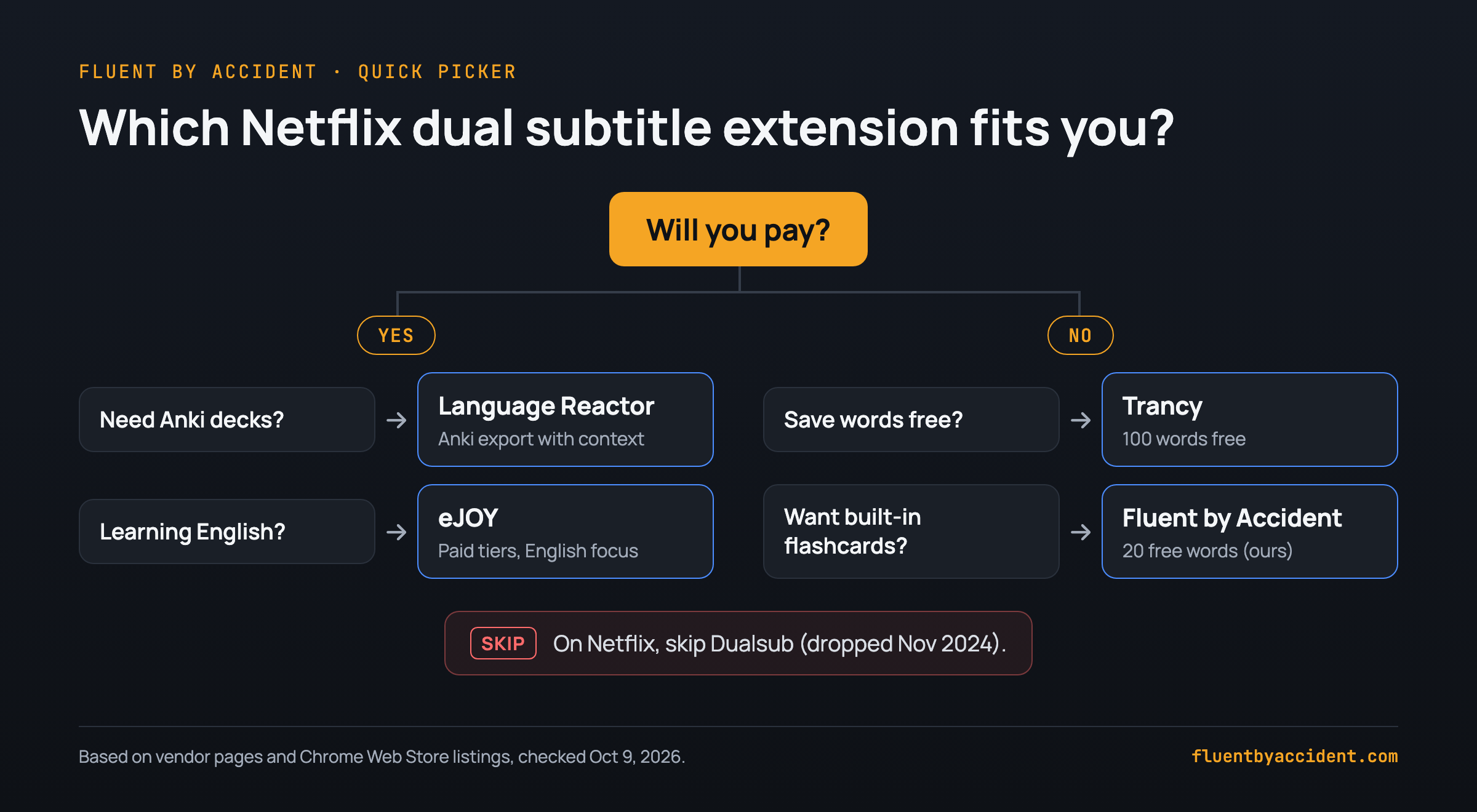
- You want Anki decks with sentence context and will pay: Language Reactor.
- You want to save words for free, or you use Firefox or Safari: Trancy.
- You want flashcards built in without Anki, and Chrome is fine: Fluent by Accident (ours, see above).
- You are learning English: eJOY.
- You only want two lines: a free single-purpose extension (see the note under DoubleSubs), or DoubleSubs for a phrasebook, after checking recent Netflix reviews.
- On Netflix: skip Dualsub.
How to read Reddit advice: In recent "Language Reactor alternative" threads, a noticeable share of replies come from developers recommending tools they built (see r/languagelearning and r/learnfrench). Check the commenter's history or disclosure.
Unsure the hours pay off? Read why watching TV shows teaches you a language.
FAQ
How do I get dual subtitles on Netflix?
Four steps on a laptop or desktop computer:
- Install a dual subtitle extension in desktop Chrome (Trancy also runs in Edge, Firefox and Safari).
- Open Netflix in that browser, not in the Netflix app.
- Set Netflix's audio and subtitles to the language you are learning.
- In the extension's panel, pick your native language as the second line.
For the full routine, see how to learn a language with Netflix.
Can you have two subtitles on Netflix without an extension?
No. Netflix Help explains picking a subtitle language from the "Audio & Subtitles" menu; there is no option to show two at once on any device (Netflix Help). For two lines at once you need an extension in a desktop browser. Which subtitle languages you can choose also varies by title, profile language and country, because of content licensing (Netflix Help), so check that your target language exists for the show first.
Is there a free Netflix dual subtitles extension?
Yes. Language Reactor, Trancy, Fluent by Accident and DoubleSubs all show two subtitle lines on Netflix for free. Saving words differs: Language Reactor keeps it for Pro (FAQ), Trancy saves 100 words and 50 sentences (pricing), Fluent by Accident 20 (pricing), and eJOY keeps unlimited saving for Pro Voca and Pro Plus (plans). DoubleSubs has recent Netflix complaints, so read its reviews first.
Does any dual subtitle extension work on the Netflix app for iPad, iPhone or TV?
No. Browser extensions run in a desktop browser and cannot add a second line inside Netflix's own apps for TVs, phones or tablets. Language Reactor staff confirm it has no official mobile app (forum), and Fluent by Accident has none yet. The workaround is Chrome on a laptop, connected to your TV with an HDMI cable.
Is there a Netflix dual subtitles extension for Firefox or Safari?
Trancy is the one in this comparison that lists both Firefox and Safari on its download page. Dualsub has a Firefox version but no longer supports Netflix (changelog). Language Reactor runs only in Chrome (staff), and so does Fluent by Accident. If Firefox or Safari is your main browser, pick Trancy or keep Chrome just for watching.
Is Language Reactor free?
Partly. The dual subtitles and the popup dictionary are free on Netflix and YouTube. Its FAQ says Pro mainly adds machine translations and saving words and phrases, and that when a trial ends you return to free mode. If you cancel Pro, you can still view and export words you saved. Its upgrade screen showed $6 a month or $40 a year in 2024; prices may differ by country and may have changed since 2024, so check Settings.
Sources
Checked October 9, 2026.
- Chrome Web Store listings: Language Reactor, Trancy, eJOY, DoubleSubs, Dualsub
- Language Reactor: FAQ, export help, 2026 outage thread
- Trancy: pricing, plans FAQ, download
- eJOY: plans
- DoubleSubs: official site
- Dualsub: changelog, supported sites, pricing
- Netflix Help: choosing subtitles, missing languages
- Fluent by Accident: pricing