Prime Video Dual Subtitles: Which Extensions Work in 2026
Prime Video dual subtitles are not built in. We checked 18 Chrome extensions that claim Prime support: which still get updates, how each makes the second line, and which to pick.

You have run out of Netflix shows in your target language, Prime Video has the series you want, and the extension that gives you two subtitle lines on Netflix does nothing on Prime. You search for Prime Video dual subtitles and find a wall of store listings.
Prime's player shows one subtitle track at a time. You need a Chrome extension on a computer.
Best picks by need (from listings and recent reviews, not our own playback test):
- Prime Video Dual Subtitles: the easiest way to add a second line, with the most recent reviews saying it works on Prime. The listing states no price.
- MovieLingo: Prime-focused, updated September 2026.
- Funlingo: free, no login, if you also watch Netflix and YouTube.
- Subtitles for Language Learning: one target-language line plus a dictionary, or your own subtitle file when Amazon has none.
- Dual Subtitles (Lightning): two of Prime's own subtitle tracks instead of machine translation (only 291 users and no Prime reviews yet). EnjoySubs does the same, Pro only.
Last checked: October 9, 2026 (Chrome Web Store listings, developer docs and recent store reviews).
Does Amazon Prime Video have dual subtitles?
No. Prime's player lets you pick one subtitle track at a time, and Amazon's help page describes no way to show two; subtitle features also depend on your device (Amazon help).
Getting dual subtitles on Amazon Prime therefore means a browser extension on a desktop or laptop (Chrome is the safe choice), not the TV or phone app.
Short answer: Use Chrome on a computer with one of the extensions below; the two big names, Language Reactor and Trancy, don't list Prime.
Prime Video dual subtitles: 18 extensions compared (October 2026)
These are the 18 extensions we checked and ranked. Each names Prime Video on its listing or website (as of October 9, 2026). Rows follow our ranking; the first six are ranked, the rest are listed briefly below. It is not a full list. "Second line" says where the second subtitle comes from, which matters most (explained below).
| Extension | Second line | Price | Users / rating (n) | Last update | Learning extras |
|---|---|---|---|---|---|
| Prime Video Dual Subtitles | Live translation | Not stated | 6,000 / 4.6 (41) | May 23, 2025 | Style controls, subtitle download |
| MovieLingo Double Subtitles | Live translation | Not stated | 6,000 / 3.9 (36) | Sep 28, 2026 | None listed |
| Funlingo | Live translation | Free | 20,000 / 4.8 (289) | Oct 3, 2026 | Hover translation, AI word meanings |
| Subtitles for Language Learning | One on-video line, plus a side list | Not stated | 100,000 / 3.7 (120) | Apr 4, 2026 | Dictionary, own subtitle files |
| Dual Subtitles (Lightning) | Official Prime track | Not stated | 291 / 5.0 (3) | Aug 9, 2026 | None listed |
| Fluent by Accident (we make this) | Official track, else translation | Free plan; Pro $6.99/mo | Not on the store | Not on the store (v0.32.5) | Click to translate, save words, flashcards |
| InterSub | Translation if no track in your language | Free plan; AI from $1.50/mo | 20,000 / 4.6 (227) | Sep 29, 2026 | Word hover, saved words, Anki and Excel export |
| FluentAI: Dual Subtitles | Translation (source not stated) | Free plan; paid plans | 9,000 / 3.9 (94) | Oct 7, 2026 | Click words, flashcards, Anki export |
| Lingosive | Live translation (AI) | Not stated | 6,000 / 4.2 (57) | Sep 29, 2026 | Saved words |
| Sabi | Not stated on listing | 7-day free trial, then paid | 2,000 / 4.5 (25) | Sep 19, 2026 | AI subtitles, flashcards, quizzes |
| Sublo | Live translation | Free 20 min/day; Pro | 1,000 / 4.7 (31) | Oct 6, 2026 | Style controls |
| DualSub | Live translation | Free | 588 / 5.0 (3) | Aug 26, 2026 | Word hover while paused |
| Double Subtitles | Not stated on listing | Not stated | 112 / 5.0 (2) | Mar 22, 2026 | Save to Anki, Quizlet |
| EnjoySubs | Official Prime track | Pro $2.99/mo for Prime | 26 / none | Jun 29, 2026 | None listed |
| Traditou | Live translation | Free | 514 / 5.0 (2) | Dec 18, 2024 | Three display modes |
| Prime Video Subtitles Translator | Live translation | Not stated | 1,000 / 4.1 (51) | Jun 26, 2025 | None listed |
| Amazon Prime Subtitles & Dictionary | Your-language Prime track (translation "coming soon") | Free (per listing) | 1,000 / 2.9 (17) | Jun 10, 2026 | Dictionary, AI explanations (extension in Beta) |
| Shadowing Master | Not stated on listing | Not stated | 111 / none | Jan 2, 2026 | Voice recording |
How we checked: we read each store listing, the developer's docs and the recent store reviews that mention Prime. We did not play Prime titles with each tool, so "works" means recent reviews or developer replies say so. Where a listing does not say how it makes the second line, we mark it Not stated on listing. Ratings from fewer than 10 people tell you little.
Best dual subtitle extension for Prime Video: our ranking
Our criteria, in order: evidence it works on Prime in 2025-2026, how the second line is made, learning features, then cost and sign-in.
1. Prime Video Dual Subtitles
Who it is for: anyone who just wants two lines on Prime. The listing says it is built for PrimeVideo.com and translates the official subtitles, with style and download options (listing). Reviewers in July and September 2026 said it works on Prime (reviews).
Limits: the second line is a translation, not a second official track. The listing names no word saving, and the extension has had no store update since May 23, 2025.
2. MovieLingo Double Subtitles
Who it is for: people who watch mostly Prime and want a tool built for it that still gets updates; the developer answers reviews (listing).
Limits: the second line is generated live, and one reviewer measured the lag at about 0.5 to 1 second (reviews). Several 2025 reviews reported both lines in the same language; the developer said a September 2025 update fixed this for Spanish CC, though one reviewer reported the same problem again in October 2025.
3. Funlingo
Who it is for: learners who also watch Netflix and YouTube and want hover translation, free and with no login (listing).
Limits: we found no 2025-2026 review confirming it on Prime. One reviewer in September 2026 said it translates the on-screen subtitles, which can differ from what is spoken (reviews).
4. Subtitles for Language Learning (Prime Video)
Who it is for: learners who want one target-language line with a dictionary, or need their own subtitle file from OpenSubtitles.org or a local folder when Amazon has none (listing).
Limits: it adds one line over the video plus a side panel of lines, not a two-line overlay. Reviewers reported lines running on through ads (July 2025) and the tool stuck waiting for the video (September 2026) (reviews).
5. Dual Subtitles (Lightning)
Who it is for: people who want both lines to be Prime's own subtitles. You choose both languages from the player's options, and subtitles are not sent to any server (listing).
Limits: 291 users and three reviews, none mentioning Prime. It needs Prime to offer both your languages for that title.
6. Fluent by Accident
We make this one, so weigh our take accordingly. Fluent by Accident shows the title's official Prime subtitle track in your language when one exists, and a translation otherwise. You click a word to translate it, save it to a deck and review it with spaced-repetition flashcards.
Limits: Chrome on desktop only, installed by hand from our download page, free account required. The free plan has no AI; Pro is $6.99 a month or $49 a year. Prime support is new (October 2026) and has not yet been tested by us on real Prime titles; known gaps: some Prime titles store subtitles in a format it cannot read yet, and lines may drift after an ad. Hence sixth, not first.
Other extensions we checked, briefly
- InterSub: free plan with unlimited dual subtitles, AI translation from $1.50 a month. No recent review we read mentions Prime.
- FluentAI: dual subtitles with clickable words and free spaced-repetition flashcards; word analysis needs a paid plan. Also on Firefox. No review we read mentions Prime.
- Lingosive: AI translation across many platforms, Prime included; price not stated. One reviewer said that on Netflix it showed an AI translation instead of the original subtitle.
- Sabi: adds AI-made subtitles when a video has none, plus quizzes while you watch; 7-day free trial, then paid. No review we read mentions Prime.
- Sublo: live translation, no account; free for 20 minutes a day, unlimited on Pro.
- DualSub: free, no account; turn on Prime's subtitles first.
- Double Subtitles: saves words or sentences to Anki and Quizlet.
- EnjoySubs: shows two of Prime's own subtitle tracks, no machine translation; Prime needs Pro, $2.99 a month or $24.99 a year (26 users, no ratings).
- Traditou: free, open source, also French-Canadian sites; no store update since December 2024.
- Prime Video Subtitles Translator: Prime only, no store update since June 2025; reviews from May and September 2026 say it does not work (reviews).
- Amazon Prime Subtitles & Dictionary: listed as Beta; the two latest reviews (July 2025, January 2026) say it does not work or cannot load subtitles.
- Shadowing Master: compares your voice with the Prime audio.
- Firefox: InterSub, Lexirise, FluentAI and EasyDualSub name Prime Video; no review we read confirms it.
Why is Prime Video harder than Netflix for dual subtitles?
Five documented reasons:
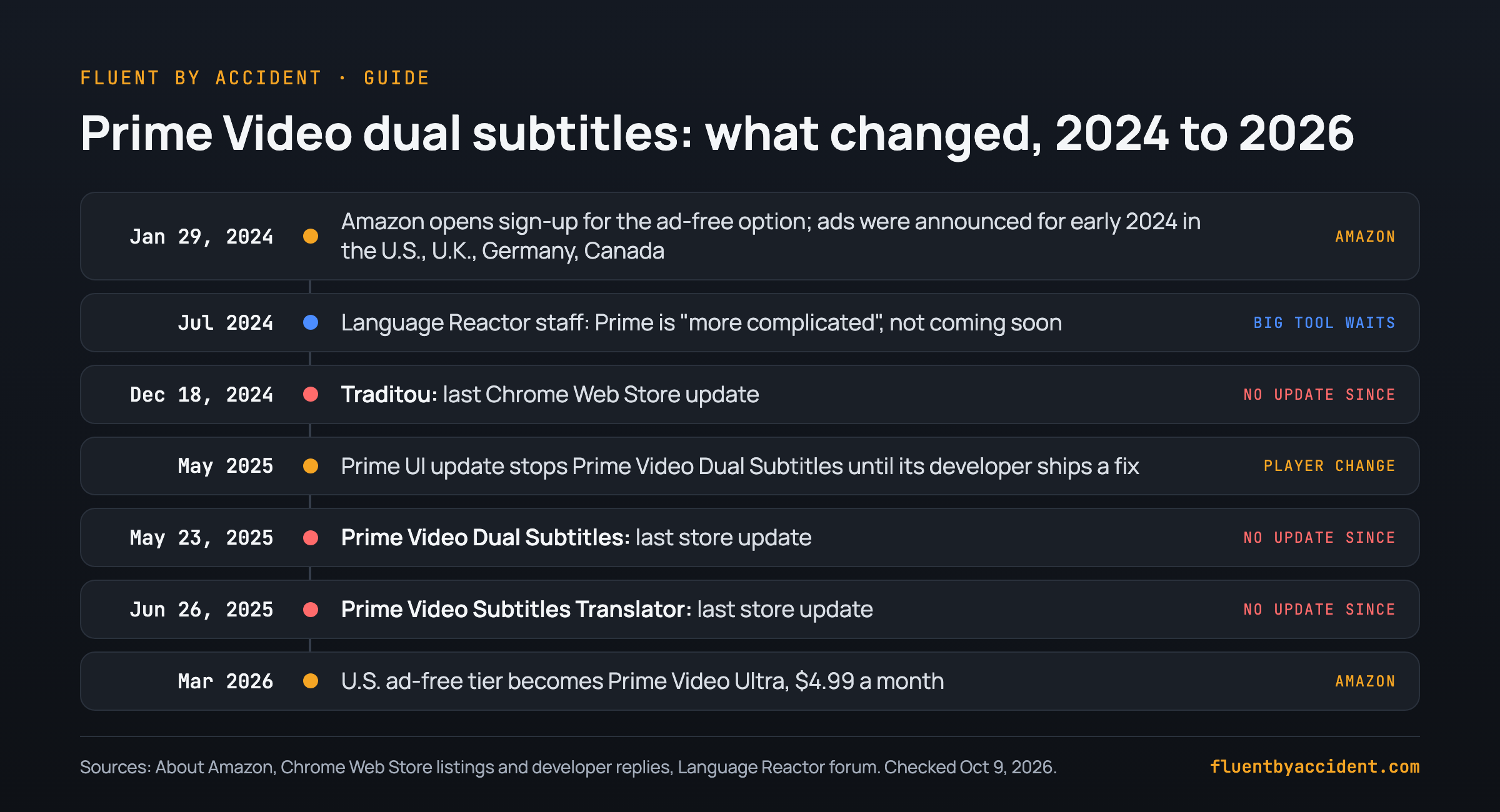
- The player changes. In May 2025 a Prime UI update stopped Prime Video Dual Subtitles until a fix (developer reply). Traditou's developer warns that supported sites often release updates that break it (listing).
- Ads inside the video. Amazon announced limited ads in Prime Video for the U.S., U.K., Germany and Canada from early 2024, with more countries to follow (About Amazon). A 2018 AWS blog post points to how Prime Video built server-side ad insertion, which places ads inside the video stream itself (AWS blog, 2018). Tools timed against the video can fall out of step; one reviewer said lines kept running through ads. In the U.S., the ad-free tier is now Prime Video Ultra at $4.99 a month (About Amazon).
- Subtitle tracks can differ by country: one reviewer on Prime Spain found no English subtitles on many titles (reviews).
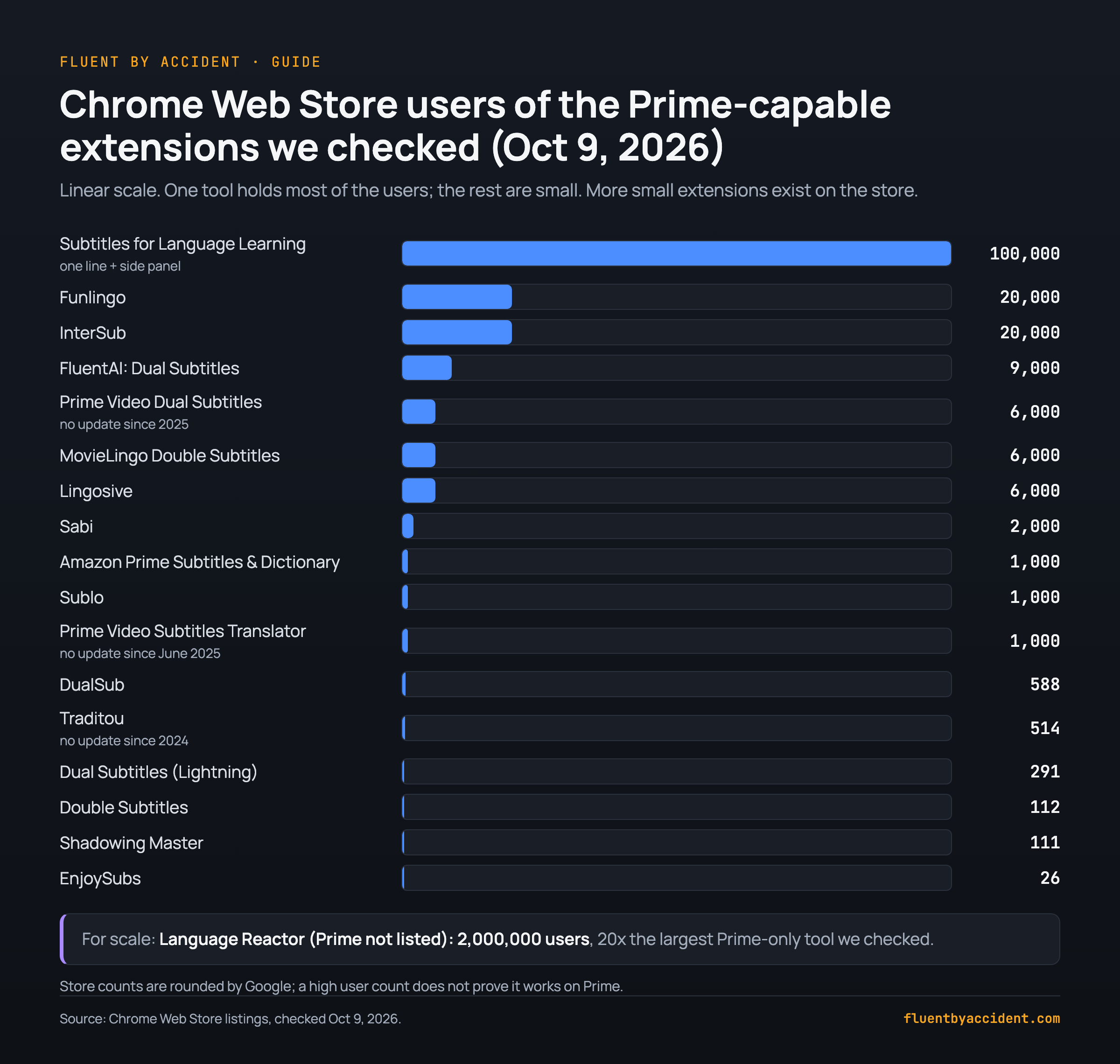
- A small niche. Our calculation: the largest Prime-only learning tool we checked has 100,000 users, one twentieth of Language Reactor's 2,000,000 (2,000,000 / 100,000 = 20), and Language Reactor does not list Prime. Three Prime tools, Prime Video Dual Subtitles (May 2025), Prime Video Subtitles Translator (June 2025) and Traditou (December 2024), have had no store update in over a year.
- Even the big tools wait. Language Reactor's team wrote in 2024 that it is "more complicated to have the extension on Prime" (LR forum).
Official subtitles or machine translation: which second line do you get?
A Prime Video dual subtitle tool gets its second line in one of two ways.
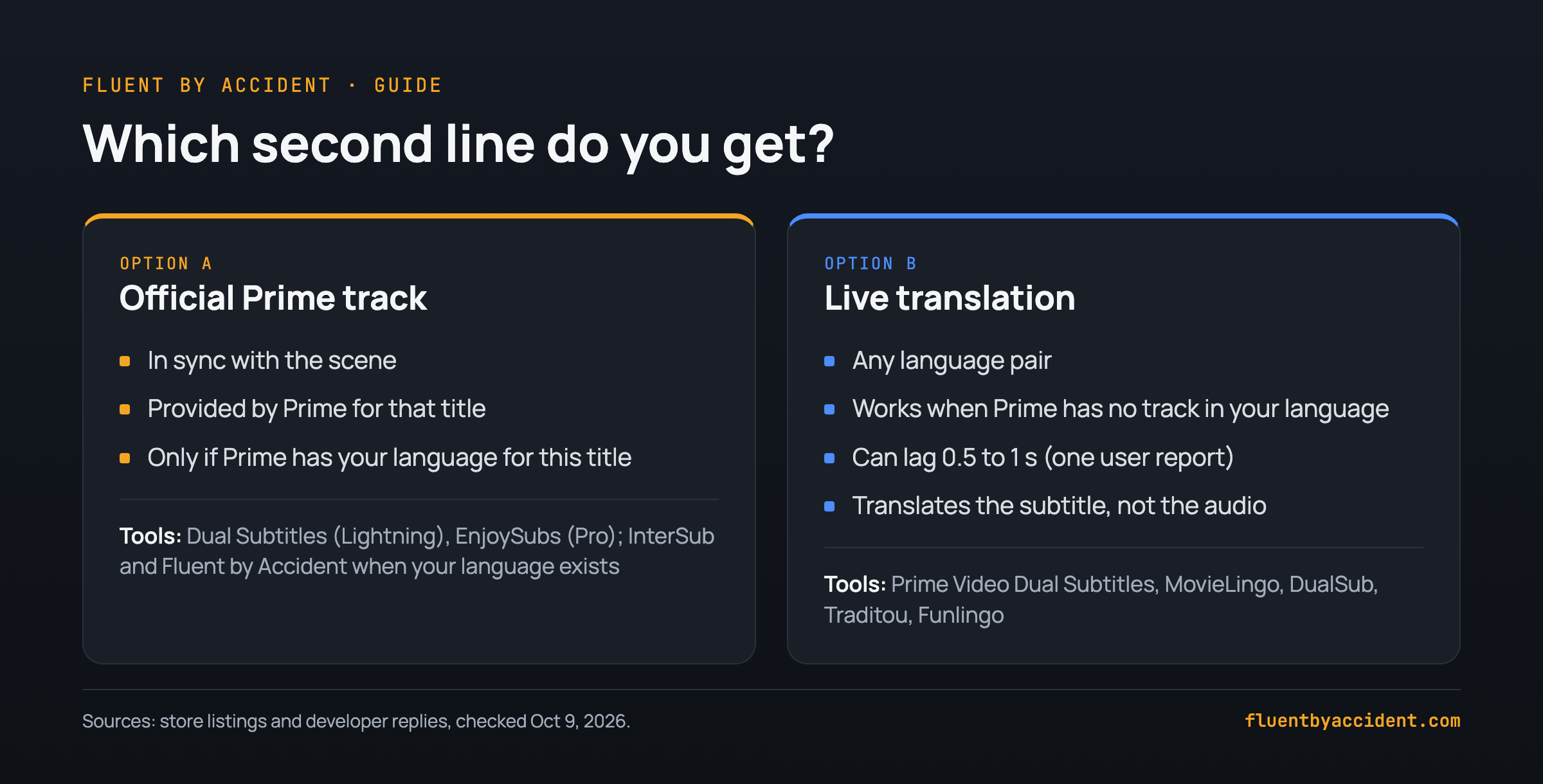
Official Prime track: a second subtitle file Prime itself offers, made for that title and timed to the scene. It exists only if Prime has your language for that title, in your country.
Live translation: the tool translates Prime's subtitle as you watch. It works for any language pair, but it can lag because the translation happens in real time (MovieLingo's developer), and it translates the subtitle, not the audio.
Rule of thumb: if Prime's subtitle menu lists your native language for that title, prefer an official-track tool. If not, use a translating tool or your own subtitle file.
To tell which you have: if your second language is in Prime's subtitle menu and both lines change at the same moment, it is most likely an official track. If the second line appears a beat later, it is a live translation. More on why watching shows teaches you a language.
Does Language Reactor or Trancy work on Prime Video?
Language Reactor: not supported. Its listing covers Netflix and YouTube, where it is maintained (version 5.1.8, July 1, 2026) (listing). Users have asked for Prime on its forum since 2022; staff said in 2024 it was not coming soon (LR forum).
Trancy: not advertised. Its store listing and homepage don't mention Prime Video, and its manual (updated June 4, 2026) leaves Prime off its platform list. Version 7.9.4's code does load on primevideo.com, so it may partly work, but Trancy doesn't claim Prime support.
| Tool | Prime Video? | What the developer says | Source date |
|---|---|---|---|
| Language Reactor | Not supported | Netflix and YouTube only; Prime "more complicated", not soon | Forum, July 28, 2024 |
| Trancy | Not listed | Manual lists 8 platforms, Prime omitted | Manual, June 4, 2026; listing, Oct 9, 2026 |
How to get dual subtitles on Prime Video, step by step
- Use Chrome on a computer. Prime's TV and phone apps do not run extensions.
- Install one subtitle extension only, so two tools do not fight over the same player.
- Open the title on primevideo.com or your Amazon site and press play.
- Turn on Prime's subtitles in your target language. DualSub, for one, needs captions on first (listing).
- Pick your second language in the extension's pop-up.
- Refresh the Prime Video page after installing, as MovieLingo's listing advises, and again if nothing appears.
Tip: test on a short episode first. Five minutes shows whether the lines are in sync and whether the second line is an official track or a translation.
Once both lines are up, use the dual subtitle method: it works the same on Prime as on Netflix.
Prime Video dual subtitles not working? Quick fixes
| Symptom | Likely cause | What to try |
|---|---|---|
| Nothing appears | Prime subtitles off, or tool not active on this Amazon site | Turn subtitles on, refresh, check the extension's site access |
| Both lines in the same language | Second language not set, or no Prime track in it | Set it in the pop-up; check Prime's subtitle menu |
| Second line about a second late | Live translation | Normal; pick an official-track tool if your language exists |
| Lines drift after an ad | Ads inserted into the video (user report) | Pause and resume, reload after the ad, or use an ad-free tier |
| Worked last month, broken today | Prime changed its player (as in May 2025) | Update the extension, check recent reviews, tell the developer |
| No subtitles in your language | No Prime track in your language for this title (may vary by Amazon site, per one user report) | Use a translating tool, load a subtitle file, or pick another title |
When you report a bug, give the title, your Amazon country site and the extension version.
FAQ
Can I get dual subtitles on the Prime Video app on my TV or phone?
No. Amazon's help page describes picking one subtitle track and no way to show two at once. Dual subtitle tools are extensions for a desktop browser (Chrome; some Firefox add-ons such as InterSub list Prime, but no review we read confirms it works), and they don't run inside the Prime Video app on a smart TV, streaming stick, phone or tablet. The usual workaround: play the title in Chrome on a laptop connected to your TV by HDMI, in full screen.
Does Language Reactor work with Amazon Prime Video?
Not officially. Language Reactor works on Netflix and YouTube, and its Chrome Web Store listing names no other streaming site. Users have asked for Prime on its forum since 2022, and in July 2024 a staff member wrote that Prime is more complicated and not coming soon. For Prime, use a tool that lists it and has recent Prime reviews, such as Prime Video Dual Subtitles or MovieLingo, and check its last update first.
Is there a free dual subtitle extension for Prime Video?
Yes. Funlingo, DualSub and Traditou say on their store listings that they are free, and Funlingo and DualSub need no account. Prime Video Dual Subtitles states no price, though one reviewer calls it free.
All four translate Prime's subtitle live, so the second line can lag slightly. Traditou has had no store update since December 2024, so check recent reviews before relying on it. Sublo (20 minutes a day) and FluentAI have free plans too. Amazon Prime Subtitles & Dictionary calls itself free, but its latest reviews say it does not work.
Why is my second subtitle line delayed on Prime Video?
Most likely your extension translates the subtitle in real time. MovieLingo's developer explained on the Chrome Web Store that the first line comes from Prime Video and the second is generated live by the extension. One reviewer put it at about 0.5 to 1 second.
Tools that show a second official Prime track avoid this, because Amazon times both files. If the delay starts only after an ad break, pause and resume or reload the page.
Why can't I find subtitles in my language on Prime Video?
Prime Video's subtitle tracks differ by title. One reviewer on Prime Spain found no English subtitles on many series and films. Your options: an extension that translates Prime's existing subtitle into your language, a subtitle file loaded with Subtitles for Language Learning (from OpenSubtitles.org or your computer), or another service such as Netflix; our Netflix shows to learn Spanish list is sorted by level.
Sources
- Amazon: Prime Video subtitles help; limited ads announcement (updated January 29, 2024); Prime Video Ultra (March 2026)
- AWS for M&E Blog on server-side ad insertion, May 31, 2018
- Chrome Web Store listings and reviews of every extension in the table, Language Reactor and Trancy (including Trancy 7.9.4's manifest), checked October 9, 2026
- Firefox Add-ons: InterSub, Lexirise, FluentAI and EasyDualSub, checked October 9, 2026; Trancy homepage
- Trancy manual, updated June 4, 2026; Language Reactor forum, Amazon Prime thread