Download Netflix subtitles & YouTube captions for study
Netflix has no subtitle download button and YouTube only shows a transcript. Here are the legit ways to get the text, SRT vs VTT, what the terms say, and how to turn it into reading practice.

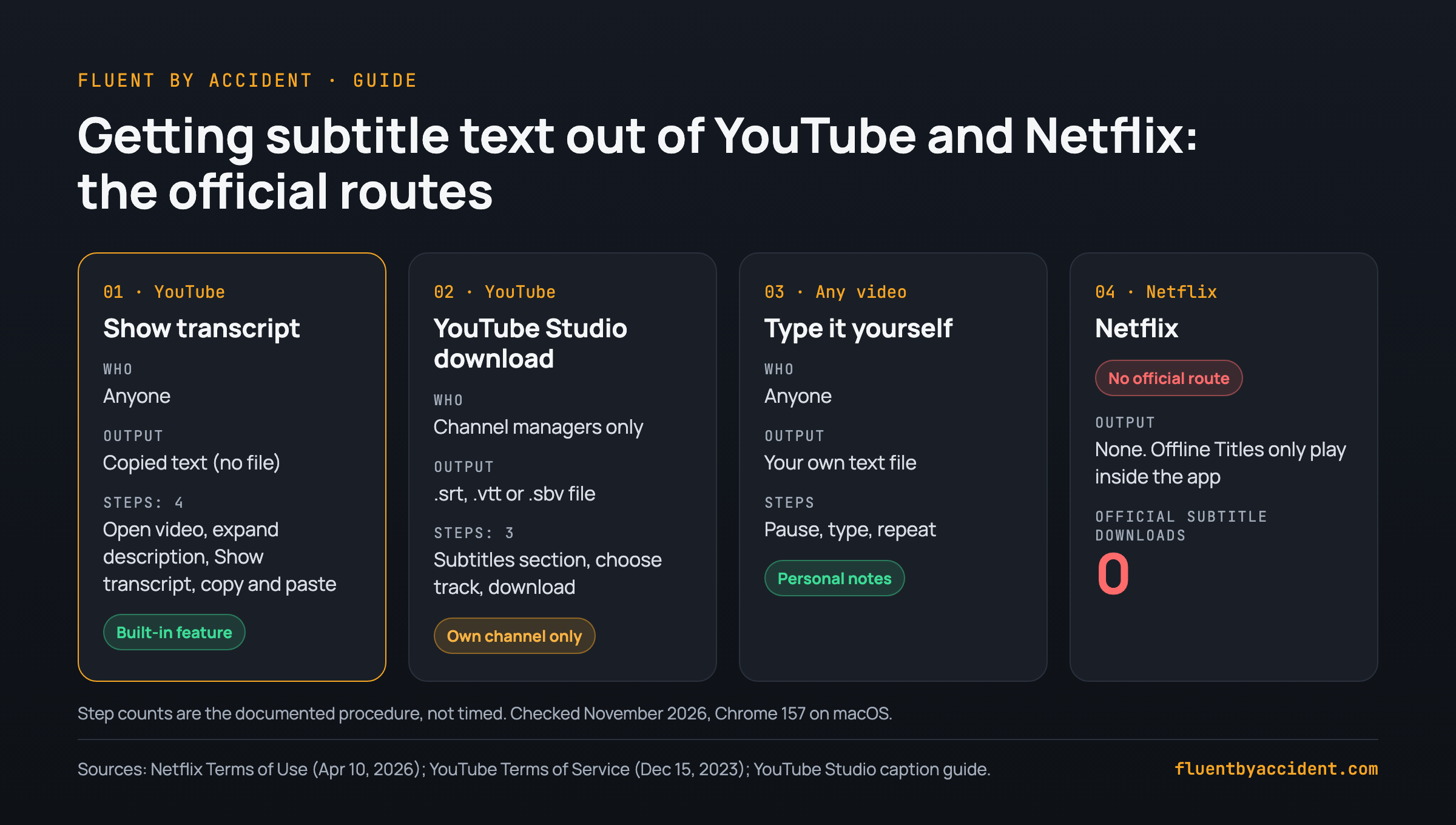
You cannot download Netflix subtitles with any built-in feature: the only "download" Netflix offers is Offline Titles inside its app, and its Terms of Use bar archiving or reproducing content from the service. On YouTube you can open "Show transcript" under a video and copy the text, or download caption files from YouTube Studio for videos on a channel you manage.
Browser extensions and scripts are third-party tools the platforms do not authorize, so that choice is yours, for private personal study only. On Netflix, the cleanest route is saving lines while you watch.
Last tested: November 2026.
How we tested: In November 2026 we used Google Chrome 157.0.8103.38 on macOS. We read the current Netflix Terms of Use (last updated April 10, 2026) and YouTube Terms of Service (effective December 15, 2023) and quote them below. We then took the subtitle file from our own test page (a TTML file, 2,883 bytes, 16 subtitle cues) and converted it to SRT and to plain text: 16 cues became 68 SRT lines, which became 21 lines of readable text, 101 words in total. We did not time the YouTube transcript or YouTube Studio steps in this pass, and we did not test any third-party downloader, so you will not find click counts or tool rankings for those here.
Can you download Netflix subtitles?
No, not officially. Netflix does not give you a subtitle file, a transcript panel or an export option. Its Terms of Use describe the one download feature it has: "Depending on the subscription plan, some Netflix content may be available for temporary download and offline viewing on certain supported devices ("Offline Titles")." Offline Titles live inside the Netflix app. They are not files you can open in a text editor.
The same terms set the limits for everything else. Section 1.4 says the service and its content "are for your personal, non-commercial use only and may not be shared with anyone outside of your household." Among the things you agree not to do:
- "(ii) archive, reproduce, distribute, modify, display, perform, publish, license, create derivative works from, offer for sale, or use content and information contained on or obtained from or through the Netflix service;"
- "(iii) circumvent, remove, alter, deactivate, degrade, block, obscure or thwart any of the content protections or other elements of the Netflix service";
- "(iv) use any robot, spider, scraper or other automated means to access the Netflix service."
Subtitle text is content obtained through the service, so saving it as a file sits uneasily with (ii). This is not legal advice, and it depends on your country. If a show's subtitles are missing entirely, that is a different problem, covered in our guide on what to do when a subtitle language isn't available on Netflix.
| Platform | Official feature | Do you get a file? | Who can use it |
|---|---|---|---|
| Netflix | Offline Titles (temporary download in the app) | No subtitle file | Subscribers on supported plans and devices |
| YouTube | Show transcript panel under the video | No file, but you can copy the text | Anyone watching a video that has captions |
| YouTube Studio | Caption download from the Subtitles section | Yes: .srt, .vtt or .sbv | Only for videos on a channel you manage |
Sources: Netflix Terms of Use, YouTube Studio caption download guide.
How to download YouTube subtitles and transcripts
YouTube is friendlier because the transcript panel is a feature the service itself provides. Its Terms of Service say you may not "access, reproduce, download, distribute ... or otherwise use any part of the Service or any Content except: (a) as expressly authorized by the Service". Using a panel YouTube itself provides is the clearest case of authorized use; a caption scraper is not something the Service authorizes.
Method A: Show transcript (any video with captions)
- Open the video in Chrome.
- Under the video, expand the description and click Show transcript. The transcript opens next to the video. If the panel has a language menu, pick your target language there; use the panel's menu to toggle timestamps off before copying, if that option is shown.
- Select the transcript text, copy it and paste it into a plain text file or a document.
- If the pasted text includes timestamps, clean them out (see the reading section below).
Method B: YouTube Studio (only your own channel)
According to a university guide to YouTube Studio, "You can only download captions files (.vtt, .srt, and .sbv format) for videos uploaded on a channel for which you have login privileges." That helps creators, not learners watching someone else's channel. In Studio, open the video's Subtitles section, choose the language track and use its download option.
Method C: write it down yourself
For a short clip, pausing and typing the lines is slow, closest to ordinary note-taking, and doubles as listening practice.
One warning applies to all three. Auto-generated captions are produced by speech recognition and can be wrong, especially with slang, accents or names. For study material, prefer videos where the creator uploaded their own captions. Our guide on how to set up YouTube for language learning covers how to pick those channels.
What about subtitle downloader extensions?
Third-party browser extensions and userscripts that save subtitles from Netflix and YouTube do exist. Store listings advertise output as SRT, VTT or TXT (for example this Chrome Web Store listing, which also states it is not affiliated with Netflix). We have not tested any of them, so we do not recommend or rank one here, and we will not give install steps.
Before you decide, read what the platforms say. YouTube's terms bar downloading content except "as expressly authorized by the Service", and a third-party tool is not something the Service authorizes. They also forbid accessing the Service "using any automated means (such as robots, botnets or scrapers)". Netflix's terms bar archiving or reproducing content (ii) and circumventing its content protections (iii). Such tools also tend to break whenever a player changes.
Rule of thumb: If you choose a third-party tool anyway, keep it to personal study, keep the files on your own device, and never share, re-upload or publish them. Never use anything that removes or bypasses content protection. That is against both platforms' terms.
| Route | Provided by the platform? | What the terms say |
|---|---|---|
| YouTube Show transcript | Yes | Built-in feature, personal non-commercial viewing |
| YouTube Studio download | Yes, own channel only | Your own captions on your own videos |
| Typing lines yourself | Not needed | Your own notes; keep them private |
| Third-party extension or script | No | Not "expressly authorized" (YouTube); conflicts with "archive, reproduce" (Netflix ii) |
| Anything that bypasses protection | No | Explicitly forbidden by both (Netflix iii, YouTube "circumvent") |
SRT vs VTT (and SBV, TTML): which file do you need?
Whichever route you take, you will run into the same handful of formats. YouTube's own help page on supported subtitle files lists "SubRip (.srt)", "SubViewer (.sbv or .sub)", "WebVTT (.vtt)", "TTML (Timed-Text Markup Language) (.ttml)" and "DFXP (Distribution Format Exchange Profile) (.ttml or .dfxp)" among others. For a learner the differences come down to how timestamps are written and how easy the file is to read.
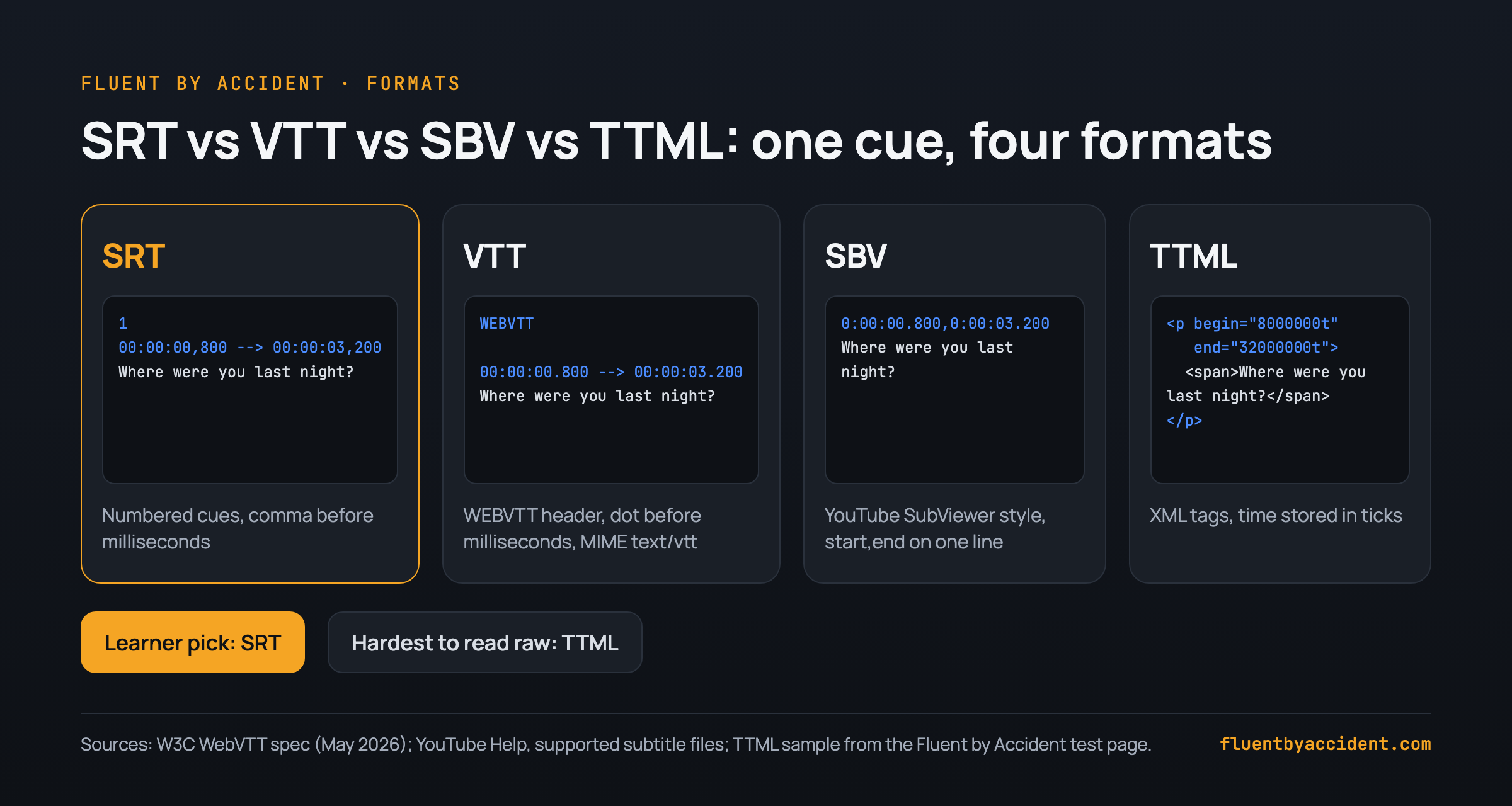
Example: the same cue in four formats. The first line of dialogue from our test page, shown in each format. The TTML is the real file; the other three are our conversions.
TTML (XML, as stored on our test page):
<p begin="8000000t" end="32000000t" region="region_00" xml:id="subtitle1">
  <span style="style_0">Where were you last night?</span>
</p>
SRT (numbered cue, comma before the milliseconds):
1
00:00:00,800 --> 00:00:03,200
Where were you last night?
WebVTT (starts with the WEBVTT header, dot before the milliseconds):
WEBVTT

00:00:00.800 --> 00:00:03.200
Where were you last night?
SBV (YouTube's SubViewer style, start and end separated by a comma):
0:00:00.800,0:00:03.200
Where were you last night?
The W3C WebVTT specification defines the format: the file must begin with "WEBVTT", cue timing looks like "00:11.000 --> 00:13.000", and the MIME type is "text/vtt". YouTube adds its own limits: for SRT and SBV, "Only basic versions of these files are supported. No style info (markup) is recognized. The file must be in plain UTF-8," and for WebVTT "styling is limited to , , " (YouTube Help).
| Format | How to spot it | Best for |
|---|---|---|
| SRT | Numbered cues, 00:00:00,800 | Most tools and video players; the safest pick |
| VTT | WEBVTT header, 00:00:00.800 | Web players; convert to SRT if a tool refuses it |
| SBV | No numbers, start,end on one line | YouTube Studio exports |
| TTML / DFXP | XML tags like <tt> and <p begin=...> | Hardest to read raw; convert before studying |
If a tool only accepts SRT, run the file through a free VTT to SRT converter, which keeps timing and line breaks and removes VTT-only styling.
How to turn subtitles into reading material
A subtitle file is a script of exactly the language you are about to hear. Remove everything that is not language and it becomes reading material. The full pipeline, as a checklist:
Checklist: from subtitle file to study material
- Get the cleanest file you can. Human captions beat auto-captions. If you have VTT or TTML, convert to SRT first.
- Strip numbers and timestamps. Paste or drop the file into the SRT to text tool, which removes numbers and timestamps from SRT or VTT and gives you one line per subtitle or full paragraphs. In our test, 68 SRT lines became 21 lines of text (101 words) for a short clip.
- Read before you watch. Read the clean text once, mark words you do not know, and only look up the ones that repeat. Then watch the episode with the text already in your head.
- Make a frequency list. Drop the file into the subtitle vocabulary tool. It lists every word, most frequent first, with an example line, and downloads as CSV, Excel or an Anki deck. Learn the top of the list before episode one.
- Build a bilingual file if you need support. With an SRT in your target language and one in your own language, the merge subtitles tool combines them into one file, target language on top, your language below.
- Pick sentences, not words. Choose lines where you understand everything except one word or structure, and turn those into cards. Our sentence mining guide explains how to choose them and how many to add per day.
- Re-read after watching. A pass a day later shows what stuck.
Example: how much reading one episode gives you. Assume a 25-minute episode with one subtitle cue every 4 seconds of dialogue for 20 of those minutes. That is 20 × 60 ÷ 4 = 300 cues. At roughly 6 words per cue (our test clip: 101 words over 16 cues, about 6.3), that is 300 × 6.3, about 1,900 words: a solid reading session from a single episode. These are assumptions for the arithmetic, not measurements of any show.
| Step | Input | Output | Free tool |
|---|---|---|---|
| 1. Convert | VTT or TTML | SRT | VTT to SRT |
| 2. Clean | SRT or VTT | Plain text | SRT to text |
| 3. Word list | Subtitle file | Frequency list, CSV, Excel or Anki deck | Subtitle vocabulary |
| 4. Bilingual | Two SRT files | One dual-language SRT | Merge subtitles |
| 5. Cards | Chosen sentences | Flashcards | Your flashcard app |
These tools process a file you already have; they do not fetch subtitles from a Netflix or YouTube link.
No file? Save lines while you watch instead
For Netflix in particular, the route that fits the terms is to stop chasing a file and capture what you need inside the player: pause on a line, save the word or the sentence, and review it later. You get fewer lines than a full file, but each is one you chose.
We walk through that workflow in how to make flashcards from Netflix and YouTube without leaving the player, and the wider method in our guide to learning a language with Netflix.
Tip: Save the whole sentence, not just the word. A sentence card carries its scene and its grammar.
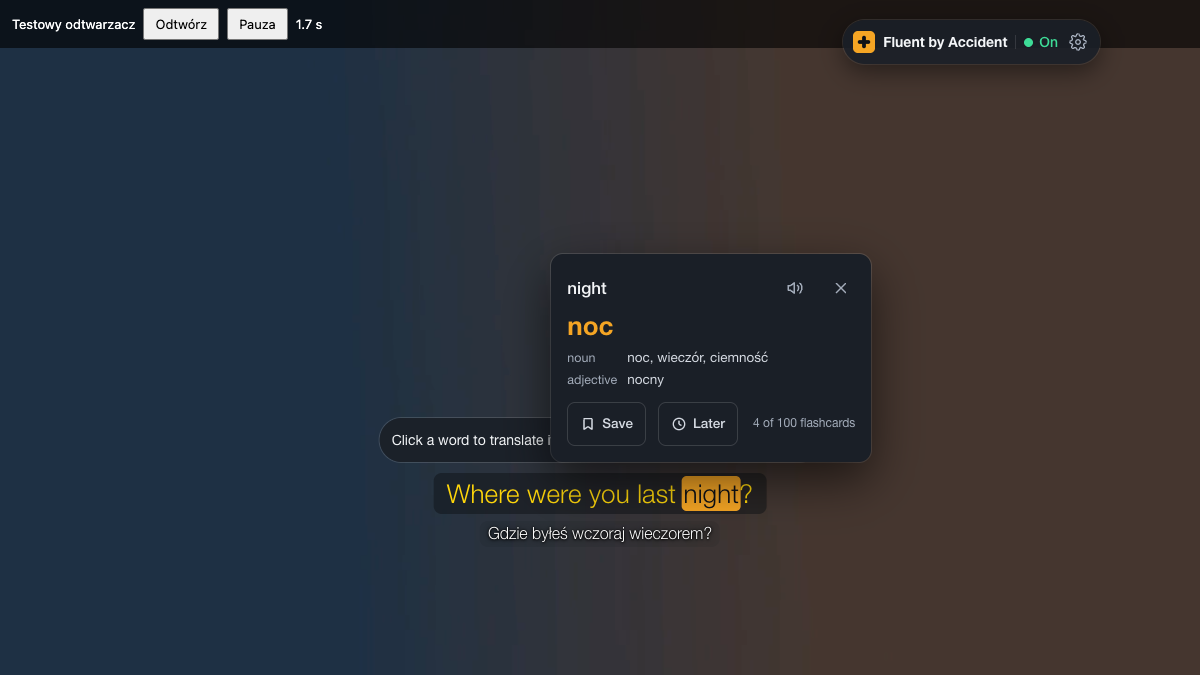
If you want that inside Netflix and YouTube, Fluent by Accident shows two subtitle lines, saves the words you click into decks and exports them as CSV, though it does not download subtitle files.
FAQ
Can you download subtitles from Netflix?
There is no official way. Netflix's only download feature is Offline Titles, which lets some plans save episodes for temporary offline viewing inside the Netflix app, and those are not subtitle files you can open. The Netflix Terms of Use (last updated April 10, 2026) also say you agree not to archive or reproduce content and information obtained through the service, or to circumvent its content protections. The alternative that fits the terms is to save the words and sentences you need while you watch.
Is it legal to download subtitles for personal study?
We cannot give legal advice, and the answer depends on your country. What we can show is what the platforms say. Netflix limits use to "personal, non-commercial use" and bars archiving or reproducing content from the service. YouTube bars downloading content except "as expressly authorized by the Service" and forbids circumventing features that restrict copying. YouTube's Show transcript panel is a built-in feature. Beyond the official routes, keep files private, never share or re-upload them, and never bypass content protection.
How do I download a YouTube transcript as a text file?
Open the video, expand the description and click Show transcript. The transcript panel opens next to the video. Select the text, copy it and paste it into a plain text file. If timestamps come along, paste the text into a cleaner such as the free SRT to text tool, or remove them by hand. If the video is on a channel you manage, YouTube Studio lets you download the caption track as an .srt, .vtt or .sbv file instead. Prefer videos with captions uploaded by the creator, since auto-generated captions can contain recognition errors.
What's the difference between SRT and VTT?
Both are plain-text subtitle formats with a timestamp line followed by the text. SRT numbers each cue and puts a comma before the milliseconds (00:00:00,800). WebVTT files must begin with the word WEBVTT, use a dot before the milliseconds (00:00:00.800) and have the MIME type text/vtt, according to the W3C specification. For study, SRT is the safer pick because almost every tool accepts it.
What if a YouTube video has no captions?
Then there is no transcript to copy, and the Show transcript option may not appear at all. Some videos only have auto-generated captions, which come from speech recognition and can miss words, names and slang, so treat them as a rough draft rather than a script. For study material, look for channels that upload their own captions, which are usually more accurate and properly punctuated. For a specific video, transcribing a short section yourself works and doubles as listening practice.
Can I turn a subtitle file into Anki cards?
Yes. The quickest route is a frequency list: drop the file into the free subtitle vocabulary tool, which lists every word with an example line and downloads as CSV, Excel or an Anki deck. A slower, more effective route is sentence mining: pick lines where only one word or structure is new and make a card from each. Our sentence mining guide explains how to pick those lines and how many to add per day without burning out on reviews.
Sources
- Netflix, Terms of Use, last updated April 10, 2026. Checked November 8, 2026.
- YouTube, Terms of Service, effective December 15, 2023. Checked November 8, 2026.
- YouTube Help, Supported subtitle and closed caption files, undated. Checked November 8, 2026.
- W3C, WebVTT: The Web Video Text Tracks Format, Candidate Recommendation Draft, May 20, 2026.
- ITO Engineering, How do I download a caption file from YouTube?, undated. Checked November 8, 2026.
- Chrome Web Store, Subtitle Downloader listing, cited only for its stated output formats. Not tested by us.
- Fluent by Accident free tools: SRT to text, VTT to SRT, subtitle vocabulary, merge subtitles. Checked November 8, 2026.
- Fluent by Accident test page fixture (TTML, 16 cues), converted by us in November 2026.