Netflix subtitle language not available? Why and how to fix it
Netflix subtitle language not available? Find out why in 2 minutes, change subtitles on TV, phone or browser, and learn what to do when the track you need is missing.

You start a Spanish series on the living-room TV, open the subtitle menu, and the list shows English, your own language and maybe one more. On a laptop, the same episode has a much longer list. So you end up searching "Netflix subtitle language not available" instead of watching.
When a subtitle language is not available on Netflix, you have one of two problems. Either the title (or your country's version of it) has no track in that language, or the track exists but your device, a download or your profile settings are not showing it. Netflix names four places to look: your location, your profile language preferences, the title and the device. The fastest test is to open the same title on netflix.com in a web browser, where a supported device shows every language Netflix has for it.
To change the subtitle language, open Audio & Subtitles while the title plays. On a TV, press up or down on the remote and choose Other to see every option (Netflix Help). To set a default, go to Account > Profiles > your profile > Languages > Audio and subtitle languages, then Save (Netflix Help). Since April 2025, TVs can show the full list too.
Last checked: October 2026, against Netflix's Help Center.
How to change subtitle language on Netflix (TV, phone, browser)
You can change it for the title you are watching or set a profile default. A choice made during playback saves automatically (Netflix Help). Labels vary slightly by device and app version.
- TV, streaming stick or console: press up or down on the remote (on Apple TV, swipe up). Languages may appear as a row at the bottom; choose Other for all of them (Netflix Help).
- Phone or tablet: tap the screen, then Audio & Subtitles. The default lives under My Netflix (lower right) > Manage Profiles.
- Web browser: click the screen, then the speech-bubble icon. Set the default under Audio and subtitle languages, directly at netflix.com/settings/language.
Display language only changes Netflix's menus, not your subtitles. If a change does not show up on one device, sign out and back in (Netflix Help).
| Device | Change it for this title | Change the default | Label to look for |
|---|---|---|---|
| TV, streaming device, console | Up or down on the remote, then the language row | Same menu; Netflix saves your pick | Other |
| Phone or tablet | Tap the screen > Audio & Subtitles | My Netflix > profile name > Manage Profiles > profile | Audio & Subtitles |
| Web browser | Click the screen > speech-bubble icon | Account > Profiles > profile > Languages, then Save | Audio and subtitle languages |
| Kids titles | Pick as usual | Saved only when you watch from a Kids profile, not on most Kids titles in an adult profile | Same as your device |
For learning, pick subtitles in the language you study, and the audio too when the title has it. In April 2025 Netflix started adding dialogue-only subtitles in a title's original language, listed as, say, "English", next to "English (CC)", which also describes audio cues (About Netflix). For your language and the target language on screen at once, see the dual subtitle method for Netflix.
Why is my Netflix subtitle language not available?
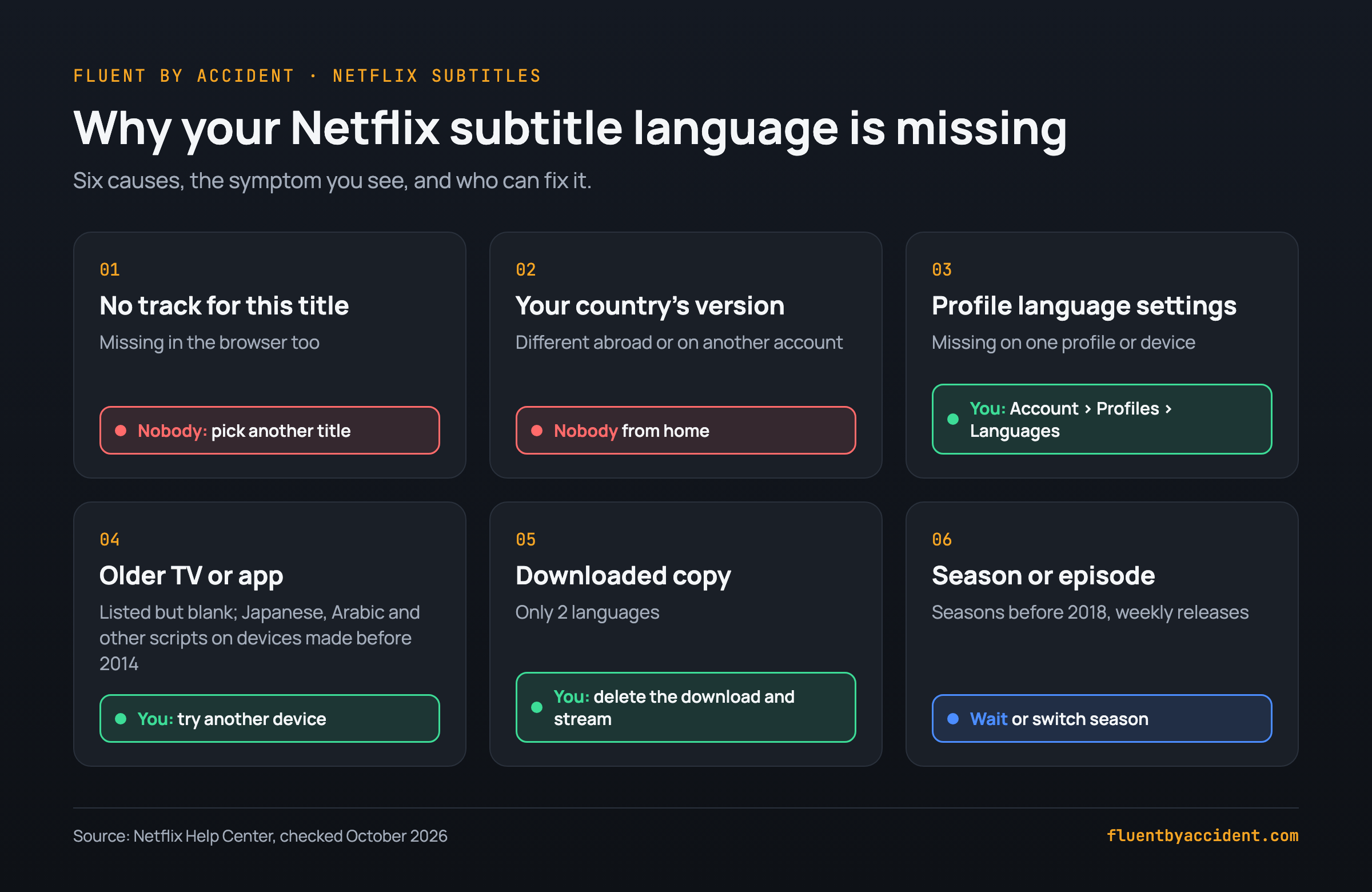
There are six reasons, all from Netflix's own help pages, and only some are yours to fix.
- The title has no track in that language. Netflix says a title may lack a language "because of content licensing and show agreements" (Netflix Help). Nobody can fix this. Pick another title.
- Your country's version is different. Audio and subtitle options for streaming and downloading vary by country (Netflix Help). You cannot change this from home.
- Your profile language settings. Netflix's first fix is to choose the language under Audio and subtitle languages for your profile and save (Netflix Help). You can fix this in a minute.
- An older device or app. Devices made before 2014 may not display Arabic, Chinese, Hebrew, Hindi, Japanese, Korean, Thai, Romanian or Vietnamese, and some later devices may not either. Netflix's advice is to try another device (Netflix Help).
- A downloaded copy. For downloads, Netflix shows only the 2 most relevant languages. If the title is also downloaded, you see only those 2 even when streaming on WiFi. Delete the download to see more (Netflix Help).
- The season or episode. Seasons can come from different subtitle sources, and seasons offered before 2018 may lack languages. Licensed weekly releases get their languages once the episodes are completed (Netflix Help). Wait, or switch seasons.
Does Netflix limit subtitle languages on TV?
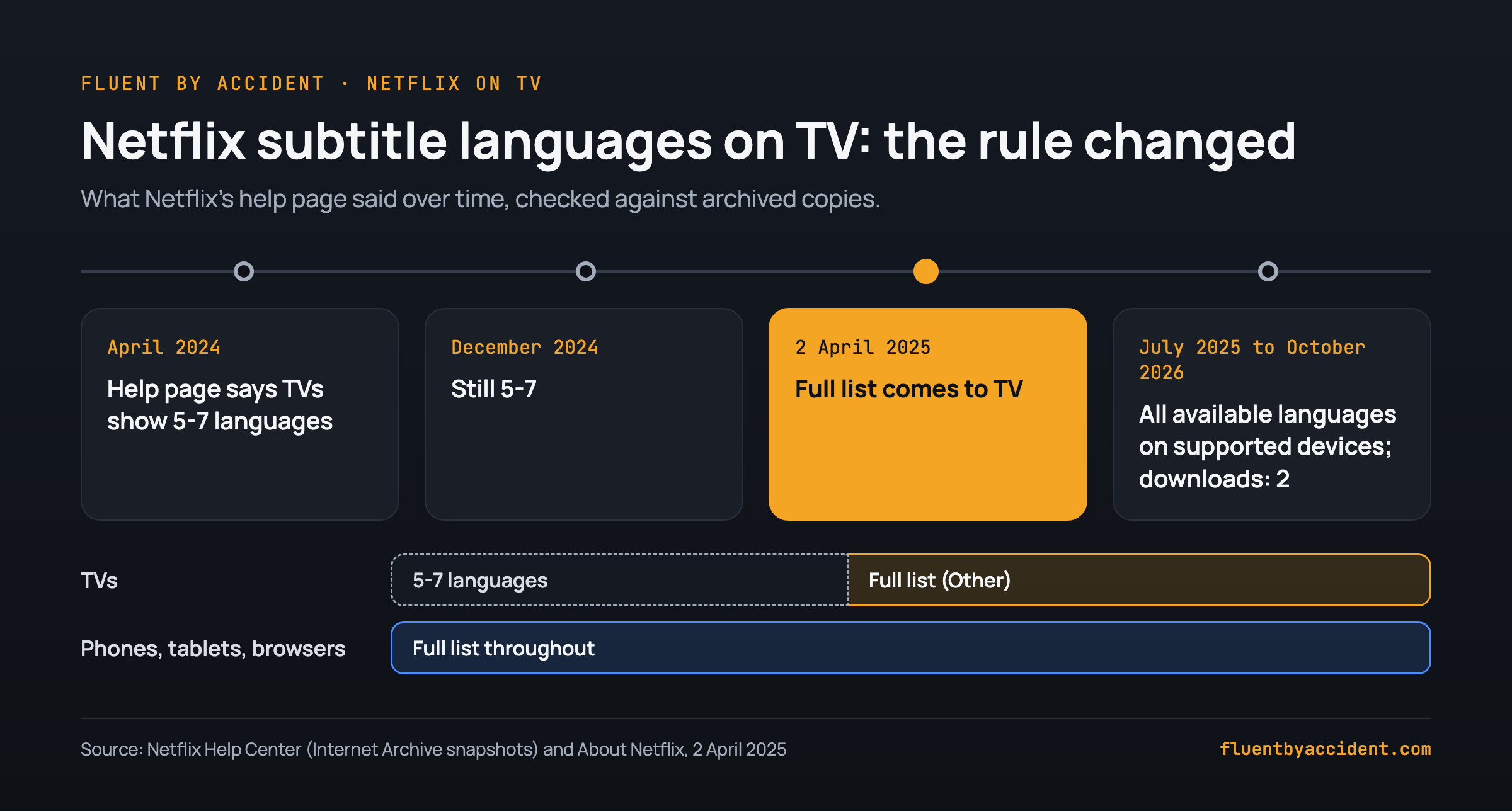
Not anymore, on supported devices. We compared archived versions of Netflix's help page with the live one:
- April 2024: the help page said TVs and TV-connected devices show 5-7 relevant languages based on your location and language settings, while phones, tablets and browsers show all of them (archived April 2024).
- December 2024: the same 5-7 wording was still there (archived December 2024).
- 2 April 2025: Netflix announced that TV viewers can pick from the full list of available languages for any title, and said it had received thousands of language availability requests per month (About Netflix).
- July 2025 to today: the page says a supported device shows all available languages for a title, with downloads still limited to 2 (archived July 2025, live page).
On a TV, the row at the bottom of the player is a shortlist; Other opens the full list (Netflix Help). If your TV still shows few languages but the browser has yours, try another device (reason 4) or sign out and back in after changing your profile languages.
Anything written before April 2025 may still describe the old 5-7 rule, so if you gave up back then, check again. We also found no per-profile language limit in Netflix's help pages. For context, nearly a third of all viewing on Netflix is for non-English stories (About Netflix).
Do Netflix subtitles depend on your country?
Yes. Netflix says choices for streaming and downloading, including audio and subtitle options, vary by country (Netflix Help). Its Terms of Use say you may watch "primarily within the country" where you set up the account (Terms of Use, section 1.5).
When you travel within the European Union, you get your home content for a limited period. Outside it, options can differ and downloads may not be available (Netflix Help).
Some people try a VPN. Netflix says a VPN can make your device look like it is somewhere else and cause errors such as E106, and VPNs are not supported on ad-supported plans or for Live events (Netflix Help). Given the Terms above, we do not suggest it.
One country rule almost nobody mentions hits learners. If your profile language matches the language Netflix lists for your country, you only see titles that have audio or subtitles in that language (Netflix Help). Example: you live in Germany, you are learning German, and you switch your profile to German for immersion. Netflix now hides every title without German audio or subtitles. To see the whole catalog, choose a profile language that is not listed for your country, or keep a separate profile for the language you study.
Check your country: these are some of the pairs on Netflix's list. Austria: German. France: French. Germany: German. Italy: Italian. Netherlands: Dutch. Poland: Polish. Spain: Spanish. United Kingdom: English. Switzerland: German, French or Italian. The full list is on Netflix's help page.
Subtitles listed but not showing, or in the wrong language?
These are the common cases once the language is in the menu, with the likely cause and fix.
| Symptom | Likely cause | Fix |
|---|---|---|
| Listed but blank or broken | The device cannot display that script (often devices made before 2014) | Try another device (Netflix Help) |
| Subtitles appear with subtitles off | Forced subtitles for dialogue in a language other than the original | Nothing to fix; Netflix shows them on purpose (Netflix Help) |
| Language resets every time | A Kids title watched from an adult profile does not save preferences | Watch from a Kids profile; for audio, play a Teens-or-above title for 2-3 minutes (Netflix Help) |
| Same language listed twice | Dialogue-only subtitles next to the CC version with sound cues | Plain name for dialogue, (CC) for audio cues (About Netflix) |
| No SDH on an older season | Not every season of a show has SDH | Check the SDH badge on the title page (Netflix Help) |
| Missing in an extension, present in Netflix's menu | The extension only sees the tracks Netflix serves it | Add the language under Audio and subtitle languages; turn the extension off to compare |
Dual subtitle extensions read the tracks Netflix sends to your player. Language Reactor forum users have reported the extension listing fewer languages than Netflix's menu, for Japanese titles in 2022 and for some Korean titles in 2023. In a 2022 thread, Language Reactor staff told a UK learner to add Spanish at netflix.com/settings/language, and the learner reported that it worked (forum thread).
Missing subtitle language: a 2-minute checklist
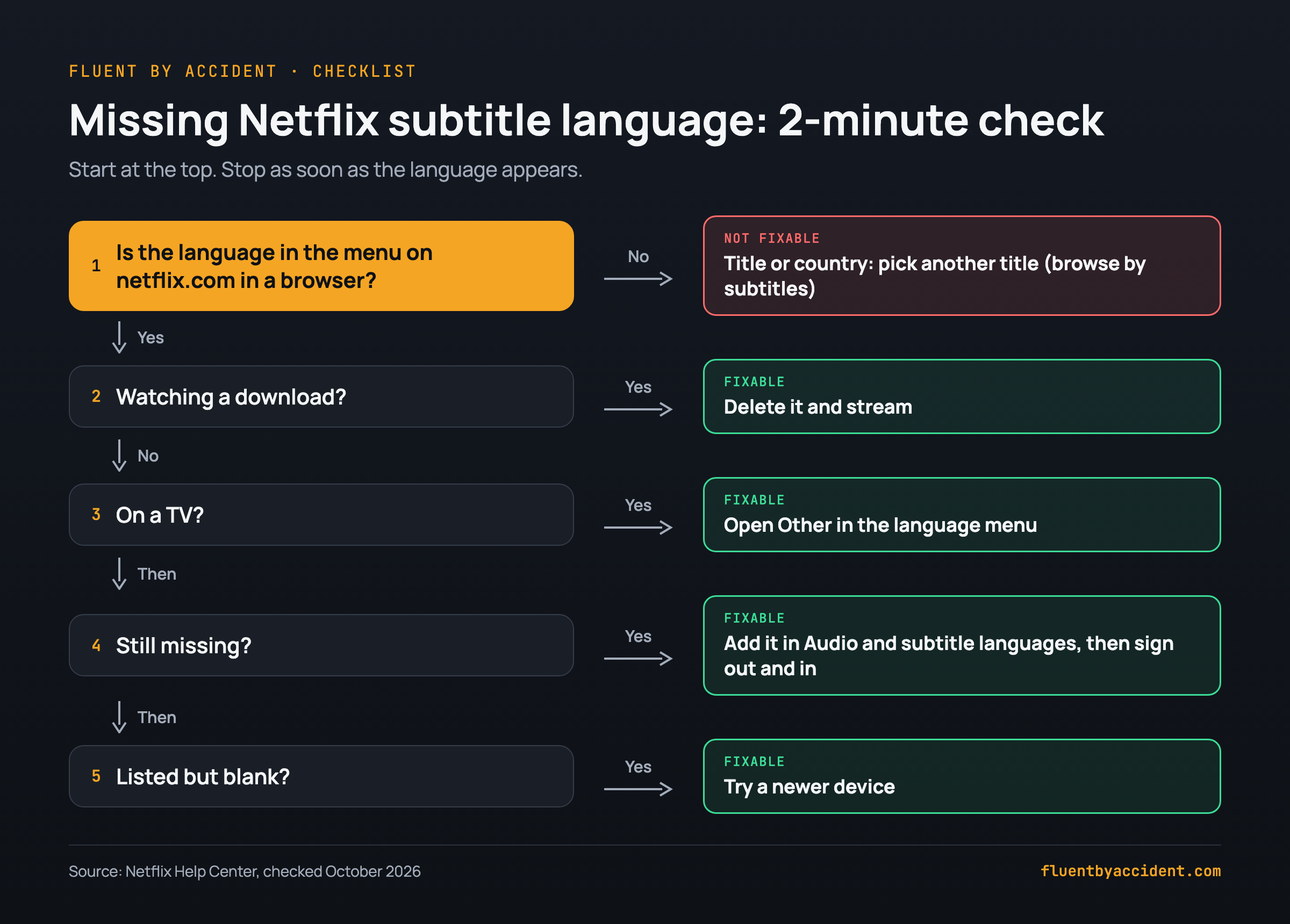
Work down the list and stop as soon as the language appears.
- Open the same title on netflix.com in a browser. Missing there too? It is the title or your country. Skip to step 6.
- On a TV, open Other in the language menu. The bottom row is only a shortlist.
- Watching a download? Delete it and stream. Downloads keep only 2 languages.
- Add the language to your profile: Account > Profiles > your profile > Languages > Audio and subtitle languages > Save. Then sign out and back in on the TV.
- Check another season or episode. Older seasons and weekly releases can differ.
- Still missing? Browse titles that have the language at netflix.com/browse/subtitles or netflix.com/browse/audio (Netflix Help).
- Listed but blank? Try a newer device.
What to do when the language you're learning has no subtitles
Sometimes the checklist ends at "the title does not have it". The episode can still be useful.
| Situation | What to try |
|---|---|
| Target-language audio, no target-language subtitles | Watch with the target audio and subtitles in a language you read well |
| Target-language subtitles, no target-language audio | Keep the original audio and read the target-language subtitles; try the CC track for sound cues |
| Neither track in your catalog | Pick another title from netflix.com/browse/audio or netflix.com/browse/subtitles |
| The track exists only in other countries | Nothing to change at home; choose a title your catalog has it for |
Mixing languages is normal: Netflix's own announcement used the example of a Mexican show with Korean dubbing and English subtitles (About Netflix). If you study Spanish, our list of Netflix shows to learn Spanish, by level is a good place to find titles with both tracks, and here is why watching TV shows teaches you a language.
No tool can add a track Netflix does not serve. We build Fluent by Accident, a Chrome extension for two subtitle lines on Netflix, and when a title has no subtitles in the language you learn, it tells you which subtitle languages that title does have.
FAQ
Why are some subtitle languages not available on Netflix?
Usually licensing. Netflix says a title may not be available in a language because of content licensing and show agreements, and audio and subtitle options vary by country (Netflix Help, Netflix Help). You cannot change those. You can fix the rest: your profile's Audio and subtitle languages setting, an older device that cannot display some scripts, or a download that keeps only 2 languages. Open the title in a web browser first; if the language is missing there too, pick another title.
How do I change the subtitle language on Netflix on my TV?
Start the title, then press up or down on the remote (swipe up on Apple TV). Pick a language from the row at the bottom, or choose Other to see every language the title has (Netflix Help). Your choice saves automatically. For a default, change Audio and subtitle languages in your profile in a browser, then sign out and back in on the TV. Since April 2025, TVs can show the full list of languages (About Netflix).
Why did my Netflix subtitle language disappear?
If you downloaded the title, Netflix shows only the 2 most relevant languages, even when you stream it on WiFi, until you delete the download (Netflix Help). A new season can come from different subtitle sources. If you are traveling, options vary by country (Netflix Help). If you watch a Kids title from an adult profile, your preferences are not saved (Netflix Help). Also check your profile's Audio and subtitle languages.
Can I get other subtitle languages with a VPN?
Netflix's Terms of Use say you may watch primarily within the country where you set up your account, and that content varies by location (Terms of Use). Netflix also says a VPN can make your connection look like it comes from somewhere else and cause errors such as E106, and that VPNs are not supported on ad-supported plans or for Live events (Netflix Help). We do not recommend it. Instead, find titles in your own catalog that have the language via netflix.com/browse/subtitles.
Why are Netflix subtitles on even when I turned them off?
Most likely you are seeing forced subtitles. Netflix shows them when characters speak a language other than the title's original language, even if your subtitle setting is off (Netflix Help). They are part of the title, so settings cannot remove them. If full subtitles keep coming back, check whether you are watching a Kids title from an adult profile: Netflix saves preferences for most Kids titles only in a Kids profile.
Sources
- Netflix Help Center: Why subtitles or audio isn't available in a specific language, How to change the language on Netflix, How to use subtitles, captions, or choose audio language, How to see all TV shows and movies available in your country, Using Netflix outside of your home, VPN or proxy error
- Netflix: Terms of Use (last updated April 10, 2026)
- About Netflix: The Netflix TV Experience Just Got More Multilingual (2 April 2025), A New Way to Experience Subtitles (24 April 2025)
- Internet Archive snapshots of Netflix Help 101798: April 2024, December 2024, July 2025
- Language Reactor forum: Spanish subtitles fix, 2022, missing Japanese tracks, 2022, Korean titles, 2023