Can you get dual subtitles on Netflix TV, iPad or phone?
Netflix's TV, phone and iPad apps show one subtitle line at a time. Here is what works in 2026: a laptop on your TV, which casting routes Netflix blocks, and iPad options.

You finally have Spanish on the top line and English underneath on your laptop, so you move to the sofa and open Netflix on the TV. The Audio & Subtitles menu lets you pick one subtitle language, and that is it. The phone and iPad apps work the same way.
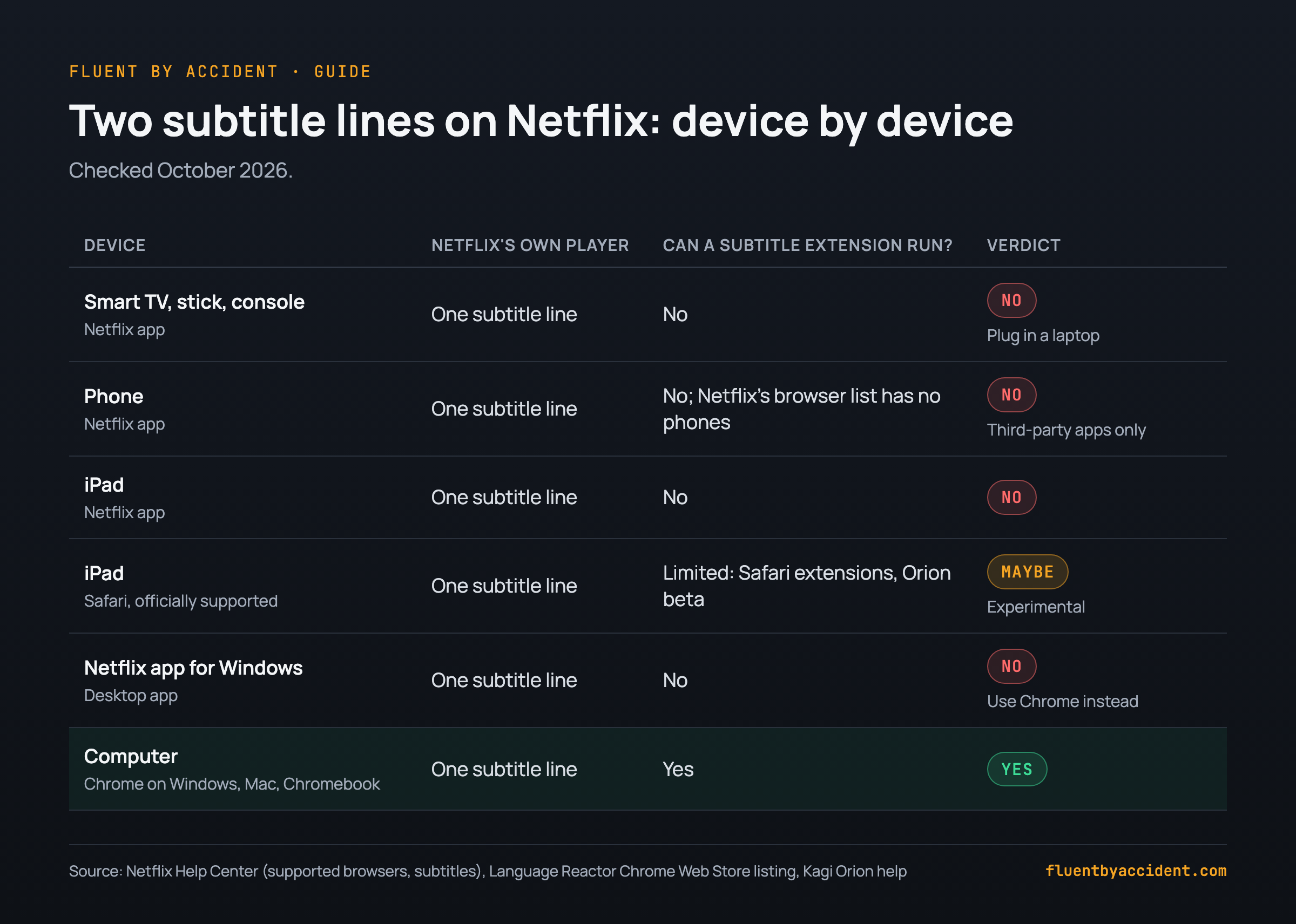
Short answer: no, you cannot get dual subtitles on Netflix TV apps, or in the phone and iPad apps. Netflix's own players show one subtitle track at a time, and its subtitle help page has no setting for a second line. Two lines come from browser extensions, which run in Chrome on a desktop or laptop computer (Chrome Web Store).
What works: play Netflix in Chrome on a laptop with a dual subtitle extension, and connect the laptop to the TV with an HDMI cable. Most wireless shortcuts are blocked by Netflix itself: AirPlay and Screen Mirroring are not supported, and phone casting now works only with a short list of older devices. iPad has a few experimental browser routes; phones only have third-party apps.
Last checked: October 2026 (Netflix Help Center pages, Language Reactor 5.1.8, App Store listings).
Can you get two subtitles at once in the Netflix app?
Netflix's subtitle help page describes the whole feature: start playing, open Audio & Subtitles (on a TV, press the up or down arrow on the remote) and pick a language. One track. Nothing in the TV, phone or iPad app adds a second line, as of October 2026.
Extensions cannot fix that, because they are browser add-ons and the Netflix app on your TV or phone is not a browser. Language Reactor's listing says it runs on Chrome on Windows and macOS computers (Chrome Web Store), and its staff wrote in September 2026 that standard mobile browsers do not support Chrome extensions (staff post). That limit applies to every Chrome subtitle extension.
Two less obvious cases:
- The Netflix app for Windows is separate from the browser (Netflix Help Center). Extensions do not load in it, so use netflix.com in Chrome.
- Downloads keep only the two most relevant languages (Netflix Help Center).
How to get dual subtitles on Netflix TV with a laptop and HDMI
This is the one setup that reliably works. Netflix plays in Chrome on the laptop, your extension draws both lines, and the TV is just a big screen on the end of a cable. The TV shows exactly what the laptop shows, so both lines come along.
Picture quality depends on the laptop. Netflix's supported browsers page lists Chrome at up to 4K on Windows and on Chromebooks (only on hardware that meets Netflix's Ultra HD requirements) and up to 1080p on a Mac. On Windows, those requirements include Windows 11, a supported graphics card and a 4K 60Hz TV on an HDCP 2.2 connection (Netflix Help Center). HDCP is the copy protection handshake between laptop and TV.
Netflix adds that "every active display" must qualify, so a laptop screen left on can hold the TV back. Set Windows to show the picture on the TV only. Honestly, 1080p is plenty for language learning: you are reading text, not judging film grain.
If the TV stays black or Netflix shows an error, suspect HDCP. Netflix's black screen guide says to reverse the cable, try another port and another cable, and use USB-C adapters that support HDCP 2.2. Its Error M7353 page adds a test: unplug the TV and play on the laptop alone. If that works, the TV probably lacks HDCP support.
New to the laptop part? Start with the dual subtitle method, step by step.
| Step | What to do | Why |
|---|---|---|
| 1. Cable | HDMI cable, or a USB-C to HDMI adapter with HDCP 2.2 | Netflix needs HDCP (Netflix) |
| 2. Browser | netflix.com in Chrome, not the Netflix app for Windows | Extensions run only in the browser |
| 3. Display mode | TV as the only display (Windows: Win+P, Second screen only) | Every active display must qualify for 4K (Netflix) |
| 4. Expectations | Chrome: up to 4K on qualifying Windows hardware, 1080p on Mac | Netflix's browser limits (Netflix) |
| 5. Subtitle size | Raise it in the extension's settings | You sit farther from a TV |
| 6. Black screen | Reverse the cable, try another port and cable, unplug to test HDCP | Netflix's troubleshooting (Netflix) |
| 7. Control | Wireless keyboard or mouse | Pause and save words from the sofa |
Can you cast or AirPlay Netflix with dual subtitles?
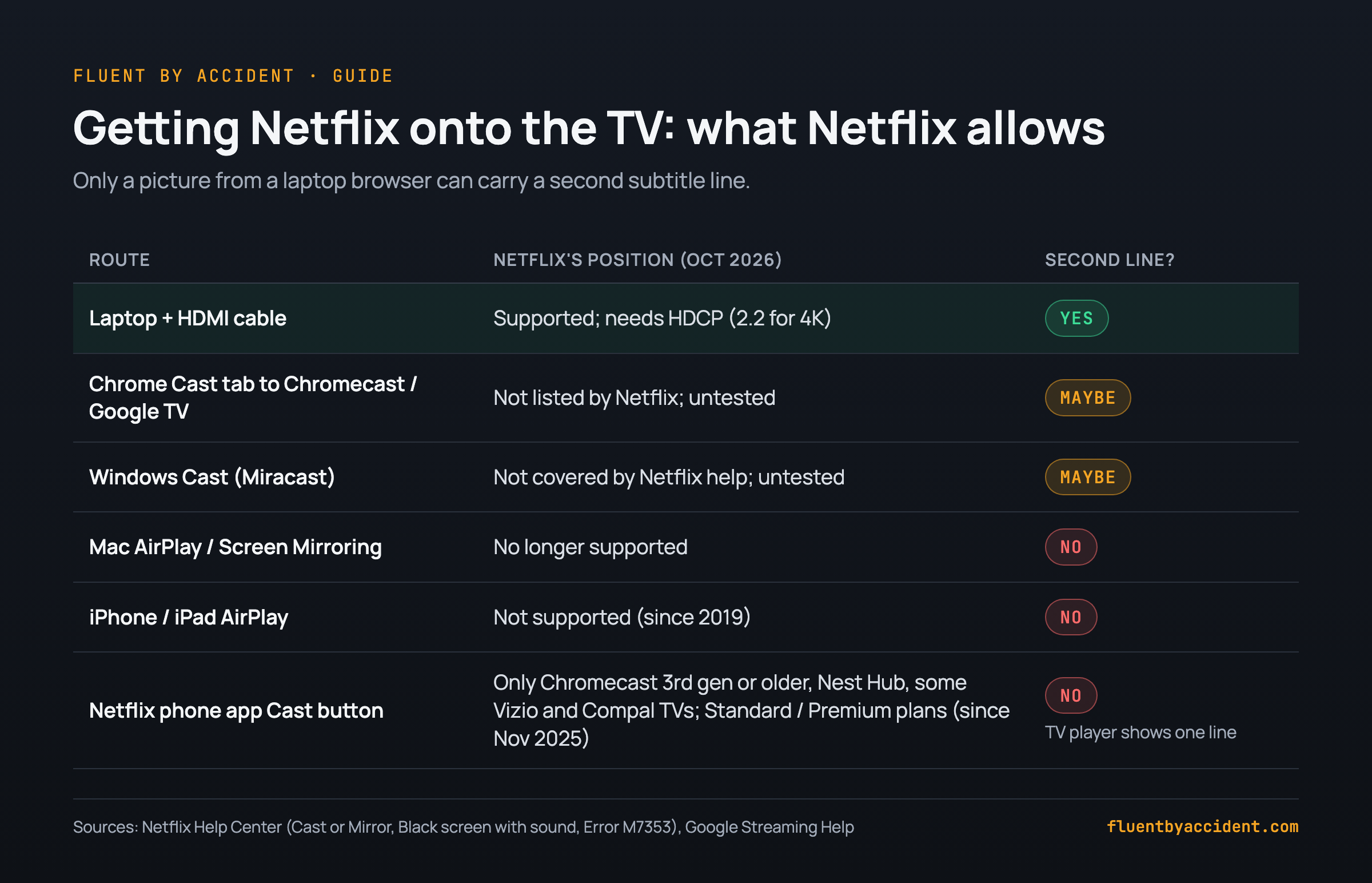
Not reliably. The wireless routes Netflix supports cannot carry a second line, and the ones that might are blocked or untested.
The Cast button in the Netflix phone app. Users noticed it vanishing for most TVs in mid-November 2025 (The A.V. Club). Netflix now lists only Chromecast 3rd gen or older (no remote), Google Nest Hub displays, and select Vizio and Compal TVs (Netflix Help Center), on Standard or Premium plans (Netflix Help Center). And casting never gave you two lines: it hands the stream to the TV device's own Netflix player, and your phone only changes its audio or subtitle settings. Your extension is not involved.
AirPlay from iPhone or iPad. Netflix dropped it in April 2019 (Engadget, 2019). With AirPlay or mirroring on, you get error AVF:11870 (Netflix Help Center).
AirPlay or Screen Mirroring from a Mac. Netflix calls both "no longer supported" (Netflix Help Center). Some guides still suggest it; Netflix's own help says otherwise.
Chrome's Cast tab to a Chromecast or Google TV. Google says Chrome can cast most web content (Google Streaming Help), but Netflix does not list it, and notes that Google no longer supports Chromecast on a computer (Netflix Help Center). We have not tested it. It may play, go black or stutter, so do not buy hardware for it.
Windows Cast (Miracast). Netflix's help does not cover it and we have not tested it. Expect the same HDCP checks as a cable.
Netflix dual subtitles on iPad: what works and what doesn't
The Netflix iPad app shows one line, like the TV app. The nuance: Netflix officially supports Safari on iPad (iPadOS 14 or later, up to 1080p), and phones are not on that list (Netflix Help Center). So browser routes exist on iPad. All are experimental.
Orion browser. Kagi's Orion has preliminary support for Chrome and Firefox extensions on iPadOS, and says it is still in beta (Kagi Orion Help). On the Language Reactor forum, one user said it worked well on iPad, while another reported lag on pause and misbehaving word clicks and went back to the laptop (forum thread, 2024). Staff said in 2023 it does not officially work on tablets (staff post).
A Safari extension. Immersive Translate's listing says it handles bilingual subtitles on sites including Netflix (App Store). Untested by us on iPad.
An app with its own Netflix browser. SubFloat's listing promises two languages at once on Netflix and other services; it launched in March 2026 and had 3 US ratings on October 9, 2026 (App Store). Jolii says you learn from Netflix inside its app with your own account (App Store). Either way, you sign in to Netflix inside another company's app.
A Chromebook tablet behaves like a laptop: Chrome, up to 4K on qualifying models (Netflix Help Center). One forum user says Language Reactor "just works" on theirs (forum post).
For real study sessions, a laptop is still easier.
| Option | How it shows two lines | Status (Oct 2026) | Catch |
|---|---|---|---|
| Netflix iPad app | It does not | One line only | No workaround runs inside it |
| Orion + Chrome extension | Extension in a browser | Beta; mixed user reports | Lag and click issues reported |
| Safari + Safari extension | Extension in Netflix's supported browser | Untested by us | Up to 1080p |
| App with its own Netflix browser | App draws its own lines | New apps, few ratings | Your Netflix login goes into another app |
| Chromebook tablet | Regular Chrome extension | Works like a laptop | A mouse helps |
Can you get dual subtitles on Netflix on your phone?
Not in the Netflix app, which shows one line (Netflix Help Center). The browser route is closed too: Netflix supports browsers on computers, iPad and Meta Quest, not phones (Netflix Help Center). One forum user said her Samsung phone would not open Netflix in the browser at all (forum post).
Kiwi, the Android browser that accepted extensions, has not been maintained since January 2025 (Kiwi on GitHub), and a forum user warned that makes it a security risk (forum thread).
What is left are apps that load Netflix in their own browser and draw the second line. Trancy describes this for iPhone and Android on its blog, though its App Store listing does not mention Netflix. Vendor claims, untested by us.
Our take: on a phone, two subtitle lines cover a big part of the picture. Use the phone to review saved words instead.
Before you install a "dual subtitles" app, check five things:
- Publisher: who makes it, and is there a real website and support page?
- Last update: Netflix changes its player often, so recent matters.
- Ratings: a handful of ratings tells you little.
- Your Netflix login: do you type your Netflix password into the app?
- Privacy label: what data does the store listing say it collects?
Does Language Reactor work on TV, iPad or phone?
No. Language Reactor is a desktop Chrome extension (Chrome Web Store), and there is no official mobile app. Its website opens in mobile browsers for your saved words, but without dual subtitles on Netflix (staff post, 2023).
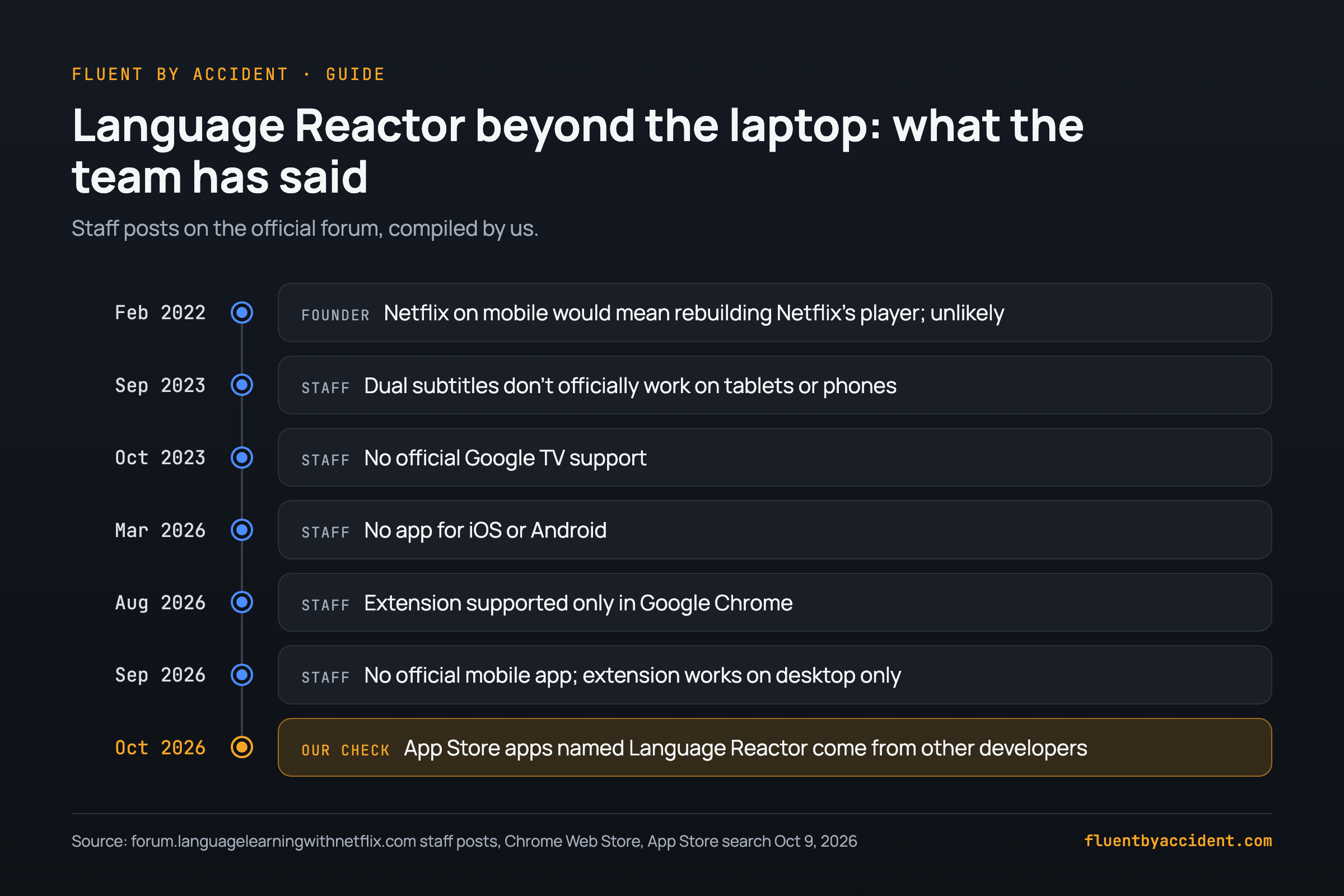
We went through the team's posts on the official forum (our compilation):
- February 2022: the founder said Netflix on mobile would mean rebuilding much of Netflix's player, and he did not expect it (post).
- September 2023: no official dual subtitles on tablets or phones (post).
- October 2023: no official Google TV support (post).
- March 2026: no app for iOS or Android (post).
- August 2026: supported only in Google Chrome (post).
- September 2026: "There is no official Language Reactor mobile app"; desktop only (post).
One warning. On October 9, 2026, our App Store search for "language reactor" returned apps such as "Language Reactor - Sounter" and "Language Reactor - PlayLingo" from unrelated developers, none from Dioco, the extension's maker. A forum user noticed the same imitations (forum thread).
How to learn with Netflix on TV when you only get one subtitle line
Some nights there is no laptop nearby. A single subtitle line still teaches you a lot if you choose it on purpose, and Netflix lets you pick any listed subtitle language, including the one you are learning (Netflix Help Center).
A simple rule: target-language subtitles on the TV for shows you know or easier shows, native-language subtitles only for new, hard ones. Then a short laptop session with two lines for the scenes where you got lost. For the background, read why watching TV shows teaches you a language; for what to watch, see Netflix shows to learn Spanish, by level.
One way to split an evening (times are our suggestion):
| Where | Subtitles | What you do | Time |
|---|---|---|---|
| TV, Netflix app | Target language | Watch; note the minutes where you got lost | One episode |
| Laptop, Chrome | Two lines | Replay those scenes; save the words that blocked you | 10-15 minutes |
| Phone | None | Review the saved words as flashcards | 5 minutes |
| TV, days later | Target language only | Rewatch and notice what now makes sense | One episode |
If you go the laptop route, Fluent by Accident is a Chrome extension with a free plan that shows both lines on Netflix and saves the words you click for review.
FAQ
Can you have two subtitles at the same time on Netflix?
Not in Netflix's own apps. The Netflix apps for TVs, streaming sticks, phones, iPads and Windows show one subtitle track at a time, chosen in Audio & Subtitles (Netflix Help Center). For two lines, open netflix.com in Chrome on a computer and add a dual subtitle extension, which draws the second line over Netflix's player. Language Reactor, for example, runs on Chrome on Windows and macOS (Chrome Web Store). To see both lines on a TV, connect the laptop with an HDMI cable.
Does Language Reactor work on a smart TV or Google TV?
Not officially. Staff said in 2023 there was no official Google TV support (staff post), and the listing still names only Chrome on Windows and macOS computers. The working route is a laptop running it in Chrome, connected to the TV by cable. Google says Chrome can cast most web content to a Google TV (Google Streaming Help), but Netflix does not list it as supported, and we have not tested it.
Is there a Language Reactor app for iPhone or Android?
No. Staff confirmed in March 2026 that there is no mobile app for iOS or Android (staff post) and repeated in September 2026 that the extension works on desktop only (staff post). App Store apps with "Language Reactor" in their name come from other developers, not from Dioco, the extension's maker. The languagereactor.com website opens in a mobile browser for saved words, without dual subtitles on Netflix.
Why can't I cast Netflix from my phone anymore?
Since mid-November 2025, the Cast button in the Netflix phone app works only with a short device list (The A.V. Club): Chromecast 3rd gen or older (no remote), Google Nest Hub displays, and select cast-enabled Vizio and Compal TVs (Netflix Help Center). It also needs a Standard or Premium plan (Netflix Help Center). Otherwise, use the Netflix app on the TV with its remote. For learners little changes: casting always showed one subtitle line.
Can I AirPlay Netflix from my Mac or iPad to the TV?
No. Netflix says AirPlay and Screen Mirroring are no longer supported from a Mac, iPhone or iPad (Netflix Help Center); on an iPhone or iPad, trying it triggers error AVF:11870 (Netflix Help Center). Netflix ended AirPlay support in April 2019 (Engadget, 2019). The supported alternative is a cable or video adapter (Netflix Help Center). For two subtitle lines, the cable has to come from a laptop running Chrome with an extension.
Sources
- Netflix Help Center, checked October 2026: subtitles, supported browsers, Windows, cast or mirror, cast icon, Chromecast, black screen, M7353, AVF:11870
- The A.V. Club, 2025; Engadget, 2019
- Google Streaming Help, Kagi Orion Help, Kiwi Browser
- Language Reactor listing and the forum posts linked above
- App Store listings, US, October 9, 2026: SubFloat, Jolii, Trancy, Immersive Translate