How to make flashcards from Netflix and YouTube (with context)
How to make flashcards from Netflix and YouTube that keep the scene: what to save, what goes on the card, four tool routes into Anki or a web app, and a review load you can keep.

You paused the episode three times for the same word and typed it into a notes app. A week later the list is a column of words you no longer recognize, because the scene that gave them meaning is gone. That is how most flashcards from Netflix fail: the word made it onto the card, the context did not.
Here is the short version. To make flashcards from Netflix or YouTube, pause on a line you almost understand, save the one word or phrase that blocks you together with the full subtitle line and its translation, then review those cards with spaced repetition before your next episode. You can do it by hand in any flashcard app, export saved words from an extension such as Language Reactor, mine cards with audio and a screenshot using asbplayer or Migaku, or use an extension that saves the word with its line and turns it into a flashcard for you.
The line is the point. A lone word loses the meaning it had in that scene; the line keeps the meaning, the grammar around it and the moment you heard it.
Last checked: October 2026, on official pages, store listings and the tools' forums.
What should a flashcard from a TV show include?
A card made from a show needs more than a word and a translation:
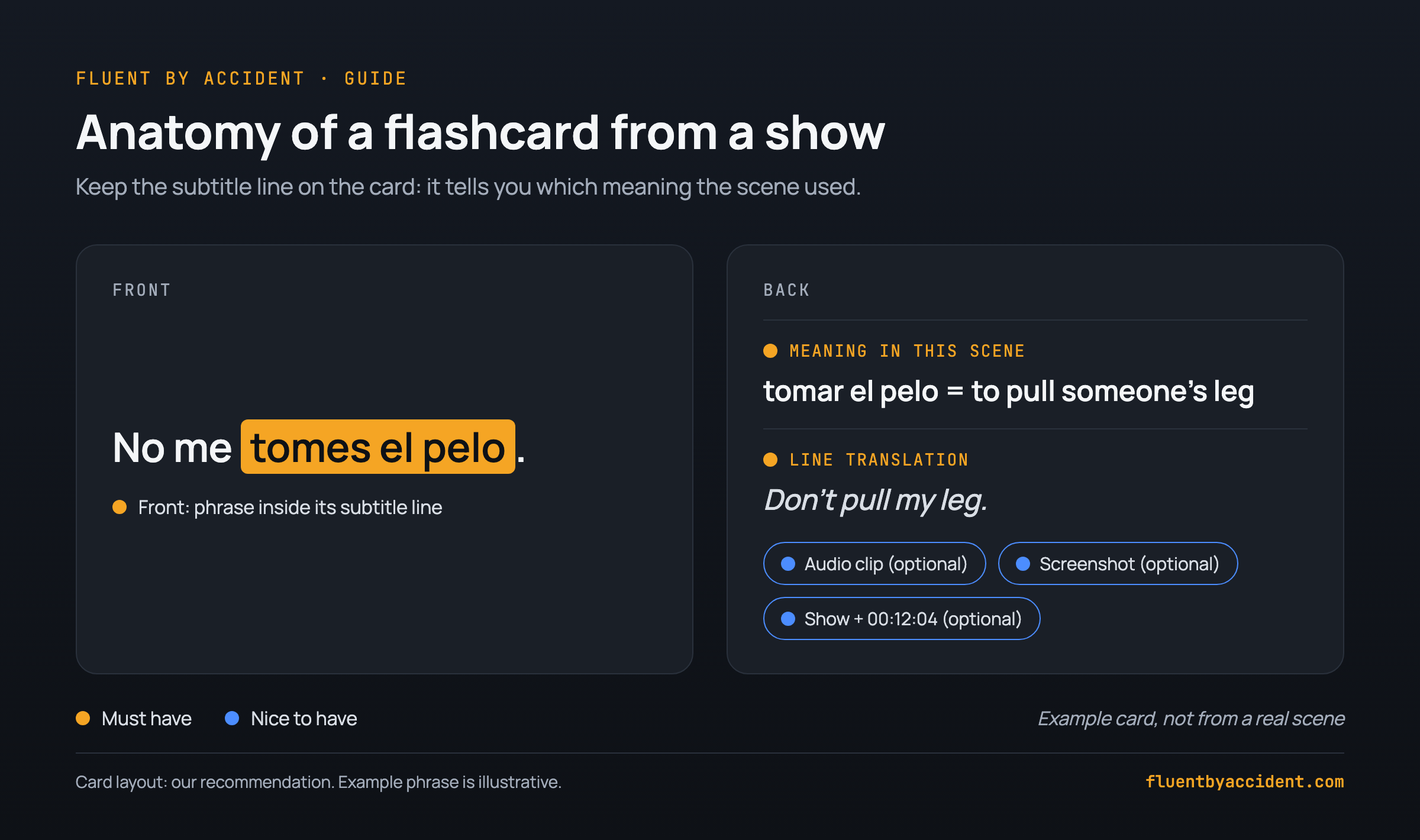
- Front: the word or phrase, inside its subtitle line. Bold the word so you know what is tested; the line tells you which meaning is meant.
- Back: the meaning in this scene, not the first dictionary entry.
- Back: a translation of the whole line. It shows the grammar around the word and catches a misread sentence.
- Optional: audio clip, screenshot, show and timestamp (for example S1E3, 12:04). The timestamp lets you rewatch the moment.
- Optional: a note on register ("informal"), slang or region.
Our recommendation: the word on the front with its line, the translations on the back. Not everyone agrees. In a WaniKani Community thread, one learner summarized a guide arguing that sentence cards are slow to review and that a familiar sentence can cue the scene rather than the word; others replied that a lone word fails for words with several meanings (WaniKani Community, 2021). Pick a layout and give it two weeks.
Example: a Spanish subtitle reads "No me tomes el pelo." Save only "tomes" and your card says "you take", which is no help. Save the phrase "tomar el pelo" with its line and the card says "to pull someone's leg", with "Don't pull my leg." as the line translation. Need a show to practice on? See our Netflix shows for Spanish learners, sorted by level.
Which words from a show are worth a flashcard?
The filter matters more than the tool, because only some unknown words come back. When Dutch-speaking learners of English watched a full-length TV program, how much vocabulary they picked up depended on how often words occurred, how many words they already knew, and whether a word resembled one in their own language (Peters and Webb, 2018). An older analysis of 88 TV programs found that the most frequent 3,000 word families, plus proper nouns and marginal words, covered about 95% of the language, and 7,000 covered about 98%; low-frequency words came up rarely (Webb and Rodgers, 2009). (More on why TV only teaches you when you understand most of it.) So card the words you will meet again and skip one-off rarities.
Run each candidate through five questions:
- Did this word keep you from understanding the line? If you got the line anyway, skip it.
- Is it a name, an invented word or one-scene jargon? Skip it.
- Will you hear it again? Common words, a character's catchphrase and the show's recurring topic qualify.
- Is the rest of the line clear? With three unknowns, keep only the one that blocks you most, or skip the line.
- Is it part of a phrase or idiom? Save the whole chunk, not one word.
A word that gets through questions 1 to 3 earns a card; questions 4 and 5 decide what exactly goes on it. Saving more just means more reviews.
1. Did this word keep you from understanding the line? No: skip Yes 2. Is it a name, an invented word or one-scene jargon? Yes: skip No 3. Will you hear it again? Common word, catchphrase, recurring topic No: skip Yes 4. Is the rest of the line clear? Three unknowns in one line is too many No: keep only the word that blocks most Yes 5. Is it part of a phrase or idiom? Example: tomar el pelo Yes: save the whole phrase No Make the card: the word or phrase plus its subtitle lineHow to make flashcards from Netflix, step by step
These steps work with any flashcard app, with or without an extension. If your subtitles aren't ready yet, first set up dual subtitles on Netflix.
- Turn on subtitles in the language you learn, plus your own language as a second line if your tool allows. Available languages depend on your location, profile, the title and the device (Netflix Help).
- Pause when a line blocks you and run the five questions.
- Capture four things: the word or phrase, the full line, its translation, and show, episode and timestamp. Type them by hand, or let an extension grab them in one click.
- Tidy up after the episode, not mid-scene. Put the dictionary form on the back, trim long lines to the clause that matters, delete what you no longer need. Exports need this too: one Language Reactor user reported that only the subtitle segment holding the word reaches the card, so context can be too short, or too long with a rambling sentence (Language Reactor forum, 2023).
- Add the cards in one batch, within a daily cap on new cards (last section).
- Review before the next episode. The payoff is catching the word on screen again without pausing.
The same six steps, by hand and with an extension:
| Step | By hand | With an extension |
|---|---|---|
| 1. Subtitles | Target-language subtitles on | Many extensions add a second line in your language |
| 2. Pause | Pause, run the five questions | Same; clicking a word shows a translation first |
| 3. Capture | Type word, line, translation and S1E3 12:04 into a note | One click or shortcut saves the word with its line |
| 4. Tidy | Dictionary form, trim the line | Same; check exported lines aren't cut off |
| 5. Add | Paste one batch, within the daily cap | Import into Anki, or use the tool's review |
| 6. Review | Before the next episode | Same |
How to make flashcards from YouTube videos
The workflow is the same. Two things differ.
Caption quality. YouTube says its automatic captions come from machine learning, so their quality "may vary", and they can misrepresent speech because of mispronunciations, accents, dialects or background noise (YouTube Help). A card built on a wrong caption teaches you a wrong word. Some videos get no automatic captions at all, for example when the sound is poor or speakers overlap. Prefer videos where the creator uploaded subtitles.
Timestamps cost nothing. You can rewatch any second of a YouTube video, so put the time on the card. For a link that starts at that second, click Share under the video, tick Start at, enter the time and copy the link into the card's source field (YouTube Help).
Check the captions first: before you save anything, find out whether the creator uploaded the captions or YouTube generated them. If automatic captions are all you have, replay the line slower and save it only if your ear agrees with the text. If a caption word makes no sense in the scene, skip the line.
Which tool should you use to make flashcards from Netflix and YouTube?
Four tools plus the manual route, compared on what lands on the card. Not a ranking: pick by what you want on the card and how much setup you will accept. Checked on official pages and store listings, October 2026.
| Route | Works on | What lands on the card | Setup | Cost (checked Oct 2026) |
|---|---|---|---|---|
| Manual | Anything you can pause | Whatever you type: word, line, translation, timestamp | None | Free, apart from your flashcard app |
| Language Reactor | Netflix, YouTube; Chrome on desktop | Word or phrase with its subtitle segment; images and audio optional | Import its Anki template, copy media into Anki | Saving words listed as Pro (2023 FAQ); check the current plan |
| asbplayer | Netflix, YouTube and most streaming sites | Sentence, word, definition, audio clip, screenshot, source URL | Anki desktop, AnkiConnect, a dictionary such as Yomitan | Free, open source |
| Migaku | Video in the browser (its guide uses YouTube) | Word, screenshot, audio snippet | Extension; cards go to Migaku's review app or Anki | $10 a month or $96 a year in the US (prices vary by country); 10-day money-back guarantee |
| Fluent by Accident (ours) | Netflix, YouTube, Prime Video, Disney+, Max; Chrome on desktop | Saves the word or phrase, translation, subtitle line and its translation, show title and second. Web app cards show the word and translation; the panel review and Anki export add the line. No audio or screenshot | Extension plus a free sign-in | Free up to 20 saved words; Pro $6.99 a month or $49 a year |
Who each route is for:
- Manual: full control in any app, if you don't mind typing. Copy single lines; don't download whole subtitle files (see the FAQ on Netflix's terms).
- Language Reactor: you already use it and want saved words in Anki. Version 5.1.8, updated July 1, 2026, rated 4.2 out of 5 from 4.4K ratings (Chrome Web Store). Its FAQ has listed saving words as Pro (forum, 2023).
- asbplayer: audio-rich Anki cards, if you accept setup. Ctrl+Shift+X opens the card creator once Anki, AnkiConnect and a dictionary are in place (GitHub). Version 1.21.2, updated September 28, 2026, rated 4.6 out of 5 from 104 ratings (Chrome Web Store).
- Migaku: one-key cards with audio and a screenshot, if you're fine paying. Hover a word and press Q (Migaku); prices vary by country (pricing).
- Fluent by Accident: we make this one, so weigh our take accordingly. It suits you if you want saved words to become flashcards without setting up Anki. Click a word, or drag or Shift+click for a phrase; saves land in a "Learning now" deck and become spaced repetition flashcards in the web app at fluentbyaccident.com, while "Later" parks a word in "Advanced", never due. Web app review shows the word and translation; to study with the line, use the extension panel's quick review or the Anki export. Limits: no audio or screenshots, Chrome only, 20 free saved words, AI only on Pro.
What about one-click AI decks? Newer extensions build the deck for you: Lexpresso says it turns a video's subtitles into flashcards filtered by your CEFR level (Chrome Web Store); we haven't tested it in depth. It picks words by level, not by whether they blocked you, so it skips the five questions above and adds words you may never meet again. Making cards yourself may also help (Pan et al., 2023; caveats in the last section).
Netflix to Anki: how to import your cards and keep the sentence
Anki's text import is where the sentence often gets lost. Anki reads settings from #key:value header lines at the top of a text file, and it keeps bold and italics only when HTML is allowed in fields (Anki manual: text files). Here is a ready file with one card. Paste it into a plain text file, make sure the gaps between the three fields are real tabs (some editors turn them into spaces), and save it as .txt:
#separator:tab
#html:true
#tags column:3
No me <b>tomes el pelo</b>.	tomar el pelo: to pull someone's leg<br><i>Don't pull my leg.</i>	spanish netflix
Add one line per card, then in Anki choose File, Import and check the field mapping.
Tip: map Field 1 to Front, Field 2 to Back and Field 3 to Tags. Both languages on the same side means the mapping is off; a file that won't import usually means the wrong separator.
Language Reactor exports with media take more steps. Per a community guide on its forum: choose CSV with "Include Media", extract the zip, import the Language Reactor template into Anki, then import the CSV and check the fields. Missing images or audio? Copy the media files into Anki's collection.media folder (How to Export guide). One more trap: one AnkiWeb forum user found that Anki's Check Media listed the Language Reactor images as unused; deleting them broke the cards, so leave them in place (AnkiWeb forum, 2024).
How many flashcards from Netflix a day before reviews pile up?
Anki's manual gives a rule of thumb: "If you are consistently learning 20 new cards a day, you can expect your daily reviews to be roughly about 200 cards/day" (Anki manual: deck options). So daily reviews run at about ten times your daily new cards.
In minutes, assuming that ten-to-one ratio, daily study, and about 8 seconds per word card or 12 seconds per card with a full line (our estimates, not measurements): 5, 10, 15 and 20 new cards a day mean about 50, 100, 150 and 200 reviews. At 8 s: 50 × 8 = 400 s (6.7 min), 100 × 8 = 800 s (13.3), 150 × 8 = 1,200 s (20), 200 × 8 = 1,600 s (26.7). At 12 s: 600, 1,200, 1,800 and 2,400 seconds, or 10, 20, 30 and 40 minutes.
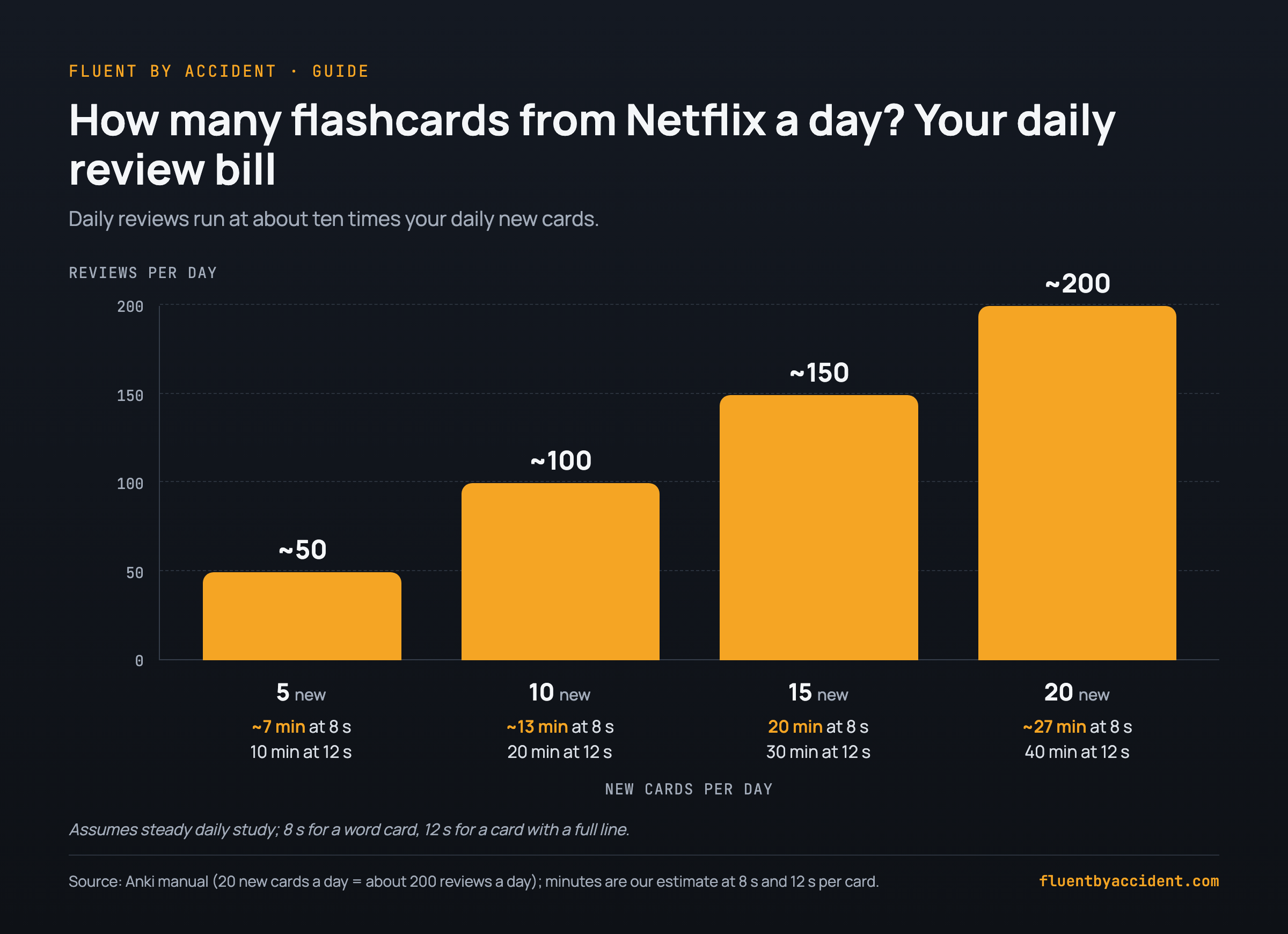
Pick the row that matches the minutes you will really spend and cap new cards there, not at what the episode offers. Extra words go on a "for later" list.
The reviews pay off. A 2022 meta-analysis of 48 experiments found spaced practice had a medium-to-large effect on second language learning, with longer gaps beating shorter ones on delayed tests (Kim and Webb, 2022). Making cards yourself may help too: college students who made their own digital flashcards beat those given premade ones on a delayed test (Pan et al., 2023), though they studied course content, not a language. In those studies students were told which terms to learn; when learners pick their own content, the benefit is less clear (Learning and the Brain, 2024). The price is time, which one Bunpro Community member called the biggest downside of sentence mining (Bunpro Community).
FAQ
Can you export words from Netflix to Anki?
Netflix itself has no export, but browser extensions do. Language Reactor exports saved words for Anki or as CSV, optionally with images and audio. asbplayer sends cards straight to Anki through AnkiConnect. Migaku sends cards to its own review app or to Anki. You can also copy lines by hand. Whichever route you pick, keep the subtitle line on the card so the word keeps its meaning.
Is it legal to make flashcards from Netflix subtitles?
This is not legal advice. Netflix's Terms of Use say the service and its content are for "personal, non-commercial use only" and list archiving, reproducing and distributing content among the things users agree not to do (Netflix Terms of Use). The cautious approach: keep your cards private, don't share or sell decks containing clips, screenshots or full subtitle files, and don't download whole subtitle tracks. Planning to publish a deck? Check the rules where you live first.
Why do I forget words I saved from Netflix?
Usually for one of three reasons. The words were saved but never reviewed. The cards hold the word without its subtitle line, so a week later nothing tells you which meaning was meant. Or too many new cards a day piled up reviews you started skipping. The fix: keep the line on every card, cap new cards at what your daily minutes allow (about ten reviews per daily new card, per the Anki manual), and review before the next episode.
Do I need Anki to make flashcards from YouTube?
No. Any flashcard app with spaced repetition works, and you can make cards from YouTube by hand: pause, copy the caption line, add the translation and the timestamp. Anki matters only for some tools: asbplayer creates its cards in Anki, and Language Reactor's flashcard exports are built for it. Migaku and some dual-subtitle extensions have their own review. Whatever you use, check automatic captions by ear first.
How do I make flashcards from Netflix on my phone or TV?
Browser extensions like these need a computer: Language Reactor lists Chrome on Windows and macOS, and most of the tools above are desktop browser extensions. On a TV or phone, note the show, episode and timestamp (or the line itself) in a notes app while you watch. Make the cards later on a computer, where you can replay the line with subtitles and check the wording before it goes on a card.