YouTube dual subtitles: the best extensions we checked (2026)
YouTube can't show two subtitles at once. We checked 8 extensions for YouTube dual subtitles on caption quality, auto-generated captions, free word saving and recent bug reports.

You find a Spanish cooking channel on YouTube, turn on captions and pick Auto-translate. The Spanish line disappears: YouTube swapped it for a machine translation. You wanted both lines on screen.
YouTube shows one caption track at a time, styled the way you set it (YouTube Help). Auto-translate is picked in that same Subtitles/CC menu instead of a listed language (YouTube Help, Android steps), so the translation takes the original's place. Getting YouTube dual subtitles takes a browser extension on a computer.
Of the 8 extensions we checked, Trancy has the best free plan on YouTube, Language Reactor is the most complete if you pay, and Fluent by Accident (which we make) suits you if you want flashcards built in. Skip YouTube™ Dual Subtitles, the first result in our October 9, 2026 web search for this phrase: reviews since May 2026 say it no longer works (store reviews). We make one of these tools, so our limits are listed too.
Last checked: October 9, 2026 (store listings, vendor pricing and help pages, changelogs, forums and recent reviews). Not a complete list of YouTube subtitle extensions: these are the 8 we checked.
Can YouTube show two subtitles at the same time?
Short answer: No. YouTube shows one caption track, so an auto-translated track replaces the original line on screen. Two lines need an extension in a desktop browser.
Auto-translate has run Google Translate on caption tracks since 2008 (YouTube Official Blog, 2008).
Auto-dubbing creates translated audio; dubbed videos are marked "auto-dubbed" in the description, and you can switch back to the original audio track (YouTube Help). Do that before you touch the subtitles. Burned-in subtitles are part of the picture; Language Reactor staff confirmed they cannot be turned off (LR forum, March 2026).
Setup in 4 steps (menus differ per extension):
- Install an extension from the ranking below that supports your desktop browser.
- Reload the YouTube tab.
- Turn on CC and pick the language you are learning for the top line.
- In the extension's settings, set your own language for the second line.
Auto-generated vs human captions: how to tell which one you have
Auto-generated captions come from YouTube's speech recognition: a "caption track created by Automatic Speech Recognition" (YouTube Help). YouTube lists 67 supported languages. It says their quality may vary and names mispronunciations, accents, dialects and background noise as causes (YouTube Help).
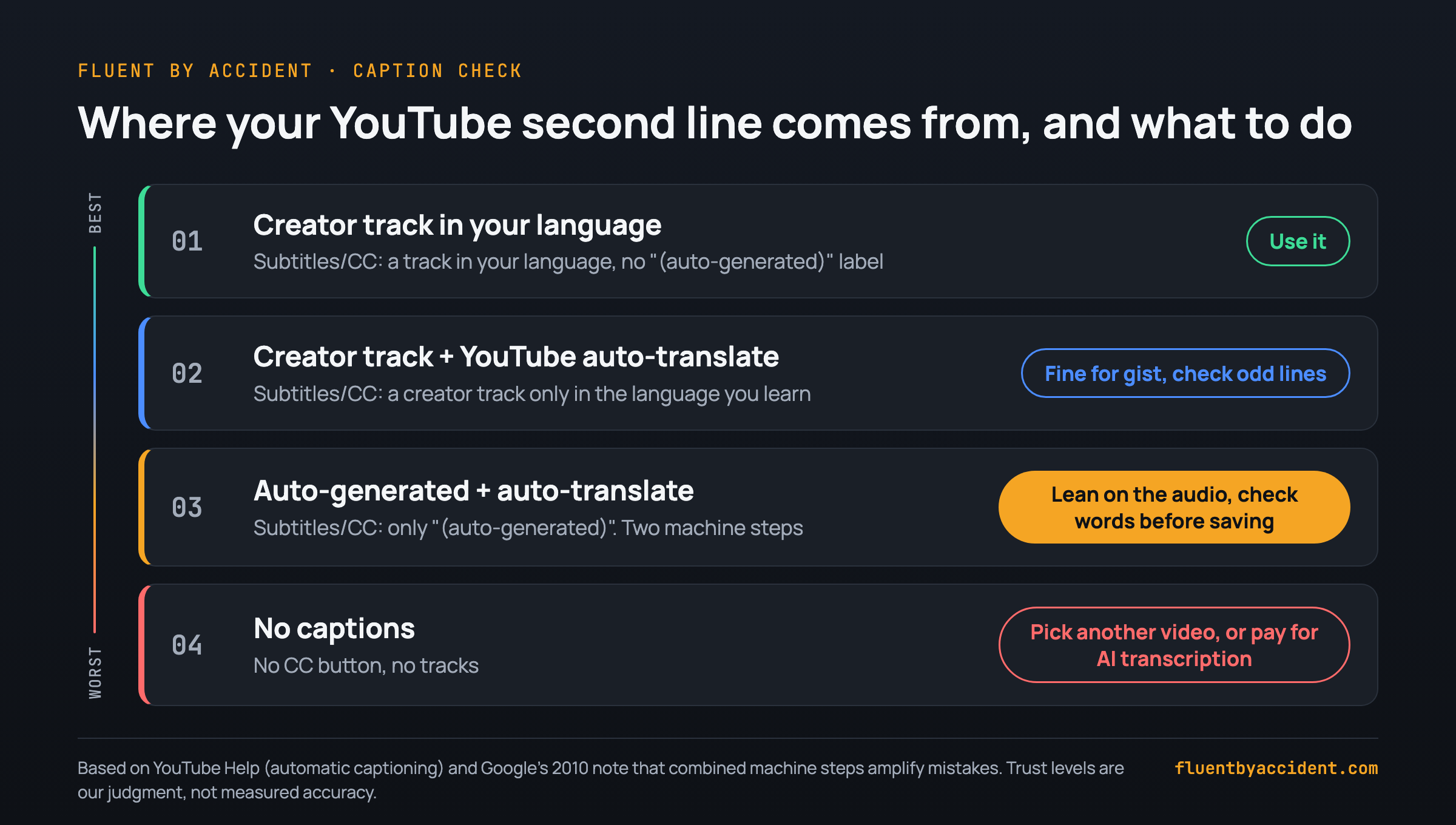
How to tell which one you have: open Settings (the gear) > Subtitles/CC. A track labelled "(auto-generated)" was made by speech recognition; a track without that label was uploaded by the creator (Rhode Island College guide). Creators can upload machine-made files too, so still run the check below.
A 2016 study of lecture videos found 7.7 phrase-level errors per minute in YouTube's auto-captions (Parton, 2016). Speech recognition has improved since, so treat that as history.
Automatic captions fail or never appear with an unsupported language, poor sound, overlapping speakers, two languages at once, a long silent start, a very long video, or unfinished processing. Live streams get them in English only, and with several audio tracks they follow the default language, so they may not match the dub you hear (YouTube Help).
30-second caption check before you study a video:
- Subtitles/CC: any track in your target language without "(auto-generated)"?
- Watch 20 seconds: do names, numbers and punctuation look right?
- Whole sentences, or a rolling stream of 2 to 4 words?
- Music, crosstalk or a second language? Expect gaps.
- Original audio or an auto-dub? Switch to the original first.
Is YouTube's auto-translate good enough for learning?
Auto-translate is machine translation of whatever track you start from. Start from an auto-generated track and you stack two machine steps. Google warned in 2010 that when the two technologies work together, "mistakes can be amplified" (Google Translate Blog, 2010). Both have improved; the mechanism holds.
- With creator captions in two languages, translate from the one closer to yours. One Japanese learner on the Language Reactor forum wanted translations built from the creator's English track, not the context-heavy Japanese one (LR forum, 2024).
- Expect more slips in context-heavy languages such as Japanese and Korean, and in slang.
Use the translation as a backup. In a 2022 eye-tracking study, bilingual subtitles helped learners grasp meaning, but only attention to the English target words, not to the translations, predicted learning gains (Wang & Pellicer-Sánchez, 2022). It is one study of Chinese learners of English and one documentary, but it supports a habit: read the top line, glance down when stuck. More on why watching videos you mostly understand teaches you a language.
Best extensions for YouTube dual subtitles in 2026, compared
| Tool | Price | Second line on YouTube | No captions? | Save words free | Updated |
|---|---|---|---|---|---|
| Trancy | Free; Premium $42/yr | Video's captions + translation; sentence segmentation | AI Subtitle, Premium, 40/day | 100 words + 50 sentences | Sep 18, 2026 |
| Language Reactor | Free; Pro $40/yr on its 2024 screen | Video's own tracks free; its machine translation is Pro | ASR subtitles, Pro | No (Pro) | Jul 1, 2026 |
| Fluent by Accident | Free; Pro $6.99/mo or $49/yr | Track in your language, else YouTube's auto-translate | "No subtitles" message | 20 words | Oct 9, 2026 (v0.32.5, manual install) |
| Dual Subtitles for YouTube™ (gythiro) | Free, open source | YouTube's translation; rebuilds fragmented captions if needed | Nothing to show | No saving | Sep 12, 2026 |
| Immersive Translate | Free; Pro €107.88/yr | Bilingual subtitles, free under fair use | AI subtitles, Pro | No (translator) | Sep 25, 2026 |
| eJOY | Unlimited saving $59.99/yr | Two tracks + AI translation layer | Not documented | Unlimited is paid | Aug 17, 2026 |
| Dualsub | Free; AI packs $4.99/7 days | YouTube's captions; AI needs an API key | Not offered | No | Jul 23, 2026 |
| DoubleSubs | Free to install | Dual captions + popup translation | Not documented | Phrasebook | Sep 29, 2026 |
Data as of October 9, 2026, linked in each entry below; browser and phone support is in the table further down. Known issues are user reports, and any extension can break when YouTube changes its player.
The 8 YouTube subtitle extensions we checked, ranked
Criteria, in order: works on YouTube today (recent update, no wave of "broken" reports), handling of auto-generated and missing captions, what the free plan saves, how you get words out, and price.
1. Trancy: the best free plan on YouTube
Free: bilingual subtitles, unlimited lookups, YouTube sentence segmentation, 100 saved words and 50 sentences (Trancy pricing). Premium adds Whisper transcription for YouTube videos with no captions, 40 a day (Trancy manual): $42 a year list, $29.40 in a promo ending October 15, 2026. It runs in Chrome, Edge, Firefox and Safari (Trancy), plus phone apps. Store: 300,000 users, 4.7/5 from 2,800 ratings, v7.9.4, updated September 18, 2026 (Chrome Web Store).
Known issues: in 2026 store reviews, one user reported having to log in again every day and two reported Arabic shown left to right (reviews).
Who it is for: learners who want to save words without paying, or who use Firefox, Safari or a phone.
2. Language Reactor: the most complete, if you pay
Subtitles the video provides are free (LR staff); Pro adds machine translations and saving words (LR FAQ), with Anki export (LR help). Its 2024 upgrade screen showed $6 a month or $40 a year (LR forum); check Settings for yours. Chrome only (LR staff). Store: 2,000,000 users, 4.2/5 from 4,400 ratings, v5.1.8, updated July 1, 2026 (Chrome Web Store).
Known issues: users reported Pro ASR subtitle errors in August to October 2026 (LR forum, store reviews). In September 2026, staff confirmed some YouTube translations were split into the wrong sentence and forwarded a fix (LR forum).
Who it is for: learners who will pay and want Anki cards with sentence context.
What users say: A 2025 r/languagelearning reply called it painless "for the most part"; others there prefer the free asbplayer + Yomitan setup (thread).
3. Fluent by Accident: flashcards built in (we make this one)
We make this one, so weigh our take accordingly. Fluent by Accident shows two subtitle lines on YouTube, Netflix, Prime Video, Disney+ and HBO Max. On YouTube it prefers a creator track over an auto-generated one; the second line is a track in your language if one exists, otherwise YouTube's own auto-translate. Click a word to translate it; saved words become spaced-repetition flashcards, with CSV export. Free saves 20 words; Pro is $6.99 a month or $49 a year, unlimited.
Limits: Chrome desktop only; installed by hand in Developer mode, not from the Chrome Web Store; sign-in required; no AI on the free plan. On YouTube the translation is YouTube's own, auto-captions are not rebuilt into sentences, and videos without captions get a "no subtitles" message. Too new for public reviews.
Who it is for: learners who want YouTube and Netflix words in one flashcard deck, no Anki setup.
4. Dual Subtitles for YouTube™ (by gythiro): the best free viewer
It uses YouTube's whole-track translation; when a track cannot be translated, it rebuilds fragmented auto-captions into full sentences first. It exports .srt files and accepts your own API key. Free, MIT open source, no account, Chromium 111+ (developer site). Store: 10,000 users, 4.9/5 from 42 ratings, v3.7.0, updated September 12, 2026 (Chrome Web Store).
Limits: no word lookup or saving. Several extensions share this name, so check the developer. Known issues: no "not working" reports in recent store reviews; one October 2026 reviewer found the settings hard to find (reviews).
Who it is for: anyone who wants two clean lines and no account.
5. Immersive Translate: a translator that also does YouTube
Free: YouTube bilingual subtitles, unlimited under fair-use rules. Pro (€107.88 a year, as shown to a European visitor) adds AI subtitles for videos without captions, 1,000 minutes a month (pricing). Store: 3,000,000 users, 4.0/5 from 3,100 ratings, v1.33.3, updated September 25, 2026 (Chrome Web Store).
Limits: a translator, not a vocabulary tool, so no word saving; the Pro price we saw was in euros, so yours may differ; how it splits rolling auto-captions is not documented. Known issues: no recurring YouTube complaints in recent store reviews; one October 2026 reviewer said the paid limits were not clear before installing (reviews).
Who it is for: people who want one extension for web pages, PDFs and YouTube.
6. eJOY: built for English learners
On YouTube it shows two original tracks plus an AI translation layer and saves phrases to a notebook (eJOY help). Unlimited saving starts at Pro Voca: $26.99 per 3 months or $59.99 a year (eJOY plans). A September 2026 reviewer has to re-pick the subtitle language every time (reviews). Store: 700,000 users, 4.8/5 from 5,000 ratings, v7.1.51, updated August 17, 2026 (Chrome Web Store).
Who it is for: English learners who want a dictionary and phrase notebook.
7. Dualsub: YouTube-focused, also on Firefox
YouTube's captions are free; its own AI translation is built for English subtitles, needs an API key and has a free quota (Dualsub docs), then $4.99 per 7 days or $9.99 per 30 days (pricing). 2026 reviewers mention API-key trouble, a bot check and mixed "not working" reports (reviews). Store: 100,000 users, 3.6/5 from 477 ratings, v2.71.1, updated July 23, 2026 (Chrome Web Store); on Firefox, 4.2/5 from 125 ratings, Android included (add-on).
Who it is for: Firefox users, including on Android, who mainly watch YouTube.
8. DoubleSubs: simple and free to install
Dual captions on YouTube and Netflix, a phrasebook, select-to-translate; free to install, no published price (DoubleSubs). Store: 6,000 users, 4.1/5 from 66 ratings, v3.12, updated September 29, 2026 (Chrome Web Store).
Who it is for: casual viewers who want two lines and a phrasebook.
Skip for now: YouTube™ Dual Subtitles (dual-subtitles.com). It has 200,000 users and ranked first in our web search for this phrase on October 9, 2026, but was last updated November 29, 2024 (Chrome Web Store). Reviews from May to September 2026 say it no longer works and can break YouTube's own captions.
What happens when a YouTube video has only auto-generated captions, or none?
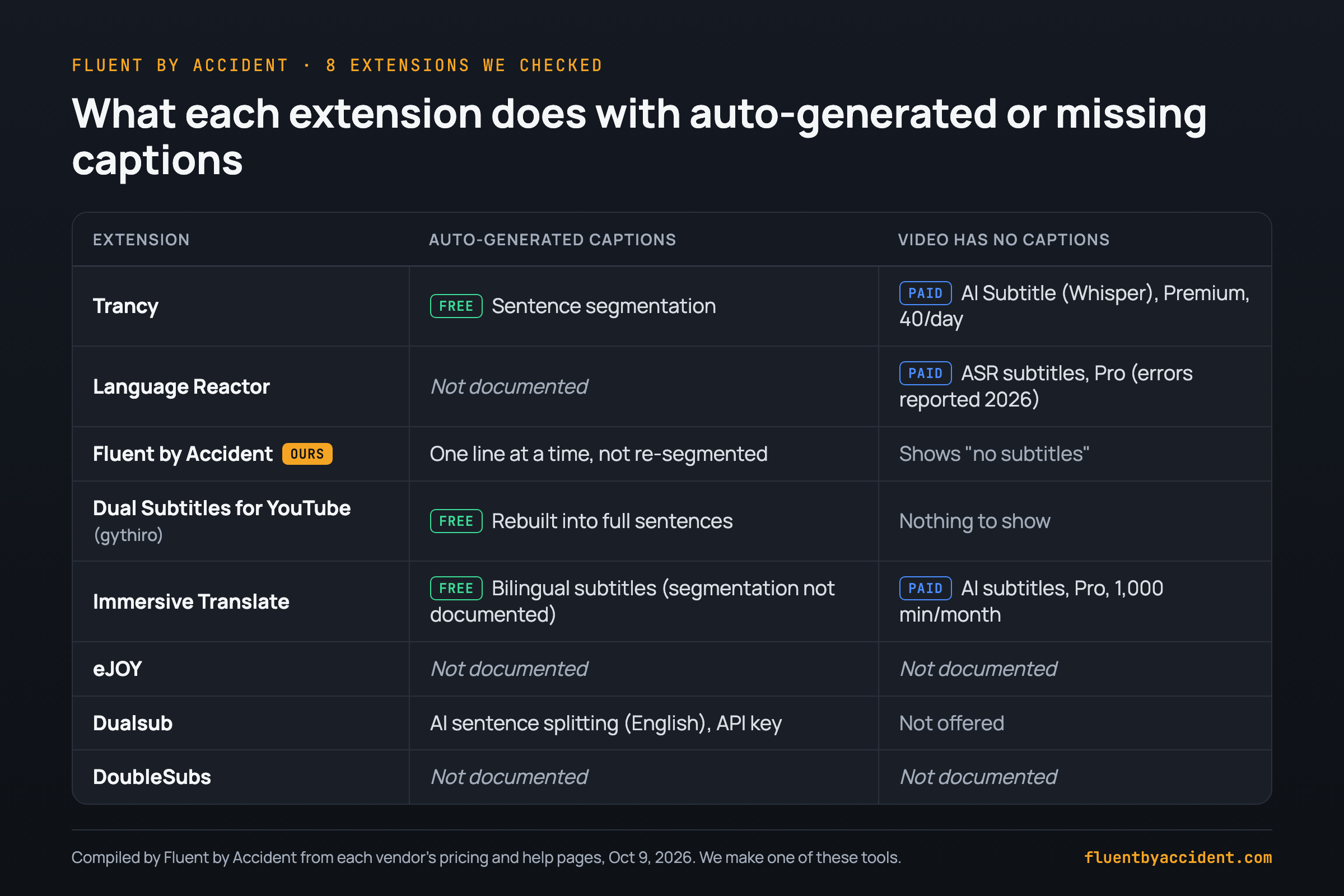
Every extension here reads YouTube's captions, so with none, most show nothing; one small extension's listing says a missing track "cannot be invented" (Chrome Web Store).
Auto-generated captions arrive as a rolling stream. Trancy (free), gythiro's extension and Dualsub's AI translation (built for English subtitles, needs an API key, paid after a free quota) rebuild them into sentences; Fluent by Accident shows them one line at a time. With no captions at all, only paid AI transcription helps: Trancy Premium, Immersive Translate Pro, or Language Reactor Pro's ASR subtitles (errors reported in 2026).
Before you pay for transcription: check other videos on the channel. Captions are set per video, so some uploads may have creator tracks.
Can you get YouTube dual subtitles on Android, iPhone or Firefox?
None of the tools we checked adds a second line inside the YouTube app. On a phone, use Trancy's own iOS and Android apps, or Dualsub or Immersive Translate in Firefox for Android (add-on). On desktop Firefox: Trancy, Dualsub or Immersive Translate.
Standalone iPhone apps that add bilingual subtitles to YouTube videos exist too (example); we did not check them.
| Tool | Chrome | Edge | Firefox | Safari | Phone |
|---|---|---|---|---|---|
| Trancy | Yes | Yes | Yes | Yes | iOS and Android apps |
| Language Reactor | Yes | No | No | No | No |
| Fluent by Accident | Yes | No | No | No | No |
| Dual Subtitles for YouTube™ | Yes | Yes | No | No | No |
| Immersive Translate | Yes | Yes | Yes | Yes (Mac) | Firefox for Android; iOS and Android apps, YouTube not checked |
| eJOY | Yes | Yes | Not listed | Not listed | Not listed |
| Dualsub | Yes | Yes | Yes | No | Firefox for Android |
| DoubleSubs | Yes | Yes | Not listed | Not listed | Not listed |
Which dual subtitle extension should you install for YouTube?
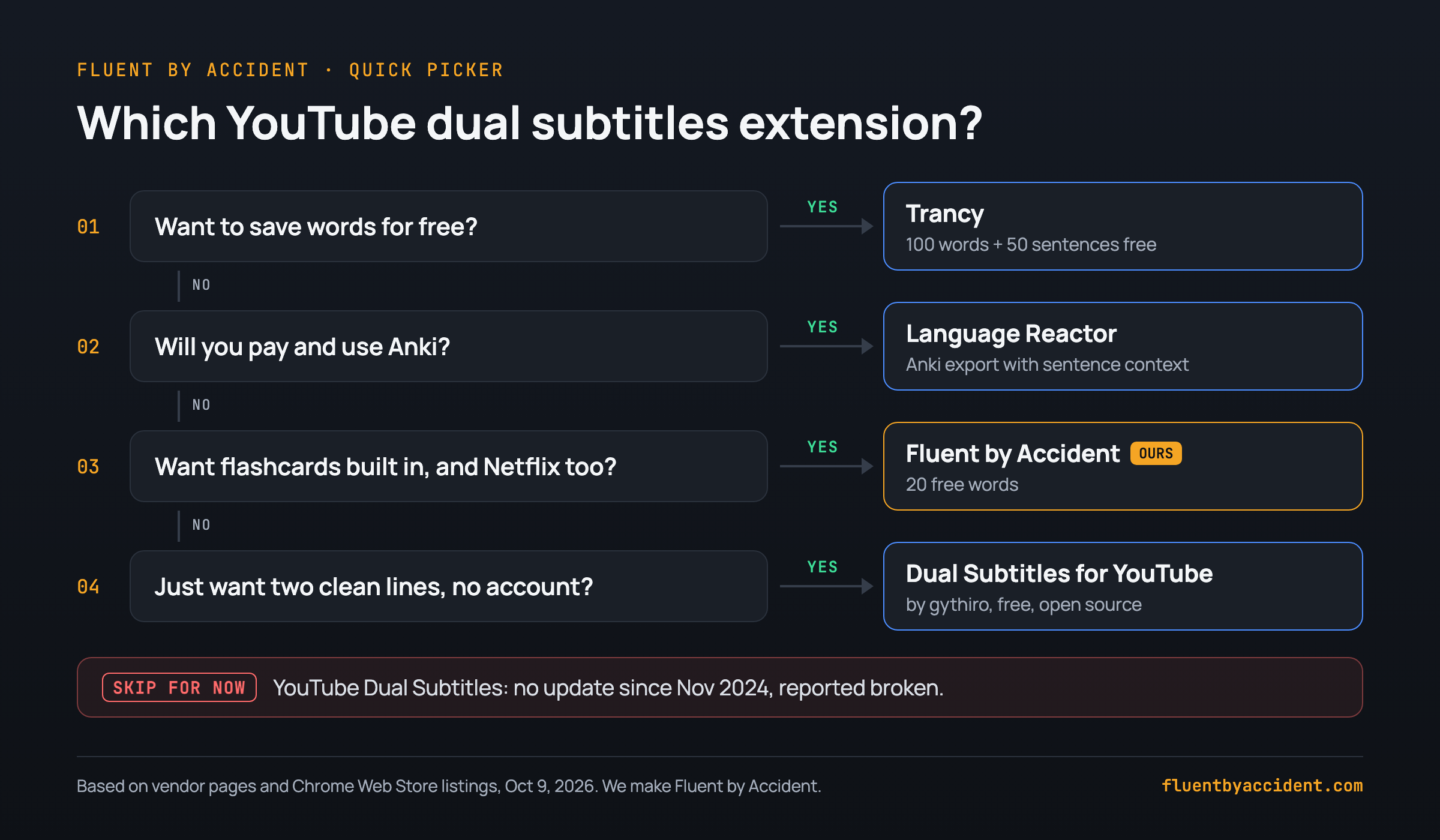
Not in the picker:
- Firefox, Safari or a phone: Trancy.
- Already translate web pages and PDFs: Immersive Translate.
- Learning English specifically: eJOY.
Run the 30-second caption check first, then use the dual subtitle method step by step on YouTube. Also on Netflix? Try these Netflix shows to learn Spanish, by level.
How to read reviews: Developers often recommend their own tools. In July 2026, one developer on this list reviewed a competitor's extension and linked their own (reviews), and builders reply in Reddit threads too (r/learnfrench). We are a vendor too, hence the links.
FAQ
Why are my YouTube dual subtitles not showing or out of sync?
Start with the video: with no caption track there is nothing to translate (YouTube Help), and burned-in subtitles are part of the picture, so no extension can hide them (LR forum). Ad blockers can interfere: Language Reactor staff suggest disabling other extensions, especially ones that block ads (LR forum).
YouTube also tests player changes; staff suspected a YouTube A/B test when one user's captions vanished early (LR forum). Still broken? Check the extension's last update date and its forum.
Why does YouTube's auto-translate replace the original subtitle?
YouTube's player renders one caption track. Auto-translate is chosen in the same Subtitles/CC menu as the original languages, so the translated track is shown instead of the original. Extensions work around this by drawing a second line over the player. If the source track is auto-generated, you get machine translation on top of machine transcription, and Google noted in 2010 that mistakes can compound when the two combine.
Are YouTube auto-generated subtitles accurate enough to learn from?
Often good enough for the gist when speech is clear, but YouTube says quality may vary with accents, dialects, mispronunciations and background noise. Open Settings > Subtitles/CC and look for the "(auto-generated)" label. Use a creator track in your target language when one exists. If not, lean on the audio and look a word up before you save it.
Live streams get auto-captions in English only.
Is there a free dual subtitle extension for YouTube that saves words?
Yes. Trancy saves 100 words and 50 sentences free, the largest published free limit among the tools we checked. Fluent by Accident, which we make, saves 20 words free and turns them into flashcards. DoubleSubs has a phrasebook with no published cap.
Language Reactor needs Pro to save words, and gythiro's free Dual Subtitles for YouTube™ saves nothing. Immersive Translate shows bilingual subtitles free but is not a word-saving tool.
Can I get dual subtitles in the YouTube app on Android or iPhone?
Not in the YouTube app itself, which shows one caption track. Trancy's own iOS and Android apps are the main phone option among the tools we checked. On Android, Dualsub and Immersive Translate also run in Firefox for Android. Language Reactor, Fluent by Accident and gythiro's extension need a desktop browser.
On a TV, play YouTube in Chrome on a laptop connected by HDMI.
Sources
Checked October 9, 2026. YouTube Help: automatic captioning, caption settings, automatic dubbing. YouTube Official Blog, 2008. Google Translate Blog, 2010. Wang & Pellicer-Sánchez, 2022. Parton, 2016. Vendor pages, store listings and forum threads are linked in each entry above, plus Dualsub pricing.