Is Language Reactor Pro Worth It? 2026 Review
Pro adds machine translation, saved words with Anki export and subtitles for dubbed audio. Here is the October 2026 price, what the free version already does, and a buy or skip table.
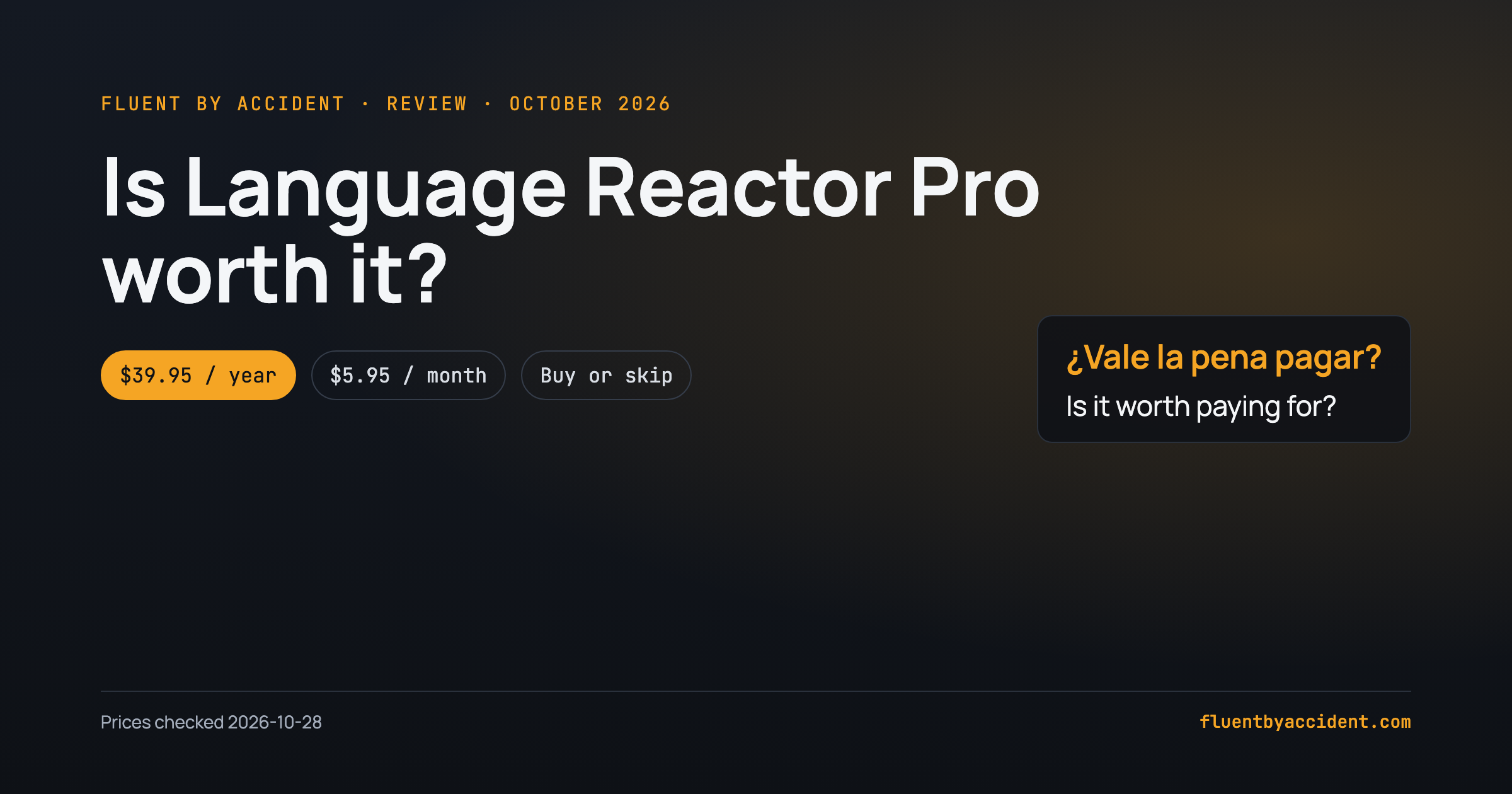
Language Reactor Pro is worth it only if you want to save words and export them to Anki, or you want machine translation and subtitles for dubbed audio on Netflix; for two subtitle lines built from Netflix's own human translations, the free version already covers you. Pro costs $5.95 a month, $13.95 for three months or $39.95 a year, according to the prices Language Reactor's own Pro page loaded from its checkout provider on October 28, 2026 (checked from the US).
That makes the yearly plan $3.33 a month, which is cheap for a tool you use daily and poor value for one you open twice a month. The rest of this Language Reactor Pro review lays out exactly what the paid tier unlocks, what it costs in three currencies, and a buy-or-skip table by learner type.
Last checked: October 28, 2026.
How we tested: On October 28, 2026 we checked Language Reactor version 6.0.1 for Chrome (the version returned by the Chrome update service and listed in the extension's manifest). We read the Pro feature list word for word from the text inside the 6.0.1 package and the languagereactor.com site, pulled live prices for the US, UK and Germany from the price feed Language Reactor's checkout uses, and read the manifest to see which sites the extension runs on (Netflix, YouTube, languagereactor.com, plus a script for Amazon sites). We did not buy Pro and did not run a paid account; this review is built from Language Reactor's own feature text, live prices and user reports. We did not test Prime Video support.
What does Language Reactor Pro include?
Language Reactor's own interface lists Pro in four lines under the heading "Pro mode includes:". Each one, with LR's tooltip and what it means in practice:
- "Machine translations." LR's tooltip: "More accurate translations that better capture original meaning." In practice, the second subtitle line can be a machine translation of the original subtitles instead of the human subtitle track Netflix happens to offer. LR's settings text adds a fair warning: machine translations "show literal meaning and sentence structure but may contain errors", while human translations "better handle idioms and expressions."
- "Save words and phrases." Tooltip: "Track your vocabulary progress with automatic highlighting. Export to Anki flashcards." This is the feature most Pro buyers are actually paying for.
- "Subtitles for dubbed content." Netflix often has dubbed audio in other languages but no matching subtitles. LR's text says it "can create subtitles from the audio, so you can study, for example, German with Breaking Bad."
- "Support the developers." Not a feature, but honest: LR's welcome screen says machine translation "used to be free, but this is an expensive service to provide."
Two smaller extras sit outside that list. LR's AI helper, Lexa, gets "a more intelligent model that may give better responses" in Pro mode. And on PhrasePump, LR's developer was quoted on LR's forum (relaying a Reddit comment) saying paying users "can star specific phrases to review again and change the order in which you learn words. Free is fine though."
There are limits. A Pro subscriber on the same forum thread quoted LR's FAQ: "Some quotas apply for machine translations", and one subscription covers "Netflix, Youtube and LanguageReactor.com website". Trancy, a competing tool, puts the machine translation cap at "up to 5 hours/day"; we could not confirm that number on LR's own pages. The 6.0.1 package also contains daily-limit messages for AI chat and for audio processing.
| Feature | Free | Pro | Source |
|---|---|---|---|
| Second subtitle line from Netflix's human translations | Yes | Yes | LR settings text, LR FAQ via forum |
| Machine translation of the subtitles | No | Yes (quotas apply) | LR Pro list |
| Speech recognition on Netflix audio | No | Yes | LR homepage text |
| Subtitles for dubbed audio tracks | No | Yes | LR Pro list |
| Save words and phrases, highlighting | No | Yes | LR Pro list |
| Export saved words to Anki | No | Yes | LR Pro tooltip |
| Lexa AI helper | Standard model | "More intelligent model" | LR Lexa text |
| PhrasePump | Yes | Yes, plus starring and word order | Developer quote on LR forum |
How much is Language Reactor Pro in 2026?
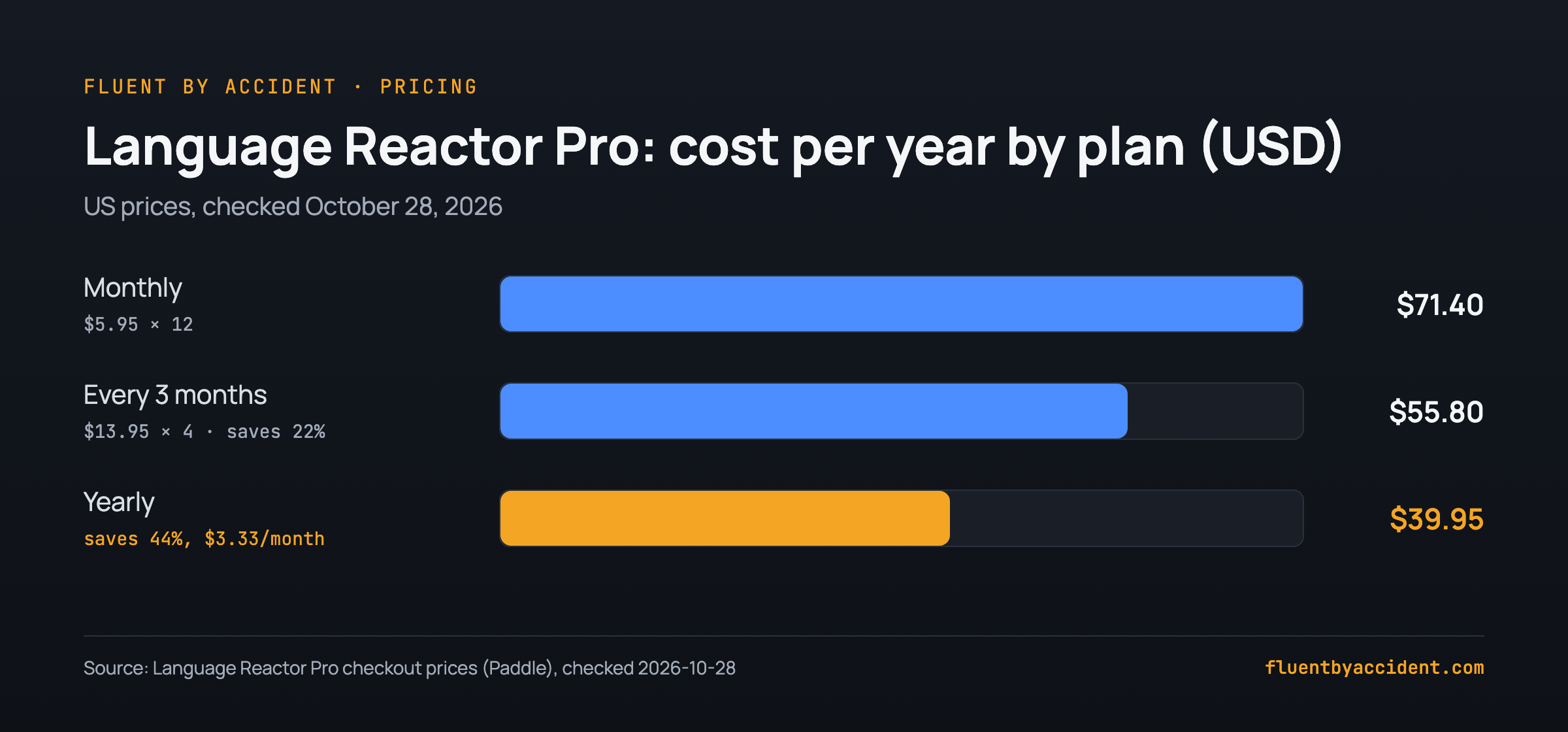
On October 28, 2026, the checkout feed behind the Language Reactor Pro page returned these gross prices (tax included for the UK and Germany). LR can change prices and they vary by country, so treat this as a snapshot.
| Plan | US (USD) | UK (GBP) | Germany (EUR) | Per month (USD) | Per year (USD) |
|---|---|---|---|---|---|
| Monthly | $5.95 | £4.56 | €5.45 | $5.95 | $71.40 |
| Every 3 months | $13.95 | £10.70 | €12.78 | $4.65 | $55.80 |
| Yearly | $39.95 | £30.63 | €36.60 | $3.33 | $39.95 |
Our arithmetic, from those prices:
- Monthly for a year: $5.95 × 12 = $71.40.
- Quarterly for a year: $13.95 × 4 = $55.80, or $4.65 a month. That saves $15.60, about 22% against monthly.
- Yearly: $39.95 ÷ 12 = $3.33 a month. That saves $31.45, about 44% against monthly. The UK (£54.72 vs £30.63) and German (€65.40 vs €36.60) prices give the same 44%.
Most reviews ranking for this search still quote an older figure. Lingopie and Mezzofanti Guild both say "$5 per month", and Trancy writes "~$5/mo". The live price we read was $5.95.
Payment runs through Paddle, which LR labels "Pay with credit card or PayPal". LR's text also offers a Bitcoin option where you pay any amount above a monthly minimum, with no recurring charge.
What do free Language Reactor users miss?
LR describes itself as "already packed with great free features", and Pro as adding "some extra magic". The practical gaps for a free user come down to three:
- No machine translation line. You rely on the human subtitle tracks the platform provides. If Netflix has no subtitles in your native language for a show, the free version cannot fill the second line with a translation. LR also notes machine translation "only works with the movie's original subtitles."
- No saved words and no Anki export. You can look things up while watching, but your vocabulary does not travel with you into a review system. If you already use flashcards, this is the biggest gap. There are other routes, covered in our guide on how to make flashcards from Netflix and YouTube.
- No subtitles for dubbed audio. Watching a Spanish show dubbed into German with German subtitles is a Pro-only trick, because Netflix rarely ships matching subtitles for dubs.
Free is enough if: you mostly watch shows that already have good human subtitles in both your target and native language; you keep vocabulary in a notebook or another app; you do not care about dubbed audio; and you watch a few hours a month rather than daily.
Is Language Reactor Pro worth it? Who should buy
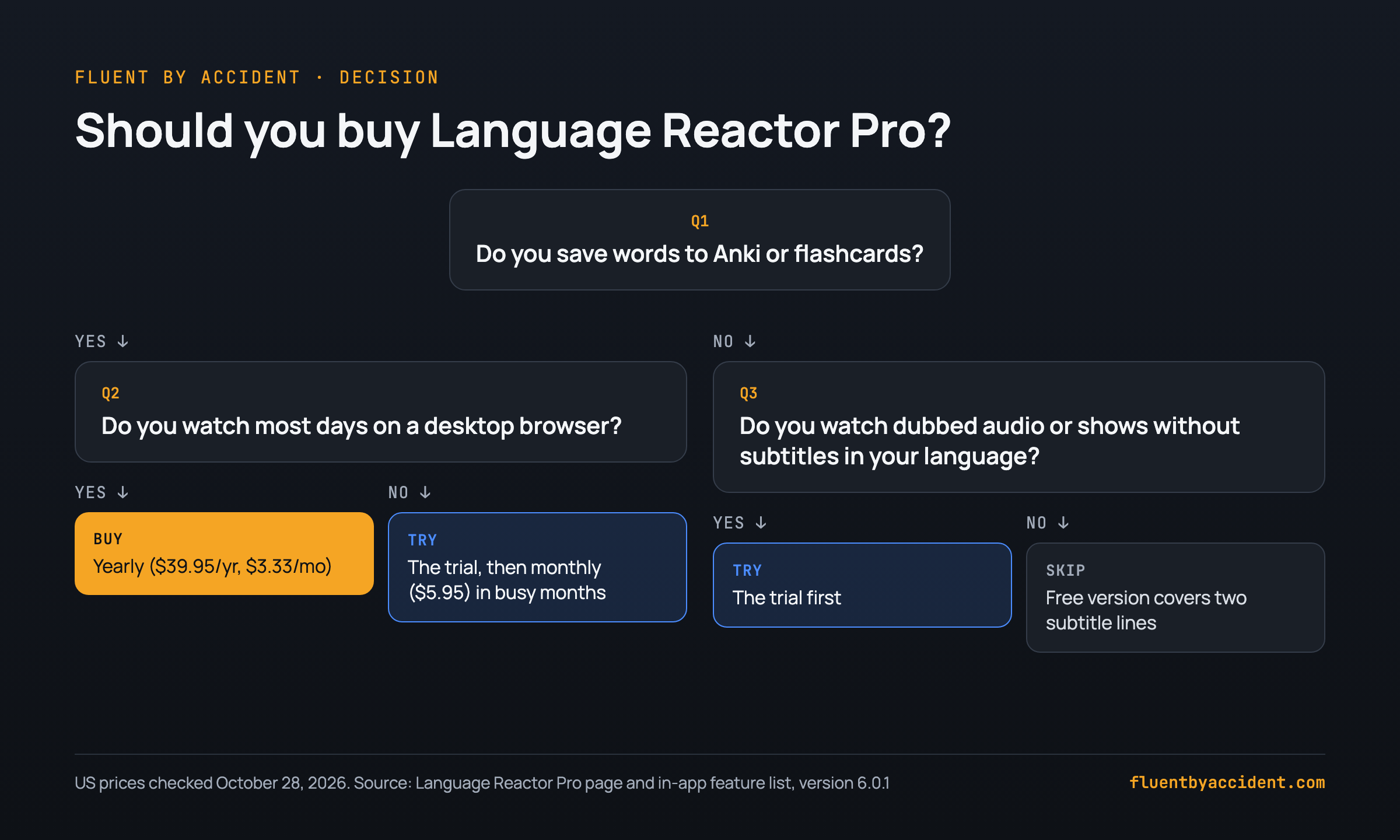
The honest answer depends on one habit: whether you turn what you watch into flashcards. Use this table to find your row.
| You are... | Verdict | Why |
|---|---|---|
| An Anki user who watches Netflix or YouTube on a laptop most days | Buy (yearly) | Saving words and Anki export are Pro-only, and $3.33 a month is low for daily use. |
| Watching dubbed Netflix in your target language | Try the trial, then decide | Subtitles for dubbed audio are Pro-only and generated from audio, so test quality on your own shows first. |
| Watching shows with no subtitles in your native language | Try the trial | Machine translation fills the second line, but LR warns it "may contain errors" and quotas apply. |
| Only wanting two subtitle lines | Skip | Human-translation dual subtitles work on the free version. |
| Mostly on YouTube channels with good human subtitles | Skip, or trial | The free version handles the second line; pay only if you need word saving. |
| Watching on a phone, iPad or TV | Skip | Language Reactor is a desktop Chrome extension. See dual subtitles on TV, iPad or phone. |
| Wanting grammar lessons or speaking practice | Skip | Pro adds translation and vocabulary tools, not a course or conversation practice. |
| Watching a few hours a month | Skip, or pay monthly in heavy weeks | At low use, $5.95 for a single month beats a year you will not use. |
A worked example, with assumed usage: if you watch 5 hours a week, that is about 260 hours a year. On the yearly plan, $39.95 ÷ 260 hours comes to roughly 15 cents an hour. At 1 hour a month (12 hours a year), the same plan costs about $3.33 an hour, and paying monthly only in the months you watch makes more sense.
What do users say about Language Reactor Pro?
We tried to collect Reddit opinions for this review, but Reddit blocked our fetcher on October 28, 2026, so we could not verify any thread and we are not quoting one. The opinions below come from Language Reactor's own forum and from published reviews, several of which are written by competitors. Read them as individual views, not facts.
An annual subscriber deciding whether to renew (LR forum, July 2024): User thomas_chapman wrote that he would "soon need to pay for another year's subscription" and asked, "Would you reinvest a year's subscription?" He pointed out that the team's last news post had been in August 2023. A Language Reactor team member, Hofit_Nagar, replied: "yes, we are working on it very actively." (thread)
An outage report (same thread, July 2024): User jitowix reported that people "haven't been able to use it on youtube for 3 days." If you hit something similar, our guide to fix Language Reactor when subtitles won't load covers the usual causes.
A user who left (same thread, October 2025): User Flaze9 said they were "tired of such a slow reaction from the team" and switched to another tool. The thread had 2.6k views when we checked.
Lingopie (a competitor, so weigh accordingly): Its review says "it's hard to justify the pro upgrade", calls the speech recognition "hit-or-miss" and the Anki export "clunky and outdated", while granting that unlimited word saving "is useful."
Trancy (also a competitor): Its February 2026 comparison concludes Pro "is worth it for desktop learners focused on Netflix and YouTube who rely on Anki", calling it "good value for that specific use case."
Mezzofanti Guild (links to Lingopie with affiliate links): Donovan Nagel's review calls LR "a feature-rich, well-designed video wrapper for subtitle analysis" and says "I can't argue with the price", while preferring Lingopie for his own use.
The pattern is consistent: reviewers who value Anki export see Pro as fair value, and the complaints are about development pace and reliability rather than the price.
Free trial and cancelling Language Reactor Pro
Here is what LR's own interface text in version 6.0.1 says about trying and stopping Pro. We did not go through checkout or cancel a subscription ourselves.
What LR's text says about trial and cancellation:
- Trial: "You can use Pro features for free for two weeks." (An older one-week variant of this message also exists in the package, so the length may vary.)
- Renewal: Pro is a subscription. LR's checkout label says "You can cancel after paying if you don't want auto-renew."
- Paying through Google: "Pro mode remains active for 30 days after your last payment."
- No-renewal option: the Bitcoin payment has "no recurring charge".
Our suggestion: start the trial on a weekend you plan to watch a lot, save at least 30 words, and try one Anki export before the trial ends. If the export does not fit your routine, you have your answer for free. If Pro features stop working mid-subscription, check our Language Reactor troubleshooting guide before contacting support.
If Language Reactor Pro isn't for you
If the table above pointed you to "skip", you do not have to give up dual subtitles. Our roundup of Language Reactor alternatives worth switching to covers tools for learners leaving LR, and the Netflix dual subtitle extensions we compared ranks the options side by side.
Quick recap: Buy Pro yearly if you export words to Anki and watch most days. Try the two-week trial if you want dubbed-audio subtitles or machine translation. Skip it if two human subtitle lines are all you need.
If you want two subtitle lines on Netflix, YouTube, Prime Video, Disney+ and Max with saved words going straight into spaced-repetition flashcards, Fluent by Accident does that too (there is a free download), and we make it, so weigh this accordingly.
FAQ
Is Language Reactor free?
Yes, the core of Language Reactor is free. LR describes itself as "already packed with great free features", and a Pro subscriber on LR's forum quoted the in-app FAQ saying Pro "primarily includes 2 additional features: machine translations and saving words and phrases." So the free version gives you a second subtitle line from the human translations the platform provides. Saving words, Anki export, machine translation and subtitles for dubbed audio require Pro. You need the Chrome extension, which runs on Netflix, YouTube and the languagereactor.com site.
How much does Language Reactor Pro cost?
On October 28, 2026, checked from the US, Language Reactor Pro cost $5.95 a month, $13.95 every three months or $39.95 a year. In the UK it was £4.56, £10.70 and £30.63; in Germany €5.45, €12.78 and €36.60, tax included. The yearly plan works out to $3.33 a month and saves about 44% compared with paying monthly for twelve months ($71.40). Many reviews still list "$5 per month", which is out of date. Prices can change, so confirm on LR's Pro page before you pay.
Is there a Language Reactor Pro free trial?
Yes. The text inside Language Reactor 6.0.1 says "You can use Pro features for free for two weeks." The package also contains an older message offering one week, so the exact length may depend on when and how you start it. The trial runs inside the extension rather than through the checkout, which shows no trial on the paid plans themselves. Use the trial to test the features you would actually pay for: save a batch of words, try an Anki export and, if you watch dubbed shows, check the generated subtitles on one episode.
Does Language Reactor Pro work on phones or iPad?
Language Reactor is a Chrome extension for desktop browsers, and the version we checked (6.0.1) runs on Netflix, YouTube and languagereactor.com, with a script for Amazon sites that we did not test. We did not find an official mobile app on Language Reactor's own pages. If you mostly watch on a phone, tablet or TV, Pro will not change that, so skip it and look at other setups for those devices instead. Our guide to dual subtitles on TV, iPad or phone covers the options.
Can you export Language Reactor words to Anki for free?
No. In Language Reactor's own feature list, "Save words and phrases" sits under "Pro mode includes", with the tooltip "Export to Anki flashcards." Without Pro you can still read two subtitle lines and look words up, but saving them into a vocabulary list and exporting them to Anki needs a paid plan or the trial. If Anki export is the only reason you would pay, compare the yearly price ($39.95 in the US on October 28, 2026) with free ways to build cards from shows by hand.
Is Language Reactor still being updated?
The Chrome update service served version 6.0.1 when we checked on October 28, 2026. Paying users have questioned the pace before: in July 2024 an annual subscriber on LR's forum asked whether to renew, noting the team's last news post was from August 2023, and a team member replied "yes, we are working on it very actively." In October 2025 another user in the same thread said they had switched tools over slow responses. Treat these as individual reports, and check the forum for recent activity before buying a year.
Sources
- Language Reactor, Pro mode page, prices loaded from its Paddle checkout feed for the US, UK and Germany, checked 2026-10-28.
- Language Reactor, site bundle and extension 6.0.1 interface text (Pro feature list, trial, cancellation, Lexa and translation strings), checked 2026-10-28.
- Google, Language Reactor on the Chrome Web Store, version 6.0.1 via the Chrome update service and manifest, checked 2026-10-28.
- Language Reactor forum, Pro features, joan_LanguageProcess, 2023-07-14.
- Language Reactor forum, Is Language Reactor being developed? Worth continuing my subscription?, posts from July 2024 and October 2025.
- Lingopie, Language Reactor Review: Why Lingopie Is The Better Choice, 2026 (competitor).
- Donovan Nagel, Mezzofanti Guild, The Problem With Language Reactor (Review) (contains affiliate links to Lingopie).
- Trancy, Language Reactor Pro vs Trancy (2026), 2026-02-17 (competitor).