Dual Subtitles on Firefox, Edge, Safari and Brave
Which dual subtitle tools work in Firefox, Edge, Safari and Brave, checked against each store listing in October 2026, with install steps per browser and the Netflix quality limits to expect.

For dual subtitles in Firefox, install one of the add-ons published on Firefox Add-ons (SubText, InterSub, asbplayer, FluentAI or Dualsub), because Language Reactor has no official Firefox add-on. Edge and Brave run extensions from the Chrome Web Store, while Safari has only a few small Mac App Store extensions, such as Rubi, so on a Mac, Chrome, Edge or Firefox give you more choice.
Last checked: October 28, 2026.
Most guides about two subtitle lines assume Chrome. This page answers a narrower question, browser by browser, with store data behind every claim: which tool installs in your browser, and what do you give up?
How we tested: On October 28, 2026 we checked the Firefox Add-ons store (AMO) listing data for 6 add-ons (users, last update, supported apps, stated sites), searched AMO for "dual subtitles" (228 results) and "language reactor" (no official listing), searched the Mac App Store for the 7 tool names in the table plus "dual subtitles" and NflxMultiSubs (1 of the 7 names matched a Mac app, maker unconfirmed), read Netflix's supported-browser table, and read Microsoft's instructions for installing Chrome Web Store extensions in Edge. We covered 4 browsers: Firefox, Edge, Brave and Safari. We did not run playback tests. Chrome Web Store listings were blocked by a consent page from our test setup, and the Edge Add-ons search did not return results to our requests, so Edge and Brave cells say "Not checked" where we could not confirm a listing.
Which dual subtitle tools work in which browser?
The short version: Firefox has 5 add-ons published by their own makers, Edge and Brave borrow the Chrome ecosystem, and Safari has a few small Mac App Store extensions. The table below maps each tool to each browser using only what the stores and official help pages showed on our test date. For which tool is best on Netflix, see our ranked comparison of Netflix dual subtitle extensions; this page only answers where each one runs.
| Tool | Firefox (AMO) | Edge | Brave | Safari | Netflix named in listing? |
|---|---|---|---|---|---|
| SubText | Yes, official add-on | Not checked | Not checked | Not found (a Mac app also named Subtext exists, maker unconfirmed) | Yes |
| InterSub | Yes, official add-on | Not checked | Not checked | Not on Mac App Store | Yes |
| asbplayer | Yes, official add-on | Not checked | Not checked | Not on Mac App Store | Yes |
| FluentAI | Yes, official add-on | Not checked | Not checked | Not on Mac App Store | Yes |
| Dualsub | Yes, official add-on (also Firefox for Android) | Not checked | Not checked | Not on Mac App Store | Not named ("YouTube and other video websites") |
| Language Reactor | No official add-on (a third-party copy exists) | Chrome Web Store version reported to work by users on its forum (2022-2023 posts) | Not checked | Not on Mac App Store | Yes (Netflix and YouTube, official site) |
| Fluent by Accident (we make this one, so weigh our take accordingly) | No, built for Chrome | Our install guide covers Edge via Load unpacked | Our install guide covers Brave via Load unpacked | No | Yes (download page) |
Data from AMO listings, the Mac App Store, Microsoft Support, the Language Reactor forum and site, and our own download page, checked October 28, 2026. "Not checked" means we could not verify a listing for that browser on that date, not that the tool fails there. Many Edge and Brave cells are empty because neither the Chrome Web Store nor Edge Add-ons returned listings to our test setup that day.
Dual subtitles in Firefox: the add-ons that exist
Firefox is the only browser here where we checked a dedicated add-on store (AMO) listing by listing. An AMO search for "dual subtitles" returned 228 results on our test date, but those are search hits, not all of them dual subtitle tools. One of the top hits, "YouTube™ dual subtitles", still had about 2,610 users while showing a last update of August 27, 2022, which is a good reminder to check the update date before you install anything.
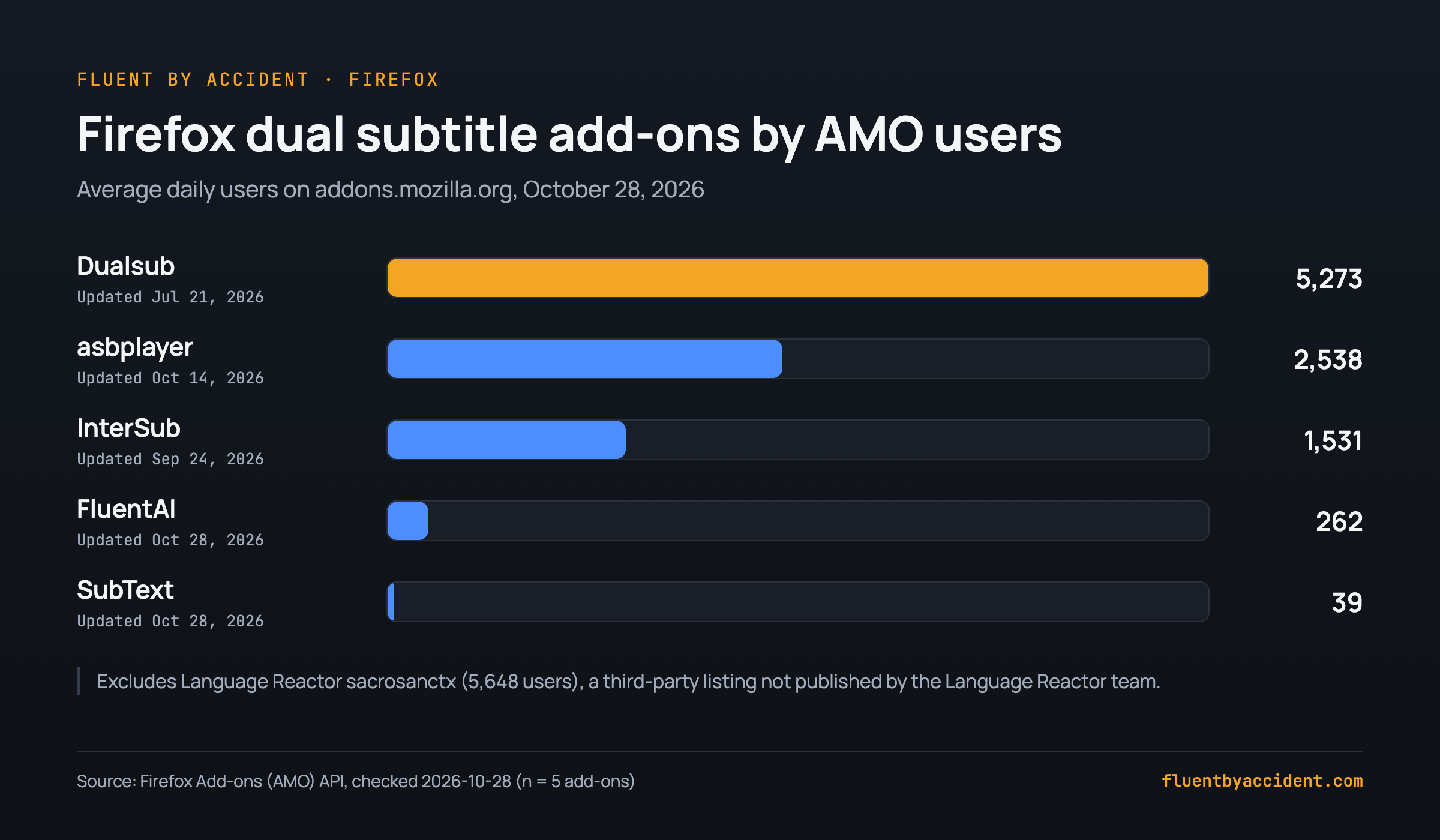
These five add-ons are published by the tools' own makers and were updated in 2026. User counts are AMO's average daily users, as of October 28, 2026.
- Dualsub (AMO listing): about 5,273 users, last updated July 21, 2026, available for Firefox on desktop and Android. The listing describes it as a tool to "translate and display dual subtitles on YouTube and other video websites", so it is YouTube-first. If YouTube is your main source, our guide to dual subtitles on YouTube goes deeper.
- asbplayer (AMO listing): about 2,538 users, last updated October 14, 2026. It lets you "bring your own subtitle files, or use auto-detected subtitles on popular streaming services like Netflix and YouTube". Its makers describe it as "completely free, open source" on the listing.
- InterSub (AMO listing): about 1,531 users, last updated September 24, 2026. The listing names Netflix, YouTube, Prime Video, Disney+, HBO, Crunchyroll and Coursera, and calls the extension "completely free".
- FluentAI (AMO listing): about 262 users, last updated October 28, 2026. The listing names Netflix, YouTube, Prime Video and Disney+.
- SubText (AMO listing): about 39 users, last updated October 28, 2026. It lists YouTube, Netflix, Disney+, Prime Video, Hulu, Viki and Udemy, says machine-translated dual subtitles and word hover "work without an account", and sells a paid subscription for "context-aware AI translations".
Firefox install checklist: 1) Open the add-on's AMO page from the links above. 2) Check the "by" line and the "Last updated" date. 3) Click "Add to Firefox" and read the permission prompt. 4) Pin the add-on from the puzzle-piece menu. 5) Open Netflix or YouTube, start a video and turn on the second subtitle line in the add-on's panel.
Does Language Reactor work on Firefox?
No official version exists. Our AMO search for "language reactor" found no listing published by Language Reactor itself on October 28, 2026. According to a thread on the Language Reactor user forum, the Language Reactor front page once showed Firefox and Edge as "Coming Soon" in April 2022, and no Firefox release had appeared on AMO by October 28, 2026.
What you will find is "Language Reactor sacrosanctx", with about 5,648 users, published by an account named colonelmd, with no homepage listed and a last update of September 17, 2025. It is not published by the Language Reactor team. We make no claim about its safety, but you should know who you are giving page access to before installing an add-on that can read the pages you watch on.
If you want Language Reactor-style features in Firefox, the official add-ons in the section above are the safer route. Our list of Language Reactor alternatives compares the options for switchers, and if you stay on Chrome or Edge with the original, here is how to fix Language Reactor loading errors.
Tip: On any AMO page, look at the "by" line under the add-on name and the homepage link in the sidebar. An add-on that uses a well-known brand name but has a different author and no homepage is not from that brand.
How to install Chrome dual subtitle extensions in Edge and Brave
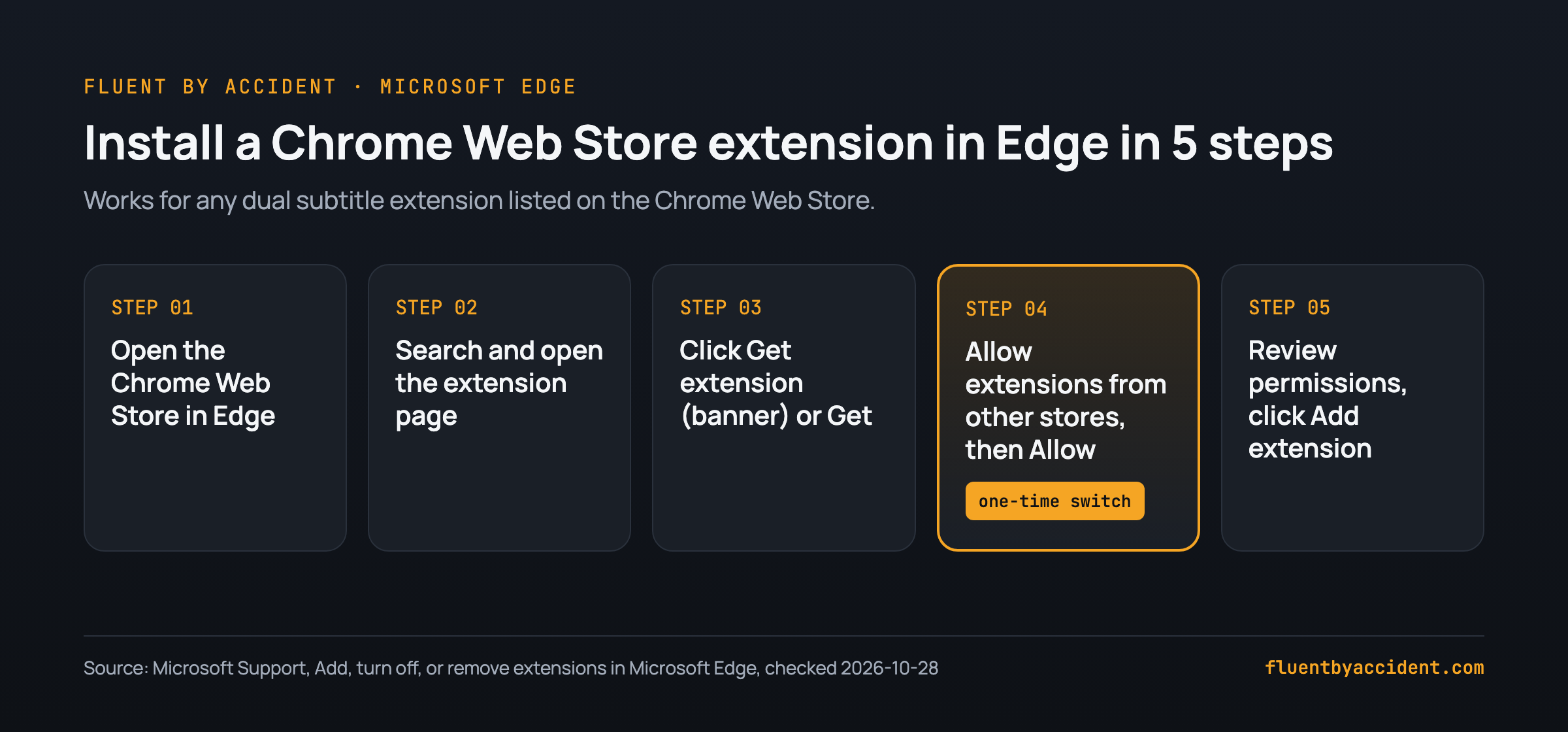
Edge can install extensions straight from the Chrome Web Store. Microsoft documents the steps in its support article on Edge extensions. Here they are in order:
- In Microsoft Edge, go to the Chrome Web Store.
- Search for the extension and open its product details page.
- Select "Get extension" in the banner at the top, or the "Get" button on the page.
- If Edge asks, select "Allow extensions from other stores", then "Allow".
- Review the permissions in the prompt and select "Add extension" to finish.
Brave is built on Chromium, the same open-source base as Chrome, and Chrome Web Store extensions are commonly installed in it from the store listing. We could not load Brave's help page to confirm the exact steps. If an extension misbehaves in Brave on a streaming site, Brave's privacy shields are the first thing worth checking.
Extensions that are not on a store install differently. Fluent by Accident (we make it, so weigh this accordingly) is built for Chrome and is installed from a downloaded file; our download page walks through it, and its steps also cover Edge and Brave. The route is: unzip the file, paste chrome://extensions into the address bar (it works in Edge and Brave too), turn on Developer mode (in Edge it sits in the left sidebar), click Load unpacked and pick the folder, then pin the extension and sign in.
Edge and Brave checklist: 1) Confirm the tool has a Chrome Web Store listing (or a download page with Load unpacked steps). 2) In Edge, allow extensions from other stores once. 3) Read the permission prompt. 4) Pin the extension. 5) Start a video and check that both subtitle lines appear before you settle in for a full episode.
Is there a dual subtitle extension for Safari?
Yes, but only small ones. Safari does not install Chrome Web Store extensions, and a Mac App Store search for the 7 tools in the table found no Safari version from their makers. The only near match was a Mac app also named Subtext, which says it "works with Netflix in Safari or Chrome on a Mac"; we could not confirm it comes from the maker of the Firefox add-on.
A "dual subtitles" search found other small Safari options. Rubi describes itself as "a Safari extension that adds a second line of subtitles to videos you watch in Safari", names Netflix and YouTube among its sites, and was updated October 25, 2026, with no ratings yet. VidLingo works on YouTube, Netflix and Bilibili videos in Safari (updated September 15, 2026, no ratings yet). The older NflxMultiSubs (version 2.4.3) was last updated December 8, 2022, too old to rely on.
Short answer: On a Mac, install Chrome, Edge or Firefox for dual subtitles and keep Safari for everything else. If you want two subtitle lines on a TV, iPad or phone instead of a laptop, see our guide to dual subtitles on a TV, iPad or phone.
Which browser gives the best Netflix quality with dual subtitles?
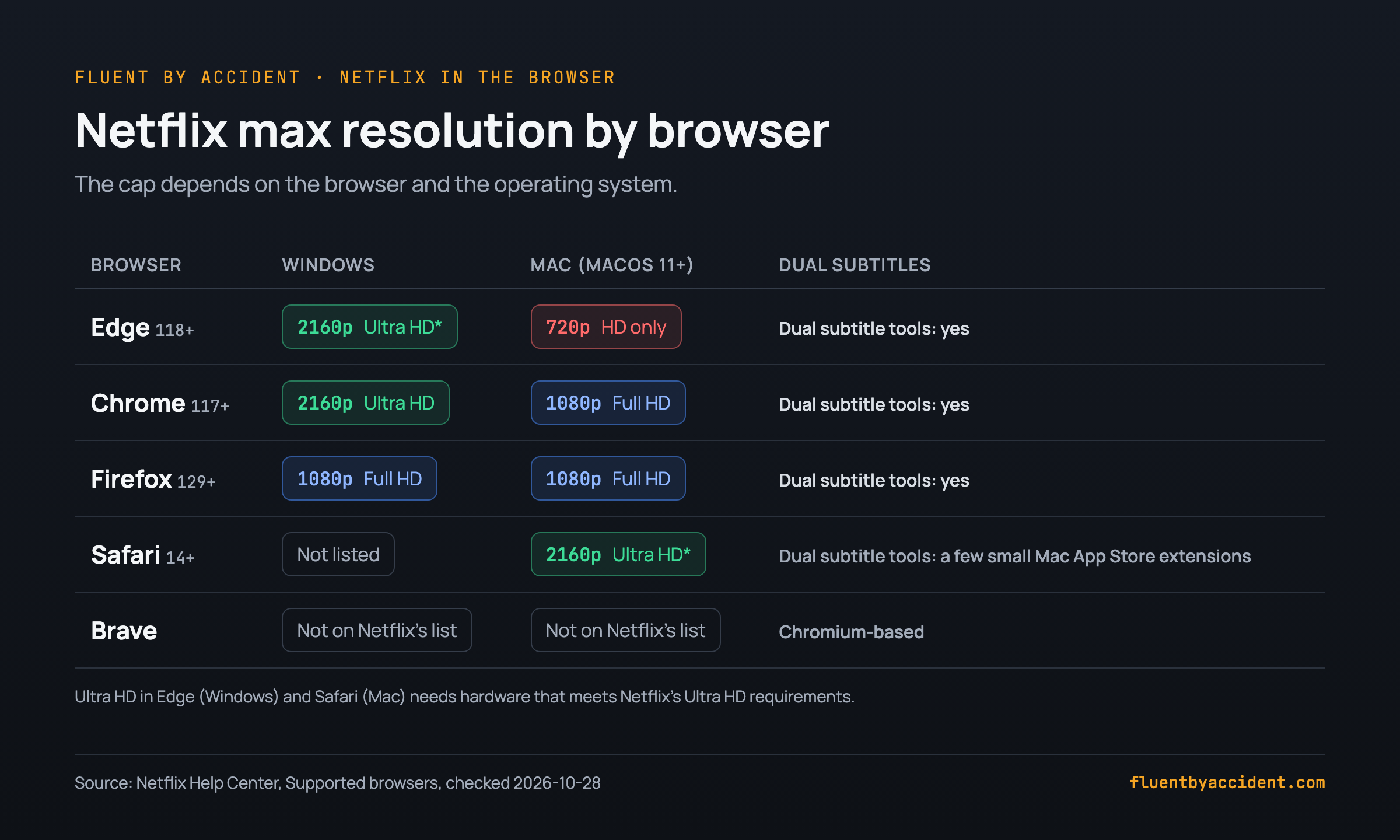
Your browser caps your Netflix resolution, and the cap differs by operating system. Netflix publishes the limits on its supported browsers page. The trade-off is awkward: on a Mac, the browser with the best picture (Safari) is the one with the fewest dual subtitle tools.
| Browser | Windows | Mac (macOS 11+) | Dual subtitle tools |
|---|---|---|---|
| Edge 118+ | Up to Ultra HD (2160p)* | Up to HD (720p) | Chrome Web Store extensions |
| Chrome 117+ | Up to Ultra HD (2160p) | Up to Full HD (1080p) | Chrome Web Store extensions |
| Firefox 129+ | Up to Full HD (1080p) | Up to Full HD (1080p) | 5 official AMO add-ons |
| Safari 14+ | Not listed | Up to Ultra HD (2160p)* | A few small Mac App Store extensions |
| Brave | Not on Netflix's list | Not on Netflix's list | Chromium-based |
Source: Netflix Help Center, checked October 28, 2026. *Netflix says Ultra HD in Edge is "only available on Windows computers that meet these Ultra HD requirements". Netflix also requires Macs to meet its Ultra HD requirements for 2160p in Safari.
Practical picks from the table, as a worked example of the trade-off:
- Windows, want the sharpest picture: Edge or Chrome, up to 2160p on capable hardware, with Chrome Web Store dual subtitle extensions.
- Windows or Mac, prefer Firefox: you get up to 1080p and the AMO add-ons listed above. For subtitle reading on a laptop screen, 1080p is usually enough.
- Mac: Chrome or Firefox reach 1080p. Edge on a Mac is capped at 720p according to Netflix, so it is the weakest choice there despite supporting Chrome extensions.
- Linux: Netflix says it "can't guarantee Netflix will work" on Linux because of the many configurations, so test before you commit.
FAQ
Does Language Reactor work on Firefox?
Not officially. On October 28, 2026, a search of Firefox Add-ons for "language reactor" returned no listing published by Language Reactor itself. The third-party "Language Reactor sacrosanctx" add-on (about 5,648 users) does not come from the Language Reactor team. If you want similar features in Firefox, add-ons such as asbplayer, InterSub, SubText, FluentAI and Dualsub are published by their own makers and were updated in 2026. According to its forum users, Language Reactor runs in Chrome, and users on its forum reported in 2022-2023 that it works in Edge.
Can I use Chrome extensions in Microsoft Edge?
Yes. Microsoft's support page explains that you can open the Chrome Web Store in Edge, search for an extension, select "Get extension" or "Get", and then allow extensions from other stores when Edge asks. You only need to allow other stores once. After that, Edge shows the extension's permissions and you select "Add extension" to finish. This means most Chrome dual subtitle extensions are available to Edge users without a separate Edge listing. Keep in mind that Netflix caps Edge at 720p on a Mac, while Edge on Windows can reach Ultra HD on hardware that meets Netflix's requirements.
Do Chrome extensions work in Brave?
Brave is built on Chromium, the same open-source base as Chrome, and Chrome Web Store extensions are commonly installed in it from the store listing. We could not load Brave's help page on October 28, 2026 to confirm the exact steps. Brave is not on Netflix's list of supported browsers, which does not mean Netflix blocks it. If a dual subtitle extension misbehaves in Brave, try turning off Brave's shields for the streaming site first.
Is there a dual subtitles extension for Safari?
Only small ones. Safari cannot install Chrome Web Store extensions, and none of the 7 tools in our table has a Safari version from its maker on the Mac App Store. Newer Safari extensions such as Rubi (updated October 25, 2026) and VidLingo exist, but neither had ratings yet. On a Mac, the practical answer is to install Chrome, Edge or Firefox for dual subtitles. Netflix lists Chrome and Firefox on a Mac at up to 1080p, which is sharp enough for reading two subtitle lines on a laptop.
Why does Netflix look worse in Firefox than in Edge?
Netflix sets a maximum resolution per browser. On Windows, its help page lists Edge 118 or later at up to Ultra HD (2160p) on computers that meet its Ultra HD requirements, while Firefox 129 or later tops out at Full HD (1080p). Nothing is wrong with your add-on or your connection when Firefox stops at 1080p; that is the ceiling Netflix publishes for it. On a Mac the order flips: Firefox reaches 1080p while Edge is capped at 720p. If picture quality matters more to you than staying in Firefox, use Edge or Chrome on Windows with a Chrome Web Store dual subtitle extension.
Does Fluent by Accident work in Firefox?
No. Fluent by Accident is built for Chrome, and there is no Firefox or Safari version. We make it, so weigh our take accordingly. Our install guide also covers Edge and Brave through the Load unpacked option on the extensions page, since both use the same chrome://extensions screen. It shows two subtitle lines on Netflix, YouTube, Prime Video, Disney+ and Max, and you need to sign in to use it. If you are committed to Firefox, the AMO add-ons covered in this article, such as asbplayer, InterSub and SubText, are the options to look at instead.
If you use Chrome, Edge or Brave and want two subtitle lines plus saved words that turn into flashcards, you can try Fluent by Accident.
Sources
- Netflix Help Center, "Netflix supported browsers and system requirements", https://help.netflix.com/en/node/23742 (checked 2026-10-28)
- Microsoft Support, "Add, turn off, or remove extensions in Microsoft Edge", https://support.microsoft.com/en-us/microsoft-edge/add-turn-off-or-remove-extensions-in-microsoft-edge-9c0ec68c-2fbc-2f2c-9ff0-bdc76f46b026 (checked 2026-10-28)
- Firefox Add-ons, SubText, https://addons.mozilla.org/en-US/firefox/addon/subtext/ (checked 2026-10-28)
- Firefox Add-ons, Dualsub - YouTube Subtitle Translator, https://addons.mozilla.org/en-US/firefox/addon/dualsub/ (checked 2026-10-28)
- Firefox Add-ons, Dual Subtitles & AI Translation - InterSub, https://addons.mozilla.org/en-US/firefox/addon/intersub/ (checked 2026-10-28)
- Firefox Add-ons, asbplayer (Official), https://addons.mozilla.org/en-US/firefox/addon/asbplayer-language-learning/ (checked 2026-10-28)
- Firefox Add-ons, FluentAI: Dual Subtitles for Netflix & more, https://addons.mozilla.org/en-US/firefox/addon/fluentai-app/ (checked 2026-10-28)
- Firefox Add-ons, Language Reactor sacrosanctx, https://addons.mozilla.org/en-US/firefox/addon/language-reactor-sacrosanctx/ (checked 2026-10-28)
- Firefox Add-ons search, "dual subtitles", https://addons.mozilla.org/en-US/firefox/search/?q=dual%20subtitles (checked 2026-10-28)
- Firefox Add-ons search, "language reactor", https://addons.mozilla.org/en-US/firefox/search/?q=language%20reactor (checked 2026-10-28)
- Firefox Add-ons, YouTube™ dual subtitles, https://addons.mozilla.org/en-US/firefox/addon/youtube-dual-subtitles/ (checked 2026-10-28)
- Mac App Store, Rubi - Dual Subtitle Player, https://apps.apple.com/us/app/rubi-dual-subtitle-player/id6762080234 (checked 2026-10-28)
- Mac App Store, VidLingo - Bilingual Subtitles, https://apps.apple.com/us/app/vidlingo-bilingual-subtitles/id6794886606 (checked 2026-10-28)
- Mac App Store, Subtext: Bilingual Subtitles, https://apps.apple.com/us/app/subtext-bilingual-subtitles/id6809089752 (checked 2026-10-28)
- Mac App Store, NflxMultiSubs, https://apps.apple.com/us/app/nflxmultisubs/id1594059167 (checked 2026-10-28)
- Language Reactor, official site, https://www.languagereactor.com/ (checked 2026-10-28)
- Language Reactor forum, "Alternate Browser ETA?", https://forum.languagelearningwithnetflix.com/t/alternate-browser-eta/7451 (user forum, April 2022)
- Language Reactor forum, "Language Reactor add-on in Edge legit?", https://forum.languagelearningwithnetflix.com/t/language-reactor-add-on-in-edge-legit/15308 (user forum, November 2023)
- Fluent by Accident, download and install steps, https://fluentbyaccident.com/download (checked 2026-10-28)