Free dual subtitles: where each tool's paywall starts
Every big dual subtitle extension is free to start, but each one puts the paywall somewhere else: saved words, machine translation, AI or platforms. Here is where it sits in each tool.

Free dual subtitles are real: Language Reactor, Trancy, Fluent by Accident and Dualsub's Simple mode show two subtitle lines on Netflix and YouTube without paying. What you pay for is everything around those two lines: machine or AI translation when the show has no official track in your language, unlimited saved words, and extra platforms or AI features.
So the useful question is not "which tool is free" but "where does each tool put its paywall, and will I hit it". This guide lays that line out tool by tool, explains the one distinction that decides most of it, and ends with a five-question checklist so you can decide in a minute whether to pay at all.
Last tested: October 2026.
Are dual subtitles free? The short answer by tool
In every tool below except Migaku (a 10-day trial, then paid), you can watch with two subtitle lines for $0. The difference is what sits behind the paywall. This is not a quality ranking; for that, see our full ranking of Netflix dual subtitle extensions.
How we tested: On 29 October 2026 we read each tool's public pricing or plan page (or, where the vendor page could not be read, the most recent secondary source, labelled "listed as"). We did not install or rate competitors for this article, and no prices below come from memory. For our own extension (code version 0.32.5) we ran the free plan on our fake Netflix test page, which loads the extension's code into a mock player, in Google Chrome 156 on a Mac desktop: two lines after 1 click (Play), the bottom line labelled "Official" or "Auto-translated", and the AI option locked. We did not time a Web Store install or save 20 words on a live account; that cap comes from the live pricing page.
| Tool | Free dual subtitles? | Where the paywall sits | Paid price | Source |
|---|---|---|---|---|
| Fluent by Accident | Yes, Netflix, YouTube, Prime Video, Disney+, Max (HBO Max) | More than 20 saved words; AI translation with scene context | $6.99/month or $49/year | pricing page |
| Language Reactor | Yes, Netflix and YouTube | Machine translations and saving words (2023 FAQ) | Listed as $5.95/month or $39.95/year; another review says $5/month | LR forum FAQ, RabbitPair |
| Trancy | Yes, "Free Forever" on major platforms | Over 100 saved words or 50 sentences; AI transcription; LLM engines | Listed as ~$3/month or $27/year | pricing page, RabbitPair |
| Immersive Translate | Basic features free (dual subtitles not confirmed on vendor page) | Pro features | Listed as ~$6.99/month or $83.88/year | RabbitPair |
| Dualsub | Yes, Simple mode with the platform's own subtitles | Standard mode (advanced translation engines) | Not listed in our sources | RabbitPair |
| Migaku | No free plan, trial only | Everything after a 10-day trial | Listed as $10/month with an annual discount | RabbitPair |
"Listed as" means the price comes from a third-party roundup, not the vendor's own page, and those roundups disagree with each other. Check the vendor page before you subscribe.
What "free" actually covers: official vs machine-translated subtitles
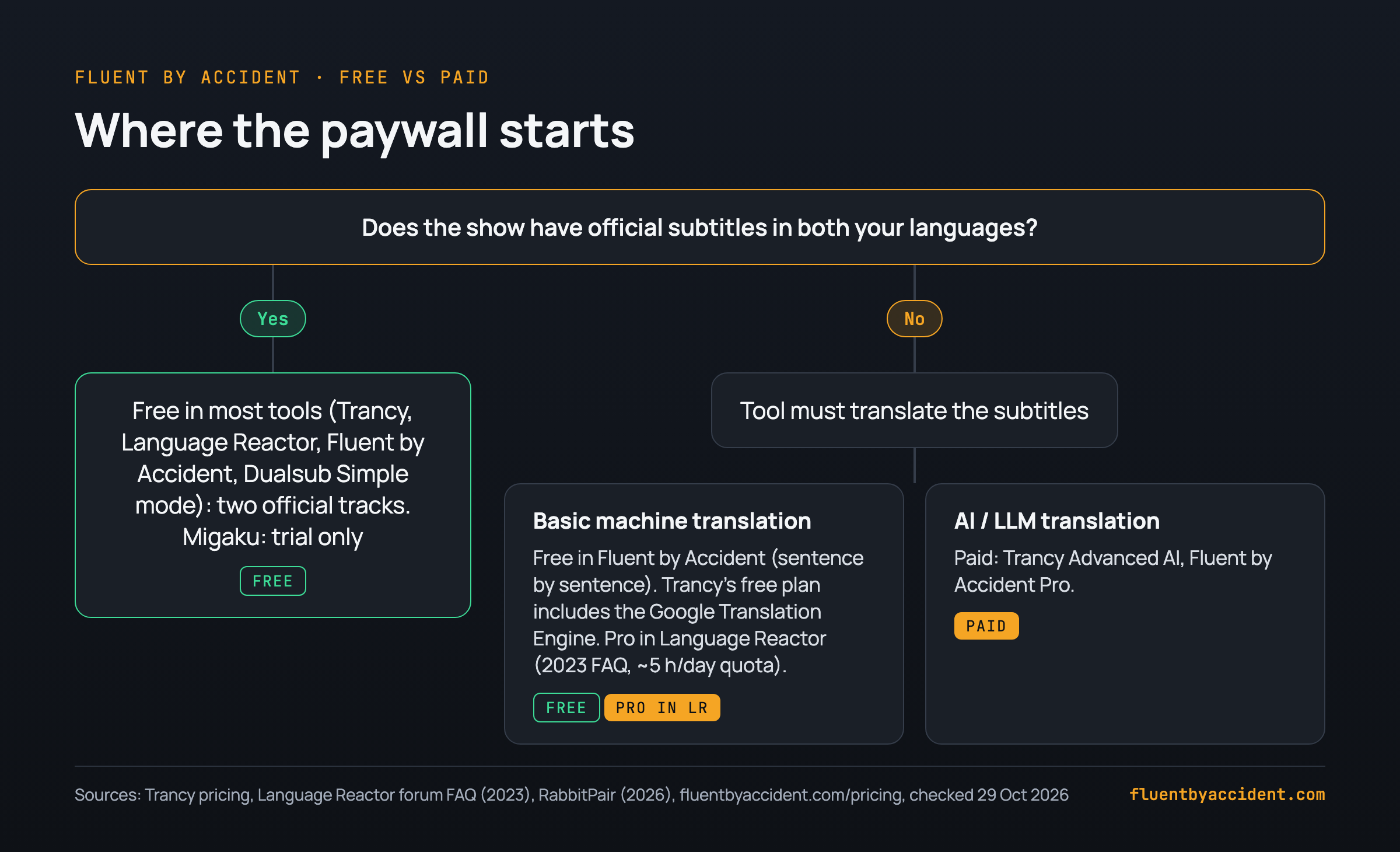
Most of the free vs paid line comes down to one question: does the show already have subtitles in both of your languages?
When it does, the tool only has to display two tracks the platform already provides. That costs the tool almost nothing, so every free tier here does it (Migaku has a trial, not a free tier). Language Reactor added small info icons that tell you which line is the "Human Translation" and which is the "Machine Translation", according to a 2023 forum post. Our extension labels lines the same way: "Official" means the platform's own subtitles, "Translated" means we translate them for you.
When the show lacks your language, the tool has to translate the subtitles itself, and that is where quotas and paywalls begin:
- Language Reactor, as of its 2023 FAQ, put machine translations behind Pro, with a quota of "about 5 hours of (new, previously untranslated) content every day" (LR forum).
- Dualsub splits it into a free Simple mode that uses the platform's native subtitles and a paid Standard mode with advanced translation engines (RabbitPair).
- Trancy includes the Google Translation Engine for free and puts LLM engines in its Advanced AI tier (Trancy pricing).
- Fluent by Accident gives free users "Basic translation", described in the extension as "Free, sentence by sentence". AI translation with scene context is "Available in Pro" (pricing page).
In practice: if you watch mainstream Netflix titles in a big language like Spanish or French, official tracks often exist and the free tier may be all you ever use. If you watch older shows, smaller languages or YouTube videos with auto-generated captions only, you will hit the translation line much sooner.
Where each paywall sits: saved words, AI, platforms
Beyond translation, tools gate three other things: how many words you can save, AI features, and which sites work.
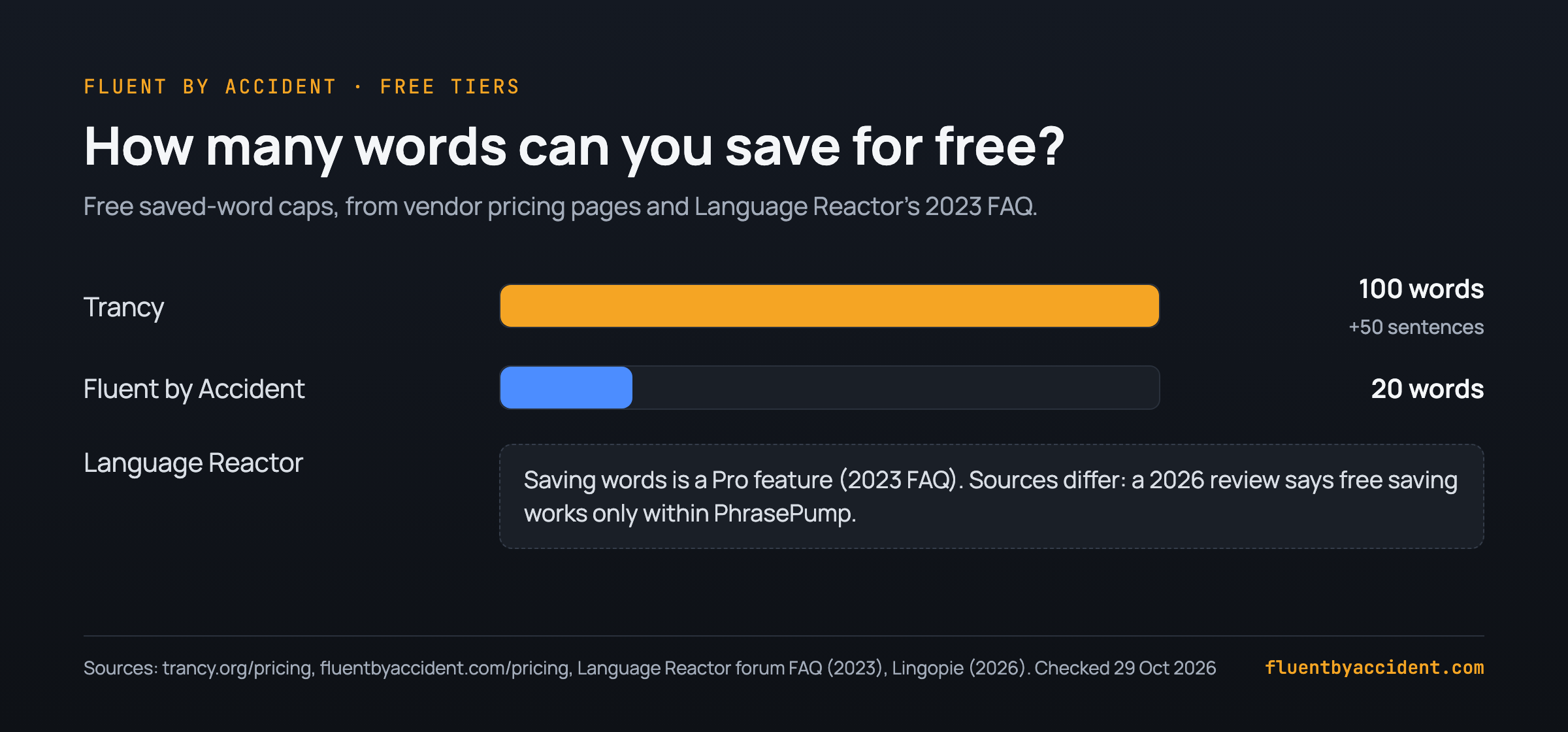
Trancy. The free column is generous on lookups: "Unlimited Word & Sentence Translation" and "Unlimited Bilingual Subtitle Downloads". Saving is capped: the plan table lists Word Bookmarking at 100 free vs unlimited, and Sentence Bookmarking at 50 free vs unlimited. Premium adds "YouTube AI Subtitle Transcription", up to 40 videos per day, and the Advanced AI tier raises that to 60 per day with models such as GPT-5-mini and Claude 4.5 Haiku (Trancy pricing). One note: a Trancy blog post says the 40 AI videos per day are on the free plan, while the pricing page lists them under Premium. We go with the pricing page.
Language Reactor. Its 2023 FAQ said "Pro mode primarily includes 2 additional features: machine translations and saving words and phrases", and that one subscription covers Netflix, YouTube and the LanguageReactor.com website (LR forum). Sources differ: a 2026 Lingopie review describes Pro as unlimited word and phrase saving "rather than just within PhrasePump", plus Anki export. If you are weighing a switch, our guide to Language Reactor alternatives covers that decision.
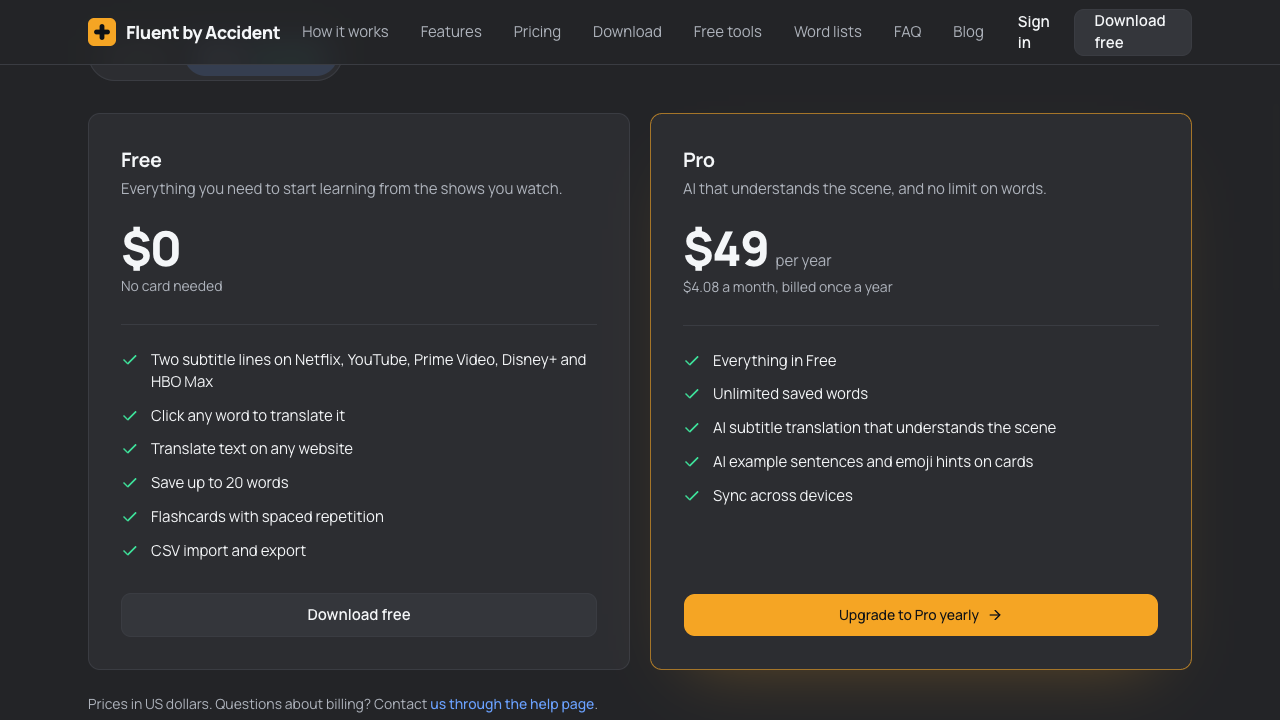
Fluent by Accident. Free includes two lines on five platforms, click-to-translate, translating text on any website, flashcards with spaced repetition and CSV import and export, with a cap of 20 saved words. Pro removes the cap and adds AI subtitle translation, AI example sentences and emoji hints on cards, and sync across devices (pricing page).
DualPiP. Listed as "Free for YouTube bilingual subtitles and the basic PiP player", with Pro unlocking all-platform support (RabbitPair, which makes DualPiP). This is the platform-style paywall: free where it is cheapest to run, paid elsewhere.
Is machine translation good enough for learning?
For understanding the gist, usually yes. For learning exact phrasing, idioms and jokes, it is noticeably weaker than official subtitles, and that is the strongest argument for paying only when official tracks are missing.
The clearest recent data point is a small 2025 study by Hasibuan, Sibarani, Sinaga and Siregar in the Journal of English Language and Education. The researchers compared DeepL's translations of 30 dialogue segments from Inside Out 2 with the official subtitles:
17% Accurate 67% Moderately accurate 17% Inaccurate DeepL on 30 segments of Inside Out 2. Source: Hasibuan et al., JELE 10(3), 2025The authors trace the errors to "literal translation, misinterpretation of idiomatic expressions, and lack of contextual adaptation", and found the official subtitles more accurate. Their conclusion: DeepL is grammatically fluent but "still lacks the semantic and pragmatic sensitivity required for high-quality subtitle translation in films." Keep the limits in mind: one film, 30 segments, qualitative ratings. It is a signal, not a verdict on every engine.
A practical rule that follows from it:
- Machine translation is fine for following a show you already half understand, especially at beginner and intermediate levels.
- Do not trust it for idioms, jokes, slang or wordplay. Look those lines up separately.
- When an official track exists, use it. Which language goes on which line is its own decision, covered in which subtitle language to put on which line.
- Treat the translated line as a crutch you plan to remove. Our guide on how to fade dual subtitles out shows the steps.
How much does paying cost per year?
Here is the arithmetic, using the prices on each source on 29 October 2026. These are worked examples, not quotes: the "listed as" prices come from a third-party roundup and may be out of date.
| Tool | Monthly price x 12 | Yearly plan | Yearly saves | Price source |
|---|---|---|---|---|
| Fluent by Accident Pro | $6.99 x 12 = $83.88 | $49 ($4.08/month) | $34.88 (42%) | Vendor page |
| Language Reactor Pro | $5.95 x 12 = $71.40 | $39.95 | $31.45 (44%) | Listed as (RabbitPair) |
| Trancy Premium | ~$3 x 12 = ~$36 | $27 | ~$9 (25%) | Listed as (RabbitPair) |
| Immersive Translate Pro | ~$6.99 x 12 = ~$83.88 | Listed as $83.88 | None listed | Listed as (RabbitPair) |
| Migaku | $10 x 12 = $120 | Annual discount, amount not listed | Not listed | Listed as (RabbitPair) |
Example: if you watch for about 3 hours a week, that is roughly 156 hours a year (3 x 52). A $49 yearly plan works out to about $0.31 per viewing hour ($49 / 156); a $27 plan to about $0.17. Whether that is worth it depends entirely on whether you would hit the free limits, which is what the checklist below decides.
One more data point from the same roundup: a bring-your-own-key tool is listed as translating a full movie for "~$0.03–0.07 with DeepSeek V4 Flash" (RabbitPair). That suits people comfortable with API keys; everyone else pays a subscription for not having to.
Do you need to pay? A 5-question checklist
Answer these before you upgrade anything. If you say yes to none or one, stay on a free plan.
Checklist: pay only if...
- Your shows lack official subtitles in your language. Check two or three titles you actually plan to watch. If both tracks exist, the free tier covers you.
- You save more words than the free cap. Trancy's free cap is 100 words, ours is 20. If you save a handful per episode, you will pass 20 within a few weeks; 100 lasts longer.
- You want saved words as flashcards you review. If you never review, a bigger cap is wasted money. If you do, see how to turn saved words into flashcards.
- You want translation that handles idioms and tone. The study above found plain machine translation (DeepL) weakest on idioms and context. Trancy (Advanced AI tier) and Fluent by Accident (Pro) put AI translation behind the paywall; check other tools' pages.
- You need a platform or site the free tier skips. DualPiP is free on YouTube only; Language Reactor covers Netflix and YouTube; check that your service is listed before paying.
Bonus test: if you watch less than about 3 hours a week, try a month-to-month plan first instead of a yearly one.
If you mainly watch YouTube, our guide to YouTube dual subtitles covers the free options there.
Our free plan, tested
We make Fluent by Accident, so weigh our take accordingly. Here is what the free plan includes, from our live pricing page, and what we saw when we ran it on our fake Netflix test page in Chrome 156 on 29 October 2026:
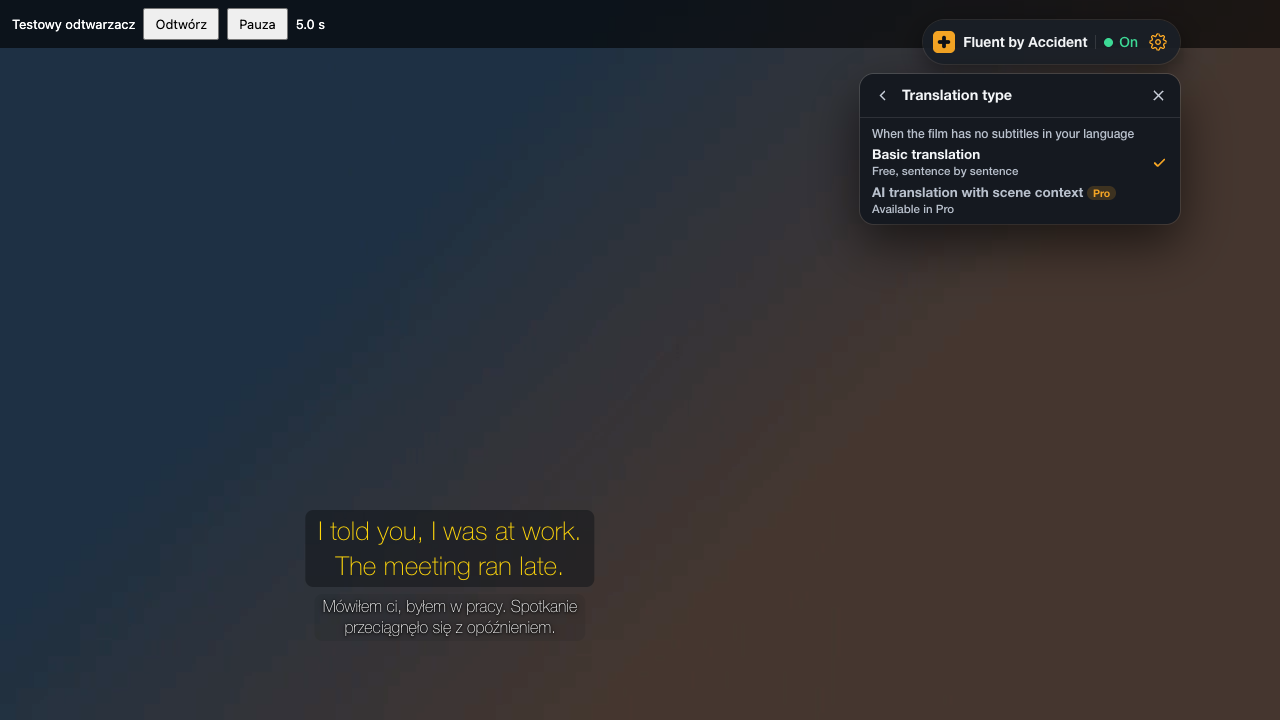
- Two lines after 1 click. Pressing Play was enough; we changed no settings.
- Line labels. With an official Polish track, the menu showed the bottom line as "Official". Without one, it showed "Auto-translated" and basic translation filled the line.
- AI locked. The translation menu had "Basic translation" selected ("Free, sentence by sentence"); "AI translation with scene context" carried a Pro tag and the note "Available in Pro".
| Feature | Free ($0, no card) | Pro ($6.99/month or $49/year) |
|---|---|---|
| Two subtitle lines on Netflix, YouTube, Prime Video, Disney+, Max (HBO Max) | Yes | Yes |
| Click a word, translate text on any website | Yes | Yes |
| Translation when a show lacks your language | Basic translation, sentence by sentence | AI translation with scene context |
| Saved words | Up to 20 | Unlimited |
| Flashcards with spaced repetition, CSV import and export | Yes | Yes, plus AI example sentences and emoji hints |
| Sync across devices | No | Yes |
A few details from the plan pages:
- When a film has no subtitles in your language, the free basic translation can run on Chrome's built-in translator once you download it. The extension's prompt says it "works on your computer, faster, and no text leaves it."
- When you reach 20 saved words, "your cards stay and you can keep reviewing all of them." To save new ones you upgrade or delete cards you have learned.
- The limits: Chrome on desktop only, a free account sign-in is required, and the free plan has no AI.
You can install it from the download page.
FAQ
Is Language Reactor free?
Yes, the core of Language Reactor is free: you get dual subtitles on Netflix and YouTube without paying. As of its 2023 FAQ, the Pro plan added two main things: machine translations (with a quota of about 5 hours of new content per day) and saving words and phrases. Sources differ: a 2026 review describes free saving as limited to PhrasePump. Prices quoted by third parties disagree, from $5 per month to $5.95 per month or $39.95 per year, so check languagereactor.com directly before subscribing. If the show already has official subtitles in both languages, the free version is often enough.
Is there a completely free Netflix dual subtitle extension?
Yes. Several extensions show two lines on Netflix for free, including Language Reactor, Trancy and Fluent by Accident, and Dualsub's Simple mode uses the platform's own subtitles at no cost. The catch is the same everywhere: the free experience is best when Netflix already offers official subtitles in both of your languages. When it does not, the tool has to translate one line, and that is where quotas, basic engines or paid tiers come in. Pick a few titles you plan to watch and check their subtitle menus first.
Is Language Reactor Pro worth paying for?
It depends on whether you need machine translations and saved words. If your shows have official tracks in both languages and you do not build a word list, the free version covers most of what you would use. If you watch titles without your language, or you want to save words and export them to Anki, Pro starts to make sense. Listed prices work out to roughly $40 to $71 a year depending on billing. For how it compares with other tools on overall quality, see our full ranking of Netflix dual subtitle extensions.
Are machine-translated subtitles accurate enough to learn from?
Good enough for the gist, weaker for exact meaning. A 2025 study in the Journal of English Language and Education rated DeepL on 30 segments of Inside Out 2: 17% accurate, 67% moderately accurate and 17% inaccurate. Most errors came from literal translation and missed idioms, and the official subtitles scored higher. The sample is small, so treat it as a signal. The practical takeaway: prefer the official track when one exists, double-check idioms, jokes and slang, and use AI or human translations for lines that seem off.
What happens to my saved words if I stop paying?
In Fluent by Accident, cards stay when you are over the free limit: you can keep reviewing all of them, and to save new words you upgrade or delete cards you have learned. For Language Reactor, a user on its forum reported in 2023 that you can still see all the words and phrases saved with Pro, you just cannot save more. Policies change, so check each tool's help page before you cancel. Exporting your list to CSV first is a cheap way to make sure nothing is lost.
Do free dual subtitle tools work on a TV or phone?
Mostly not. The tools in this guide are browser extensions, so they run in a desktop browser, typically Chrome. Fluent by Accident, for example, works in Chrome on desktop only. Watching on a TV usually means casting or connecting a laptop, which has its own trade-offs. Our guide to dual subtitles on Netflix on a TV walks through the options that work today. On phones, extension support is very limited, so plan your study sessions around a computer if you want two lines.
See the dual subtitles on a TV guide for setups.
Sources
- Fluent by Accident, Pricing page, checked 29 October 2026: https://fluentbyaccident.com/pricing
- Fluent by Accident extension 0.32.5, free plan run on our fake Netflix test page in Google Chrome 156 (translation menu and line labels), 29 October 2026.
- Trancy, Pricing, checked 29 October 2026: https://www.trancy.org/pricing
- Trancy, "Free Netflix dual subtitle extension" blog post, 2026: https://www.trancy.org/blog/free-netflix-dual-subtitle-extension-no-language-reactor-31f9d22520058039b157f18a77ca6534
- Language Reactor community forum, "Pro features / Pro plan membership" thread quoting the official FAQ, July to October 2023: https://forum.languagelearningwithnetflix.com/t/pro-features-pro-plan-membership/13025
- RabbitPair, "Best Dual Subtitle Chrome Extensions in 2026" (vendor of DualPiP and CaptionGo), 2026: https://www.rabbitpair.com/en/blog/best-bilingual-subtitle-chrome-extension-2026
- Torres, G., "Language Reactor Review", Lingopie, 2026: https://lingopie.com/blog/language-reactor-review/
- Hasibuan, Sibarani, Sinaga and Siregar (2025), DeepL vs official subtitles in Inside Out 2, Journal of English Language and Education 10(3): https://jele.or.id/index.php/jele/article/view/877