Netflix Browse by Language: find shows in any language
Netflix's Browse by Languages page filters by original language, dubbing or subtitles. Here is how to reach it, read the filters, find shows that were really made in your target language, and fill the gaps.

To browse Netflix by language, open netflix.com/browse/original-audio in a web browser (the "Browse by Languages" page that Netflix's help center links to), then pick Original Language, Dubbing or Subtitles and choose a language. On a phone or TV, type a query such as "Spanish movies" or "Hindi Dubbed Movies & TV" into the search bar instead, which Netflix's Search by Language update supports on any device.
If you are learning a language, pick Original Language, not Dubbing. Netflix usually has subtitles that match the audio for a title's original language, while subtitles on dubbed audio often do not, so an original-language show gives you ears and eyes on the same words.
Last tested: November 2026
How we tested: On 2026-11-01 we read Netflix's three help center pages on search, catalog visibility and changing language and its May 2026 newsroom post, then counted the languages each third-party index lists: 40 named languages in What's on Netflix's printed filter list and 34 study languages in the Language Learning with Netflix catalogue dropdown. We also checked, in Chrome, the subtitle menu on our own Netflix-style test page (the one we use to test our extension): 3 subtitle tracks by default (English, English [CC], Español), 4 when a native-language track is switched on (adds Polski), and 0 when subtitles are removed, which leaves only "Off". We did not use a live Netflix account, so we quote no click or title counts from the real page; the steps follow Netflix's own wording.
How do you browse Netflix by language?
The Browse by Languages page is a web-only view of the Netflix catalog with three dropdowns. What's on Netflix notes that it used to filter only by audio language, and has since been expanded to "three filter options: Original Language, Dubbing, Subtitles", each covering "over 40 languages".
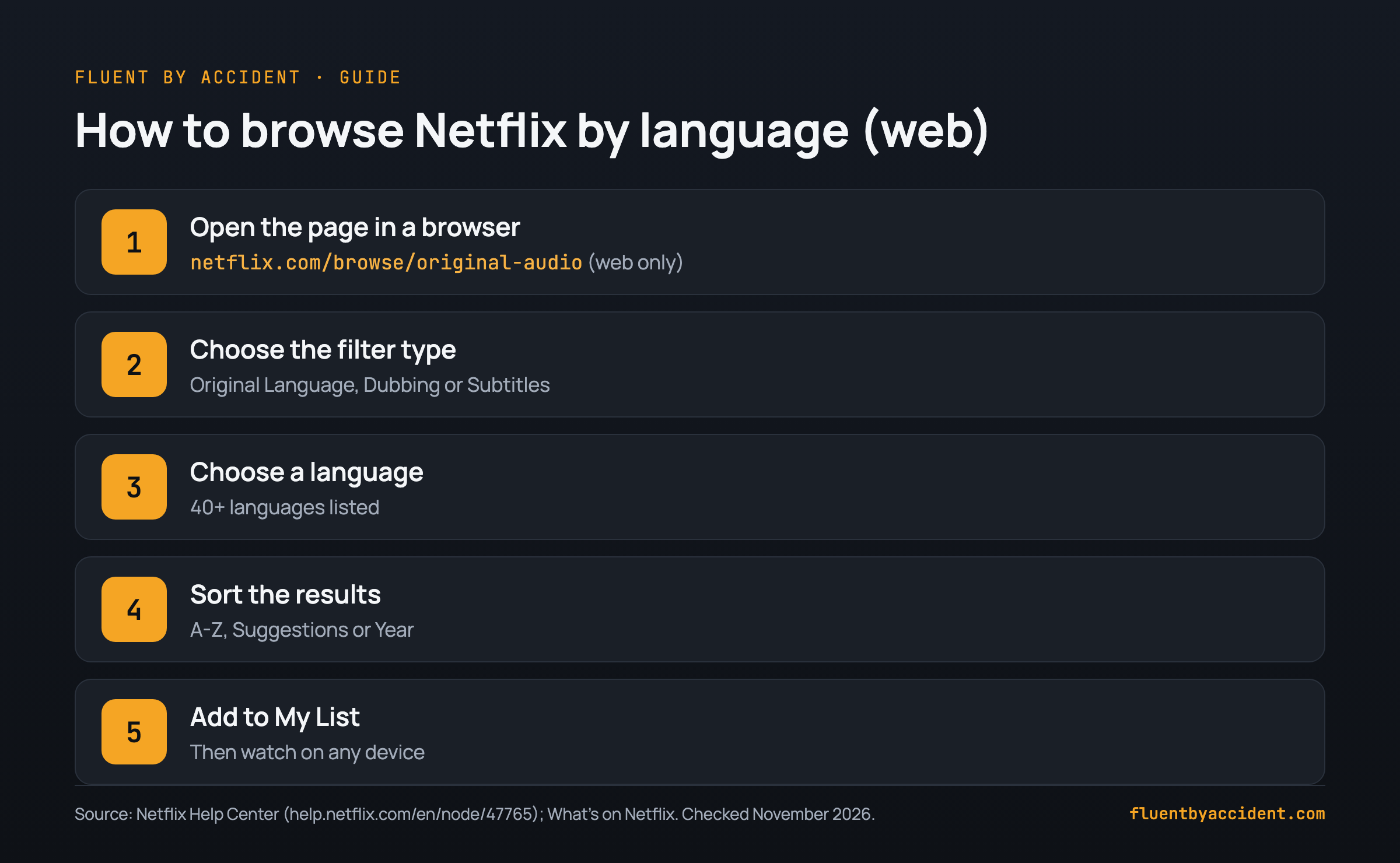
Here is the full route:
- Open the page in a desktop or laptop browser. Go straight to netflix.com/browse/original-audio while signed in, or follow the "Browse by Languages" link in Netflix's search help article. That article describes it as the place "to search for shows and movies by specific subtitle, audio, or original language".
- Choose the filter type. The first dropdown switches between Original Language, Dubbing and Subtitles. The difference matters a lot for learners (next section).
- Choose the language. The second dropdown lists the languages. The list What's on Netflix printed has 40 entries, from Arabic and Basque to Ukrainian and Vietnamese, introduced as "include (but are not limited to)", so your list may be longer.
- Sort the results. What's on Netflix explains that you can sort the results "in an A-Z format, allow the algorithm to make suggestions or pick by year released". A-Z gives you the full set instead of a recommendation shelf.
- Add picks to My List. Open a title and add it to My List (Netflix's wording for the + button). The list syncs to every device on that profile, which is how you get these titles onto your TV.
In 2022, John Yunker of Global by Design reported "seeing English-language content coming up first" when he browsed by language. Choosing Original Language rather than Dubbing is meant to avoid that.
Original language vs dubbing vs subtitles: which filter should learners use?
Each filter answers a different question. Original Language asks "what language was this made in?", Dubbing asks "what audio tracks can I switch to?", and Subtitles asks "what text tracks exist?". For learning, the first one is almost always the right start.
The reason is subtitle quality. The Language Learning with Netflix team, who built a catalogue for exactly this problem, put it plainly: "Netflix usually has good subtitles for the original language of a title, that match the audio track. Subtitles often don't match the audio for dubbed audio." Dubs and subtitles are often produced separately, so you can hear one sentence and read another.
| Filter | What it returns | Do subtitles match the audio? | Use it when |
|---|---|---|---|
| Original Language | Titles produced in that language | Usually yes, on the original track | You want native speech with matching target-language subtitles |
| Dubbing | Titles with an audio track in that language, including dubbed English hits | Often no, per Language Learning with Netflix | You want to rewatch a show you already know, for listening practice |
| Subtitles | Titles with a subtitle track in that language | Only if the audio is also in that language | You want reading support in your own language, or a target-language text track on a show in another language |
Dubbing still has a place: on a show you already know, a dub lets you focus on sound. Just do not expect the subtitles to follow it word for word.
Which subtitle language to put on screen depends on your level. We cover that decision separately in which subtitle language to use at your level.
How to search by language on Netflix TV and mobile
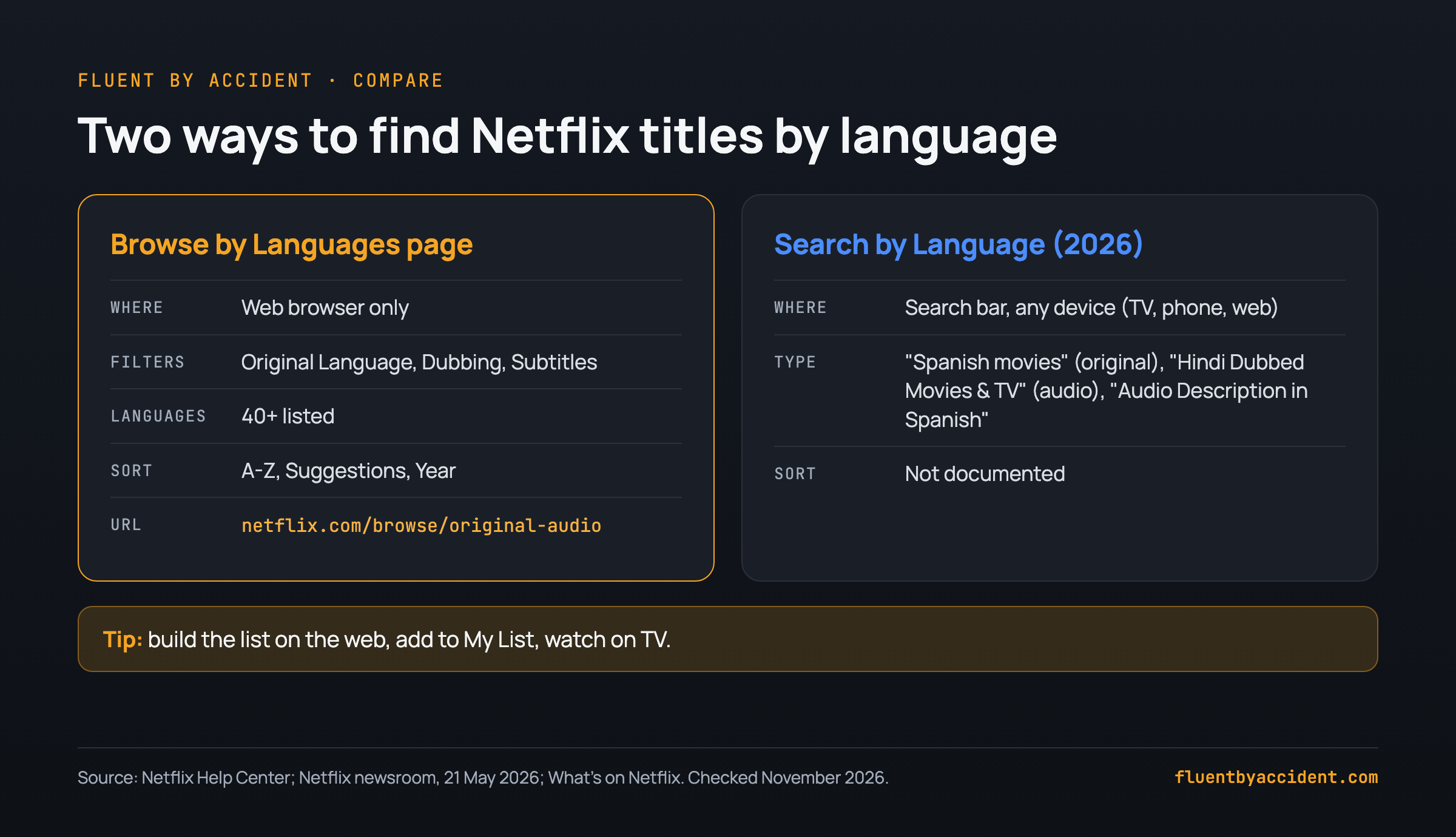
The Browse by Languages page is web only. What's on Netflix states that "you must browse via a web browser" because the mobile and TV apps "don't allow you to sort in this manner". Since 2026 there is a second route that does work everywhere.
Netflix's May 2026 newsroom post says: "This year, we rolled out 'Search by Language,' a new search update that lets members find TV shows and movies by language and accessibility features directly from the search bar, on any device." The same post says titles come with subtitles, SDH/CC, audio description and dubbing "in over 30 languages", and that non-English series and films are now "more than a third" of total viewing.
Netflix's help center documents the search terms to type:
| What you want | Example search terms (Netflix's wording) |
|---|---|
| Original language | Spanish movies, French TV shows |
| Audio (dubbed) language | Hindi Dubbed Movies & TV, Portuguese Dubbed Movies & TV |
| Audio description | Audio Description in English, Audio Description in Spanish |
So on a TV, open search and type "Korean TV shows" for shows made in Korean, or follow Netflix's "Hindi Dubbed Movies & TV" pattern with your language, for example "Spanish Dubbed Movies & TV". Netflix does not document an A-Z sort for search results, so for a full list the older workaround still helps: What's on Netflix suggests you "find titles, add them to your Netflix queue", meaning My List, on the web, then watch them later from your list row on the TV.
If you also want two subtitle lines while you watch on the big screen, see what works on Netflix TV, iPad or phone; browser extensions do not run inside TV apps.
Why some titles never show up (the profile language rule)
Netflix quietly filters the catalog by your profile language. Its help center says: "If your profile language matches one listed with your country below, you'll only see TV shows and movies that have audio or subtitles available in that language." Netflix does this so you only see titles "you'll be able to enjoy".
For learners this cuts both ways. Set your profile to your target language, and in many countries Netflix hides every title that lacks audio or subtitles in it, which can be a handy pre-filter. Leave it on your native language, and titles with no track in your native language disappear, even if they are perfect for your target language. The same help page gives the way out: to see everything in your region "regardless of the audio or subtitles available, choose a language other than what's listed below for your country".
Check this first: 1. Open Netflix's list of country and profile language pairs and find your country. 2. If your profile language is on that list, change it to a language that is not, using Netflix's change-language steps. 3. Reload Browse by Languages and run the same filter again. Titles that were hidden by the profile rule now appear.
Some gaps have a different cause: a title can exist in your country without the language you want, because tracks and catalogs vary by region. That is a licensing question, and we explain it in why a subtitle language is missing on one title. The search help article also points out that you can suggest a show or movie if it is not there at all.
How to check a show's subtitle and audio languages before watching
A filter result tells you a title matches one language. Before you commit to a whole series, check the full track list so you know which audio and subtitles you can actually combine.
Start the first episode and open the audio and subtitles menu. This is the list that matters, because it is what your account gets in your country right now.
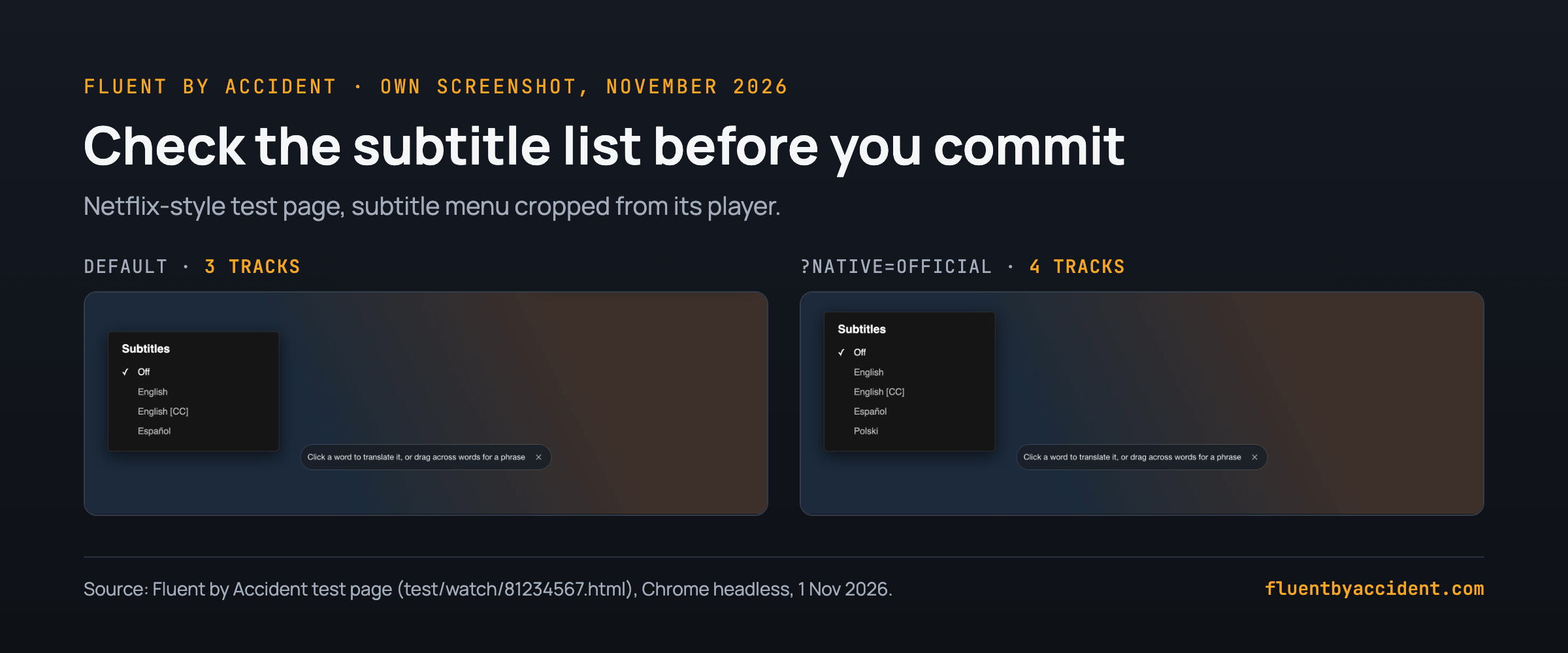
What to look for: An audio track in your target language marked as the original, plus a subtitle track in the same language. "[CC]" marks what Netflix calls SDH/CC, subtitles for the deaf and hard of hearing, which are fine for learners too. If only your native-language subtitles exist, the show is still usable for listening.
Track lists vary by country, so the player menu on your own account is the final word.
Sites that index Netflix subtitle and audio languages
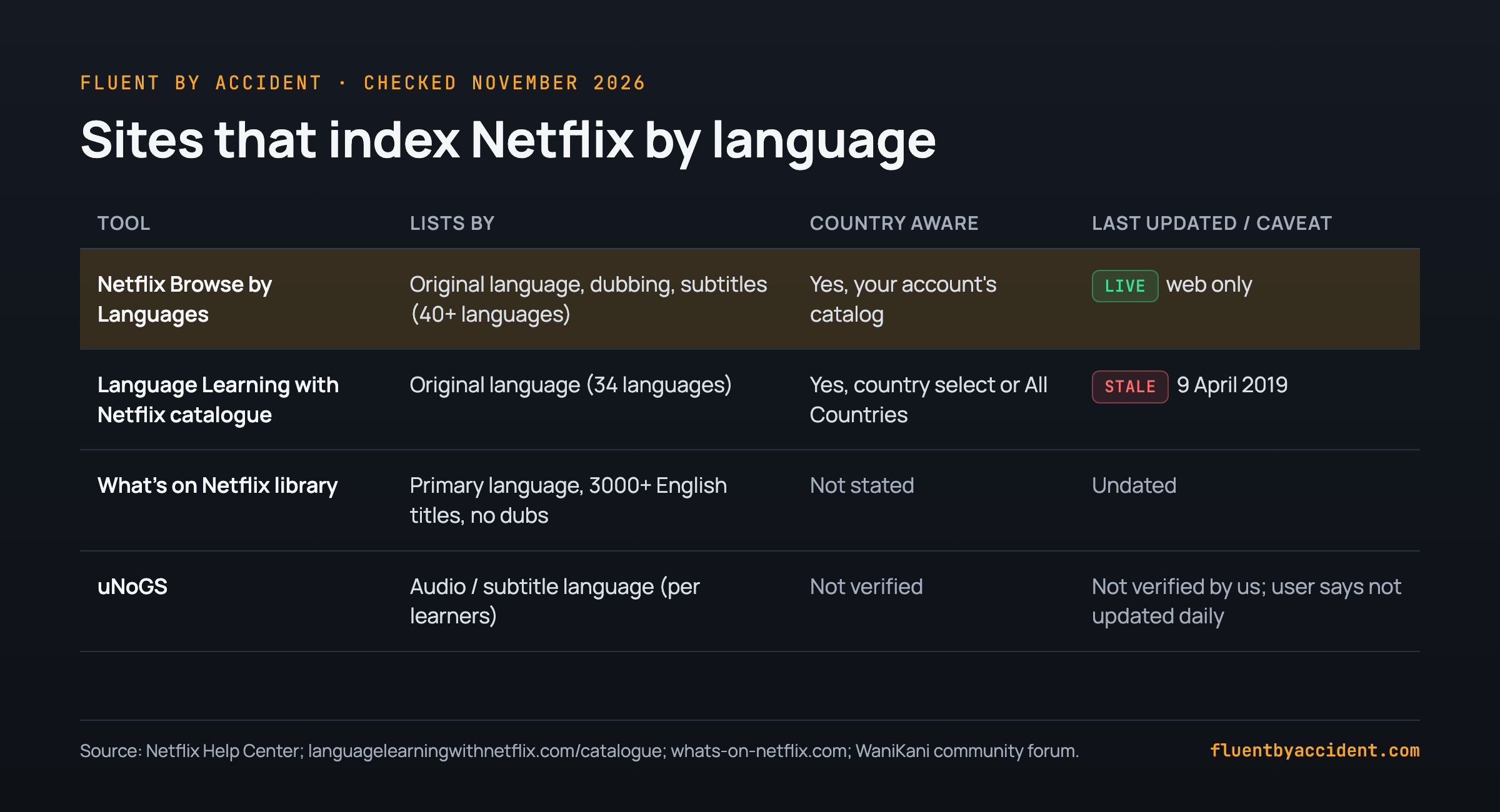
Third-party indexes can help when Netflix's own filters feel noisy, but each has a limit. Here is what we found when we checked them on 2026-11-01.
- Language Learning with Netflix catalogue. Built "to help you find Netflix titles with high-quality subtitles in the language you study". It "lists titles by their original language", asks you to "select the country where Netflix detects you are located", and its dropdown has 34 study languages by our count. The page says "Last updated: 9th April 2019", so treat it as a starting list and confirm each title on Netflix.
- What's on Netflix library lists. The site offers "expanded information on over 3000 English titles" and says "We don't include dubs in our list, only titles in their primary language." Useful if English is your target language.
- uNoGS. We could not load its search during our check (the page showed only a cookie banner to our fetch), so we cannot vouch for its filters. Learners on the WaniKani community forum recommend it for searching by audio or subtitle language, and one user there noted in 2019 that its database was not "updated daily".
Filters inside these tools can mix up audio and original language too. In a thread on the Language Learning with Netflix forum, one learner reported that "no matter if I filter by French or Spanish, the top results are always English shows (Breaking Bad, Stranger Things)". A reply suggested the filter works on available audio languages, "not by the original language", and another user said they were "having trouble finding anything in my study language that's not a dub". These are user reports, but they match the Dubbing behavior described above.
A quick routine to build a watchlist in your target language
Do this once on a laptop, then watch anywhere.
- Check the profile rule. If your profile language is on Netflix's country list, decide whether you want it as a filter or switch it so you see the whole catalog.
- Filter by Original Language. Open netflix.com/browse/original-audio, choose Original Language and your target language.
- Sort A-Z. Switch from suggestions to A-Z so you see the full set, not just the recommendation shelf.
- Shortlist five titles. Favor genres you already enjoy and shows with lots of everyday dialogue over fantasy or legal drama.
- Check tracks on each. Open the first episode of each and confirm a target-language subtitle track exists next to the original audio.
- Add to My List. Your list follows you to TV and mobile, where the browse page does not exist.
Tip: Start with a show at your level, not the most popular one. For Spanish, our list of Netflix shows to learn Spanish, sorted by level gives a starting point, and a quick pass over the most common Spanish words before episode one makes the first subtitles less dense.
Once the list is ready, the watching part is where you learn. Our guide to the dual subtitle method for learning with Netflix covers how to pace episodes and when to drop your native-language line. If a show has no official subtitles in your own language, the Fluent by Accident Chrome extension shows two subtitle lines on Netflix and machine-translates the bottom line for you.
FAQ
Can you filter Netflix by language on a TV?
Not with the Browse by Languages page, which What's on Netflix notes works only in a web browser. You can search by language on a TV, though. Netflix says its 2026 Search by Language update works "directly from the search bar, on any device". Type a query such as "Spanish movies" for titles made in Spanish, or "Hindi Dubbed Movies & TV" for titles with a Hindi dub. For a complete A-Z shortlist, filter on the web, add titles to My List, and open that list on your TV.
Why does Netflix show English titles when I browse by another language?
You are probably on the Dubbing filter, or on an older view that filtered by audio language. Dubbing returns every title with an audio track in that language, and big English shows are dubbed into many languages, so they rise to the top. Switch the first dropdown on Browse by Languages to Original Language, or search "French TV shows" style terms, which Netflix's help center lists under original language rather than audio language.
How do I find Netflix shows originally in Spanish, not dubbed?
Open netflix.com/browse/original-audio in a browser, set the first dropdown to Original Language, choose Spanish, and sort A-Z. That returns titles produced in Spanish rather than English shows with a Spanish dub. On a TV or phone, type "Spanish movies" or "Spanish TV shows" into search, which Netflix documents as original-language search terms. Before you start a series, open the first episode and confirm a Spanish subtitle track exists, because original tracks usually have subtitles that match the audio, which dubs often lack.
Why does Netflix hide some shows in my country?
Two different things can hide a show. First, the profile language rule: if your profile language is on Netflix's list for your country, you only see titles with audio or subtitles in that language, and switching to a language not on that list shows everything in your region. Second, catalogs and tracks vary by region because of licensing, so a title or a language can simply be missing where you live.
Is there a website that lists Netflix subtitle languages?
A few try. The Language Learning with Netflix catalogue lists titles by original language, has 34 study languages by our count and a country selector, but it was last updated on 9 April 2019. What's on Netflix keeps lists of over 3000 English titles in their primary language, without dubs. Learners on the WaniKani forum recommend uNoGS for audio and subtitle search, though one user noted in 2019 it was not updated daily and we could not verify it ourselves. For a current answer, Netflix's own Browse by Languages page is the most reliable.
Sources
- Netflix Help Center, "How to search and browse Netflix", checked 2026-11-01: https://help.netflix.com/en/node/47765
- Netflix Help Center, "How to see all TV shows and movies available in your country", checked 2026-11-01: https://help.netflix.com/en/node/117967
- Netflix Help Center, "How to change the language on Netflix", checked 2026-11-01: https://help.netflix.com/en/node/13245
- Netflix Help Center, title request form: https://help.netflix.com/en/titlerequest
- Netflix newsroom, "Our latest steps in making content more accessible", 21 May 2026: https://about.netflix.com/en/news/our-latest-steps-in-making-content-more-accessible
- What's on Netflix, "How to Browse English-Language Movies and Shows on Netflix", undated, checked 2026-11-01: https://www.whats-on-netflix.com/news/can-you-hide-foreign-movies-series-on-netflix/
- John Yunker, Global by Design, "Browsing the Netflix 'browse by language' feature", 3 January 2022: https://globalbydesign.com/2022/01/03/browsing-the-netflix-browse-by-language-feature/
- Language Learning with Netflix, Catalogue, last updated 9 April 2019, checked 2026-11-01: https://languagelearningwithnetflix.com/catalogue
- Language Learning with Netflix forum, "Netflix not filtering by language" (user reports): https://forum.languagelearningwithnetflix.com/t/netflix-not-filtering-by-language/39746
- WaniKani community forum, "Browser extension: Language Learning with Netflix" (user reports on uNoGS), posts from 2019: https://community.wanikani.com/t/browser-extension-language-learning-with-netflix/36063
- uNoGS, unofficial Netflix online Global Search (not verified by us): https://unogs.com/