How to slow down Netflix playback speed, and when it helps
Slow Netflix to 0.75x or 0.5x from the speed icon in a browser or the Android, iPhone and iPad apps. Here is how to go slower in Chrome, and what research says slowing does for listening.

To slow down Netflix, pause the show while it is playing, select the speed icon, and choose a slower option such as 0.75x or 0.5x. Netflix says this works in web browsers and in its Android, iPhone and iPad apps, but not while casting or mirroring from a mobile device, or in a web browser on an ad-supported plan.
For language learners, we suggest slowing in short bursts rather than as a default. That is our reasoning, not a study result. The one study we rely on here found that learners preferred slower audio, with no evidence that it changed their comprehension. So slow the line you missed, then go back to normal speed.
This guide covers playback speed. If Netflix itself keeps stalling, you want Netflix's page on buffering and slow loading instead.
Last tested: November 2026
How we tested: We did not test real Netflix, because it needs a paid login. The steps and limits below come from Netflix's help center, and the speed list comes from dated how-to guides. We also did not test the third-party extensions in this guide.
- What we ran: on November 6, 2026, in Chrome 157 (headless) on macOS 26.5.2, on a synthetic Netflix-style test page we built, with a plain video player, a muted 60-second clip and made-up English and Polish subtitles. That page is not Netflix and does not use Netflix's player.
- Slow replay of one line: we timed a subtitle line of 2.8 seconds using the 0.75x slow-replay key in our own extension (version 0.32.4). At normal speed the line took 2.84 seconds on the clock (mean of 3 runs). At 0.75x it took 3.84 seconds (mean of 3 runs), and the speed returned to 1x after the line ended in all 3 runs.
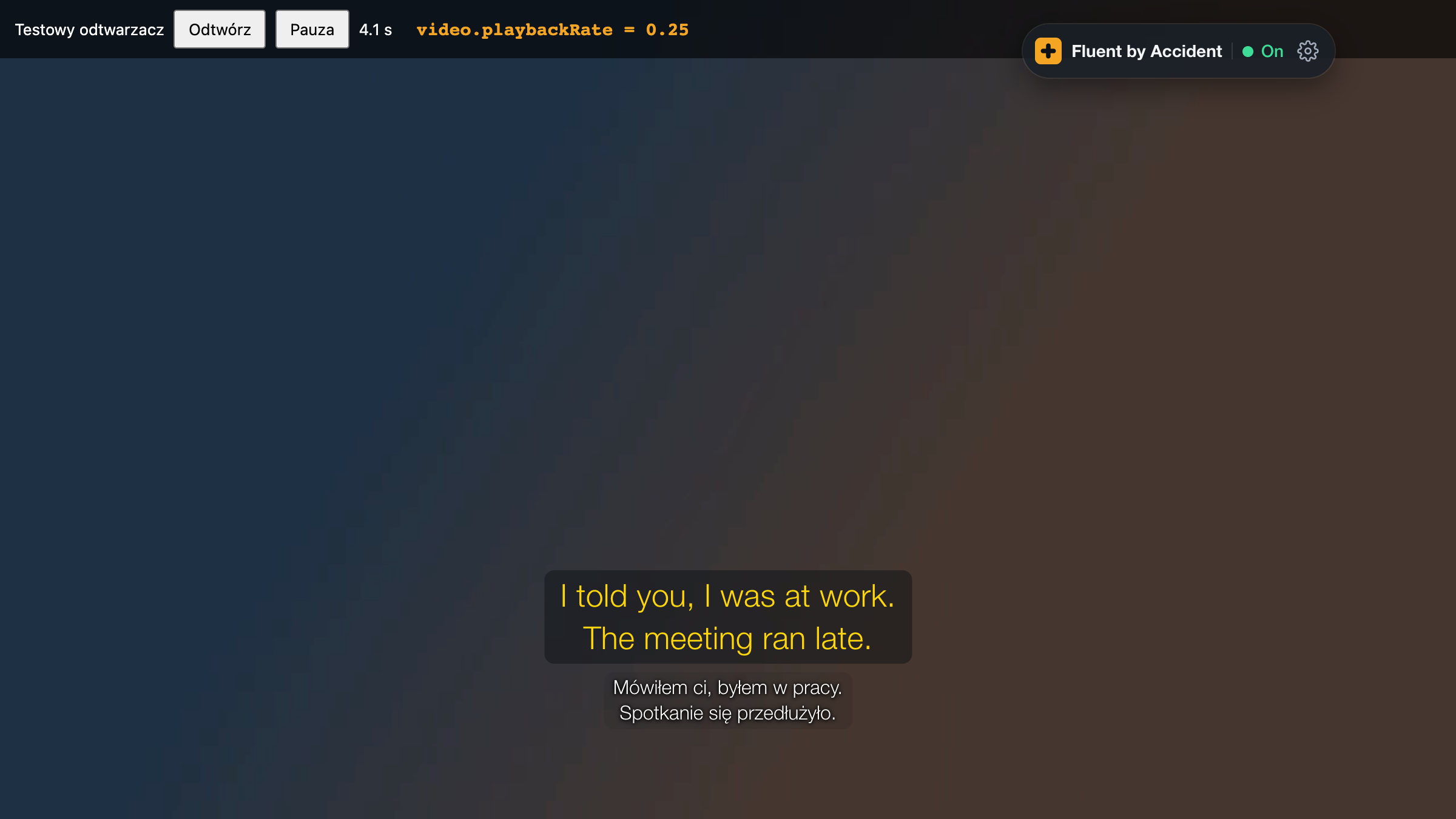
- Going below 0.5x: on that plain video player, a speed of 0.5x and a speed of 0.25x both held after 1 second of playback (1 run each). This says nothing about whether the real Netflix player accepts them.
How do you slow down Netflix?
Netflix's own instructions come down to two steps, taken from its help center:
- Pause the TV show or movie while it's playing.
- Select the speed icon, then choose a playback speed.
Netflix's help page doesn't list the options. Guides from 2020 and 2021 list five: 0.5x, 0.75x, 1x, 1.25x and 1.5x (Technipages, 2021; Xataka, 2020). We could not check that list on a live account, so treat it as the likely menu and trust what your screen shows.
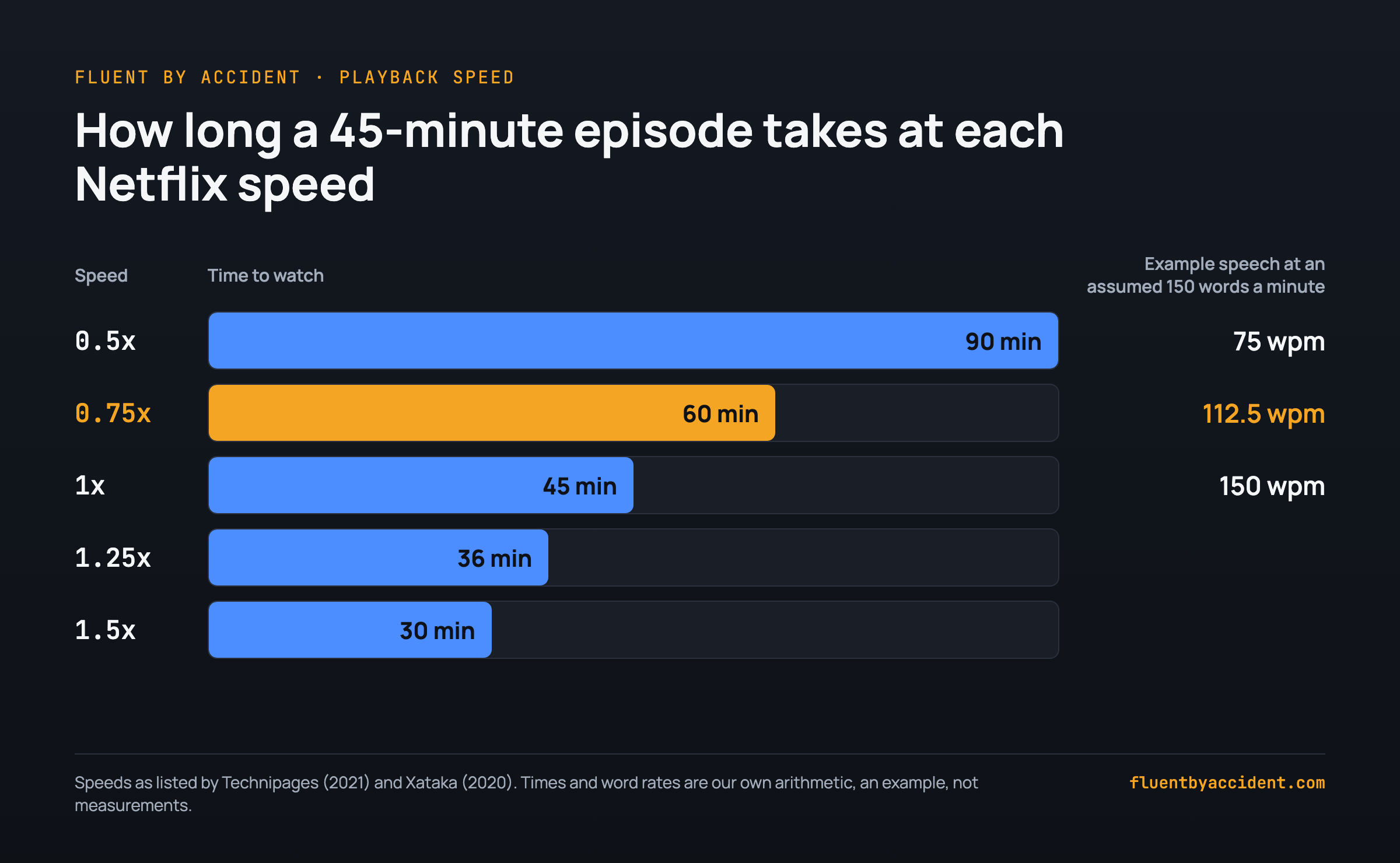
Slower speeds cost time, and the arithmetic is simple: divide the running time by the speed. As an example, a 45-minute episode takes 60 minutes at 0.75x (45 / 0.75) and 90 minutes at 0.5x (45 / 0.5).
Speech slows by the same factor. Assume, for the sake of the example, a character speaking at 150 words a minute. That becomes 112.5 words a minute at 0.75x and 75 at 0.5x.
Why is the Netflix speed option missing?
Netflix's playback speed page lists where the option works: web browsers and the Netflix app on Android phones and tablets, iPhone and iPad. It names two situations where it isn't available: casting or mirroring from a mobile device, and using a web browser on an ad-supported plan. The page does not mention ad plans in the mobile apps, so we make no claim either way there.
| Situation | Speed option | What to do |
|---|---|---|
| Web browser on an ad-supported plan | Not available, per Netflix | Check your plan in your account. |
| Casting or mirroring from a mobile device | Not available, per Netflix | Stop casting and play on the device in your hand. |
| The title hasn't started | Netflix's steps start from a playing title | Start playback, then pause, then look for the speed icon. |
| Smart TV app or console | Not on Netflix's supported list, not tested by us | Pause during playback and look for the icon. If it isn't there, see Netflix's playback speed page. |
Older guides can mislead you here. One 2020 guide says the feature is "only available for the Netflix Android app". That described the launch at the time, so don't take it as the rule today.
How to slow Netflix below 0.5x in Chrome
The guides above list 0.5x as Netflix's slowest speed, so going slower needs something outside Netflix's menu. The route we list is a third-party Chrome extension. We have not tested either of the two below. The ranges are what each store listing claims, read on the listings on November 6, 2026, and they are not Netflix features. Change Video Playback Speeds has not been updated since 2021, so it may not work in current Chrome.
| Extension | Range its listing claims | Listing last updated | Tested by us |
|---|---|---|---|
| Netflix Speed Controller | Any speed from 0.1x to 16x | August 15, 2026 | No |
| Change Video Playback Speeds | 0.0x up to 10x, says it works with Netflix | August 30, 2021 | No |
Before you install one, read its current listing and the permissions it asks for, because any of these claims may have changed. Then try it on a single scene. Our test showed that a plain video player kept a speed of 0.25x, but Netflix's real player may behave differently.
If you also study with YouTube, the speed settings on YouTube are covered in our YouTube guide.
Does slowing down Netflix help listening?
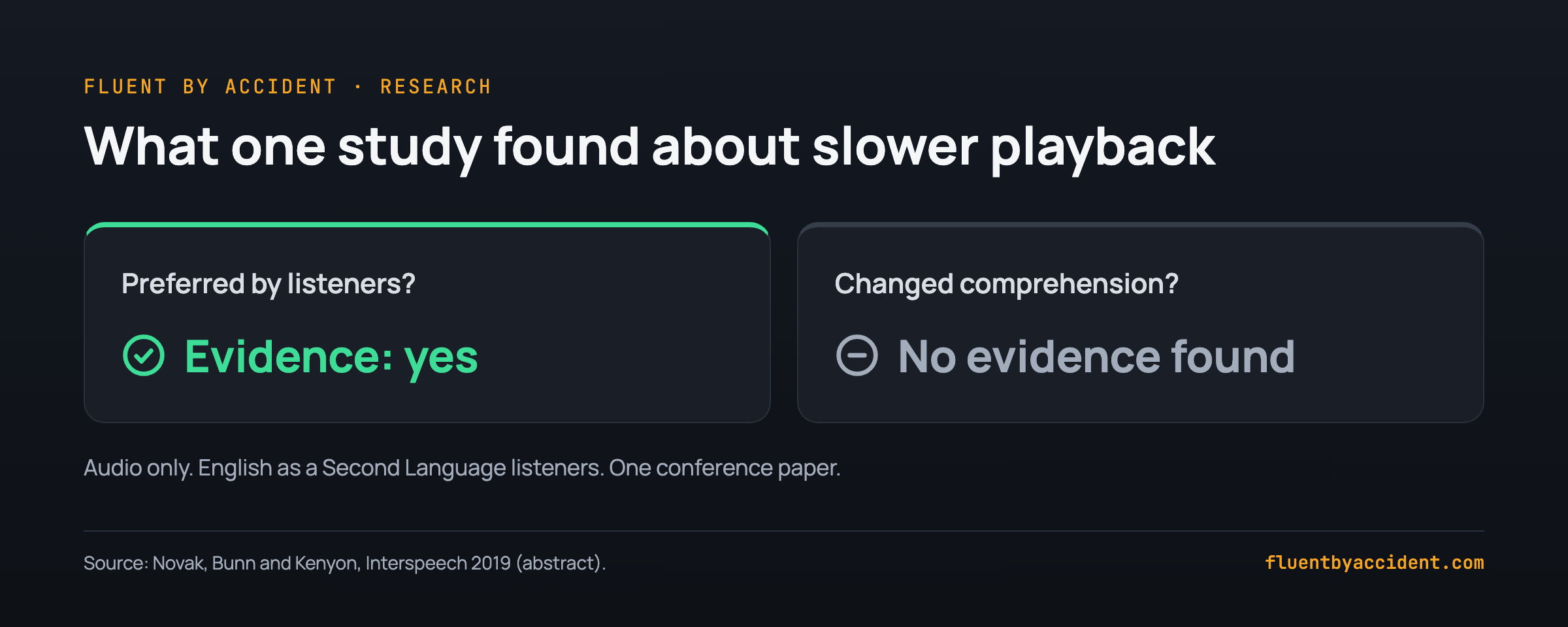
The evidence we could confirm says listeners preferred slower audio, and it does not show that they understood more. In a 2019 Interspeech paper, Novak, Bunn and Kenyon gave English as a Second Language listeners fine-grained, real-time control over the speed of long conversational audio tracks. They tested comprehension at the speeds listeners chose and at unmodified speed. The authors report evidence that slower rates were preferred, "but no evidence that such playback rates affect listener comprehension."
That result has real limits, and we want to be plain about them:
- It is one conference paper from 2019.
- The abstract describes audio tracks, not video, so it was not a Netflix-style setup.
- It covered English as a Second Language listeners only, so it may not carry over to your language.
- We read the abstract, so we can't give you the sample size or the exact speeds.
- "No evidence of an effect" is not proof that no effect exists.
Our reading: a preference for slower speech does not mean comprehension changed. Slow speech may feel more comfortable while your actual comprehension stays where it was. A comfortable session is still worth something if it keeps you watching, but it isn't proof that your listening improved.
Speed is also only one setting. For the separate question of what you read on screen, see what research says about subtitles.
When should you slow down, and when not?
Use slow playback as a tool for one line, not as your normal way to watch. This section is our own reasoning, not a study result. The logic is that real speech reaches you at 1x, and that a whole episode slowed down costs more time, as the arithmetic above shows.
It also helps to pick material you can mostly follow at normal speed. If you're lost at 1x, an easier show may serve you better than a slower one, and our guide to comprehensible input from TV shows covers how to choose.
| Your situation | Slow down? | Why (our reasoning) |
|---|---|---|
| You missed one fast line | Yes, for that line | The cost is a few seconds, and you get a clearer look at where the words begin and end. |
| You want to check a sound or a word you think you heard | Yes, briefly | You are checking a detail, so comfort isn't the goal. |
| You want to repeat a line aloud | Yes, then repeat at 1x | Slow speed gives you time to copy it. Normal speed is the target. |
| You plan to watch a full episode at 0.75x | No | A 45-minute episode becomes 60 minutes, and the speech isn't what you'll hear from real speakers. |
| You understand almost nothing at 1x | No, change the material | A slower version of speech that is too hard may still be too hard. |
| You are just watching to enjoy the show | No | If you're relaxing, stay at 1x and let the story run. |
A slow-playback listening routine for one scene
This routine keeps the slow part small and ends at normal speed. It is a suggestion built on the reasoning above, not a tested method, and we make no promise about results. Pick a scene of a minute or two from something you can mostly follow.
One-scene routine:
- Watch the scene once at 1x with no help, and notice which lines you lost.
- Go back to the first lost line. Replay it at 1x once.
- If it is still unclear, drop to 0.75x for that line only.
- Still unclear? Try 0.5x, then read the subtitle to check what was said.
- Repeat for the other lost lines, and only those.
- Return to 1x and watch the whole scene again to confirm you can now follow it.
- Save one useful line for later review.
The time cost stays small. As an example, assume you lost 3 lines of 3 seconds each. At 0.75x each line takes 4 seconds (3 / 0.75), so all three take 12 seconds, while slowing a whole 45-minute episode to 0.75x adds 15 minutes.
For step 7, sentence mining shows how to turn a saved line into review material, and the full Netflix study method shows where this routine fits in a wider plan.
If you study in Chrome, Fluent by Accident, our sign-in-required extension that you can install from our download page, has an R key that replays the current subtitle line at 0.75x and then returns to normal speed, which covers step 3 without opening a menu.
FAQ
Can you slow down Netflix on a TV?
Netflix's playback speed page lists web browsers and its Android, iPhone and iPad apps, and does not list TVs. It also says the feature isn't available while casting or mirroring from a mobile device. We did not test a TV app.
The fastest check is to start a title on your TV, pause it during playback, and look for the speed icon. If you're casting from a phone, stop casting first and try on the phone itself.
Why can't I see the speed option on Netflix?
Netflix's playback speed page points to three checks. First, you may be on a device outside its list, which covers web browsers, Android phones and tablets, iPhone and iPad. Second, you may be in a web browser on an ad-supported plan. Third, you may be casting or mirroring from a mobile device. Also make sure a title is actually playing, because Netflix's steps begin by pausing a show or movie while it's playing.
Can Netflix go slower than 0.5x?
Not through the options listed in guides from 2020 and 2021, where 0.5x is the lowest of five speeds. Some third-party Chrome extensions claim lower speeds in their store listings, such as 0.1x. We did not test those extensions on Netflix, so treat the claims as unverified. For language study, speech that slow is rarely the point anyway, because the routine above works line by line and ends at 1x.
Does Netflix remember your playback speed?
According to Technipages in 2021, no: "the new video speed you chose will not apply to other videos you'll watch later on Netflix." That guide describes Android steps and is several years old, and we could not recheck it on a live account.
In practice, expect to set the speed again for the next title. If you use slow playback only for single lines, as this guide suggests, that reset does no harm, because you want to return to 1x anyway.
Do subtitles stay in sync when you slow Netflix down?
They should. Technipages reported in 2021 that you don't need to change any subtitle settings, because subtitles adjust on their own to stay in sync with the new audio speed. That source covers Android steps, and we did not confirm it on real Netflix in November 2026.
If you do see a drift between subtitles and speech at a slower speed, note the device and title. Then return to 1x and check whether the drift disappears before you change anything else.
Is 0.75x speed good for language learners?
No study we could confirm names a best speed. The 2019 Interspeech paper found that English as a Second Language listeners preferred slower audio, with no evidence that it affected their comprehension. It did not test Netflix or set 0.75x as a target.
Our suggestion, which is reasoning and not a research finding, is to treat 0.75x as a first step for one missed line. It is gentler than 0.5x, and the line takes only a third longer than at normal speed. Then go back to 1x to confirm you can follow it.
Sources
- Netflix Help Center, "How to change playback speed", undated, read November 6, 2026: https://help.netflix.com/en/node/116584
- Netflix Help Center, "TV show or movie loads slowly or keeps buffering", undated, checked November 6, 2026: https://help.netflix.com/en/node/230
- Novak, J. S., Bunn, D., Kenyon, R. V. (2019), "The Effects of Time Expansion on English as a Second Language Individuals", Interspeech 2019, pp. 2643-2647, DOI 10.21437/Interspeech.2019-2763, abstract read: https://www.isca-archive.org/interspeech_2019/novak19_interspeech.html
- Sanhz, J., Technipages, how to change Netflix video playback speed, last updated August 25, 2021: https://www.technipages.com/netflix-how-to-change-video-playback-speed
- Xataka, how to change Netflix playback speed (in Spanish), August 13, 2020: https://www.xataka.com/basics/como-cambiar-velocidad-reproduccion-netflix-para-ver-pelis-series-rapido-despacio
- Nerds Chalk, how to change Netflix playback speed, around August 2020: https://nerdschalk.com/how-to-change-netflix-playback-speed/
- Chrome Web Store listing, Netflix Speed Controller, version 1.2.0, updated August 15, 2026, read November 6, 2026: https://chromewebstore.google.com/detail/ggengamhoniclfpdefgbibfooflpebcn
- Chrome Web Store listing, Change Video Playback Speeds, version 0.1, updated August 30, 2021, read November 6, 2026: https://chrome.google.com/webstore/detail/change-video-playback-spe/ncnbdjhoplchclmeanmckpmobhmodlio?hl=en
- Fluent by Accident, synthetic test page run, November 6, 2026: extension 0.32.4, Chrome 157 headless, macOS 26.5.2.