Learn a language with Disney Plus: settings and titles
To learn a language with Disney Plus, rewatch a film you know in a target-language dub if your player lists one, set subtitles by level, then move to original-language series. Settings, method and titles.
To learn a language with Disney Plus, rewatch a film you already know in your target-language dub, set subtitles by your level, then move to series made in that language. Disney+ suits beginners because one film can come in several language versions, so a plot you know supplies the meaning while you train your ear.
This guide covers the Disney-specific part: which settings to use, how to reach a missing language version, and which titles to start with. For the routine that works on any platform, see the dual subtitle method.
Last tested: November 2026.
How we tested: We did not test on real Disney+, because it needs a paid login. The settings below come from Disney's public pages, not from our own account.
- What we ran: on November 4, 2026, our Chrome extension 0.32.4 in Chrome 157 (headless) on macOS 26.5.2, on a synthetic Disney-style test player we built, with made-up English and Polish subtitle tracks.
- What we measured: 2 of 2 test runs, using two ways of loading the stream's subtitle list, showed both lines. The extension found 3 tracks: English, Polish and forced English (a track for short foreign-language lines).
- What this does not show: which languages any real title has, or how closely real dubs match real subtitles. We did not measure either.
Routines and defaults here are our suggestions, not study results.
Why learn a language with Disney Plus?
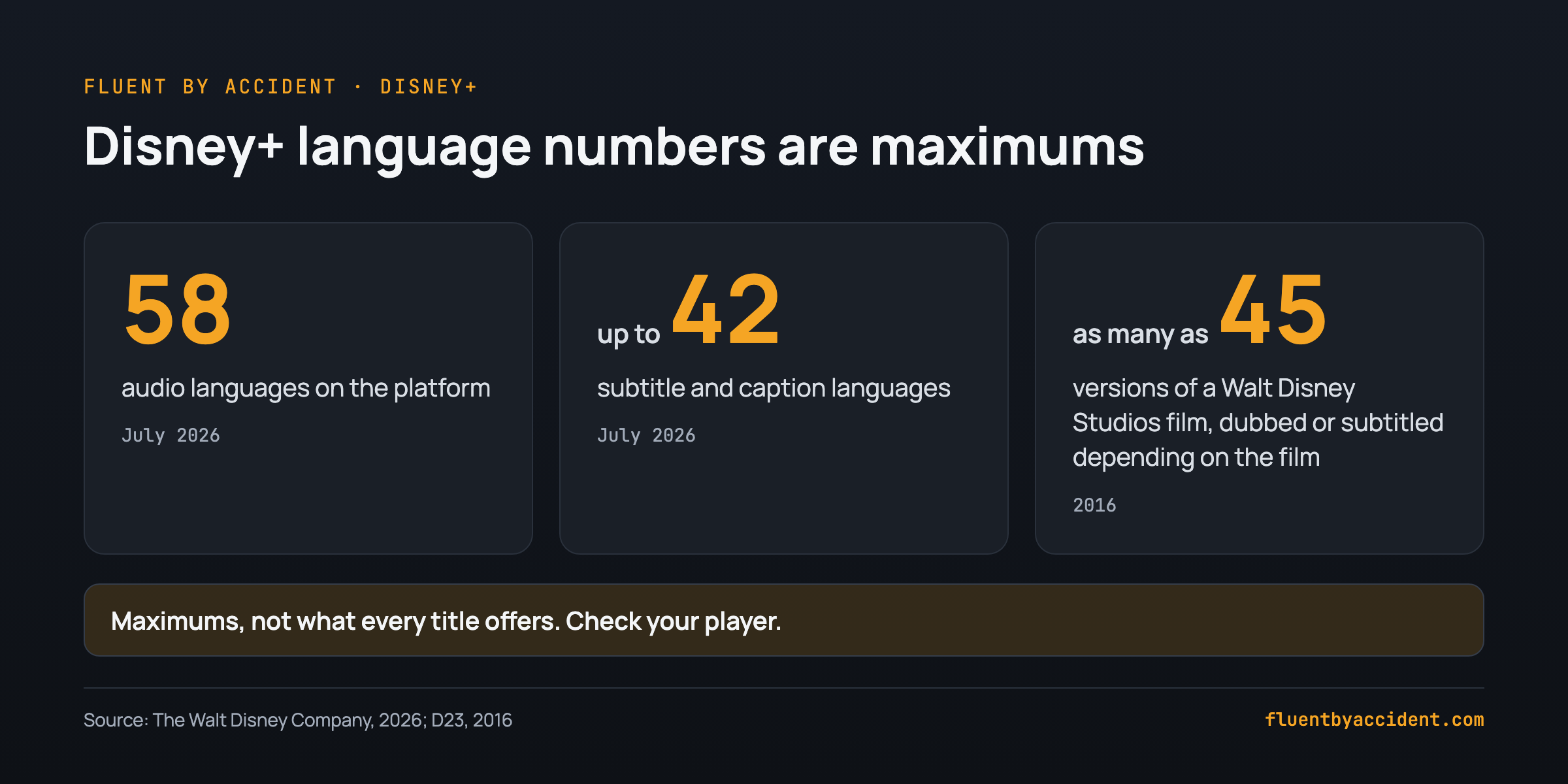
Disney+ is a good choice mainly because of its range of languages. Disney says the platform supports 58 audio languages, with subtitles and captions in as many as 42, figures from July 2026. Those are platform totals, not a promise for any one title: Disney warns that availability varies by language and country or region.
The film catalog adds the second reason. A 2016 D23 article said Disney Character Voices oversees as many as 45 versions of every film Walt Disney Studios releases, through dubbing or subtitles depending on the film, and that Moana's song was sung in 24 languages. That is a studio figure from 2016, not a count of dubs on Disney+ today.
That Disney+ suits beginners is our own reasoning: a plot you already know gives you context, and a new dub lets you reuse it. We found no source showing that cartoons are linguistically easier, so choose films you know well over films that look simple.
What to expect:
- Gains per hour are small. In Peters and Webb (2018), learners who watched a one-hour TV documentary without subtitles gained 3.97 of 64 target words, against 1.56 for controls. How often a word appeared, prior vocabulary and cognates all affected the result.
- Unaided TV asks a lot. Webb and Rodgers (2009) found that 3,000 word families, plus proper nouns and marginal words, covered 95.45% of the words in 88 TV programs. Below that, a known plot has to fill the gaps.
How do you change audio and subtitles on Disney+?
Disney's steps are the same for audio and subtitles, and you do them while the title is playing:
- Start your title.
- Open the settings menu.
- Select the dubbing language or the subtitle language you want.
- Close the menu and keep watching.
| Task | Where | Watch out for |
|---|---|---|
| Change the audio language | Settings menu during playback | The list changes by title and by country or region |
| Turn subtitles on or off | Settings menu during playback: select or de-select the option you want | Steps vary by device |
| Open settings on Roku | The * button on the remote | Other devices may differ |
| Change font, size or opacity | Subtitle settings | Steps and options vary by device |
| Reach a language missing from the menu | Profile icon, Edit Profiles, App Language | Only works if a version exists in that language |
| Pick a regional variant | Audio or subtitle list | Depends on your country or region and the title |
If your language is not in the menu, select the profile icon, choose Edit Profiles, then set App Language. Disney says that "if there is a version available in the selected app language, your content will automatically play in the language you chose." Your menus switch language too, so note the path before you change it.
Regional variants change what you hear. Depending on country and title, Disney lists Spanish for Latin America and Spain, French for Canada and France, and English for the US and UK. Pick the variant you want to speak. Disney also says titles such as Frozen and Toy Story may have multiple versions for regional and cultural differences.
Do not plan around a title's public page. When we read Frozen's page in October 2026, it showed badges such as "Subtitles / CC" and no language list. We found no public per-title language list from Disney, so the player is the place to check.
What are the best Disney+ settings for language learning?
Keep the audio in your target language at every level, and change only the subtitles as you improve.
| Level | Audio | Subtitles | Move on when |
|---|---|---|---|
| Beginner | Target language | Your language | You catch whole phrases before reading them |
| Intermediate | Target language | Target language | You rarely need to read a line twice |
| Advanced | Target language | None | You follow a whole episode without subtitles, then pick a harder series |
A Spanish teacher's guide gives similar advice: English subtitles for total beginners, then Spanish audio with Spanish subtitles for intermediate or advanced learners.
The research leans the same way, with limits. A 2022 meta-analysis by Reynolds, Cui, Kao and Thomas found that captions and subtitles helped vocabulary overall (d = 0.884, a large effect):
- Target audio with same-language text: d = 0.877 to 1.732
- Target audio with your-language text: d = 0.430
- Your-language audio with target text: d = -0.401, from only 2 studies
Do not read that as a ranking. The differences between types were not significant under the random-effects model, results varied widely between studies, and only receptive knowledge of meaning was tested. It does give you a reason to avoid the reversed setup as your main routine.
For the deeper choice, read which subtitle language to use at your level and what the research says about subtitles.
How do you learn from a film you already know?
Use a same-film ladder: one film you know, watched in small steps before you commit to all of it.
1 Pick a film you know The plot does the work 2 Check the player Target audio and subtitles listed? 3 One scene with subtitles Two or three minutes 4 Same scene, no subtitles Notice what you now catch 5 Whole film Keep your level's setting 6 Next title Another film you know, then a seriesOur suggested routine.
Step 2 matters because Disney's lists vary by title and region. If your target audio is missing, try the app-language route above, then pick another film. Steps 3 and 4 are the core of the ladder: a second listen gives you a better chance of following a scene, and why watching TV can teach you a language explains the idea behind that.
Example: Learning Spanish with Frozen. Check the player for Spanish (Latin America or Spain), set your-language subtitles, and watch one scene for three minutes. Then replay it with subtitles off and count the phrases you now catch.
Learning a second language later? Run the same ladder on the same film in that dub, if your player lists it.
The one-minute mismatch test
One Chrome Web Store reviewer reported in June 2026 that Disney's captions "do not match the words being spoken". That is one user's report, so test your own title:
- Set the target audio and target subtitles.
- Read along with one minute of dialogue, checking each line against what you hear.
- Replay that minute if you are unsure.
- If the lines differ, use the text for meaning only, and do not copy its sentences as if they were the spoken words.
What should you watch on Disney+ to learn a language?
Start with a dubbed film you know, then move to a series made in your target language. Confirm every title in your player first, because availability varies: one Spanish teacher's list notes a series only available on Disney+ in Latin America.
Dubbed starters: Frozen and Toy Story, which Disney names as titles that may have multiple versions, and Moana, whose song was sung in 24 languages as of 2016. These work in any language your player offers.
Learn Spanish with Disney Plus: Spanish is the one language we could verify title by title. Details come from the Mis Clases Locas list, and the hours are our own calculation. For a first series, try Elena of Avalor, which the list calls "simple dialogue, repetition", or Partitura Secreta, the shortest to finish. Elena of Avalor is the one version here that was not produced in Spanish: it is a US series made in English.
| Series | Origin | Episodes | Minutes each | Hours of input | Rating |
|---|---|---|---|---|---|
| Elena of Avalor | Spanish-language version, not a Spanish-made series | 77 | 24 | 30.8 | TV-G |
| Violetta | Argentina | 240 | 45 | 180 | TV-G |
| Soy Luna | Argentina | 220 | 45 | 165 | TV-G |
| Bia | Argentina | 120 | 33-43 | 66-86 | TV-G |
| Selenkay | Argentina | 16 | 40 | 10.7 | TV-PG |
| Entrelazados | Argentina | 17 | 34-54 | 9.6-15.3 | TV-PG |
| Tierra Incógnita | Argentina | 16 | 30-43 | 8-11.5 | TV-14 |
| Partitura Secreta | Mexico | 8 | 33 | 4.4 | Not listed |
The arithmetic is episodes x minutes / 60, assuming every episode runs the listed length. Together these eight series give about 475 to 504 hours, so one hour a day would last over 15 months.
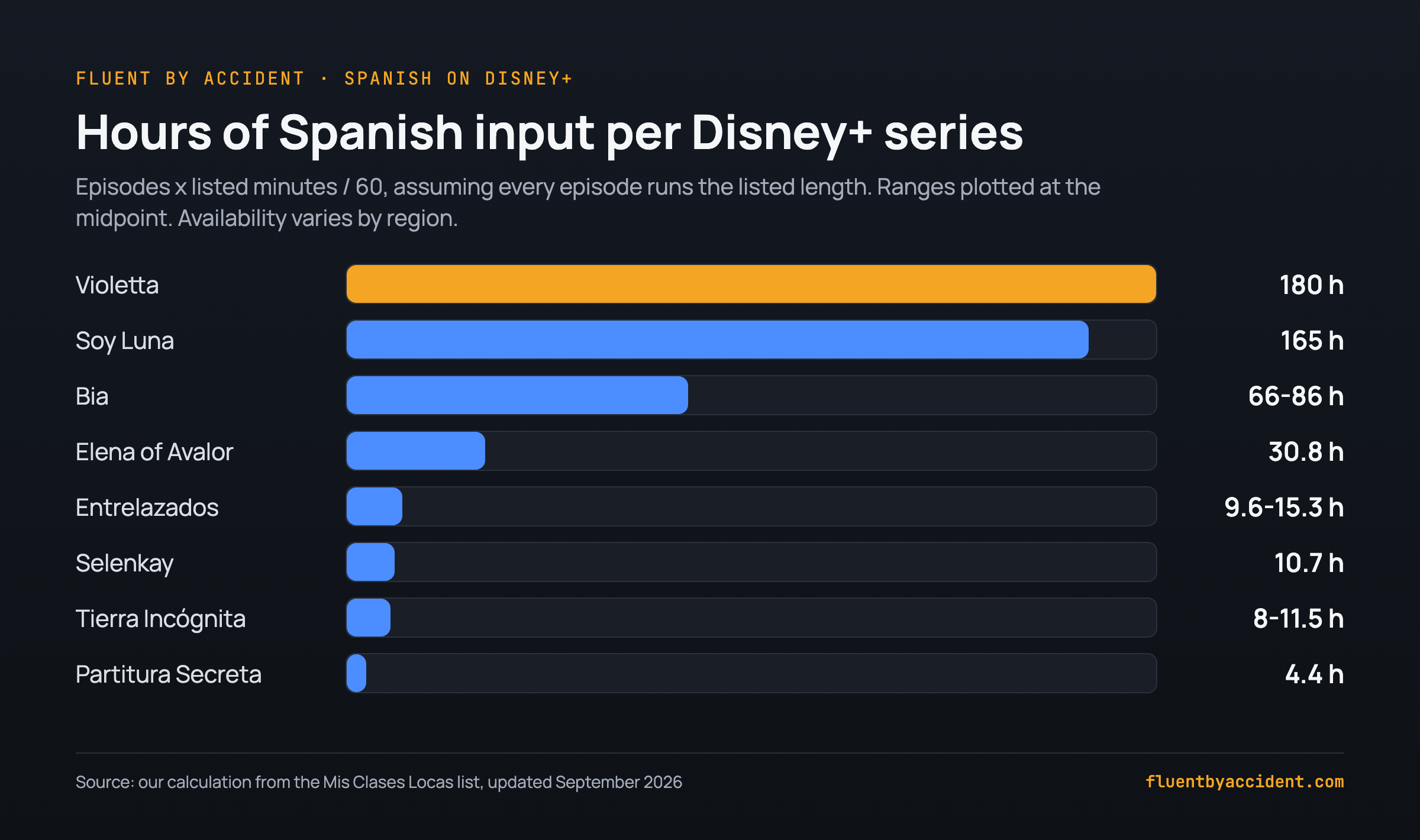
Use the table to match length to commitment: Partitura Secreta takes 4.4 hours, while Violetta is a long-term habit.
Learning Korean: Disney's July 2026 post names Perfect Crown among its most popular local originals, and it is a Korean original series. Check that your player lists it, then set subtitles by the table above.
How do you see two subtitle languages on Disney+?
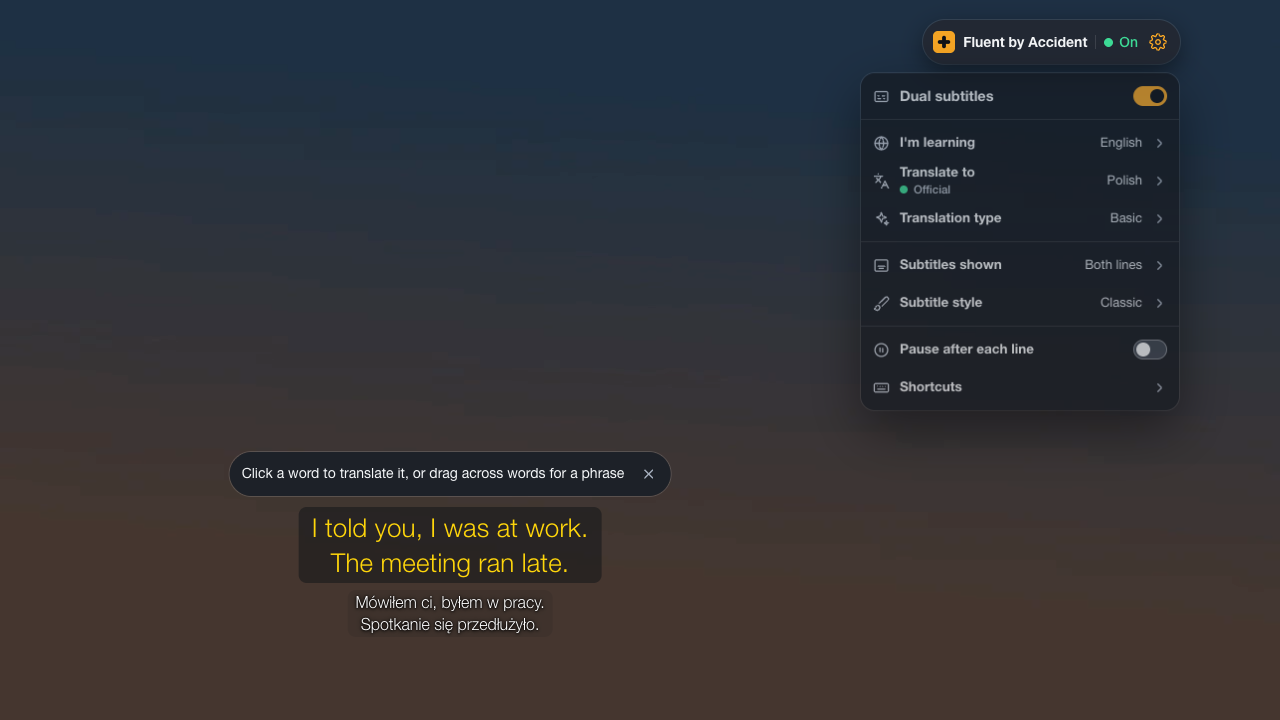
Disney's steps describe selecting a subtitle language in the settings menu, and they mention no way to show two at once. We could not check this in a paid account. For two lines at once, you need a browser extension on a computer.
Tip: Disney describes no two-language option in its TV app. If you want two lines, watch on a computer and compare the dual subtitle extensions for Disney+. Extensions depend on the subtitle tracks a title offers, so check the player first.
How do you remember the words you hear?
Watching alone gives small gains, as the Peters and Webb numbers show, so save a few words on purpose. Our suggestion is a cap of about five new words per episode, which keeps review manageable.
- Save the full line. Sentence mining means keeping the whole sentence with the word, so you remember the context.
- Check it against the audio. If your title failed the one-minute mismatch test, write down what you heard.
- Move it to flashcards. This guide shows how to build flashcards from what you watch.
- Prep the vocabulary if you can. If you have a subtitle file, our free subtitle vocabulary tool lists every word, most frequent first. Spanish learners can also start from the 1,000 most common Spanish words in films and TV.
If you watch on a computer, Fluent by Accident is our Chrome extension for showing two subtitle lines on Disney+, clicking a word to translate it and saving it to spaced repetition flashcards.
FAQ
Can you really learn a language with Disney Plus?
Yes, as one part of your study, but watching alone is slow. In Peters and Webb (2018), an hour of TV without subtitles gave learners 3.97 new words out of 64 tested, against 1.56 for controls. Disney+ helps because you can rewatch a film you know in a target-language dub, if your player lists one, which gives you context. Pair it with saved words and flashcards. We found no study showing that Disney+ alone will make you fluent, so treat it as regular listening practice.
Why can't I change the language on Disney Plus?
Language options depend on the title and on your country or region, so the language you want may not exist for that film where you live. Disney's advice is to try the app language: select the profile icon, choose Edit Profiles, then set App Language. If a version exists in that language, the title plays in it automatically. If it still does not appear, pick another title, because some titles are exceptions to dubbing and subtitle availability.
What languages are available on Disney Plus?
Disney said in July 2026 that the platform supports 58 audio languages, with subtitles and captions in as many as 42. Those are platform totals, so one title may offer fewer. Disney's March 2026 explainer lists options that may include English, Spanish, French, German, Italian, Dutch, Portuguese, Chinese, Japanese and Korean, with regional variants for some. We found no public per-title list, so open a title's settings menu in the player to see what it offers you.
Are dubbed movies good for learning a language?
They can be, mainly because a film you already know gives you context for new audio. That is our own reasoning, since the research cited here did not test Disney dubs. Use the target-language dub as listening practice, and check that the subtitles match the dub before you copy lines from them. One Chrome Web Store reviewer reported captions that did not match the speech, so a one-minute mismatch test is a sensible first step.
Does Disney Plus have dual subtitles?
Disney's explainer describes choosing a subtitle language in the settings menu and mentions no option for showing two at once. We could not check this in a paid account. For two lines at once, you need a browser extension on a computer, and it depends on the subtitle tracks the title offers. Disney describes no two-language option in its TV app. Our guide to dual subtitle extensions for Disney+ covers the choices.
Is Disney Plus good for beginners learning Spanish?
Yes, if you start with something you know. Rewatch a familiar film with Spanish audio and subtitles in your own language, then try a short series. Disney lists Spanish for both Latin America and Spain on some titles, so choose your variant. A Spanish teacher's list describes Elena of Avalor's Spanish version as "simple dialogue, repetition", at 77 episodes of 24 minutes. Confirm any title in your player, because availability varies by region.
Sources
- The Walt Disney Company, news post on new Disney+ languages, July 15, 2026: thewaltdisneycompany.com. Read November 4, 2026.
- Explore Disney+ Contributor, explainer on changing language on Disney+, March 18, 2026: disneyplus.com. Read November 4, 2026.
- Disney+ public title page for Frozen: disneyplus.com. Read October 9, 2026.
- Beth Deitchman, D23 article on Disney film translations, December 16, 2016: d23.com. Read October 9, 2026.
- Reynolds, Cui, Kao and Thomas (2022), Systems 10(5), 133: mdpi.com. Read October 9, 2026.
- Peters and Webb (2018), Studies in Second Language Acquisition: doi.org. Read October 9, 2026.
- Webb and Rodgers (2009), Language Learning: doi.org. Read October 9, 2026.
- Allison Wienhold, Mis Clases Locas, Spanish TV series on Disney+, updated September 25, 2026: misclaseslocas.com. Read November 4, 2026.
- Wikipedia, Elena of Avalor (country of origin and original language): en.wikipedia.org. Read November 4, 2026.
- What's On Disney Plus, on Perfect Crown as a Korean original, 2026: whatsondisneyplus.com. Headline read November 4, 2026.
- Chrome Web Store user review, June 1, 2026 (one user report): chromewebstore.google.com. Read October 9, 2026.